- Home
- /
- Article

Thanks for your feedback.


 In this article
 Feedback?
Introduction
Webex Meetings empowers global employees and virtual teams to collaborate in real time, bridging the distance to create a seamless, "in-the-room" experience. Organizations ranging from commercial enterprises to government agencies rely on Webex to streamline business processes and drive better outcomes across sales, marketing, training, project management, and support functions.
For these organizations, security is not just a feature—it is a fundamental requirement. Whether scheduling meetings, authenticating participants, or sharing sensitive documents, collaboration must be protected at every touchpoint.
Cisco elevates this standard with Ultra Secure Webex Meetings. By embedding a Zero Trust architecture directly into the platform, Cisco ensures that security is intrinsic to every interaction. This approach incorporates:
- Zero Trust End-to-End Encryption(E2EE)—Advanced encryption protocols ensure that meeting content remains private and inaccessible to unauthorized parties, including Cisco itself.
- Zero Trust End-to-End Identity (E2EI)—This feature leverages customer-provided certificates to verify meeting participant identities, providing a robust defense against unauthorized access and sophisticated deepfake attacks.
Cisco makes security the top priority throughout the design, development, deployment, and maintenance of its networks, platforms, and applications. You can incorporate Webex Meetings into your business processes with absolute confidence, knowing that your collaboration tools are engineered to meet even the most rigorous security and compliance requirements.
What you will learn
This paper describes the security features of the Webex Suite meeting platform (WSMP). It discusses the meeting types, deployment options, features, tools, processes, and engineering that help customers confidently collaborate on Webex.
The Webex Suite meeting platform includes:
- Webex Meetings
- Webex Webinars
- Webex Edge Audio
- Webex Cloud Connected Audio
- Webex Assistant
- Polling (by Slido)
These products are part of the unified Webex Suite, which integrates meetings, calling, messaging, whiteboarding, and more, providing a seamless collaboration experience. The platform supports capacities ranging from 2 to 1000 attendees in a meeting, to up to 5000 attendees in webinars and 100,000 viewers in webcasts, with advanced features such as AI-powered assistance, real-time translation, and enhanced security controls. The Webex Suite is available through various buying models, including Enterprise Agreement and Named User subscriptions, and it offers additional add-ons and integrations to meet diverse organizational needs.
Future Features
Some features discussed in this document are scheduled to be made generally available later in CY 2026. Features marked with the  symbol are planned for delivery in Q3 CY26. Features marked with the symbol are planned for delivery in Q1 CY27. Please contact your account manager if you need early access to these features.
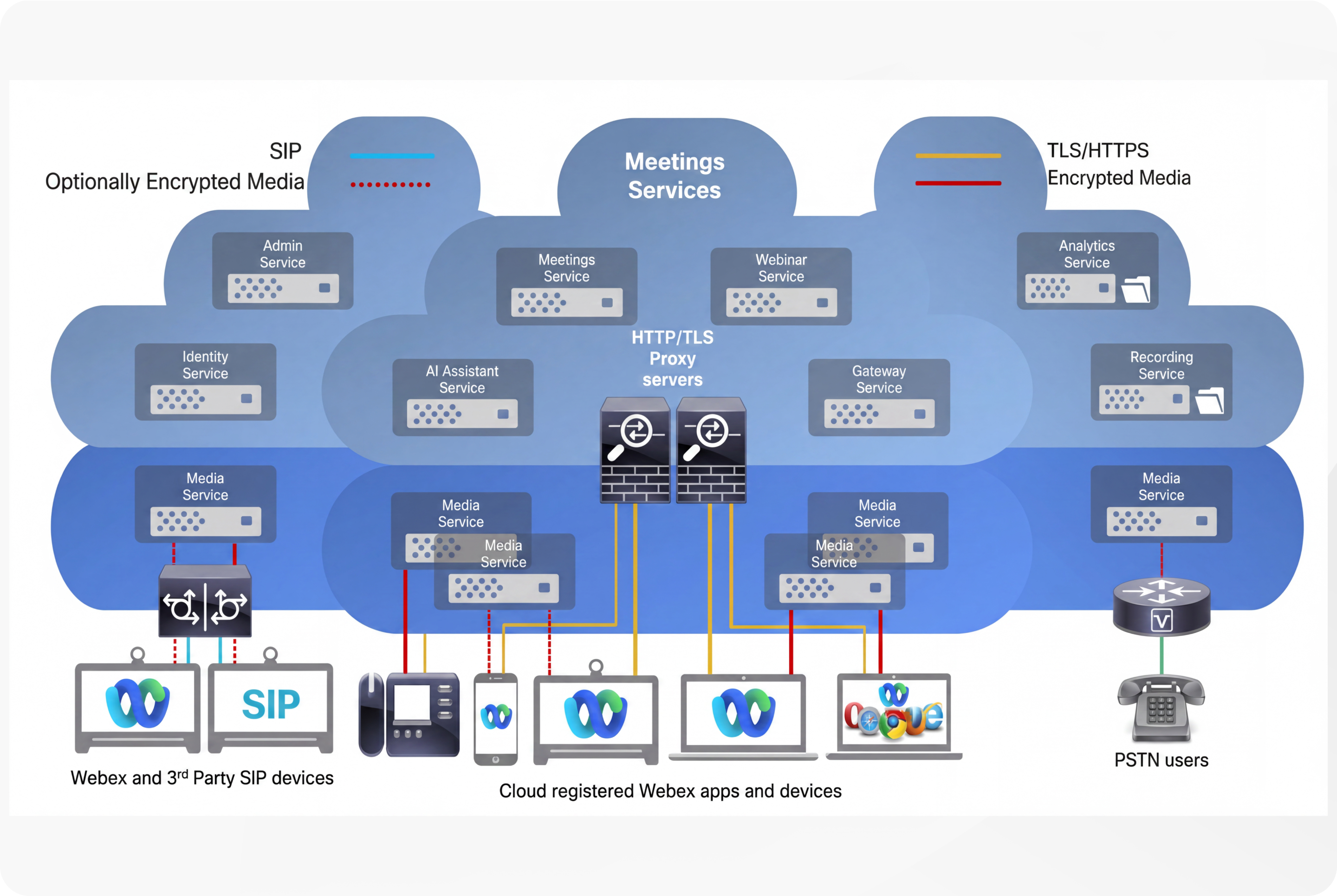
Core Webex Meetings Services and Components
- Webex Meetings is part of the Webex Suite, providing audio/video conferencing with content sharing and web conferencing capabilities.
- The platform includes multiple microservices such as Meetings Service, Webinar Service, Identity Service, Recording Service, AI Assistant service, Analytics Service, Admin Service, and Media Service.
- Webex Meetings supports cloud-registered apps and devices, enabling users to join meetings from various OS platforms and devices. Users can also join meetings via the PSTN and with SIP endpoints.
Architecture and Deployment
- Webex Meetings services are regionalized and replicated across multiple independent data centers to ensure redundancy and high availability.
- Media services are globally distributed with media server clusters in each data center, providing local and geographic redundancy.
- Media servers handle voice, video, and content sharing, with media commonly encrypted using AES-256-GCM.
- The architecture supports encrypted signaling over TLS/HTTPS and encrypted media streams.
Webex supports joining meetings from multiple platforms and devices, including:
- Webex desktop application on Windows, Mac and Linux.
- Webex mobile application on Android and iOS.
- Webex web application using Chrome, Edge, Safari, Firefox and other browsers.
- Cisco Room Devices and Desk Devices.
- Third-party SIP standards-based audio and video endpoints.
- PSTN devices.
Evolving Webex Deployments: Prioritizing Sovereignty and Zero Trust Security
As organizations increasingly prioritize data sovereignty and rigorous security standards, Webex is evolving its deployment models to provide greater control over meeting content, ensuring that security never comes at the expense of functionality.
Webex Customer Sovereignty
In response to the growing demand for data residency, Webex has introduced enhanced sovereignty capabilities. Starting with recording, and with support for more services to come, organizations can now maintain control over their meeting content with:
- Localized Processing—Processing meeting content, such as recordings, within their own infrastructure.
- On-Premises Storage—Utilizing their own file storage services to house sensitive meeting assets, ensuring data remains within specified geographic or organizational boundaries.
Ultra Secure Webex Meetings
Historically, "Ultra Secure" features, such as Zero Trust End-to-End Encryption (E2EE), often required a compromise in meeting functionality, as cloud-based value-added services required access to encryption keys, and only a limited number of endpoint types could join these meetings. Webex has eliminated this trade-off with:
- Feature-Rich Zero Trust—Webex has transformed Zero Trust End-to-End Encrypted (E2EE) meetings, adding functionality that make Zero Trust meetings feature-rich. Support for a wider number of endpoint types provides a seamless experience without sacrificing the tools necessary for modern collaboration.
- Zero Trust for Standard Meetings—Webex has integrated Zero Trust E2EE capabilities directly into standard meetings. This ensures that even everyday collaboration can benefit from the highest levels of security, providing consistent protection across the entire Webex ecosystem.
A Unified Approach to Collaboration
By integrating Customer Sovereignty with these advanced Zero Trust E2EE capabilities, Webex empowers organizations to achieve a dual objective: hosting highly secure, Zero Trust meetings within the Webex cloud while maintaining full control over the processing and storage of critical meeting content on-premises. This synergy provides the flexibility and security necessary for modern, compliance-driven enterprise environments.
The Webex Security Framework: Three Tiers of Protection
Webex offers three tiers of secure meetings, designed to align with stringent compliance, sovereignty, and data protection requirements.
- Standard Meetings—Provides robust encryption for data in transit and at rest. While these meetings meet enterprise-grade security standards, they do not utilize a Zero Trust architecture, as the cloud infrastructure retains the capability to manage encryption keys.
- Standard Meetings with Adaptive Security—Enhances the standard model by applying dynamic security policies. This tier prioritizes the use of End-to-End Encryption (E2EE) whenever the participant environment and endpoint capabilities permit, balancing flexibility with heightened security.
- Zero Trust End-to-End Encrypted (E2EE) Meetings—Represents the highest security posture. By ensuring that encryption keys are generated and managed exclusively by meeting participants, this model renders the cloud infrastructure "blind" to the media stream and meeting content. This architecture enforces strict Zero Trust integrity, preventing cloud-side decryption throughout the duration of the session.
Hybrid Infrastructure and Security Integration
Organizations can further augment these security tiers by deploying on-premises Webex services, such as the Webex Video Mesh Node. This integration extends the security perimeter, enabling a consistent Zero Trust posture within the Webex cloud while providing several operational advantages:
- Optimized Media Routing—Reduces latency by keeping media traffic local, ensuring high-quality performance for on-premises endpoints.
- Localized Service Delivery—Enables the hosting of specific meeting services, such as on-premises recording, while maintaining strict adherence to security and sovereignty requirements.
- Enhanced Security Perimeter—Facilitates secure, low-latency access for internal infrastructure, ensuring that Zero Trust integrity is maintained even when integrating hybrid components.
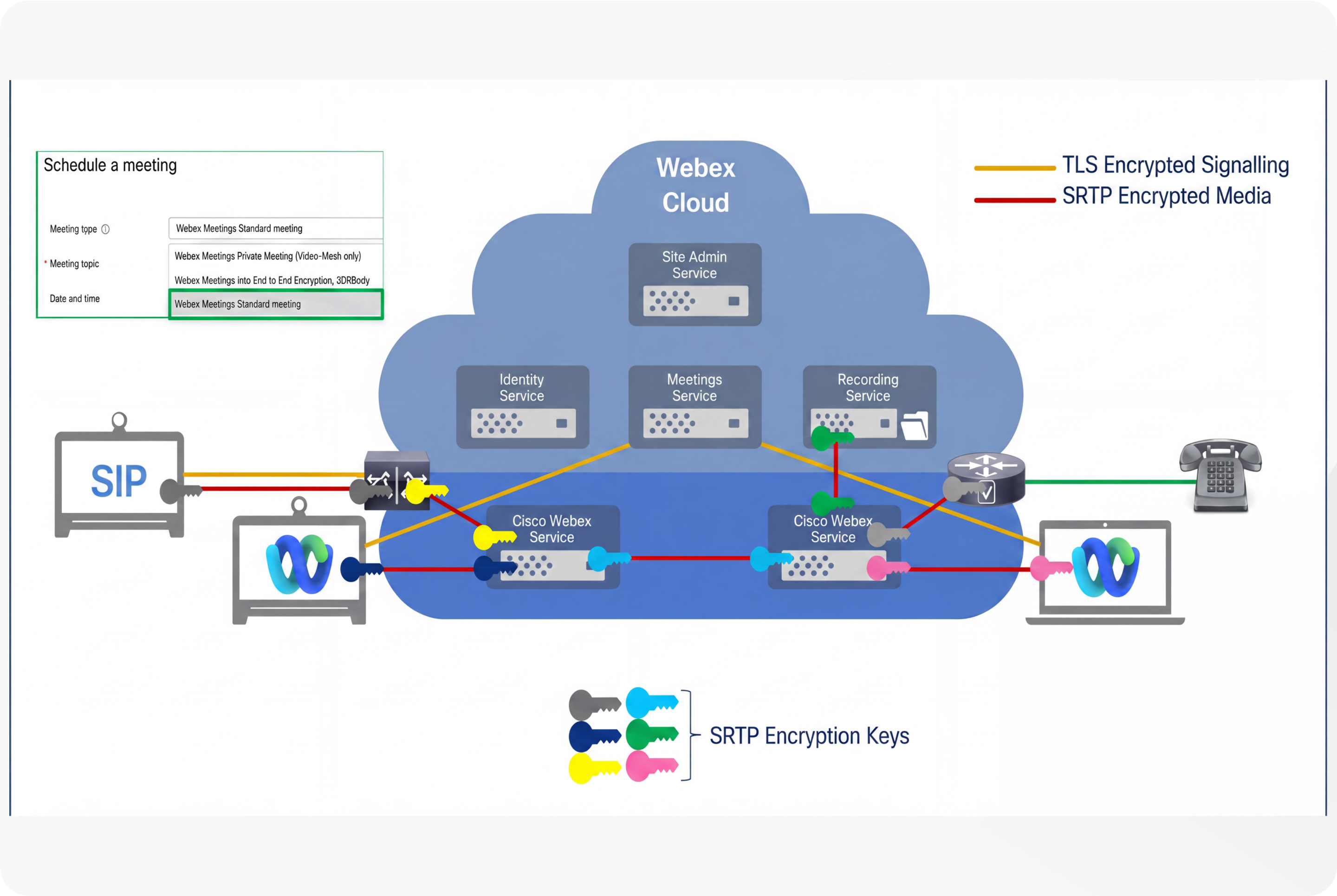
Standard Webex Meetings deliver a robust, professional-grade video conferencing service capable of supporting meetings with up to 1000 participants. Key features include breakout sessions, content sharing, integrated audio and video, an AI-powered assistant, real-time translation, meeting recording, chat, file sharing, whiteboards, and enterprise integrations. The platform encrypts signaling and media streams using hop-by-hop SRTP encryption, allowing the Webex cloud to decrypt media to enable advanced services such as recording, transcription, and AI functionalities.
Meeting content such as recordings, transcriptions, whiteboards, chat, and files are securely stored in the Webex cloud, encrypted with AES-256-GCM, and safeguarded by a key management system that supports hybrid data security and bring-your-own-key options. Identity verification is supported through standard methods, including Single Sign-On (SSO) and integration with external identity providers. Accessibility spans a wide range of endpoints, including SIP devices and PSTN users, making the solution suitable for users requiring comprehensive features with cloud service integration and broad device compatibility. Administrators have control over meeting content retention, access controls, and meeting features through Webex Control Hub, providing centralized management, diagnostics, and security oversight.
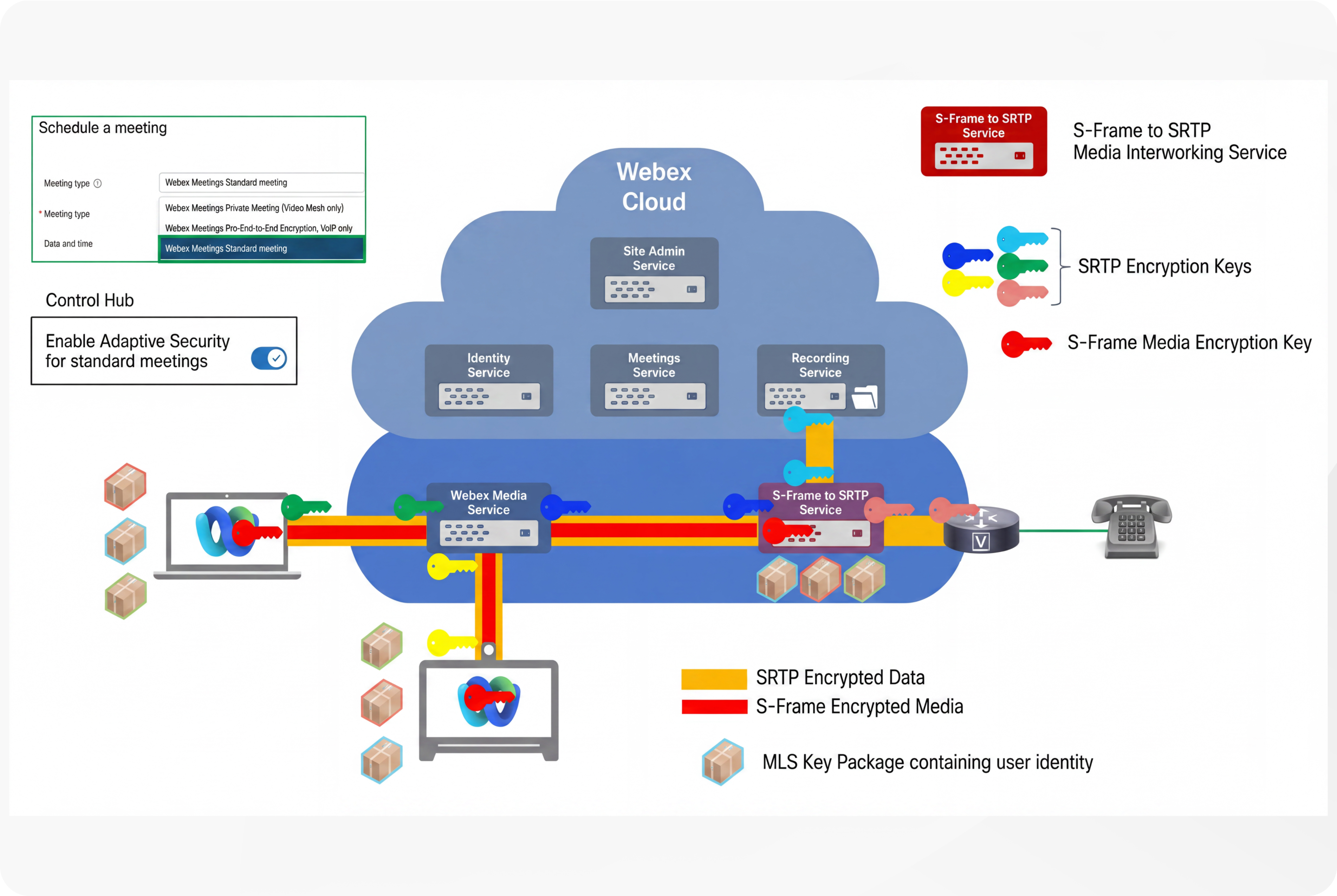
Standard Webex Meetings with Adaptive Security include all the features of Standard Webex Meetings, enhanced with Zero Trust end-to-end encryption capabilities. In this model, Webex endpoints that support end-to-end encryption use the Messaging Layer Security (MLS) protocol ( RFC 9420) for key negotiation and SFrame ( RFC 9605) for media transport. This approach provides two key benefits:
-
Zero Trust End-to-End Encryption—When all participants and services support MLS and SFrame, the meeting encryption keys are generated and shared exclusively among participants, preventing the Webex cloud or any intermediary from decrypting the media streams.
If an endpoint or service that does not support MLS and SFrame joins, Webex dynamically introduces an SFrame-to-SRTP interworking service to convert between the two media formats. At this point, the meeting’s security posture changes from Zero Trust to Secure, as Webex gains access to the encryption keys, enabling SRTP-only endpoints and Webex cloud services such as recording and AI Assistant to participate. Meanwhile, Webex endpoints continue to use MLS and SFrame.
- Zero Trust End-to-End Identity—All Webex endpoints using MLS exchange user identity certificates during the meeting key negotiation process. These certificates can be issued by the participants’ organizations, allowing identities to be presented and validated independently of Webex services. This form of Zero Trust Identity ensures participants are who they claim to be, protecting against deepfake attacks without relying on detection services.
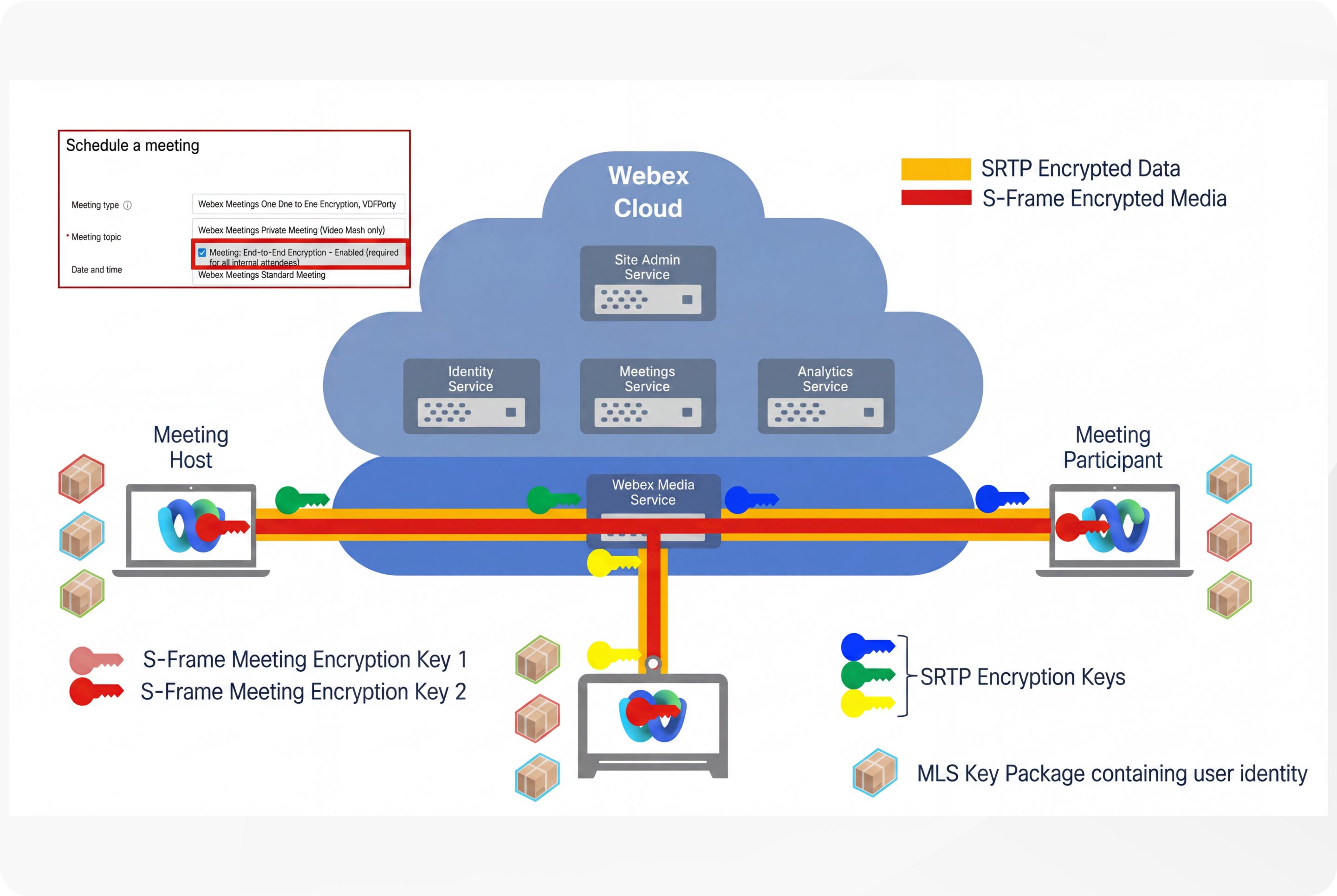
Webex Zero Trust end-to-end encrypted meetings provide enhanced security by combining end-to-end encryption with verified participant identity. This security model uses the Messaging Layer Security (MLS) protocol for key negotiation and SFrame for media transport, ensuring that meeting encryption keys are generated and shared exclusively among participants. As a result, the Webex cloud or any intermediary cannot decrypt the media streams, offering a Zero Trust security posture.
Key features include:
- Zero Trust End-to-End Encryption—All participants support MLS and SFrame, the meeting encryption keys remain accessible only to them, preventing cloud or service provider access.
- Zero Trust End-to-End Identity—Participants exchange user identity certificates during key negotiation, which can be issued by their organizations. This allows independent validation of identities without relying on Webex services, protecting against impersonation and deepfake attacks.
- Security Verification—A meeting security code derived from all participants’ MLS key packages is displayed to all attendees. Matching codes confirm that the meeting has not been intercepted or tampered with by a man-in-the-middle attacker.
- Supported Features and Limitations—Zero Trust meetings support up to 1000 participants, local recording, in-meeting chat, file transfer, whiteboarding, annotation, remote desktop control, and video/audio watermarking. However, features requiring cloud access to decrypted media, such as network-based recording, transcription, AI Assistant, and PSTN or SIP device calls, are not supported. (By deploying a Hybrid Webex architecture, the majority of these limitations can be addressed – see below).
- Identity Verification—Hosts can see the verification status of participants, distinguishing between verified identities (via external or Webex Certificate Authorities) and unverified users, enabling better meeting security management.
Extending the security boundary with Video Mesh Node
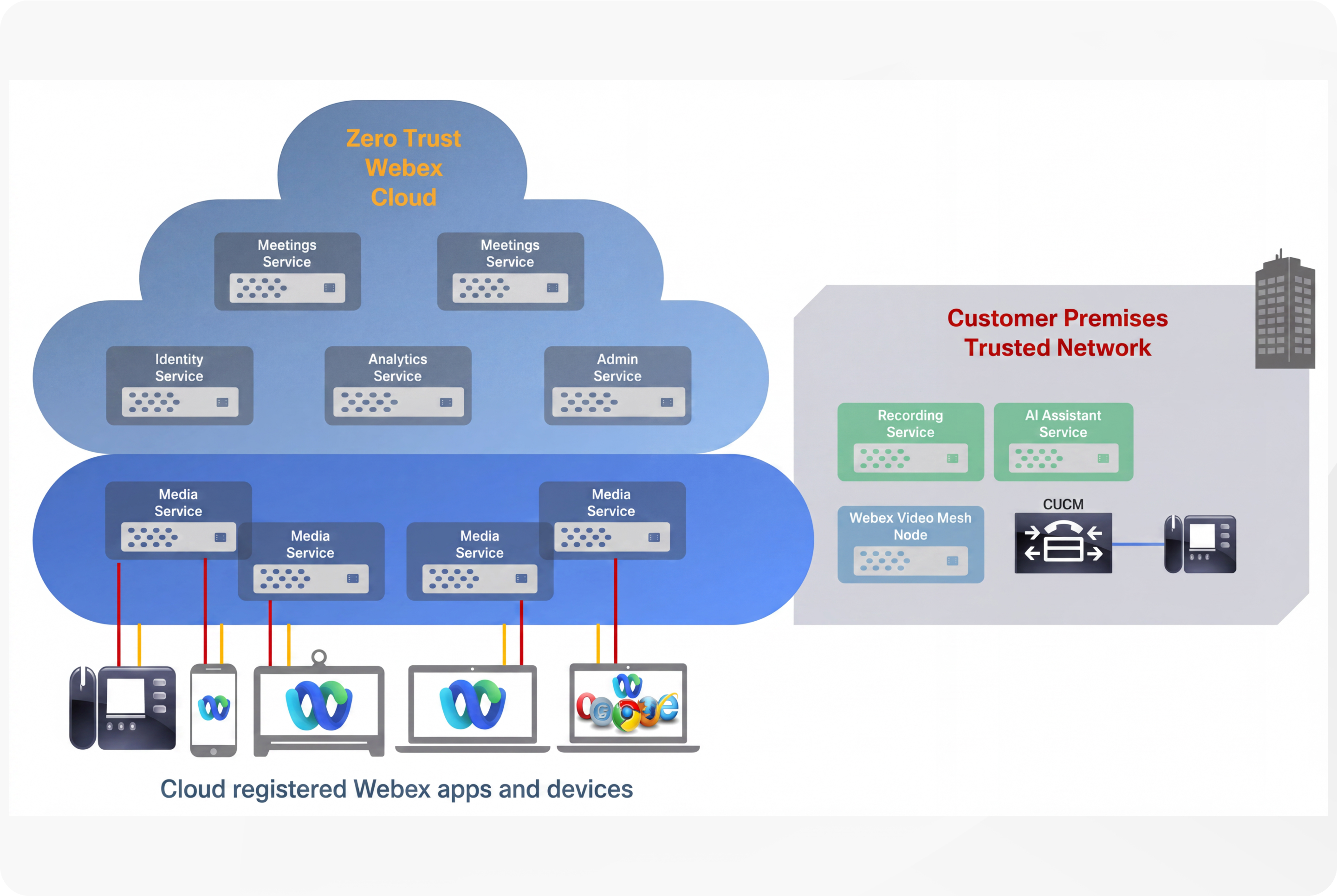
Adding a Video Mesh Node to an organization enables customers to provide on-premises meeting services, and allows their on-premises endpoints to join any Webex meeting. From a security perspective, integrating a Video Mesh Node maintains Zero Trust within the Webex cloud while offering near-feature parity with standard Webex meetings. Customers also benefit from data sovereignty, as services such as Video Mesh Node meeting recordings are processed and stored on-premises.
|
Feature |
Webex Pro (Standard) Meetings with on premises Video Mesh Node (VMN) |
Webex End-to-End Encrypted (Zero Trust) Meetings with on premises Video Mesh Node (VMN) |
|---|---|---|
|
Encryption Type |
Hop-by-hop (TLS/SRTP) |
End-to-End (MLS / S-Frame) |
|
Participant Capacity |
Up to 1,000 |
Up to 1,000 |
|
Webex App Desktop |
Supported |
Supported |
|
Webex App Mobile |
Supported |
Supported |
|
Webex Web App |
Supported |
Supported |
|
Webex Web SDK |
Supported |
Supported |
|
Cisco Video Devices (cloud registered) |
Supported |
Supported |
|
Webex Calling IP Phones (cloud registered) |
Supported |
Supported Cisco 9800 series phones Cisco 8875 series phones |
|
Cisco Video Devices (On premises (SIP) CUCM registered) |
Supported |
Supported (VMN) |
|
Webex Calling IP Phones (On premises (SIP) CUCM registered) |
Supported |
Supported (VMN) |
|
PSTN |
Supported |
Not Supported - Not Zero Trust |
|
Meeting Recording |
Local – Supported (Webex App) Webex Cloud – Supported On premises – Supported (VMN) |
Local – Supported (Webex App) On premises – Supported (VMN) |
|
Cisco AI Assistant Summaries, Transcripts, Action Items |
Webex Cloud – Supported On premises – Supported (VMN)
|
Webex Cloud – Supported On premises – Supported (VMN)
|
|
Breakout Rooms |
Supported |
Supported |
|
Embedded Apps (e.g. Slido) |
Supported |
Supported Not Zero Trust |
|
Personal Meeting Room |
Supported |
Supported |
|
Lobby & Admission Controls |
Supported |
Supported |
|
Join Before Host |
Supported |
Supported |
|
Remote Desktop Control |
Supported |
Supported |
|
Chat, Files, Whiteboards, Annotation |
Supported |
Supported – not persisted |
|
Transcoding when screen sharing with endpoints supporting lower video resolution |
Supported |
Not Supported Low resolution screen sharing used for all participants if a low-end endpoint joins the meeting |
Using Zero Trust end-to-end encryption may add a few extra seconds to joining a meeting, but it provides clear security assurance — only the meeting participants have access to the meeting encryption keys, so the meeting content cannot be decrypted by the service provider or other intermediaries.
Summary: Webex Meetings and Hybrid Deployment Models
As shown in the comparison above, deploying Video Mesh Node (VMN) allows Zero Trust Webex Meetings to achieve near-feature parity with standard Webex meetings. While Zero Trust meetings do not support PSTN participants, the Webex web-based application serves as a widely available alternative for end-to-end encrypted access. Furthermore, VMN enables office-based workers using desk phones to seamlessly join Zero Trust meetings.
Video Mesh Node also ensures data sovereignty for critical meeting content, including recordings and—in the near future—transcripts, summaries, and action items. By processing and storing this data on-premises, VMN provides customers with complete control over their information while maintaining a Zero Trust architecture within the Webex cloud.
Private Webex Meetings
If your organization has Video Mesh on your network, your administrator can enable private meetings by contacting your account representative. This feature enhances the security of your meeting by terminating the media on your premises only. When you schedule a private meeting, the media always terminates on the Video Mesh nodes inside your corporate network with no cloud cascade. While Private Webex Meetings offer privacy by keeping media on your premises only, they also introduce limitations by limiting meeting participants only to members of your organization, and blocking access to cloud services such as recording and Cisco AI Assistant.
For more details on Private Webex Meetings and design guidance for Webex Edge Video Mesh, see Preferred Architecture for Webex Edge Video Mesh.
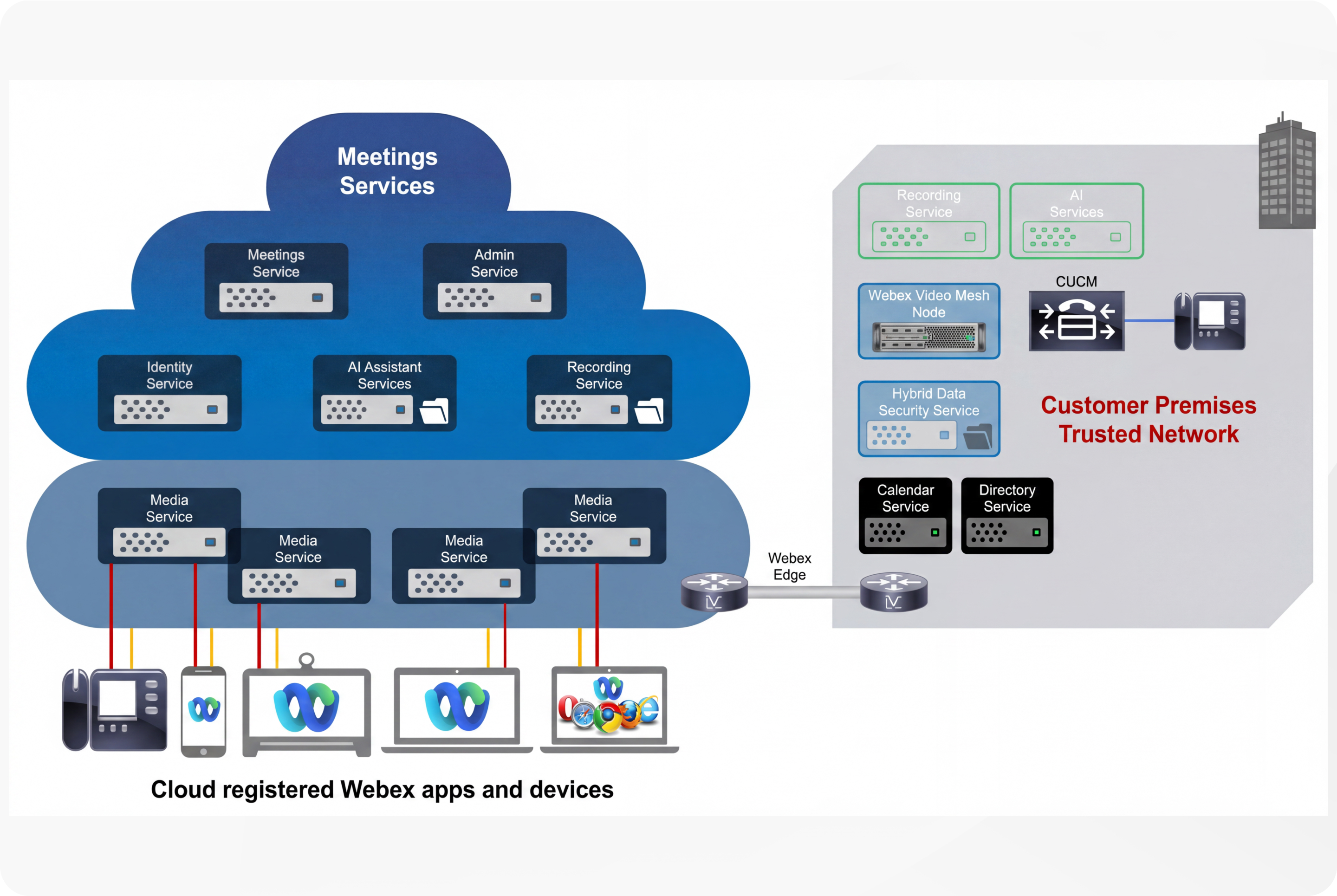
Webex offers an extensive range of hybrid services that allow organizations to leverage existing investments in on-premises infrastructure while benefiting from cloud innovation, providing a consistent user experience, enhanced security, and flexible deployment options for Webex Meetings and collaboration overall. The key hybrid services available for Webex Meetings include:
- Video Mesh Media Nodes—Enable IP Phones and SIP endpoints registered to Unified CM to send audio, video, and screen share content to a Webex Video Mesh cluster during meetings, improving media routing and quality.
- Video Mesh Recording—Enables organizations to record Webex Meetings using on-premises infrastructure. This ensures that all recording data is processed in a Video Mesh Node and stored locally, providing greater control over data residency and security.
- Webex On-Premises AI Services—Summaries, Transcripts, and Action Items are processed and stored locally, providing greater control over data residency and security.
- Hybrid Data Security Service—Allows organizations to store and manage Webex encryption keys in their data center on-premises for enhanced security.
- Call Service—Integration of existing Cisco Unified Communications Manager or other on-premises call control with the Webex cloud, allowing users to join meetings seamlessly.
- Calendar Service—Integration with supported calendar environments to enable scheduling meetings from anywhere without plugins.
- Directory Service—Synchronization of user directories between on-premises and cloud environments for consistent user identity management.
- Webex Edge Audio and Webex Edge Connect—Provide on-net VoIP paths and dedicated, QoS-enabled IP links from customer premises to the Webex cloud, improving audio quality and reducing costs by bypassing PSTN.
Webex Encryption and Privacy
Webex Meetings ensure robust security by encrypting both signaling and media data in transit and at rest. All communications between Webex apps, devices, and services use TLS 1.2 or later with strong cipher suites for signaling encryption. Media streams—including audio, video, screen sharing, and document sharing—are encrypted using the AES-256-GCM as the preferred cipher.
Cryptography: Encryption of data in transit
All communications between cloud-registered Webex apps, Webex devices and the Webex services occur over encrypted channels. Webex uses TLS protocol with version 1.2 or later with high-strength cipher suites for signaling.
After a session is established over TLS, all media streams (audio, video, screen share, and document share) are encrypted.
Encrypted Webex Signaling
Webex services support TLS versions 1.2 and 1.3, with TLS 1.3 preferred when supported by the connecting endpoint. If a client supports only TLS 1.2, the Webex server selects the strongest common cipher suite offered by the client. Unlike TLS 1.2, TLS 1.3 does not use server-preference cipher suite selection because it relies on a smaller, curated set of modern ciphers. This design simplifies the selection process, focusing more on performance improvements such as reducing the overall handshake length, while maintaining strong security. The cipher suites for TLS 1.2 and 1.3 used by Webex are well-defined and prioritized to ensure secure communication.
TLS Cipher Suites
TLS 1.3 cipher suites (TLS 1.3 servers do not use a preference order for suite selection)
|
Cipher Suite |
Key negotiation/generation protocol |
|---|---|
|
TLS_AES_256_GCM_SHA384 |
ECDH SecP256r1MLKEM768 (eq > 3072 bits RSA) |
|
TLS_AES_128_GCM_SHA256 |
ECDH SecP256r1MLKEM768 (eq > 3072 bits RSA) |
|
TLS_CHACHA20_POLY1305_SHA256 |
ECDH SecP256r1MLKEM768 (eq > 3072 bits RSA) |
TLS 1.2 cipher suites (suites in server-preferred order)
|
Cipher Suite |
Key negotiation/generation protocol |
|---|---|
| TLS_ECDHE_RSA_WITH_AES_256_GCM_SHA384 |
ECDH secp256r1 (eq. 3072 bits RSA)
|
| TLS_ECDHE_RSA_WITH_AES_128_GCM_SHA256 |
ECDH secp256r1 (eq. 3072 bits RSA)
|
| TLS_ECDHE_RSA_WITH_CHACHA20_POLY1305_SHA256 |
ECDH secp256r1 (eq. 3072 bits RSA)
|
| TLS_ECDHE_RSA_WITH_AES_256_CBC_SHA |
ECDH secp256r1 (eq. 3072 bits RSA)
|
| TLS_ECDHE_RSA_WITH_AES_128_CBC_SHA |
ECDH secp256r1 (eq. 3072 bits RSA)
|
AES_256_CBC and AES_128_CBC encryption ciphers are supported to maintain compatibility with legacy systems, older browsers, and embedded devices that do not support modern AEAD (Authenticated Encryption with Associated Data) ciphers like AES-GCM e.g. Internet Explorer 11 on Windows 7 and Windows 8.1, Safari 6/7/8 on early iOS and MacOS releases use CBC based ciphers.
The CHACHA20_POLY1305 is stream cipher that has a low dependency of hardware, making it a superior cipher to use on mobile devices or devices with low-power CPUs.
Post-Quantum Secure Cryptography
Post-Quantum Cryptography (PQC) is a future-proofing measure that acts as a proactive shield against Harvest Now Decrypt Later (HNDL) attacks for data being transmitted today.
HNDL relies on the fact that current asymmetric encryption (like RSA and Diffie-Hellman) is vulnerable to future quantum computers. Attackers "harvest" this traffic now, knowing they can't read it yet, but betting that in 10 years they will have the tools to unlock it.
PQC implements a mathematical "lock" on vulnerable data. PQC uses lattice-based or hash-based math that is resistant to both classical and quantum algorithms. Even if an attacker harvests PQC-encrypted data today, it remains a "black box" to them forever, as even a future quantum computer won't have the algorithm to crack it.
Most HNDL attacks target the Key Exchange (the process where two parties agree on a secret key). If an attacker captures the key exchange today using legacy methods, they can derive the session keys later and decrypt the entire conversation.
Webex TLS and MLS protocols support Post-Quantum Key Encapsulation Mechanisms (ML-KEM). This ensures that the very first "handshake" between a user and the Webex cloud is quantum-resistant. If the key exchange is secure against quantum attacks, the rest of the encrypted session remains safe from retrospective decryption.
Webex TLS with PQC support
The Webex cloud supports ECDH-SecP256r1-MLKEM768 for key encapsulation within TLS 1.3 cipher suites. This hybrid key agreement mechanism integrates classical key exchange (ECDH over SecP256r1) with quantum-resistant key encapsulation (ML-KEM-768). This hybrid approach ensures post-quantum security while maintaining backward compatibility, falling back to classical ECDH if the TLS 1.3 client does not support ML-KEM.
Utilization of TLS 1.3 with Post-Quantum Key Encapsulation Mechanisms (PQ-KEM) depends on the operating system of the connecting client. Supported systems include Windows 11, macOS 14.4 (Sonoma), Linus (OpenSSL 3.5+), iOS 26, and Android 17.
Webex MLS with PQC support
The Messaging Layer Security (MLS) protocol ( RFC 9420) is an IETF-standardized, high-efficiency framework designed for secure end-to-end encryption in group communications. Webex integrates ECDH-SecP256r1-MLKEM768 into MLS to provide quantum-resistant key agreements for Zero Trust end-to-end encrypted meetings.
Implementing PQC at the MLS layer provides a critical "defense-in-depth" advantage—it shields meeting media and content from Harvest Now, Decrypt Later (HNDL) attacks. Even if a connecting device lacks OS-level support for PQC—leaving the TLS transport layer potentially vulnerable—the underlying meeting content remains secure and cannot be decrypted by future quantum compute resources.
Encrypted Webex Media
Media Encryption Standards for Webex
Webex meetings and calls utilize robust AES-based encryption for all media packets. The specific cipher suite depends on the endpoint type, with AES-256-GCM serving as the preferred standard for optimal security.
|
Endpoint Type |
Supported Ciphers |
|---|---|
|
Webex App and RoomOS devices |
AES-256-GCM |
|
Third Party SIP/H.323 devices |
AES-256-GCM AES-128-GCM AES-CM-128-HMAC-SHA1 |
Key Security Considerations
- Preferred Standard—AES-256-GCM is the recommended cipher for all deployments to ensure the highest level of data integrity and confidentiality.
- Interoperability—While Webex maintains support for legacy ciphers (such as AES-CM-128-HMAC-SHA1) to ensure interoperability with third-party SIP and H.323 systems, organizations prioritizing a zero-trust architecture should enforce AES-256-GCM where device compatibility allows.
Media Transport Protocols
Webex supports media transport via UDP, TCP, or TLS. For optimal voice and video performance, Cisco strongly recommends UDP.
Performance Considerations:
- Real-Time Efficiency—UDP is the preferred transport for real-time media as it minimizes latency and jitter by avoiding the retransmission and buffering mechanisms inherent in connection-oriented protocols.
- Impact of TCP/TLS—While TCP and TLS provide reliable, ordered data delivery, this behavior is counterproductive for real-time media. The resulting packet retransmissions and stream buffering introduce latency and jitter, which can significantly degrade the quality of experience for participants
Webex use of SRTP and SFrame for media
To maintain the high-security standards required for WebexZero Trust environments, it is important to distinguish between transport-level security (SRTP) and application-layer end-to-end encryption (SFrame).
|
Feature |
SRTP (Secure RTP) |
SFrame (Secure Frame) |
|---|---|---|
|
Primary Goal |
Secure media transport |
End-to-End Encryption (E2EE) |
|
Layer |
Transport Layer |
Application/Payload Layer |
|
Visibility |
Encrypts RTP payload; headers often visible |
Encrypts media frame before transport |
|
Key Management |
DTLS-SRTP |
Decoupled (MLS protocol) |
|
Media Server / Media Gateway (SFU) Interaction |
SFU decrypts/re-encrypts |
SFU is "blind" (cannot decrypt) |
Key Technical Distinctions—SRTP & SFrame
- SRTP (Secure Real-time Transport Protocol)
SRTP is the industry standard for securing media streams in transit.
- Scope—It provides confidentiality, message authentication, and replay protection for the RTP payload.
- Operational Context—In many architectures, the Media Server/ Media Gateway (Selective Forwarding Unit (SFU)) terminates the SRTP connection to perform media processing (for example, mixing, layout composition, or transcoding). Because the SFU decrypts the media to process it, the media is technically vulnerable at the SFU point.
- SFrame (Secure Frame)
SFrame is an IETF standard. RFC 9605 is designed specifically to facilitate true end-to-end encryption in a multi-party conferencing environment.
- Scope—It encrypts packetized media frames before they are encapsulated into RTP packets. Webex adds an additional layer of encryption using SRTP.
- Zero Trust Architecture—Because the media is encrypted at the application layer, the SFU acts only as a "blind" relay. It routes the encrypted packets to other participants without ever having access to the decryption keys.
- Independence—SFrame is transport-agnostic. It remains secure even if the underlying transport (UDP/TCP/TLS) is compromised, as the security context is tied to the participants' endpoints rather than the transport connection.
SFrame is the critical mechanism that enables E2EE. While SRTP ensures that data is encrypted while traversing the network, SFrame ensures that the media remains encrypted throughout the entire lifecycle of the meeting, including while it resides on Cisco’s infrastructure (the SFU), effectively removing the service provider from the trust boundary.
Encryption of Data at Rest: Webex Meetings
Data at rest within Webex Meetings is classified into two distinct categories, each with its own security profile:
- Webex Meetings content
- Webex Meetings metadata
Webex Meetings Content
Meeting content consists of data created by participants or generated by Webex services on behalf of the meeting host. This includes:
- Media-related content—Recordings, transcripts, summaries, and action items.
- Collaboration data—Chat messages, shared/transferred files, whiteboards, and annotations.
Webex Meetings Content Security—Webex End-to-End Encryption
Webex secures meeting content generated by participants using a robust end-to-end encryption (E2EE) framework. Central to this architecture is the Webex Key Management Service (KMS), which is responsible for generating, distributing, and managing the encryption keys for all user-generated content.
Meeting Content Security Layers
- Data in Transit— Webex App and Cisco video devices use Webex end-to-end encryption (E2EE) with AES-256-GCM to encrypt user generated meeting content such as recording files, AI summary files, chat messages, etc. This is further encapsulated within Transport Layer Security (TLS) to provide dual-layer protection during transmission.
- Data at Rest—Once stored in the Webex cloud, encrypted content is additionally protected by AES-256-GCM disk encryption.
- Protection Profile—This approach shields content from TLS interception during transit and ensures that stored data remains inaccessible to unauthorized actors within the cloud environment.
Webex end-to-end encryption with managed content access for Core Services
Unlike Zero Trust end-to-end encryption, where Webex has no access to media or content encryption keys, Webex end-to-end encryption allows the platform to utilize the Webex KMS-generated keys to decrypt data for essential core services. This managed access enables:
- Search and Indexing—Allows users to search through content history.
- Compliance and Governance—Enables Data Loss Prevention (DLP), eDiscovery, and data archival.
- Media Optimization—Supports file transcoding for cross-device compatibility.
- Security—Facilitates malware scanning using the Extended Security Pack.
Webex Meetings Metadata
Meetings metadata consists of the administrative and technical information generated by the system to facilitate, track, and manage a meeting, rather than the actual content (audio, video, or shared files) of the meeting itself. Metadata can be broken down into several categories:
- Session Information—Meeting title, meeting ID, scheduled start and end times, and the actual duration of the meeting.
- Participant Data—A list of invitees and actual attendees, their IP addresses, device types (such as Windows, iPhone, Cisco Room Kit), and their join/leave timestamps.
- Usage and Quality Metrics—Data used for troubleshooting, such as packet loss, jitter, latency, and the resolution of the video stream.
How Metadata is Used
- Analytics and Reporting—Administrators use metadata in WebexControl Hub to see how many meetings are happening, which departments are most active, and the overall quality of the experience.
- Troubleshooting—Cisco TAC (Technical Assistance Center) uses metadata to identify and resolve meeting issues.
- Compliance and eDiscovery—Compliance officers can search metadata to prove a meeting took place, who was there, and whether it was recorded, even if they cannot see the encrypted content of the meeting.
- Security—Metadata helps identify unauthorized access attempts or unusual patterns that might indicate a security threat.
Security and Privacy of Metadata
- Encryption—While metadata is not "end-to-end encrypted", it is still encrypted in transit (using TLS) and at rest in Cisco’s secure data centers.
- Access Control—Cisco’s privacy policies strictly limit who can access this metadata, and it is used to provide and improve the service.
For more information on Webex meeting content and metadata, see the Webex Meetings Offer Disclosure.
Webex Meetings Session Types
Webex Meetings session types are configurations or templates that define the features and options available for meetings scheduled on a Webex site. These session types can be either standard or customized by site administrators to enable or disable specific features for users. This flexibility allows organizations to tailor meeting experiences according to their security requirements and user needs. For more information, see Manage session types in Control Hub. 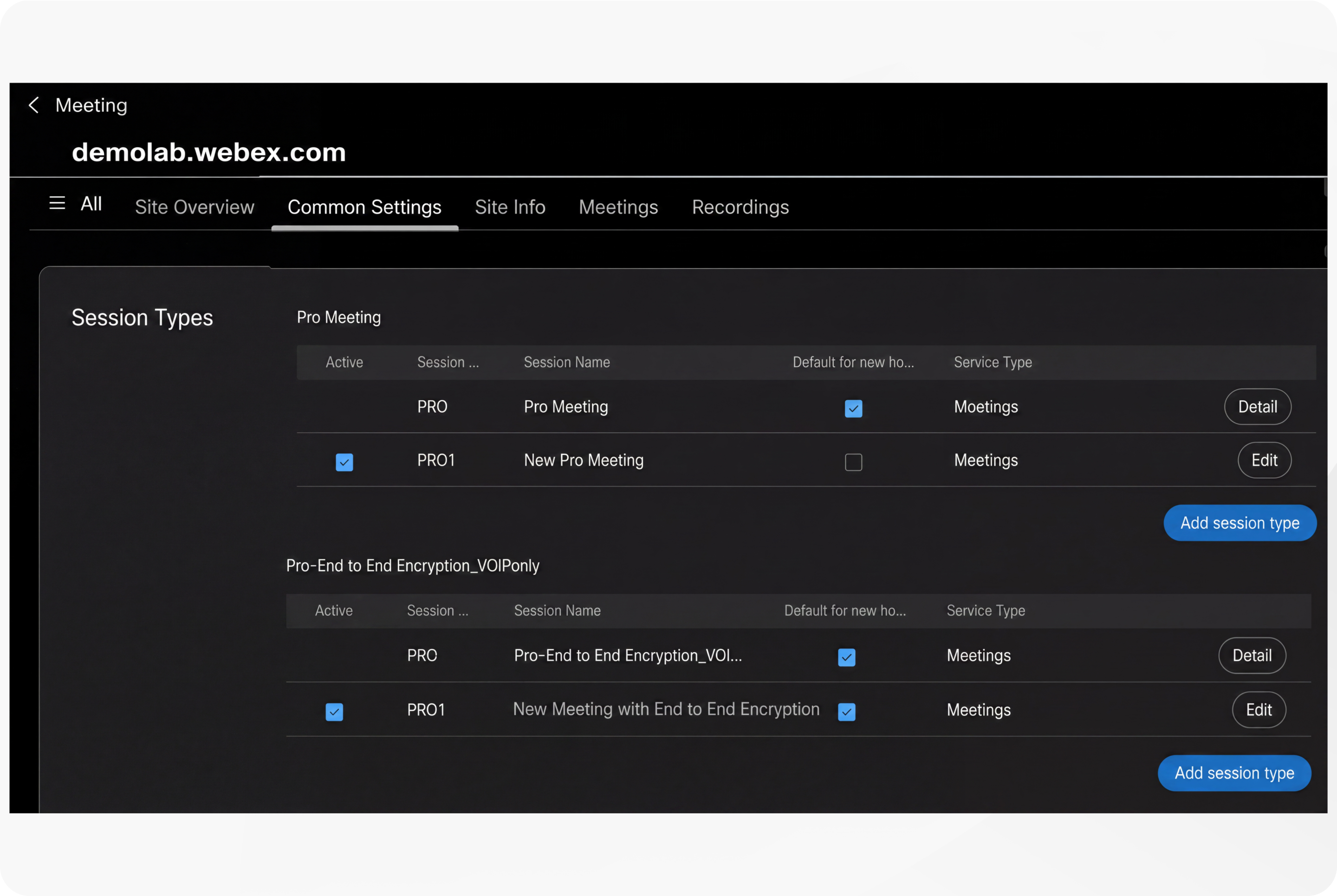
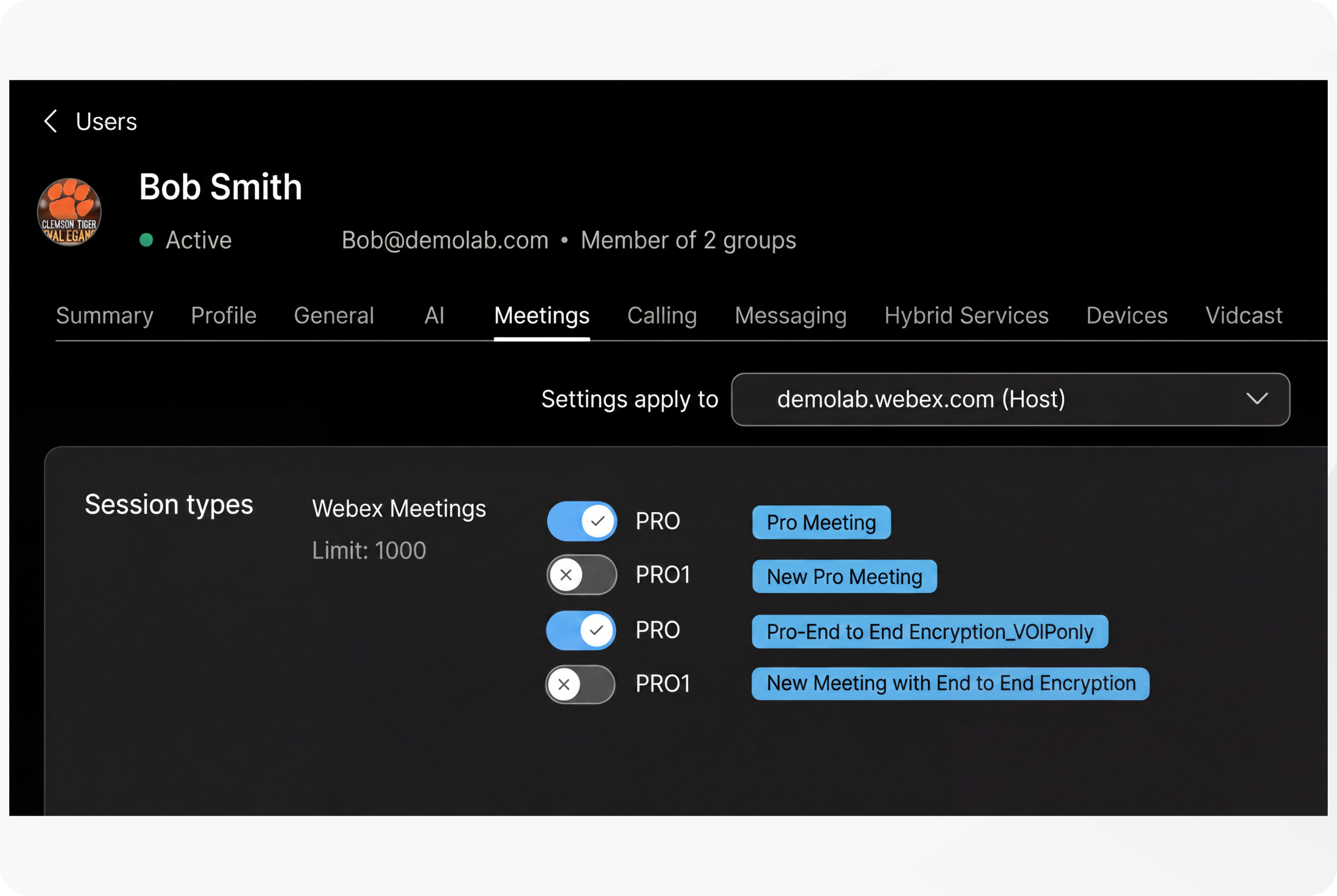
Assigning meeting session types to users
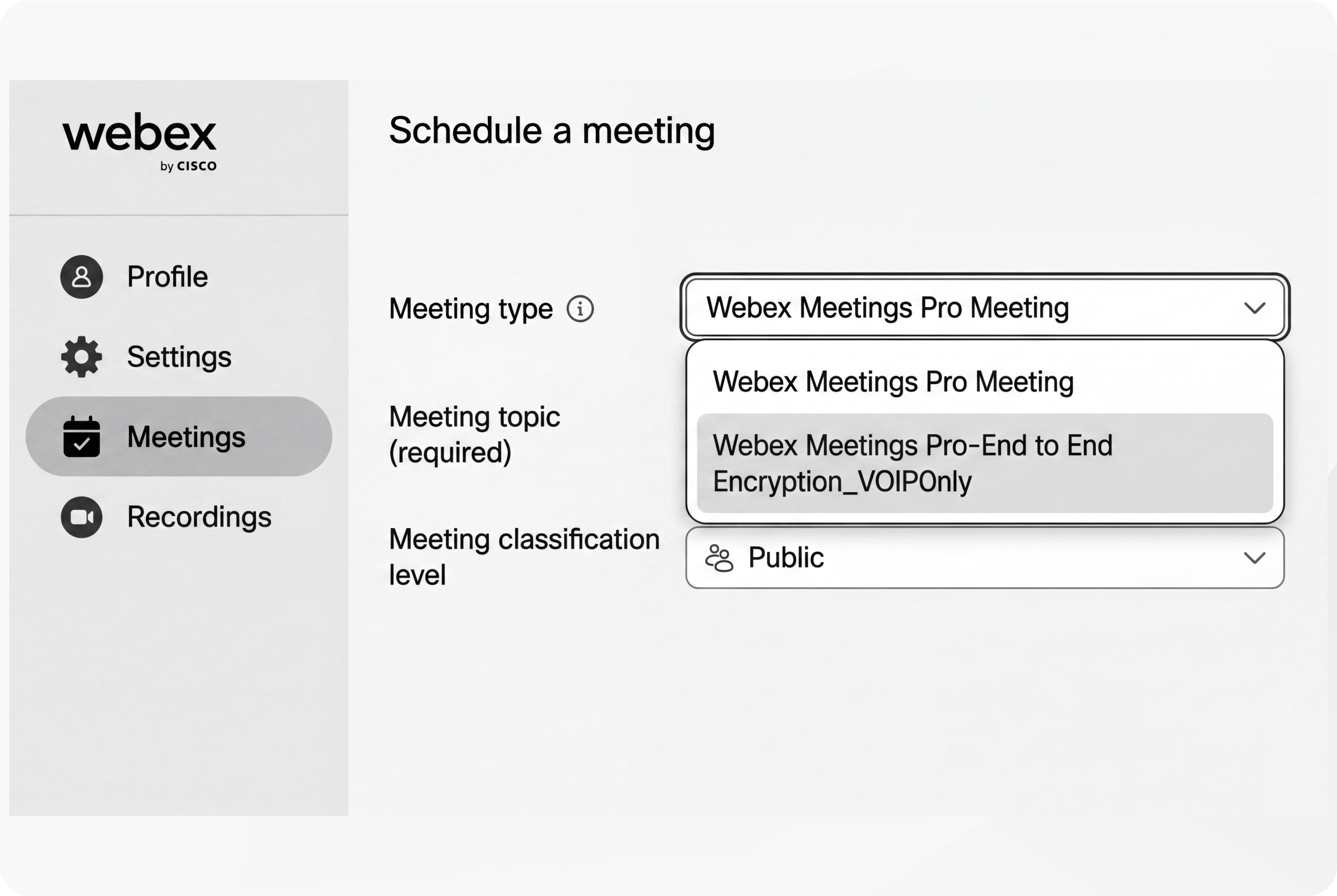
Webex Control Hub administrators can assign one or more meeting types that their users can use for scheduled meetings. By default, all users are assigned the Pro Meeting and Pro-End to End Encryption_VoIPonly meeting types.
Schedule a meeting—Select the meeting type
Users can select the meeting type that they want to use when scheduling a meeting from Webex App, Webex User Page and Webex Email Add-In for Microsoft Outlook.
Schedule a meeting—Select the meeting type in Webex App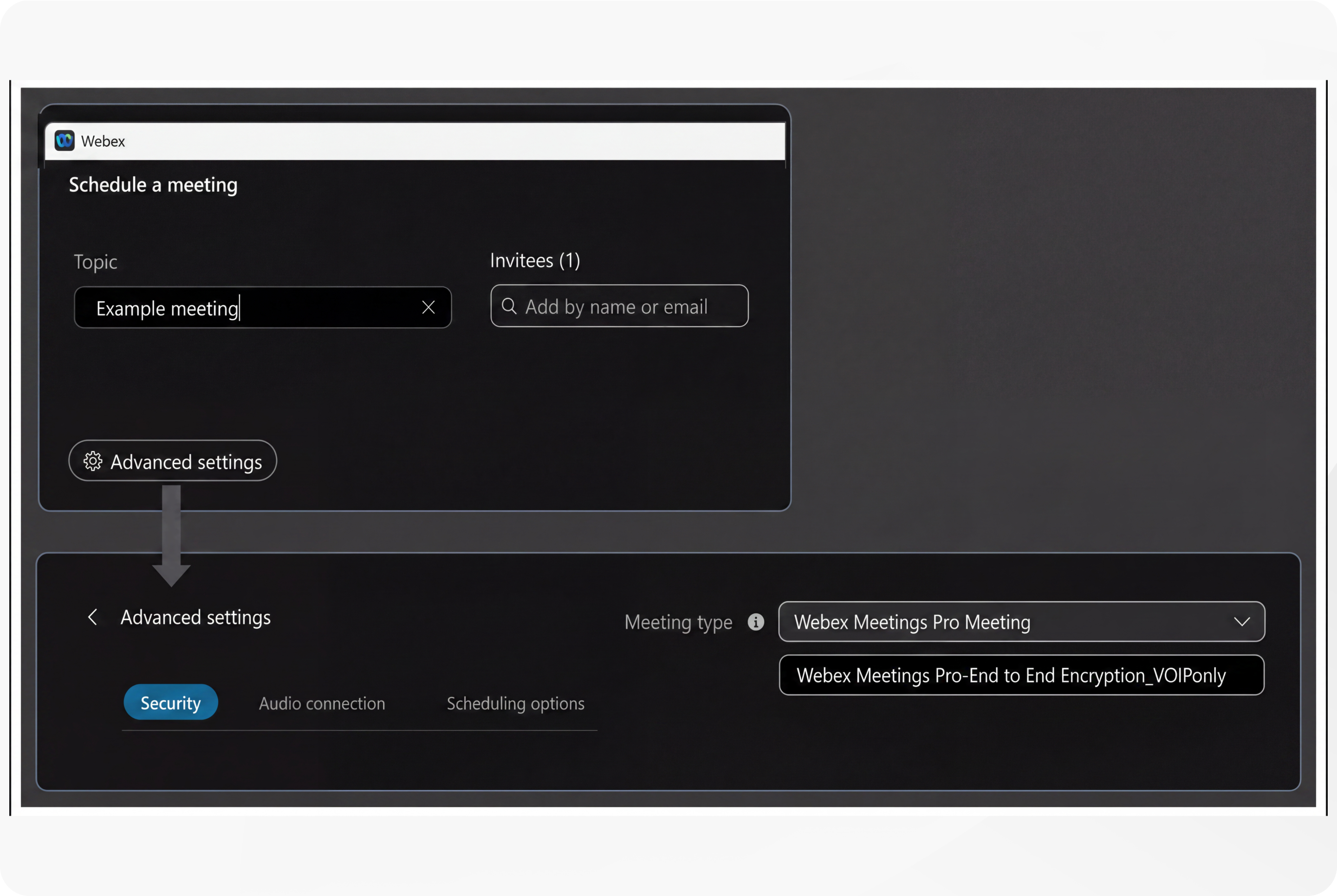
Schedule a meeting—Select the meeting type from the Webex user page
Set a default meeting type
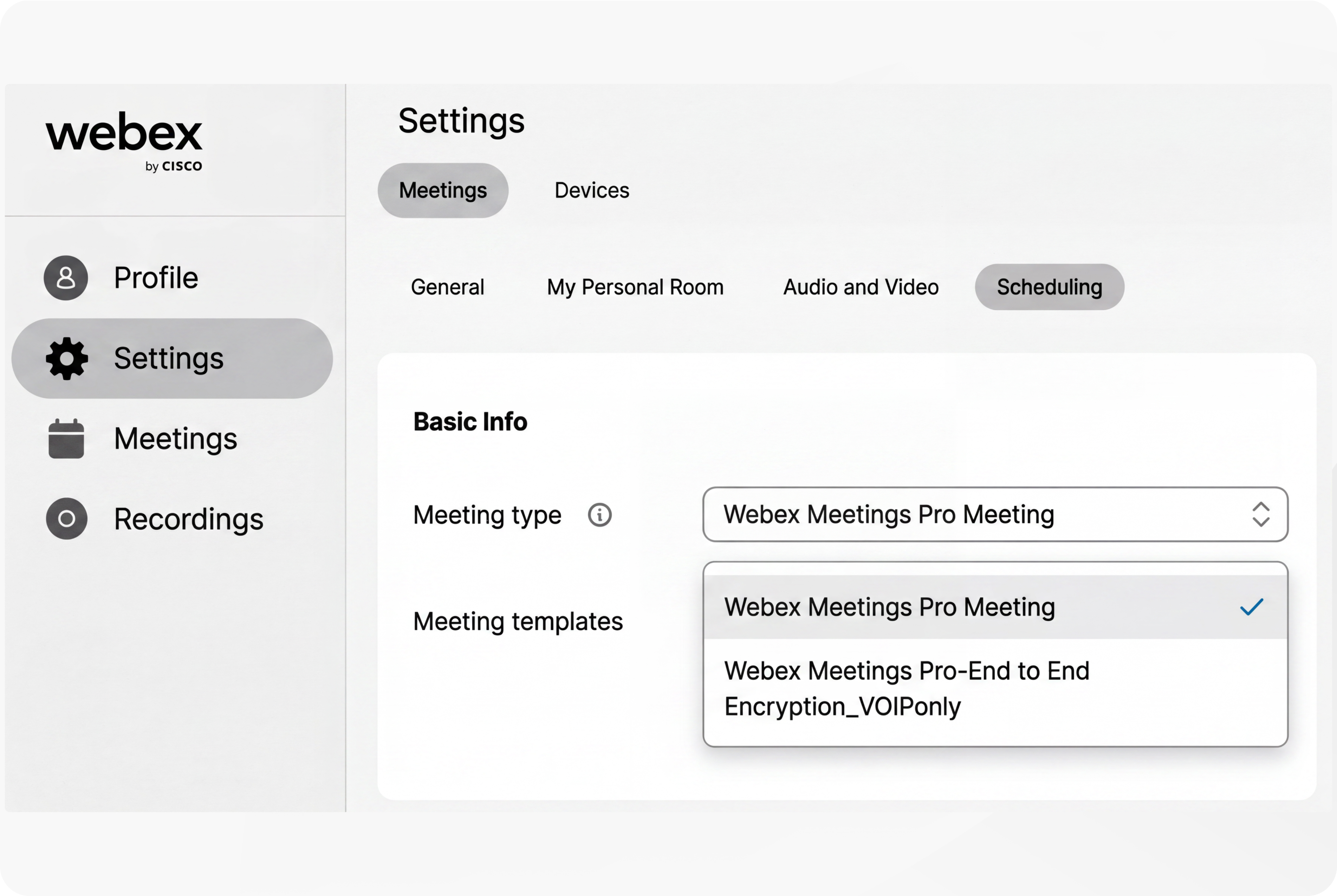
Users can set their default meeting type from on their Webex user page.
The default meeting type applies to both scheduled meetings and Personal Meeting Rooms.
Set the Default Meeting Type from the Webex User page
Security for Scheduled Webex Meetings and Webex Personal Meeting Rooms
Scheduled Webex Meetings and Webex Personal Meeting Rooms differ significantly in their security features and intended use cases.
Scheduled meetings are designed for secure, planned sessions and offer a comprehensive set of security controls, including password protection, attendee registration, lobby screening, disabling join-before-host options, and unique meeting URLs for each session. These features help ensure that only authorized participants can join and that hosts maintain control over the meeting environment.
In contrast, Personal Meeting Rooms provide a persistent URL for quick, informal meetings with trusted participants. They include basic security features such as lobby controls, manual or automatic locking, and CAPTCHA to prevent automated attacks. However, because the Personal Room URL is constant, it can pose a higher security risk if widely shared.
For meetings requiring stringent security, scheduled meetings are recommended, while Personal Meeting Rooms are better suited for trusted groups prioritizing ease of access over strict security controls.
Control Hub administrators can configure Webex Personal Room Meetings for use in internal meetings only.
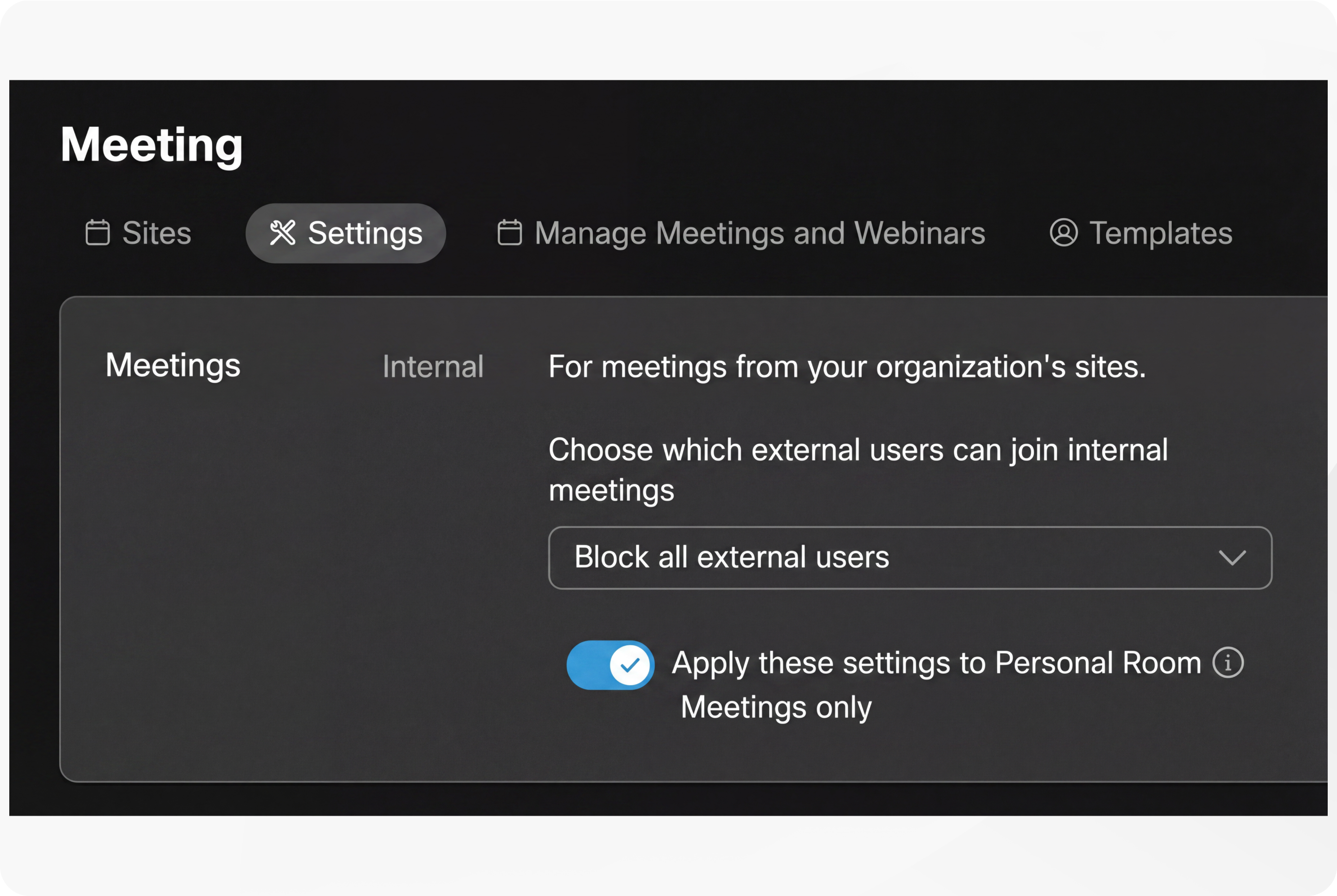
Meeting security settings for administrators
Control Hub offers a comprehensive set of security controls for scheduled Webex Meetings, enabling administrators to tailor meeting access and participant management to organizational policies. These controls include:
- Meeting Lobby Settings—Configure lobby behavior for guests and unverified users, including options to allow guests to join directly, wait in the lobby, or be blocked from joining.
- Lobby categories groups for internal, external and unverified (guest) users.
- Participant labels—Domain names of internal participants and/or external participants, Unverified label for unauthenticated (guest) participants.
- Meeting Auto Admit Feature—Allow authenticated, invited users and rooms to join or start meetings without host intervention, while uninvited users wait in the lobby or are blocked.
- Automatic Meeting Lock—Automatically lock meetings after a specified number of minutes (0, 5, 10, 15, or 20) from the start time to prevent late joiners.
- Meeting Lock Behavior—Define what happens when a meeting is locked—whether participants wait in the lobby or are prevented from joining.
- Enforce Meeting Passwords—Require passwords for attendees joining from phones or video conferencing systems, with system-generated numeric passwords added to invitations.
- Set specific meeting password length and complexity requirements.
- Hide Meeting Link from Attendees—Prevent attendees from easily copying and sharing meeting links during the meeting to reduce unauthorized access.
- Disable Virtual Cameras—For macOS users, disable third-party virtual cameras to enhance security by limiting camera access to Webex only.
- Meeting Watermarking—Enable audio and video watermarking to identify the source of recordings or screenshots, helping identify data leakage.
- Domain-based Access Controls for External and Internal Meetings—Control whether users can join external meetings and restrict external users from joining internal meetings.
- Templates for User Groups—Apply meeting feature settings to groups of users or individual users via templates.
For more information, see:
Webex best practices for secure meetings: Control Hub
Webex App | About the lobby in Webex Meetings
Customize the participant labels that display in Webex Meetings
Meeting content sharing controls for administrators
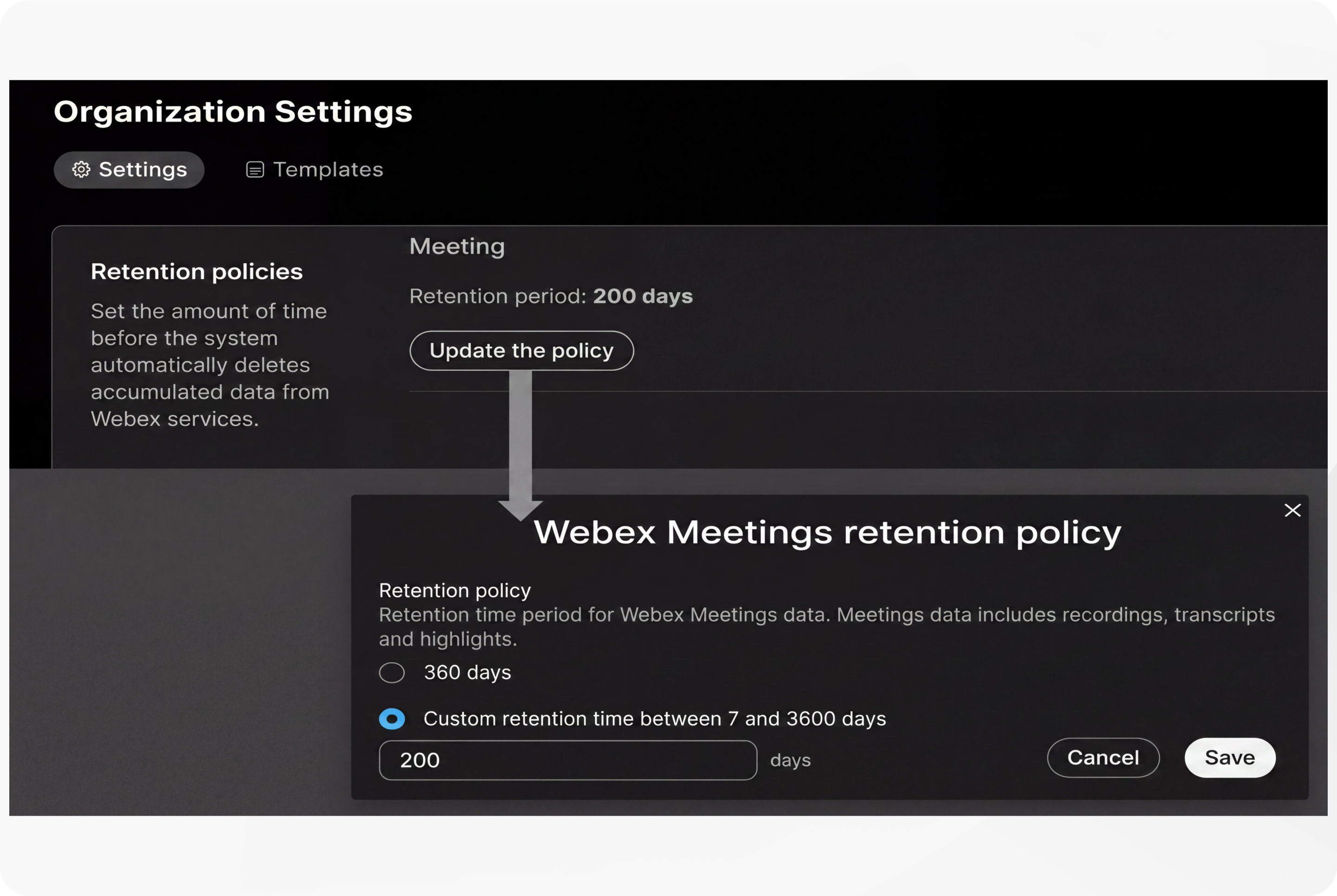
Control Hub allows administrators to control how content such as recordings, summaries, action items, etc. can be shared during and after a meeting, and to control how long meeting content is stored in the Webex cloud, before being automatically deleted.
Content controls
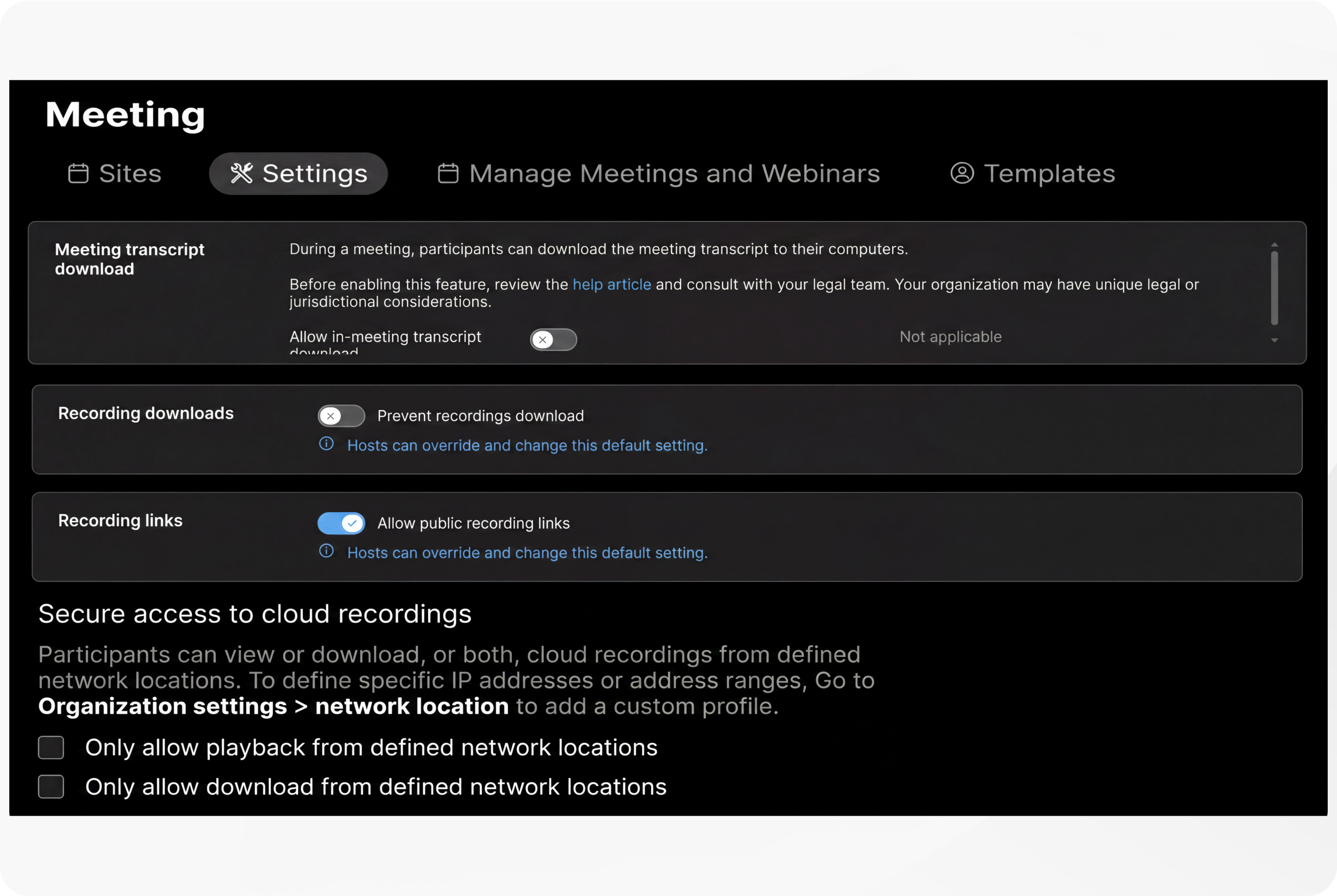
Meeting content retention policy
The meeting host has complete control over how the meeting is set up, and should ensure that only the intended invitees can join. Also, the host should follow the organization’s security policies for scheduling the meetings. To learn how to keep Webex Meetings secure as a host, see Webex Best Practices for Secure Meetings: Hosts.
Depending on the security policies, some organizations might completely block their users from joining any external meetings or only allow their users to join meetings from a list of approved external sites. In addition, organizations might restrict their users in using certain in-meeting features such as chat, file transfers, annotations, Q&A and polling when joining an external meeting. Collaboration restrictions from Webex can provide these functions. For more details, see Collaboration Restrictions for Webex Meetings in Control Hub.
Security controls for Webex meeting hosts
Webex meeting hosts play a critical role in maintaining the security and integrity of virtual meetings. They are empowered with a comprehensive set of controls designed to manage participant access, verify identities, and protect meeting content:
- Meeting Lobby Controls—Hosts can admit or remove participants waiting in the lobby, which groups users as internal, external, or unverified guests. This allows vetting attendees before entry.
- Meeting Locking—Hosts can manually lock or unlock the meeting to prevent new participants from joining after the meeting has started. Meetings can also be set to auto-lock after a specified time (0, 5, 10, 15, or 20 minutes).
- Password Protection—Scheduled meetings are password protected by default. Hosts can enforce meeting passwords for attendees joining via phone or video conferencing systems.
- Auto Admit Feature—Hosts can allow authenticated, invited users and rooms to join or start meetings without host intervention, while uninvited users wait in the lobby or are blocked.
- Participant Management—Hosts can expel participants at any time during the meeting to remove unwanted attendees.
- Join Before Host Control—Hosts can enable or disable the option for attendees to join the meeting before the host arrives, which is recommended to be disabled for security.
- Mute Controls—Hosts can mute or unmute participants and control whether participants can unmute themselves to reduce disruptions.
- Entry and Exit Tones—Hosts can enable audio notifications when participants join or leave the meeting to monitor attendance.
- Watermarking—Hosts can enable audio and video watermarking to identify the source of recordings or screenshots, helping prevent data leakage.
- Identity Verification—Hosts can ask participants to turn on video or state their name to confirm identity and validate attendees.
- End Meeting Control—Hosts can end the meeting for all participants to ensure the session is fully closed.
For more information, see Best practices for secure meetings: hosts.
Security options for hosts when scheduling a meeting
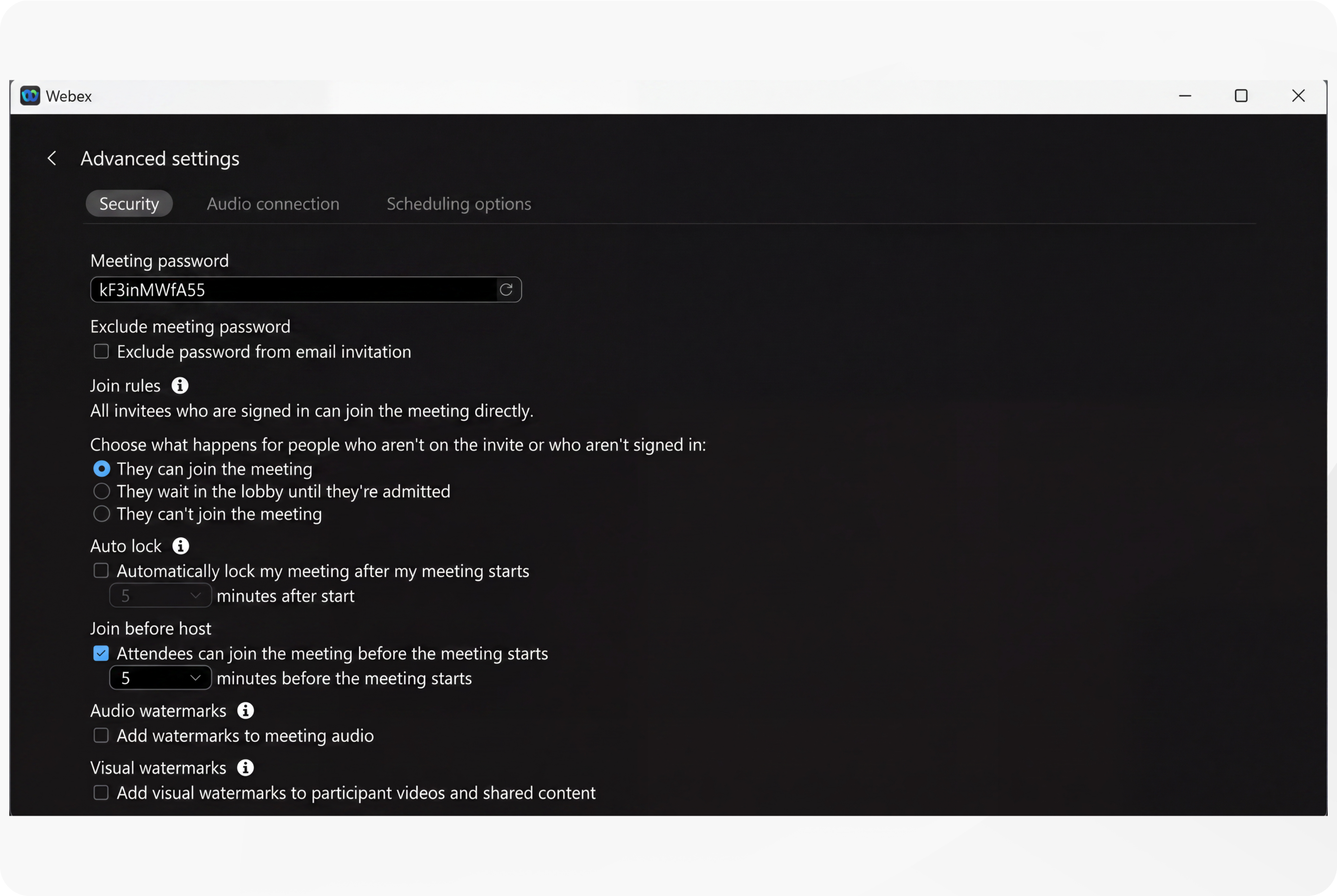
Security options for hosts when scheduling a meeting
Combatting new security threats – Deepfake User Impersonation
Deepfake threats in Webex Meetings represent a significant emerging security challenge. Deepfakes use artificial intelligence to create highly realistic but fake audio and video content, which can impersonate legitimate meeting participants. In the context of Webex Meetings, this could allow malicious actors to impersonate trusted individuals, manipulate meeting content, or conduct social engineering attacks, potentially leading to unauthorized access, data breaches, or fraud.
Webex incorporates multiple security controls that help mitigate risks associated with unauthorized access and impersonation. These include meeting lobby controls to vet participants before entry, meeting locking features to prevent late joiners, enforced password protection, participant identity verification prompts, and watermarking of audio and video to trace the source of recordings or screenshots. Together with Deepfake Detection and Deepfake Prevention, these measures create a layered defense that enhances meeting security against deepfake and other sophisticated threats, helping organizations safeguard sensitive information and maintain trust in their virtual collaboration environment.
Deepfake Detection
Cisco has partnered with GetReel and Pindrop to integrate advanced AI-driven deepfake detection and voice authentication technologies into the Webex Suite. This integration enables real-time detection and blocking of synthetic audio and video during meetings without requiring additional hardware. The solution uses multifactor risk analysis, including voice biometrics, device and behavior analytics, and global fraud intelligence, to authenticate participants passively and identify deepfake attempts with high accuracy. This continuous, background analysis helps protect meetings from AI-powered fraud while maintaining a seamless user experience.
Deepfake Prevention: Customer provided identity certificates
Zero Trust End-to-End Identity and Deepfake Prevention
Customer-provided end-user identity certificates are a cornerstone of preventing impersonation in Webex end-to-end encrypted (E2EE) meetings. Unlike traditional deepfake-blocking mechanisms that rely on analyzing audio and video streams, this approach provides cryptographic identity validation at the point of admission. This verified status is displayed directly in the meeting roster, providing transparency to all participants.
Webex has extended its support for customer-managed certificates—previously available on RoomOS devices—to Webex App as part of our "Deepfake prevention" feature. Organizations can provision and manage their own digital certificates, issued by trusted external Certificate Authorities (CAs) using industry-standard protocols like ACME. These certificates, based on X.509 standards and ECDSA P-256 key pairs, provide cryptographic proof of participant identity during E2EE meetings.
End-to-End Verified Identity and the MLS Protocol
The Messaging Layer Security (MLS) protocol utilizes standard X.509 certificates to authenticate meeting participants. A certificate is a digitally signed statement from a trusted CA that verifies the identity of the signing key holder. Participants obtain these certificates through two primary methods:
- Managed Devices (Customer-Provided Certificates)—For organization-managed desktop and mobile clients, an identity certificate from a trusted CA can be installed on the device. When a user logs in using Single Sign-On (SSO), Webex App retrieves this certificate from the OS trust store to present the user's verified identity. This process is also supported for Webex cloud-registered Cisco video devices.
- Default (Webex-Provided Certificates)—If no customer-provided certificate is available, the Webex client or device automatically uses a certificate issued by the Webex Certificate Authority, which reflects an identity verified by Cisco.
Identity Sharing and Fallback Mechanism
During a meeting, each participant shares their Webex identity certificate and, if available, their customer-provided identity certificate with all other attendees. To ensure seamless connectivity, the Webex endpoint follows a strict hierarchy: it prioritizes the customer-provided certificate for verification; if that certificate is missing or fails validation, the system automatically falls back to the Webex-provided identity certificate.
Displaying User Identity Verification Status
When participants join a meeting using Webex App or RoomOS devices with customer-provided certificates, their identities are verified by other meeting members against the issuing CA. This ensures that only authorized users are recognized, preventing attackers from impersonating legitimate participants, as these certificates are uniquely tied to verified identities and cannot be forged by Cisco or intermediaries.
The participant list in an E2E-encrypted meeting displays the identity verification status of each user:
- Zero-Trust E2E Verified (
 domain.com )—When a customer-provided identity certificate is used, the participant’s domain is displayed in blue text. This indicates true E2E- verified identity that Cisco cannot tamper with. For example, in the meeting roster, you might see that "Kevin" has a verified email address from example.com in blue.
 -
Webex-Verified (
 domain.com)—Certificates issued by a Webex CA provide a more limited level of protection. While superior to having no identity protection, these participants are not marked as "Zero Trust E2E verified." Instead, their identity status is displayed in grey text, indicating that the identity was verified by the Webex CA.
 - Unverified Guest User (
 Unverified)—Although the identity of guest participants is not authenticated (as there is no sign-in process), they still require a certificate to join the MLS group for a call or meeting. This certificate is issued by a Webex CA and uses "anonymous" as the username.
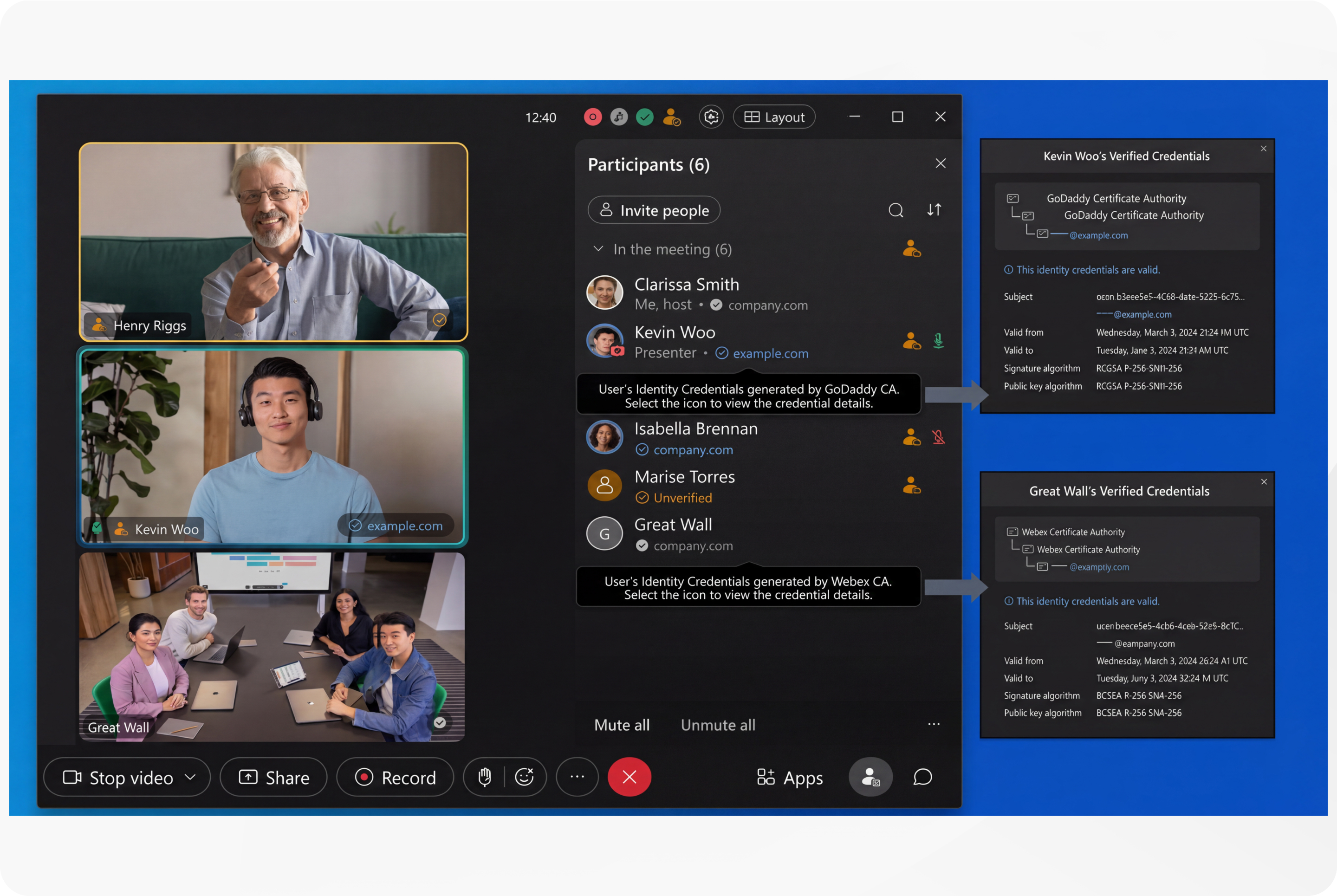
Additionally, a meeting security code derived from the cryptographic state of all participants helps detect person-in-the-middle attacks by allowing participants to verify that everyone shares the same secure meeting context. By combining cryptographic identity verification with end-to-end encryption, this "Deepfake prevention" feature offers a robust defense against impersonation and synthetic media threats, safeguarding meeting integrity and confidentiality across both Webex App and RoomOS devices.
Managing Certificate Rollout
Organizations can simplify the rollout and management of these customer-provided end user identity certificates by installing them into corporately managed devices using Mobile Device Management (MDM), Mobile Application Management (MAM), or Enterprise Mobility Management (EMM) applications. These management platforms enable IT administrators to centrally provision, configure, and control certificates and related security policies across a wide range of devices, whether corporate-owned or personally owned. For example, Microsoft Intune supports both MDM and MAM capabilities that allow organizations to deploy and manage Webex App and its security configurations, including identity certificates, on managed devices. Similarly, Cisco Meraki Systems Manager provides MDM capabilities to enroll devices, push configuration profiles, and deploy certificates to ensure trusted device status. Leveraging these management solutions reduces administrative overhead, simplifies certificate lifecycle management, and enhances the security posture for Webex E2EE meetings with "Deepfake prevention" features.
Webex Identity Management
Webex utilizes a Zero Trust architecture—"never trust, always verify"—to manage user identities. By leveraging industry-standard protocols (SAML 2.0, OIDC, OAuth 2.0, and SCIM 2.0), Webex ensures secure, scalable, and automated access control. This section outlines the technical framework for integrating Identity Providers (IdPs) and maintaining a secure collaboration environment.
The Three Pillars of Identity
Effective Identity and Access Management (IAM) for Webex relies on:
- Provisioning (CRUD)—Managing user lifecycles (Creation, Read, Update, Deletion) to ensure the "Source of Truth" matches the collaboration platform.
- Authentication (AuthN)—Verifying user identity via secure credentials or tokens.
- Authorization (AuthZ)—Defining granular permissions and API access levels post-authentication.
Provisioning & Lifecycle Management
Webex supports several methods to synchronize users and groups:
- SCIM 2.0—The preferred cloud standard. It automates the user lifecycle, ensuring offboarding in the IdP automatically revokes Webex access.
- Directory Connector—A Cisco tool for hybrid environments, bridging on-premises Active Directory (AD) to the Webex Cloud.
- API-Based Provisioning—Uses the Webex "People API" for programmatic user creation and license assignment in complex environments.
- Legacy LDAP—Supported for on-premises directories (e.g., CUCM), though less optimized for modern cloud traffic.
Authentication & Authorization Frameworks
- Authentication (AuthN):
- SAML 2.0—The enterprise standard for Single Sign-On (SSO). Webex acts as the Service Provider (SP), validating XML assertions from the corporate IdP.
- OIDC (OpenID Connect)—A modern, lightweight identity layer built on OAuth 2.0 using JSON Web Tokens (JWTs). It supports "Discovery URLs" for automated configuration.
- Authorization (AuthZ):
- OAuth 2.0—Manages API access via short-lived Access Tokens (defining scopes) and long-lived Refresh Tokens. It enforces security via PKCE (Proof Key for Code Exchange) for public clients.
Integration & Multi-IdP Strategies
Webex provides specialized paths for seamless integration:
- Entra ID Wizard—The recommended path for Microsoft environments. It uses the Microsoft Graph API for advanced attribute syncing (avatars, hierarchies) and automates OIDC/SAML configuration.
- Duo Security—Adds "Continuous Identity Security" by verifying device posture and enabling phishing-resistant MFA.
Multiple IdP Support: Webex allows organizations to federate multiple independent IdPs within a single Control Hub.
- Use Cases—Mergers, acquisitions, or decentralized IT departments.
- Routing—Authentication requests are routed based on domains or user groups.
- Consideration—Requires strict coordination to maintain consistent security policies across all federated sources.
Example of most common IdP Identity Integrations with Webex:
|
IdP Platform |
SSO Protocol |
SCIM Support |
|---|---|---|
|
Microsoft Entra ID |
SAML 2.0, OIDC |
Yes |
|
Okta |
SAML 2.0, OIDC |
Yes |
|
PingFederate |
SAML 2.0, OIDC |
Yes |
|
Google Apps |
SAML 2.0 |
No (JIT supported) |
|
ADFS |
SAML 2.0 |
No |
Best Practices and Resilience
- SSO Recovery—Always utilize the built-in "SSO Recovery" link in Control Hub to bypass SSO via a one-time password (OTP) if the IdP configuration fails.
- Certificate Management—Monitor SAML certificate expiration. The SSO Wizard automates metadata exchange, reducing manual errors.
- Troubleshooting—Use the SAML Tracer tool to inspect XML assertions and validate NameID formats if authentication issues arise.
- Security Posture—Regularly deprecate legacy grant types and ensure PKCE is implemented for all public client integrations.
Conclusion—Identity for Webex Meetings
A robust identity strategy is a continuous lifecycle process. By combining SCIM for provisioning, OIDC/SAML for authentication, and OAuth for authorization, organizations can ensure a secure, frictionless experience for users while maintaining strict administrative control.
Webex Security Model
Cisco remains firmly committed to maintaining leadership in cloud security. Cisco’s Security and Trust organization works with teams throughout our company to build security, trust, and transparency into a framework that supports the design, development, and operation of core infrastructures to meet the highest levels of security in everything we do.
This organization is also dedicated to providing our customers with the information they need to mitigate and manage cybersecurity risks.
The Webex security model (Figure 8) is built on the same security foundation deeply engraved in Cisco’s processes.
The Webex organization consistently follows the foundational elements to securely develop, operate, and monitor Webex services. We will discuss some of these elements in this document.
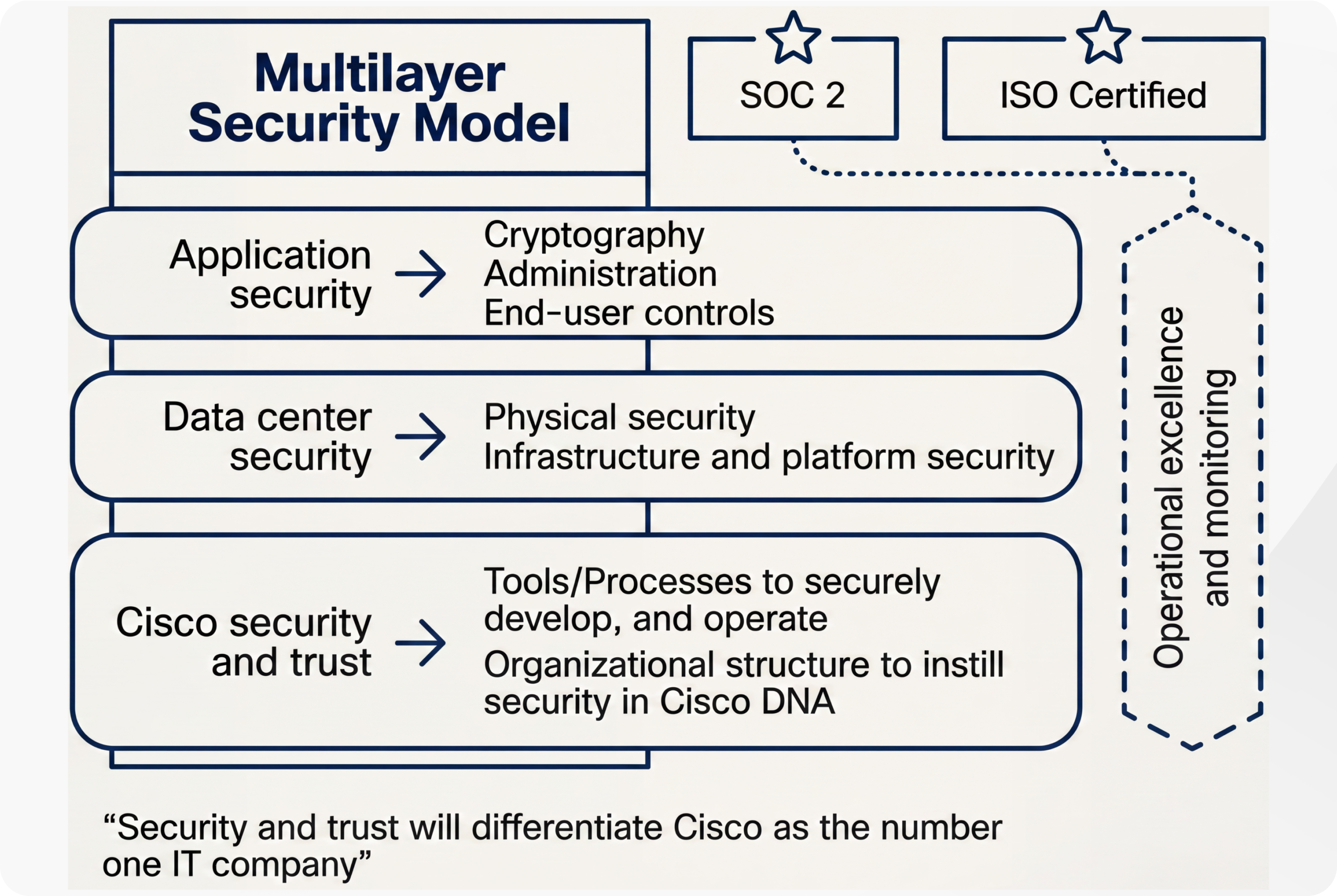
Cisco Security and Trust
Cisco Secure Development Lifecycle
At Cisco, security is not an afterthought. It is a disciplined approach to building and delivering world-class products and services from the ground up. All Cisco® product development teams are required to follow the Cisco Secure Development Lifecycle. It is a repeatable and measurable process designed to increase the resiliency and trustworthiness of Cisco products. The combination of tools, processes, and awareness training introduced in all phases of the development lifecycle helps ensure defense in depth. It also provides a holistic approach to product resiliency. The Webex Product Development team passionately follows this lifecycle in every aspect of product development.
Read more about the Secure Development Lifecycle.
Cisco Foundational Security Tools
The Cisco security and trust organization provides the process and the necessary tools that give every developer the ability to take a consistent position when facing a security decision.
Having dedicated teams to build and provide such tools takes away uncertainty from the process of product development.
Some examples of tools include:
- Product Security Baseline (PSB) requirements that products must comply with
- Threat-builder tools used during threat modeling
- Coding guidelines
- Validated or certified libraries that developers can use instead of writing their own security code
- Security vulnerability testing tools (for static and dynamic analysis) used after development to test against security defects
- Software tracking that monitors Cisco and third-party libraries and notifies the product teams when a vulnerability is identified
Organizational Structure that Instills Security in Cisco Processes
Cisco has dedicated departments in place to instill and manage security processes throughout the entire company. To constantly stay abreast of security threats and challenges, Cisco relies on:
- Cisco Information Security (InfoSec) Cloud team
- Cisco Product Security Incident Response Team (PSIRT)
- Shared security responsibility
Cisco InfoSec Cloud
Led by the Chief Security Officer for Cloud, this team is responsible for delivering a safe Webex environment to our customers. InfoSec achieves this by defining and enforcing security processes and tools for all functions involved in the delivery of Webex into our customers’ hands.
Additionally, Cisco InfoSec Cloud works with other teams across Cisco to respond to any security threats to the Webex service.
Cisco InfoSec is also responsible for continuous improvement in Webex’s security posture.
Cisco Product Security Incident Response Team (PSIRT)
Cisco PSIRT is a dedicated global team that manages the inflow, investigation, and reporting of security issues related to Cisco products and services. PSIRT uses different mediums to publish information, depending on the severity of the security issue. The type of reporting varies according to the following conditions:
- Software patches or workarounds exist to address the vulnerability, or a subsequent public disclosure of code fixes is planned to address high-severity vulnerabilities
- PSIRT has observed active exploitation of a vulnerability that could lead to a greater risk for Cisco customers. PSIRT may accelerate the publication of a security announcement describing the vulnerability in this case without full availability of patches.
- Public awareness of a vulnerability affecting Cisco products may lead to a greater risk for Cisco customers. Again, PSIRT may alert customers, even without full availability of patches.
In all cases, PSIRT discloses the minimum amount of information that end users will need to assess the impact of a vulnerability and to take steps needed to protect their environment. PSIRT uses the Common Vulnerability Scoring System (CVSS) scale to rank the severity of a disclosed issue. PSIRT does not provide vulnerability details that could enable someone to craft an exploit.
For more information about about PSIRT, see Cisco Product Security Incident Response Team.
Security Responsibility
Although every person in the Webex group is responsible for security, the main rules are as follows:
- Chief Security Officer, Cloud
- Vice President and General Manager, Cisco Cloud Collaboration Applications
- Vice President, Engineering, Cisco Cloud Collaboration Applications
- Vice President, Product Management, Cisco Cloud Collaboration Applications
Internal and External Penetration Tests
The Webex group conducts rigorous penetration testing regularly, using internal assessors. Beyond its own stringent internal procedures, Cisco InfoSec also engages multiple independent third parties to conduct rigorous audits against Cisco internal policies, procedures, and applications. These audits are designed to validate mission-critical security requirements for both commercial and government applications. Cisco also uses third-party vendors to perform ongoing, in-depth, code-assisted penetration tests and service assessments. As part of the engagement, a third party performs the following security evaluations:
- Identifying critical application and service vulnerabilities and proposing solutions
- Recommending general areas for architectural improvement
- Identifying coding errors and providing guidance on coding practice improvements
Third-party assessors work directly with the Webex engineering staff to explain findings and validate the remediation. Refer to the Webex Meetings Letters of Attestation Trust Package for penetration test attestation information.
Webex Data Center Security
Webex is a software-as-a-service (SaaS) solution delivered through the Webex Cloud, a highly secure service-delivery platform with industry-leading performance, integration, flexibility, scalability, and availability. The Webex Cloud is a communications infrastructure purpose-built for real-time web communications.
Webex meeting sessions use switching equipment located in multiple data centers around the world. Cisco data centers are used for the majority of Webex Cloud services. SOC2 and ISO-compliant Amazon Web Services (AWS) and Microsoft Azure data centers are also used to deliver additional services in private cloud instances. These data centers are strategically placed near major internet access points and use dedicated high-bandwidth fiber to route traffic around the world.
Additionally, Cisco operates network Point-of-Presence (PoP) locations that facilitate backbone connections, internet peering, global site backup, and caching technologies to enhance performance and availability for end users.
Physical Security
Physical security at the data center includes video surveillance for facilities and buildings and enforced two-factor identification for entry. Within Cisco data centers, access is controlled through a combination of badge readers and biometric controls. In addition, environmental controls (for example, temperature sensors and fire-suppression systems) and service continuity infrastructure (such as power backup) help ensure that systems run without interruption.
Data center servers are segmented into “trust zones”, based on infrastructure sensitivity. For example, databases are “caged”, the network infrastructure has dedicated rooms, and all equipment racks are locked. Only Cisco security personnel and authorized visitors accompanied by Cisco personnel can enter the data centers.
Cisco’s production network is a highly trusted network: only very few people with high trust levels have access to the network.
Infrastructure and Platform Security
Platform security encompasses the security of the network, systems, and the overall Webex data center. All systems undergo a thorough security review and acceptance validation prior to production deployment, as well as regular ongoing hardening, security patching, and vulnerability scanning and assessment.
Servers are hardened using the Security Technical Implementation Guidelines (STIGs) published by the National Institute of Standards and Technology (NIST). Firewalls protect the network perimeter. Access Control Lists (ACLs) segregate the different security zones. Intrusion Detection Systems (IDSs) are in place, and activities are signed and monitored on a continuous basis. Daily internal and external security scans are conducted across Webex. All systems are hardened and patched as part of regular maintenance. Additionally, vulnerability scanning and assessments are performed continuously.
Service continuity and disaster recovery are critical components of security planning. The design of Cisco data centers with global site backups and high-availability help enable the geographic failover of Webex services. There is no single point of failure.
Webex Privacy
Webex takes customer data protection seriously. We collect, use, and process customer information only in accordance with the Cisco Privacy Statement and the Webex Meetings Offer Disclosure.
The Service is built with privacy in mind and is designed so that it can be used in a manner consistent with global privacy requirements, including the EU General Data Protection Regulation (GDPR), California Consumer Privacy Act (CCPA), Canada’s Personal Information Protection and Electronic Documents Act (PIPEDA), Personal Health Information Protection Act (PHIPA), Health Insurance Portability and Accountability Act (HIPAA), and Family Educational Rights and Privacy Act (FERPA).
Administrative data
Information about employees or representatives of a customer or other third party that is collected and used by Cisco in order to administer or manage Cisco’s delivery of products or services, or to administer or manage the customer’s or third party’s account for Cisco’s own business purposes.
Administrative data may include the name, address, phone number, email address, and information about the contractual commitments between Cisco and a third party, whether collected at the time of the initial registration or later in connection with the management or administration of Cisco’s products or services.
Administrative data may also include the meeting title, time, and other attributes of the meetings conducted on Webex by employees or representatives of a customer. Other examples of administrative data may include meeting title, meeting time, and other attributes of the meetings hosted on Webex.
Customer data
This includes all data (including text, audio, video, image files, and recordings) that is either provided to Cisco by a customer in connection with the customer’s use of Cisco products or services, or developed by Cisco at the specific request of a customer pursuant to a statement of work or contract.
Customer data also includes log, configuration, or firmware files, and core dumps.
It is data taken from a product or service and provided to Cisco to help us troubleshoot an issue in connection with a support request. Customer data does not include administrative data, support data, or telemetry data.
Support data
Information that Cisco collects when a customer submits a request for support services or other troubleshooting, including information about hardware or software. It includes details related to the support incident, such as authentication information, information about the condition of the product, system, and registry data about software installations and hardware configurations, and error-tracking files. Support data does not include log, configuration, or firmware files, or core dumps taken from a product and provided to us to help us troubleshoot an issue in connection with a support request, all of which are examples of customer data.
Telemetry data
Information generated by instrumentation and logging systems created through the use and operation of the product or service.
All data collected in the Webex cloud is protected by several layers of robust security technologies and processes. Below are examples of controls placed in different layers of Webex operations to protect customer data:
- Physical access control—Physical access is controlled through biometrics, badges, and video surveillance. Access to the data center requires approvals and is managed through an electronic ticketing system.
- Network access control—The Webex network perimeter is protected by firewalls. Any network traffic entering or leaving the Webex data center is continuously monitored using an Intrusion Detection System (IDS). The Webex network is also segmented into separate security zones. Traffic between the zones is controlled by firewalls and Access Control Lists (ACLs).
- Infrastructure monitoring and management controls—Every component of infrastructure, including network devices, application servers, and databases, is hardened to stringent guidelines. They are also subject to regular scans to identify and address any security concerns.
- Cryptographic controls—As noted earlier, all data to and from the Webex data center to cloud registered Webex Apps and Webex Devices is encrypted, except for PSTN traffic and unencrypted SIP/H323 video devices in a cloud–enabled meeting. Additionally, critical data stored in Webex, such as passwords, is encrypted.
Cisco employees do not access customer data unless access is requested by the customer for support reasons. Access to systems in this case is allowed by the manager only in accordance with the “segregation of duties” principle. It is granted only on a need-to-know basis and with only the level of access required to do the job. Employee access to these systems is also regularly reviewed for compliance. Employees with such access are required to take annual International Organization for Standardization (ISO) 27001 Information Security Awareness training.
In addition to these specialized controls, every Cisco employee undergoes a background check, signs a Nondisclosure Agreement (NDA), and completes Code of Business Conduct (COBC) training.
Health Insurance Portability and Accountability Act (HIPAA)
Cisco can provide information regarding the functionality, technology, and security of Webex. A HIPAA-covered entity would need to consult with its own legal counsel to determine whether Webex’s functionality is compliant for its business processes and GDPR-ready.
Industry standards and certifications
In addition to complying with our stringent internal standards, Webex also continually maintains third-party validations to demonstrate our commitment to information security. Webex is:
- ISO 27001, 27017, 27018 and 27701 certified
- Service Organization Controls (SOC) 2 Type II audited
- SOC 3 certified
- Cloud Code of Conduct
- CSTAR
- Cloud Computing Compliance Controls Catalogue (C5) attestation
- FedRAMP certified (visit cisco.com/go/fedramp for more details, scope, and availability)
FedRAMP-certified Webex service is only available to U.S. government and education customers.
Refer to the Cisco Trust Portal for a complete set of security, privacy, and compliance documents including details on the above standards and certifications.


