
Thanks for your feedback.
Enable Personal insights
 Feedback?
The Personal Insights feature in Webex App will be retired on May 25th, 2026. After this date, the settings and metrics available in Control Hub for Personal Insights will be removed. This change allows us to simplify our administrative architecture and focus on more impactful management features.
You can enable Personal insights for your organization to allow your users to learn more about their collaboration habits and set goals that help them build stronger connections. It also helps them to make the most of their time and create a more inclusive workplace.
Users can learn more about this feature at Webex App | Personal insights.
| 1 |
Sign in to Control Hub and go to . 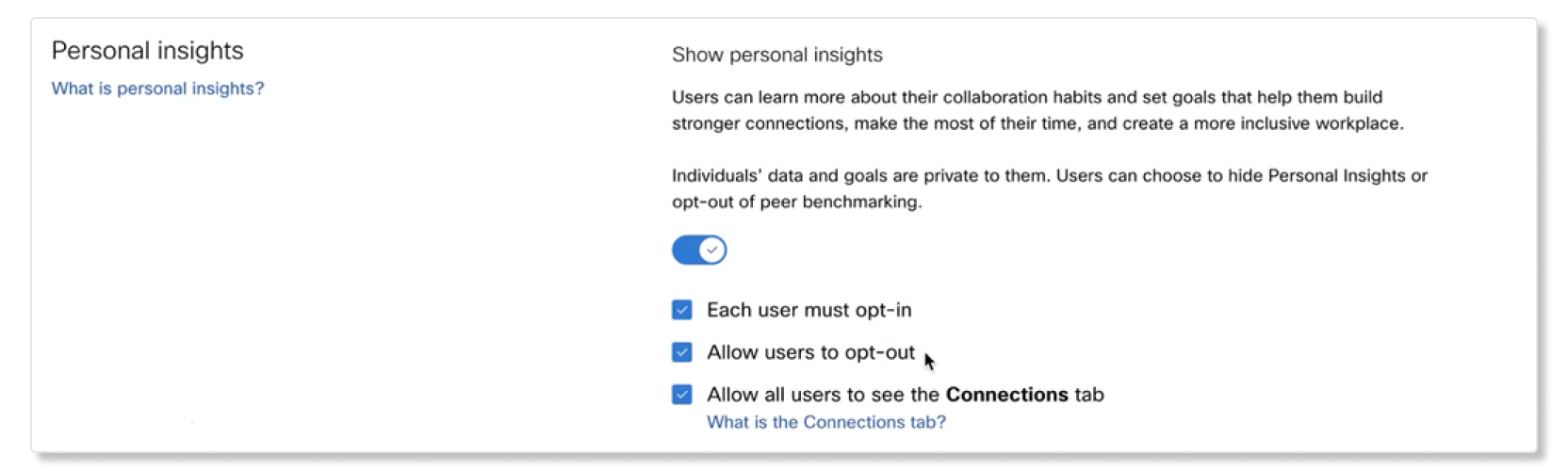 |
| 2 |
Turn on Personal insights. |
| 3 |
Uncheck the Each user must opt-in box if you want all users to automatically opt-in. The default for this setting is checked, which means that users have to opt-in themselves. |
| 4 |
Uncheck the Allow users to opt-out box if you don't want users to opt-out of sharing their Personal Insights data. The default for this setting is checked, which means that users can opt-out at any time. |
| 5 |
(Optional) Check the box to Allow all users to see the Connections tab. The users can see insights about their work connections on the Connections tab in the Webex App.
|


