- Home
- /
- Article

Thanks for your feedback.


 In this article
 Feedback?
Integrating with Microsoft Copilot allows Webex meeting users to securely connect with their Microsoft Copilot accounts as one of their data sources.
Summary
By leveraging Cisco AI Assistant in Webex App, users can search, analyze, and summarize results from Microsoft data sources, including SharePoint, OneDrive, and Copilot Connectors.
Architecture overview
Connecting to Microsoft Copilot allows you to interact with Microsoft data sources using Microsoft Retrieval APIs. When you use the Cisco AI Assistant, it retrieves data from your Microsoft sources in real-time.
Webex does not store or retain the data returned to you via Cisco AI Assistant. Data is used only in the moment to generate your response, ensuring your privacy remains protected.
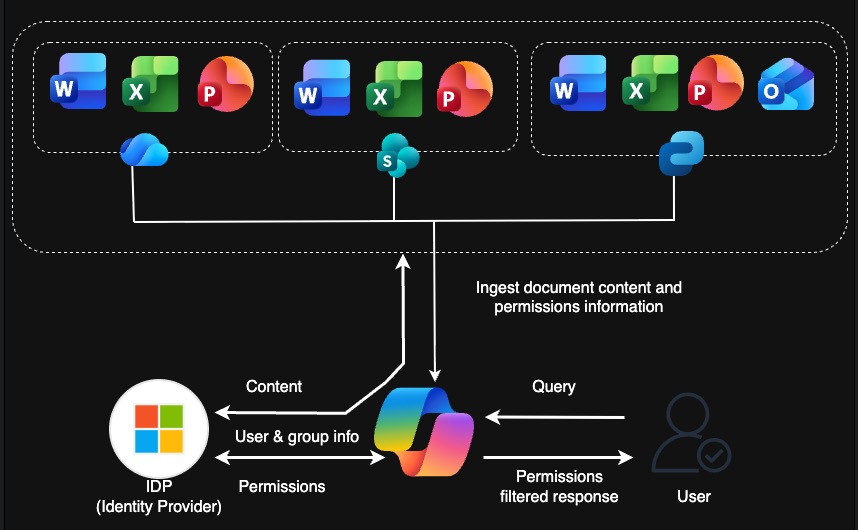
Detailed Data Flow Steps
User management and assignment
Administrators can manage users who have Microsoft Copilot licenses and turn on or off the feature for org, user or template level using Control Hub.
User authorization and connection
-
The user logs in to Webex App
-
The user navigates to the Settings page to connect their Microsoft account.
The user completes the authorization process and selects which sources (SharePoint, OneDrive, or Copilot Connector) to access.
Question and answer workflow
User asks a question, for example: what's the status of project ABC?
The following steps will be executed using multiple sub-steps by Webex Meeting Service:
-
Decrypt: system decrypts the request.
-
Load Context: relevant context is loaded.
-
LLM Reasoning: LLM rewrites the question for optimal retrieval.
-
Fetch integration info: system retrieves configuration and tokens for multi-path searching.
-
Multi-path Search: system executes retrieval across supported Microsoft tools.
-
Search: multi-path retrieval tools search detailed content.
-
Return search result: multi-path retrieval tools return search result.
-
-
Reranking & Filtering: Webex meeting service uses the LLM to rerank and filter content for relevance.
-
Generation: LLM generates a final answer with citations.
-
Answer: post final answer to Webex App.
Data handling
Data handling
This feature uses the following data and service configuration information to manage authorization, retrieve authorized Microsoft 365 content, and provide responses in Webex App:
-
Microsoft Application Registration:
The Microsoft Application Registration represents the OAuth 2.0 client configuration registered in the Microsoft Azure portal (Entra ID) for the Cisco AI Assistant integration.
This registration defines the specific delegated permissions required during the Microsoft account authorization flow:
-
Read.All and Sites.Read.All: required to access SharePoint and OneDrive content.
-
ExternalItem.Read.All: required to access Copilot Connectors content.
Cisco AI Assistant uses this registration to locate the correct OAuth settings for sign-in and token acquisition before invoking the Microsoft 365 Copilot Retrieval API. For more information, see "Register Cisco AI Assistant in Microsoft Azure."
-
-
Microsoft OAuth Tokens:
Microsoft OAuth tokens are short-lived, delegated access tokens issued by Microsoft Entra ID once a user signs in to their Microsoft account via the Webex App settings page and grants the necessary permissions.
Cisco AI Assistant uses these tokens to call the Microsoft 365 Copilot Retrieval API on the user's behalf. Microsoft Entra ID uses these tokens to authenticate each request, identify the user, and enforce Microsoft 365 access control and information barrier policies, ensuring that only content the signed-in user is permitted to access is returned.
Token Renewal
At the time of initial authorization, Microsoft Entra ID issues both a short-lived access token (valid for approximately 60–90 minutes) and a long-lived refresh token. Webex securely stores the refresh token server-side, bound to the user's Webex identity.
Access tokens are not renewed continuously. Instead, when a user submits a request, Webexchecks if the current access token is still valid. If it has expired, Webexsilently exchanges the refresh token for a new access token. The refresh token's validity is extended each time it is used, allowing the session to remain active without user intervention as long as the feature is in regular use.
Session Termination
The session is terminated and re-authentication is required under the following conditions:
-
Inactivity: The user has not used the feature for an extended period (typically 90 days, depending on the Microsoft Entra ID default policy and the customer's tenant configuration).
-
Manual Disconnection: The user explicitly disconnects their Microsoft account from the Webex App settings.
-
Administrative: A Microsoft 365 administrator revokes the application's access in Entra ID.
-
Configuration Changes: The granted permission scopes are modified, or the application registration is changed.
For more information, see "Microsoft account authorization in Webex App."
-
-
Prompt Text:
Prompt text refers to the natural-language input entered by a user within the Cisco AI Assistant, such as a request to find the status of a project or locate a document within their Microsoft account. This text is generated by the user at runtime.
Processing Workflow
When a prompt is submitted, Cisco AI Assistant follows these steps to retrieve and present information:
-
Interpretation and Optimization: The assistant interprets the prompt, performs reasoning, and executes query rewriting to produce an optimized query string.
-
API Invocation: The assistant invokes the Microsoft 365 Copilot Retrieval API against one or more data sources.
-
Filtering: Where applicable, Keyword Query Language (KQL) filter expressions are applied to scope the retrieval to specific sites, document libraries, file types, or date ranges.
-
Reranking and Synthesis: The assistant reranks and filters the returned text chunks. It then generates a final response that combines the original prompt with the retrieved content, including citations back to the source documents.
-
-
SharePoint and OneDrive Content: SharePoint and OneDrive content is authorized Microsoft 365 data retrieved via the Microsoft 365 Copilot Retrieval API to answer a user request. The Retrieval API extracts relevant text chunks directly from the Microsoft 365 hybrid content index without duplicating, exporting, or separately indexing any data.
Supported file types: .docx, .pptx, .pdf, .aspx, and .one; non-textual content such as images and charts is not supported.
All content is retrieved within the Microsoft 365 trust boundary and is strictly limited to files and documents the signed-in user is authorized to access under Microsoft 365's permissions model.
-
Request: Cisco AI Assistant sends an HTTPS POST request to https://graph.microsoft.com/v1.0/copilot/retrieval, carrying the Microsoft Entra ID delegated access token in the Authorization header. The request body contains:
-
queryString—the rewritten natural language query derived from the user's prompt (max 1,500 characters).
-
dataSource—set to SharePoint or OneDrive (one per request; separate calls are made for each source).
-
filterExpression (optional)—KQL expression to scope by site URL, path, file type, or date range.
-
maximumNumberOfResults—capped at 25 per call.
-
-
Response: Microsoft 365 processes the request within its trust boundary and returns a retrievalHits array, with each entry containing:
-
contentChunk—an extracted text snippet from the content index
-
relevanceScore—cosine similarity score between the query and the chunk, normalized to a 0–1 range
-
resource—source metadata including file name, URL, author, and last modified date
-
-
Data handling: No full file content is transferred—only pre-extracted text chunks from the Microsoft 365 hybrid index are returned. Cisco AI Assistant passes these chunks transiently to its LLM for reranking, filtering, and answer generation. Source metadata is used to construct citations in the final response. Text chunks are not stored by Webex beyond the duration of the request.
-
-
Copilot Connectors Content: Copilot Connectors content is third-party or custom enterprise data ingested into the Microsoft 365 content index via Microsoft Graph connectors and made retrievable through the Microsoft 365 Copilot Retrieval API. All returned content is limited to items the signed-in user is authorized to access under the connector's configured permissions in Microsoft 365.
-
Request: Cisco AI Assistant sends an HTTPS POST request to https://graph.microsoft.com/v1.0/copilot/retrieval, carrying the Microsoft Entra ID delegated access token in the Authorization header. The request body contains:
-
queryString—the rewritten natural language query derived from the user's prompt (max 1,500 characters).
-
dataSource—set to CopilotConnectors.
-
filterExpression (optional)—KQL expression to scope retrieval to specific connector sources or content types.
-
maximumNumberOfResults—capped at 25 per call.
-
-
Response: Microsoft 365 processes the request within its trust boundary and returns a retrievalHits array, each entry containing:
-
contentChunk—an extracted text snippet from the indexed third-party content.
relevanceScore—cosine similarity score between the query and the chunk, normalized to a 0–1 range. Note that relevance score may not be present for all Copilot Connector results.
resource—source metadata including item name, URL, and connector-defined attributes.
-
-
-
Data handling: No full source content is transferred—only pre-extracted text chunks from the Microsoft 365 content index are returned. Because the Retrieval API targets one data source per call, Cisco AI Assistant issues separate retrieval calls for SharePoint, OneDrive, and Copilot Connectors and merges results during the reranking step.
Text chunks are passed transiently to the LLM for reranking, filtering, and answer generation, and are not stored by Webex beyond the duration of the request.
Authentication and authorization
Webex interacts with your Microsoft accounts and content using the Microsoft Retrieval API, which is authenticated and managed by the Microsoft identity provider (IdP). All communication with the Microsoft IdP and the Retrieval API is protected by TLS-secured connections.
Webex Service Authentication
Cisco AI Assistant in Webex App utilizes standard OAuth 2.0 flows to interact with Webex services:
-
Identity Provider: The Webex Identity Service acts as the cloud-based IdP to authenticate users and authorize API access.
-
Bearer Tokens: Requests to Webex APIs are authorized using bearer tokens issued by the Webex Identity Service.
-
Secure Communication: All data exchange between the Webex AI Assistant, the Webex Identity Service, and Webex APIs is conducted over TLS-secured connections.
Administrative Requirements
To enable this integration, administrators must complete the following steps:
-
Microsoft 365 Configuration: Administrators must assign the appropriate Microsoft Copilot licenses to the relevant users.
-
Webex Configuration: Administrators can enable or disable the feature at the organization, user, or template level directly within Control Hub.
User-Consented permissions
During setup, the following permissions are requested:
| Permission required | Purpose |
|---|---|
| Webex App Sign in and read user profile | Sign-in to Webex App with your account. |
| Authorize and log in to your Microsoft account | Validate and authorize Webex App to connect to your Microsoft account. |
These permissions are used only during the setup process and are not stored.
Service permissions
There is NO specific service permission needed. Administrators can manage the feature and settings in Control Hub with below section detail.
Copilot integration feature management and authorization in Control Hub
Administrators can turn on or off the feature for their organization, or they can decide which one or more sources can be granted with check boxes.
For more information, see Set up AI integrations in Control Hub and Turn Cisco AI Assistant search sources on or off in Webex App
Webex App settings and configurations
Users can sign in to Webex App and authorize to connect the Microsoft account after administrator turn on the feature with authorization using Control Hub
For more information, see Access your Microsoft data with Cisco AI Assistant


