
Thanks for your feedback.
 Feedback?
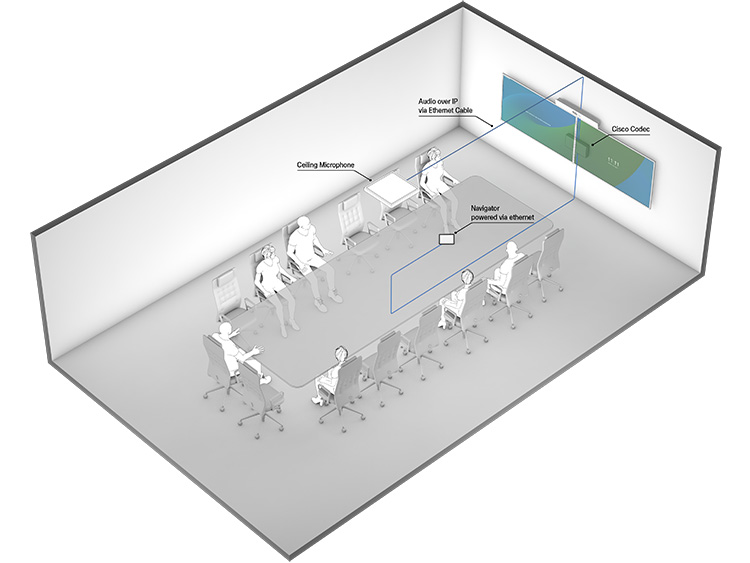
Selected Cisco devices support the AES67 standard for audio transport over Ethernet. The Audio Engineering Society has developed the standard to provide interoperability between various networked audio systems. Among the adopters are Dante and Ravenna.
Using Ethernet simplifies cabling and can remove the need for extra equipment such as external DSPs or converters. A ceiling microphone in a medium to large meeting is a typical use case. If the microphone supports audio transport using AES67, you can connect it directly to the Cisco device.
Cisco devices that support AES67
This table lists Cisco devices that support AES67, the minimum RoomOS version required, and whether an AV integrator license is needed.
| Cisco product | Minimum software version | Requires AV integrator license |
|---|---|---|
| Room Bar Pro | RoomOS 11.8 | Yes |
| Codec EQ / Room Kit EQ / Room Kit EQX | RoomOS 11.8 | Yes |
| Codec Pro / Room Kit Pro / Room 70 G2 / Room 70 Panorama / Room Panorama | RoomOS 11.8 | No |
| Board Pro | RoomOS 11.18 | Yes |
| Board Pro G2 | RoomOS 11.18 | Yes |
| Codec Pro G2 / Room Kit Pro G2 | RoomOS 26.6 | No |
| Board Pro G3 | RoomOS 26.7 | No |
Audio transport capabilities
Input streams:
-
The maximum number of input streams are 8 for all products.
-
An input stream supports up to 8 channels.
-
If performing echo cancellation on the Cisco device, there's an additional limit of 8 channels total.
Output streams:
-
The maximum number of output streams are 4 for all products.
-
The first output stream is reserved for Cisco peripherals. For products that include a Cisco DNAM IV amplifier, the second output stream is also reserved.
-
An output stream supports up to 2 channels.
Limitation for Codec Pro based products:
-
Due to a hardware limitation, Codec Pro based products don't support the role of PTP timeReceiver. Thus, these devices must be the PTP timeTransmitter on the network.
Network setup
You need physical access to the collaboration device, because the device supports AES67 only on its local network. You must configure a static IP address on all third-party peripherals on this network before connecting them.
If needed, you can extend the number of local network ports of the Cisco device by adding a network switch. We recommend using a switch from the C1200 series. The Cisco device recognizes these switches and assigns an IP address to them. Read how to configure these switches in the Configuration of C1200 switches for use with Cisco video collaboration devices technical paper.
You may use other switches; they must be assigned a static address and should support the following features:
-
Quality of Service (QoS)
-
Possibility to disable 802.3 Energy Efficiency Ethernet (EEE)
-
PoE capability if required by the peripherals
Setting up AES67 streams on a Cisco device
We have made a detailed AES67 setup guide with examples that covers how to connect third-party audio peripherals that support the AES67 standard to a Cisco device. It also describes how to subscribe to and set up AES67 streams on a Cisco device.
Except for the examples, the guide doesn't cover how to set up the peripherals in detail. We provide only a high-level description of the necessary steps, as the details varies between vendors and implementations.


