- Home
- /
- Article

Thanks for your feedback.


 In this article
 Feedback?
Setting the standard for confidential end-to-end encrypted meetings
Millions of users globally rely on Webex for secure collaboration. From enterprise boardrooms and government legislative sessions to sensitive doctor-patient consultations, Webex serves as a trusted platform for critical communications.
As the demand for remote work grows, so does the need for robust, confidential collaboration tools. Webex has addressed this need longer than any other vendor. With the rise of AI-enabled impersonation and sophisticated deepfake threats, the requirement for identity-verified, policy-driven collaboration is paramount. For our customers, security is not merely a feature — it is an integrated component of the entire meeting lifecycle, covering scheduling, participant identity, and content protection.
The foundation: Webex Zero-Trust Security
Webex has a long history of supporting strong end-to-end encryption (E2EE). Our Webex Zero Trust Security model evolves this heritage through three primary pillars:
- Establishing a foundation of standards-based, formally verified cryptography
- Augmenting end-to-end encryption with end-to-end verified identity
- Extending support to current Webex devices as well as Webex App
This technical paper provides background on end-to-end security and lays out the technical underpinnings of how WebexZero Trust Security works. For meeting operational security, such as meeting session types, security differences between scheduled meetings versus Personal Meeting Rooms, administrator and host controls, meeting content sharing and retention, and broader AI and deepfake resilience in the meeting experience, see the companion WSMP Meetings Security technical paper.
An 18-year heritage of delivering on E2E security
Webex pioneered E2E encryption for meetings in 2008. By definition, E2E security ensures that content is encrypted from the moment it is sent until it is displayed by the recipient, preventing the cloud provider or any third party from accessing or tampering with the data.
Depending on how much investment a video conferencing provider makes in E2E security mechanisms, they can provide varying levels of protection, as shown in Figure 1. Any E2E security is better than only encrypting in transit and at rest.
| Protection level | Network attackers | Passive attacks (eavesdropping) | Active attacks (impersonation) | Examples |
|---|---|---|---|---|
| Encryption in transit and at rest | Yes | No | No | Non-E2EE apps |
| E2E encryption | Yes | Yes | No | Legacy E2EE and consumer apps |
| E2E encryption and E2E identity | Yes | Yes | Yes | Webex Zero Trust Security |
Most applications that claim to provide E2E security only provide protection from passive attacks. Passive-only protections are still valuable because they make it so that bad actors can only eavesdrop on a meeting while it is ongoing. The best approach, however, is to protect against both passive and active attacks, where the conferencing provider itself might pretend to be a legitimate participant to enter the meeting. For this, an E2E identity layer is needed in addition to E2E encryption.
With Zero Trust Security, Webex brings stronger cryptography to meetings and augments end-to-end encryption with end-to-end verified identity to help keep meetings safe from the full spectrum of attacks.
The end-to-end user experience
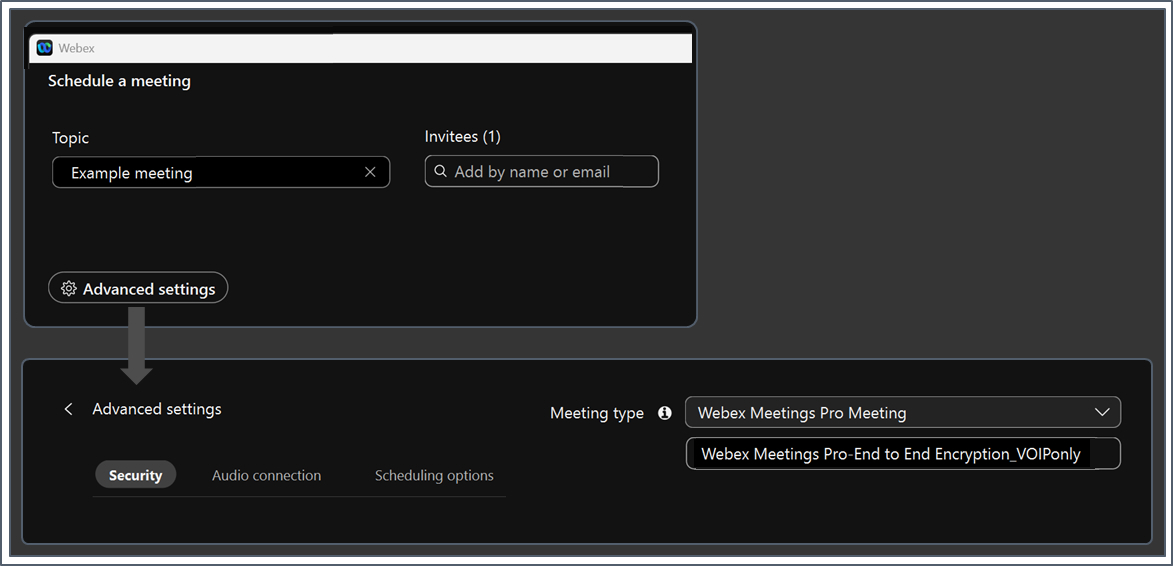
Before diving into technical details, it is helpful to understand the user experience. To create an E2E encrypted meeting, the host selects the appropriate meeting type during scheduling in Webex App (Figure 2).
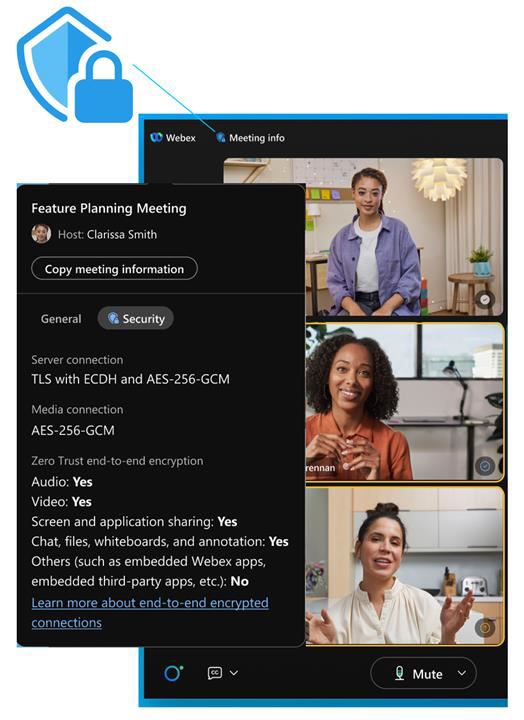
When participants join, they see a “shield with lock” icon indicating the meeting is E2E encrypted (Figure 3). Tapping this icon provides details on the meeting’s protection.
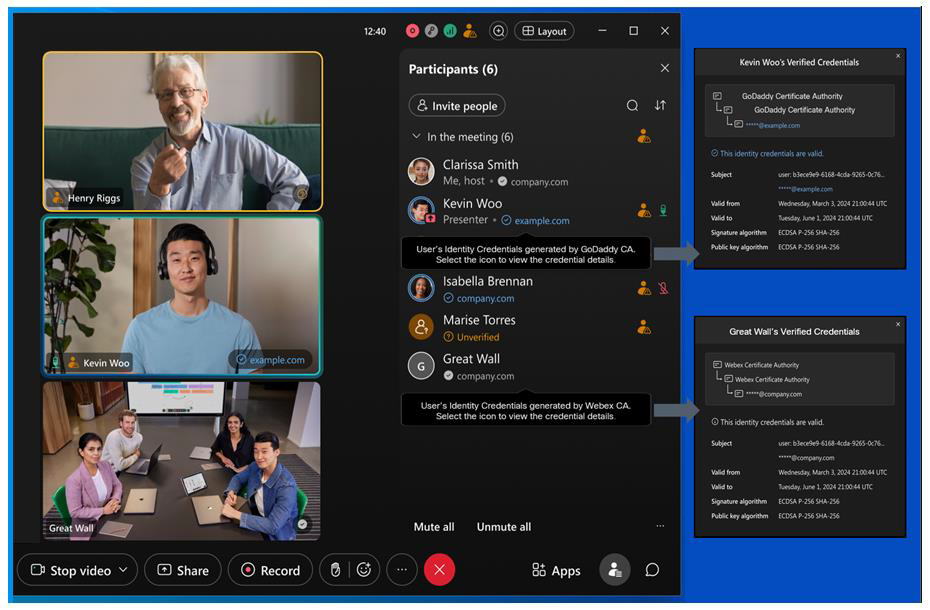
Finally, in the meeting participant list, the Webex application indicates whether the participant’s identity has been verified in an E2E-secure way—that is, whether someone other than Cisco has vouched for the participant’s identity (Figure 4).
Participants can also check that they all have the same security code to confirm they all have the same view of the meeting, and thus are secure from impersonation attacks. In deployments that use customer-provided end-to-end identity certificates, the roster state provides transparency about identity assurance.
Standards-based cryptography
Zero Trust Security is built on industry-standard cryptographic protocols, which Cisco is driving together with other leaders in security and privacy, including Google, Cloudflare, Wickr, and Wire. Cisco led the first generation of secure Voice over IP (VoIP) with technologies like Secure Real-Time Protocol (SRTP), DTLS-SRTP, STIR/SHAKEN, and WebRTC, and Cisco is doing the same with Zero Trust Security (Figure 5).
| Layer | Today | Zero Trust Security |
|---|---|---|
| Identity | SSO (SAML, OpenID) | X.509 certificate |
| Key exchange | SDES/DTLS | Messaging Layer Security (MLS) |
| Media encryption | SRTP | Secure Frames (SFrame) |
There are basically three layers to the system, and at each layer we are taking the old hop-by-hop technology and bolstering it with an additional end-to-end layer of protection. The three layers include:
- Identity—E2E identity requires that clients have credentials that prove their identity. With Zero Trust E2E Identity, the clients' credentials are provided by a Webex Independent Certificate Authority.
- Key exchange—Clients participating in an E2E meeting need to set up keys for E2E encryption without the conferencing provider being able to access those keys. The Messaging Layer Security (MLS) protocol is a ratified standard, RFC 9420, that builds on technologies developed in the open-source community and puts them in a rigorous, formally-verified setting.
- Content protection—Finally, the actual media content of the meeting needs end-to-end protection. SFrame (for "Secure Frames") is RFC 9605. It is a fast and simple encryption framework for encrypting real-time media, which allows an extra layer of encryption to be added with minimal overhead.
Let’s look at these technologies in a bit more detail, starting from the bottom up.
Lightweight media encryption
A media encryption scheme is a way to take a key shared by the participants in a meeting and use it to protect the actual content shared in the meeting, such as audio, video, and screen share. At the protocol level, the encryption scheme needs to send extra information with each unit of encrypted data, most importantly:
- A header that tells the receiver how to decrypt the packet, and
- An authentication tag that the receiver uses to verify that the packet hasn't been tampered with.
For example, in SRTP, the unit of encryption is an RTP packet; SRTP relies on the RTP header for its setup and appends an authentication tag to the end of the packet.
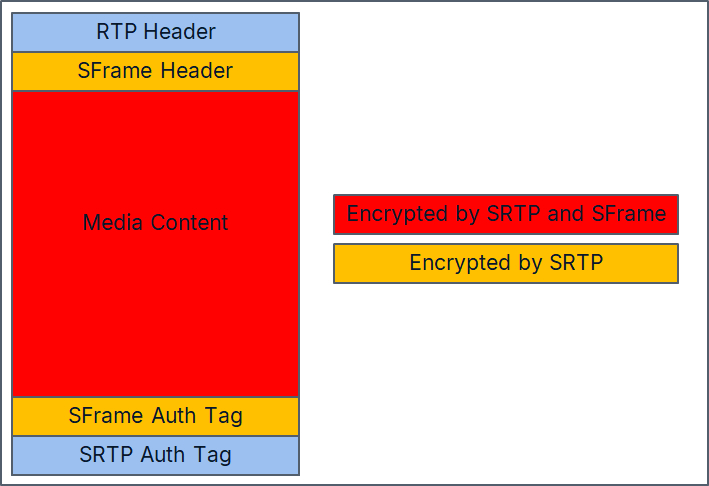
Since all of this extra information increases the bandwidth required for an E2E encrypted meeting, SFrame provides the minimal amount of framing necessary. The SFrame header indicates which key should be used, allowing for key rotation, and provides a unique sequence number that defines the initialization vector. This is followed by the content encrypted with the E2E key and an authentication tag. The SFrame header, content, and tag are then wrapped in an SRTP packet, so that SRTP protects against inspection or modification by network attackers, and SFrame protects against the conferencing provider's media elements (see example in Figure 6).
This minimalist approach has other benefits. SFrame is independent of the underlying transport, so it is forward-compatible with emerging technologies like RTP over QUIC and RIPT. It is also possible to configure SFrame so that it works on multi-packet units, such as whole frames, to further reduce encryption overhead.
Group key exchange
Setting up a secret key among a group when the group only has access to an untrusted channel seems magical. Techniques for doing this were first developed in the 1980s, and today more than 90 percent of web browsing uses Transport Layer Security (TLS) to do exactly this. Messaging Layer Security (MLS) extends this functionality to groups, while TLS only works point to point, so Webex can use MLS to set up conference keys even when the conference provider is untrusted.
MLS provides three critical security features:
- Shared key—The key is known only to authenticated group members.
- Consistency—Ensures all members have a consistent view of the group roster.
- Rotation—Automatically updates keys when a member joins or leaves.
The first feature provides us with the keys we use to encrypt media with SFrame. Together with the second feature, it provides the starting point for E2E identity. The third feature ensures that the only people who can decrypt the media are the people who are in the meeting right now—you can't decrypt media from before you joined or after you left (or were kicked out).
To accomplish all this, the clients in a meeting exchange MLS messages at critical points in the meeting to maintain an MLS group that contains exactly the participants in the meeting at any point in time. Webex routes the messages among the clients, but MLS protects these messages so that it is safe for Webex to handle them. Figure 7 shows how the messages flow.
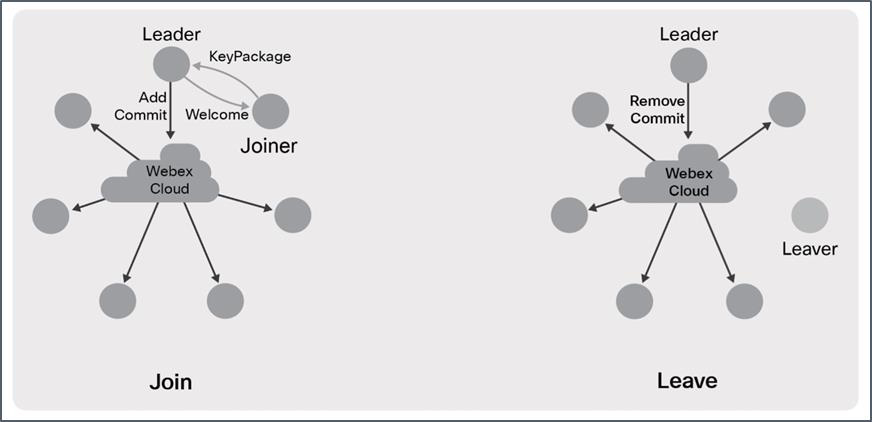
Creation: The first person to join the meeting, host or not, creates the MLS group for the meeting and becomes the "leader" for purposes of MLS. At any given point in time, a single participant in the meeting is designated as the leader. In most cases, this participant will be the meeting host. Once the session is started, MLS assures that every meeting participant has the cryptographic information to act as leader; Webex simply designates one leader to avoid confusion.
Join: When a new participant wants to join the meeting, they ask to be let in by sending an MLS Key Package message to the leader, which provides their public key and authentication information. The leader responds with a Welcome message that tells the joiner about the other participants in the meeting. The leader also broadcasts an Add message and a Commit message to the group. The Add message announces the new joiner to those already in the meeting. The Commit message causes all current participants to hash the old group key to get a new key for the now-extended group; the Welcome message provides this key to the joiner.
Leave: When someone leaves the meeting, it is the leader's job to lock them out. The leader does this by broadcasting MLS Remove and Commit messages to everyone remaining in the meeting. The Remove message tells the remaining participants who left, and the Commit encrypts a new key to all remaining participants but not to the person who left. The remaining participants hash the new key with the old group key to get a key that the person who left doesn't have. If the participant who left is the leader, Webex appoints a new leader and the new leader removes the old leader.
Both joins and leaves result in MLS generating a new key for the group. Whenever this happens, the participants in the meeting update to this new key within a few seconds. MLS can also gracefully handle multiple Add and Remove transactions in one Commit, to avoid a flurry of unnecessary and expensive key rotations in situations such as the start or end of a meeting. After each rotation, the participants in the meeting delete their copies of the old keys so that even if one of them is compromised, the old meeting content is safe. At the end of the meeting, the participants delete any remaining keys, so even if the content of the E2E meeting was stored somewhere, it can no longer be decrypted.
Key rotation can mean that it takes a couple of extra seconds to join a meeting or remove someone, but it gives clear security assurance: if someone doesn't appear in the participant list for the meeting, they don't have the keys to decrypt the content.
End-to-end verified identity
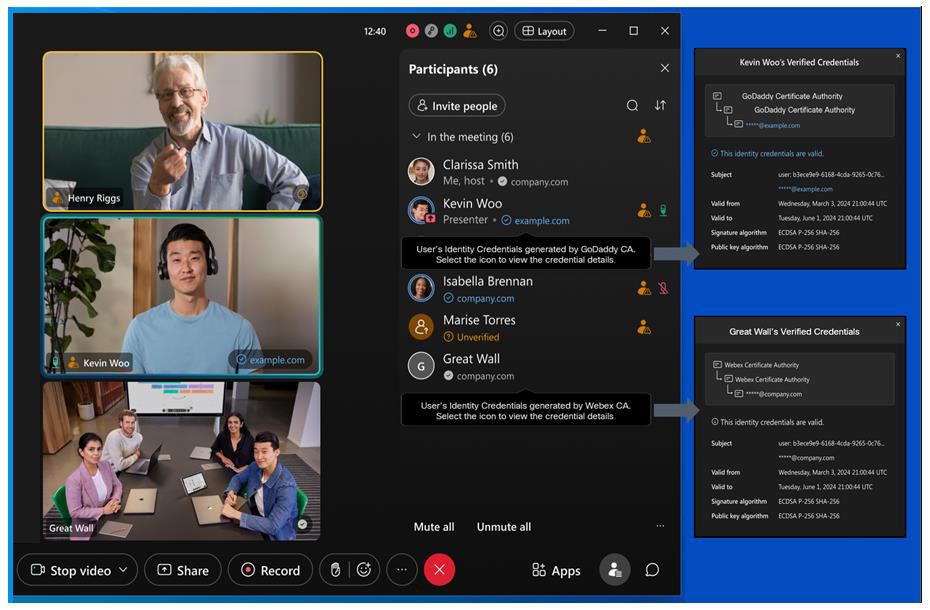
The participant list in an E2E encrypted meeting shows the identity verification of each user. Using customer-issued identity certificates provides true E2E verified identity in the sense that Cisco cannot tamper with it. In these cases, the participant list shows the domain that the participant belongs to in blue text. For example, in the meeting shown in Figure 8, you can see that Kevin has a verified email address from example.com, and Isabella has a verified email address from company.com.
Identity certificates issued by a Webex Certificate Authority, such as a video device identity, provide more limited protection. Only an attacker that compromises the Webex Certificate Authority can impersonate a user. Even though this is better than having no identity protection at all, such participants in the meeting are not marked in blue as Zero Trust end-to-end identity verified. They are shown with gray text to indicate Webex trust identity verification.
As a backstop to these procedures, Webex also provides a security code for the meeting. A security code is a short, human-readable string computed as an output of the MLS process. The security code summarizes the cryptographic state of the meeting, including the group's keys and the certificates presented by the participants. This code can be used to detect an impersonation attack, because such an attack would result in at least one participant having a different cryptographic state than everyone else. But it only rules out impersonation if everyone verifies that they have the same code. If some subset of the participants verify that they have the same code, they know that their identities are faithfully represented to each other, but someone who does not confirm their code could have been impersonated. Figure 9 shows an example of how the security code is displayed in a meeting.
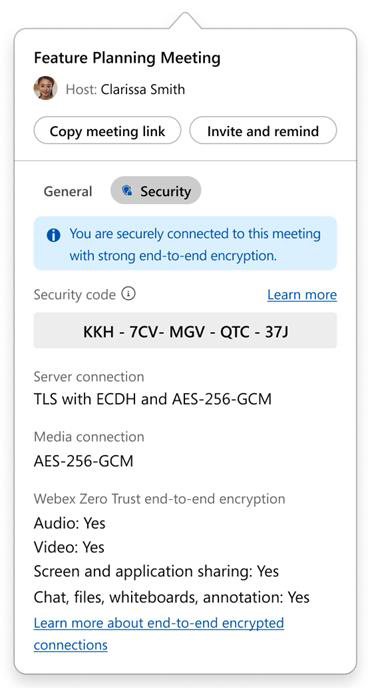
This code provides a very strong defense against impersonation attacks. It is part of the MLS protocol, so it has had robust security analysis. Because it is tightly bound to the state of the meeting, the security code changes every time someone joins the meeting. As a result, participants in the meeting need to reverify their security codes every time someone joins. The code does not rotate when someone leaves, because leaving can't introduce an impersonator.
Summary
Webex Zero Trust Security was launched in 2021. In 2026, Ultra Secure Webex meetings introduced support for additional endpoints in E2E encrypted Webex meetings, fully featured Zero Trust E2EE meetings with Video Mesh Node (VMN), and end-to-end encryption and identity capabilities for standard meetings:
- Standards-based, formally verified cryptography
- Zero Trust E2E encryption
- Zero Trust E2E verified identity
- Support for all Webex devices available for sale
- Support for Webex App on desktop, mobile, and web
- Support for Webex Web app and Web SDK (planned for Q1CY27)
- Support for Webex Calling phones (planned for Q3CY26)
- Support for Video Mesh Node
- Support for E2E encryption in scheduled meetings and Personal Meeting Rooms
Zero Trust has some limitations. E2E encrypted meetings do not support:
- Features provided by Cisco cloud services that require access to plaintext media, including:
- Webex cloud-based recording and AI Assistant services. These services can be provided using hybrid deployments with Video Mesh Node (VMN).
- Saving meeting chat, files, whiteboards, and annotations.
- PSTN or SIP interoperability.
Future directions
Going forward, Webex will improve E2E encrypted meetings in a few dimensions, guided by the principles of granting the cloud the least privilege necessary and giving customers control over their data.
Ubiquitous E2E security: Everything should be E2E secure, not just select meetings. The first step to achieving this vision has been reached with E2E security for the Webex Web App and cloud-connected Cisco phones. Eventually, the open, standards-based E2E architecture should enable Webex to bring in Session Initiation Protocol (SIP) infrastructure as well.
The innovations discussed in this paper show a clear path to the long-term vision of always-on E2E encryption. Once users can connect from anywhere and customers can securely opt in to the features they want in a meeting, E2E encryption can be used for every Webex meeting — from informal ad hoc meetings with all features turned on, all the way up to locked-down, high-security meetings. E2E encryption will always assure that the meeting's content is only available to authorized participants, and customers and users will decide what set of participants is right for a given meeting.
AI-enabled impersonation and deepfake resilience
Webex addresses AI-enabled impersonation threats through a layered approach that complements the Zero Trust end-to-end encryption model. While this paper focuses on the technical foundations of end-to-end verified identity, including customer-provided certificate-based verification and meeting cryptographic integrity checks, Webex also provides operational security controls in the meeting experience to reduce the risk of unauthorized access and harmful interactions.
For meeting session types, scheduled meetings versus Personal Meeting Rooms security differences, host and administrator controls in Control Hub, and additional AI and deepfake detection and prevention in the broader meeting experience, see the companion WSMP Meetings Security technical paper.
Conclusion
Webex is defining the future of secure meetings through standards-based cryptography and verified identity. The commitment to an open ecosystem ensures that customers maintain absolute control over their data, regardless of the meeting scenario.


