Hva kan vi hjelpe deg med?

Prøver du å bli med i et møte?

Migrering fra Unified CM til Webex Calling
Migrer sømløst til Webex Callings skyplattform i bedriftsklasse med vår omfattende veiledning.
Migrer sømløst til Webex Callings skyplattform i bedriftsklasse med vår omfattende veiledning.

Kom i gang
Alt du trenger å vite for å komme i gang med Webex.


Hjelp etter produkt
Få hjelp spesifisert for hvert av våre ulike produkter.

Administrasjon
Webex-administrasjon i Control Hub og Partner Hub.

Webex KI
Den mest avanserte plattformen drevet av kunstig intelligens, for hybridarbeid og kundeopplevelse.


Nyheter
Se hva som er nytt i Webex. Finn ut mer om nye funksjoner, problemer, feilrettinger og andre oppdateringer.

Populære artikler
Påloggingsproblemer med Webex


Webex Suite
Konfigurer lokal gateway på Cisco IOS XE for Webex Calling

Calling
Portreferanseinformasjon for Webex Calling
Calling
Bruk virtuelle bakgrunner i Webex Meetings og Webex Webinars
Webex Suite
Bygg og administrer flyter med Flow Designer

Kundeopplevelse
Administrasjonsguide for Webex AI Agent Studio
Kundeopplevelse
Koble til en Webex-appenhet

Enheter

Videoressurser


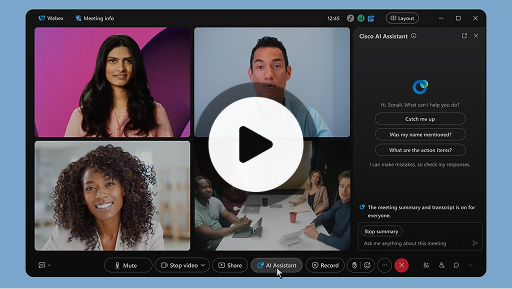
Cisco KI-assistent i møter
Webex Suite
Noen ganger kan du bli med i et møte sent, ha behov å forlate møtet et øyeblikk eller kjøre flere oppgaver samtidig og bli distrahert. Med møtesammendrag fra KI-assistent kan du raskt ta igjen det du har gått glipp av, forstå diskusjonen, stille spørsmål uten å forstyrre møtet og holde deg oppdatert på samtalen. Du mottar også et sammendrag og avskrift etter møtet, uten å måtte gjøre opptak.
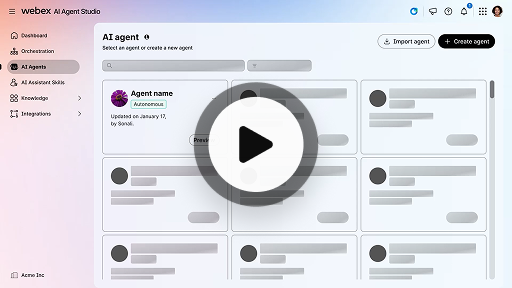
Opprett en autonom KI-agent
Kundeopplevelse
Autonome KI-agenter fungerer uavhengig uten direkte menneskelig inngripen. Autonome agenter har tilgang til og kan bruke et kunnskapslager for å gi informative og nøyaktige svar på brukerspørsmål. Disse agentene bruker avanserte algoritmer og maskinlæringsteknikker til å analysere data, lære fra miljøet de befinner seg i og tilpasser handlingene sine for å oppnå bestemte mål.
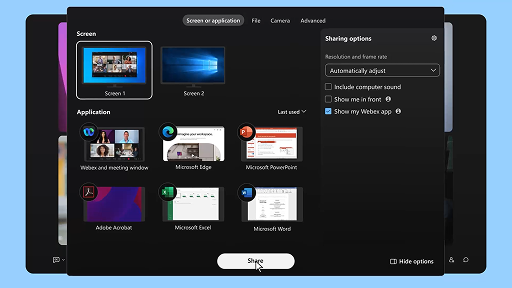
Del innhold i et møte
Webex Suite
Når du deler innhold i Webex-appen, kan alle i møtet enkelt se hva som diskuteres. Alle kan dele innhold, men bare én person kan dele om gangen.
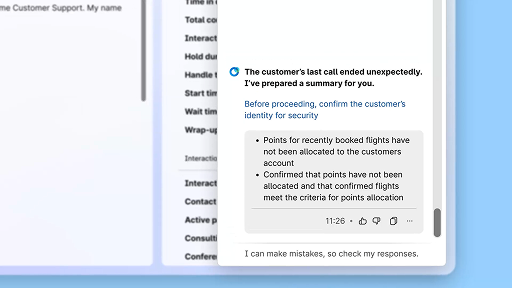
Forbedre effektiviteten med KI-genererte sammendrag
Kundeopplevelse
Ciscos KI-assistent gir konsise oppsummeringer av tidligere samhandlinger, slik at agentene kan fortsette samtaler sømløst uten å måtte hente inn informasjon på nytt. Denne umiddelbare tilgangen lar agentene fokusere på å levere effektive løsninger, noe som fører til raskere løsninger og en mer sammenhengende kundeopplevelse.
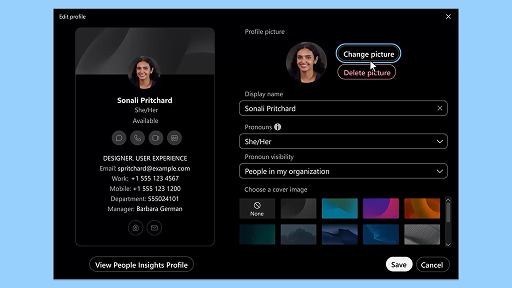
Webex-app | Legg til profilbildet ditt
Webex Suite
Gjør det enklere for andre å gjenkjenne deg i Webex-appen ved å legge til et bilde i profilen din. Inntil du laster opp et bilde, viser profilen din bare initialene dine i en sirkel.
Varsler for velværepauser fra KI-assistenten
Kundeopplevelse
Når KI-assistenten anbefaler en velværepause, vises det en popup-varsling: Godta en pause: Klikk på Ta en pause for å godta pausen. Ciscos KI-assistentmodul åpnes automatisk for å bekrefte valget ditt. Etter at du er ferdig med den gjeldende samhandling, starter en pause på ett minutt automatisk. Statusen din endres til Pause for å hindre at neste samhandling sendes til deg. Det vises en fem sekunders nedtelling på skjermen når pausen på ett minutt er over. Når pausen er over, lukkes pausevinduet automatisk og statusen endres til Tilgjengelig, slik at du er klar til neste samhandling.
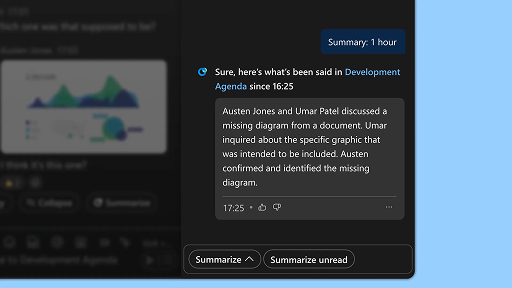
Generer områdesammendrag
Webex Suite
Når du er opptatt eller har vært borte fra kontoret, kan det være utfordrende å få med deg aktiviteten i alle områdene dine. KI-assistenten kan generere sammendrag av områder for å hjelpe deg med å holde deg oppdatert på ubesvarte meldinger og samtaler i området. Hold deg informert om beslutninger, viktige punkter og få med deg diskusjonen i korte trekk.
Forbedre effektiviteten med utskrifter i sanntid
Kundeopplevelse
Utskrifter i sanntid er utformet for å hjelpe deg med å optimalisere kommunikasjonseffektiviteten når du samhandler med kunder. Ved å tilby utskrifter direkte i Agent Desktop, bidrar funksjonen til å forbedre fokus, klarhet og svarnøyaktighet. Den er ment å forbedre forståelsen og effektiviteten under samtaler, redusere misforståelser og å støtte deg i å levere samhandlinger av høy kvalitet som forbedrer ytelsen og kundetilfredsheten.
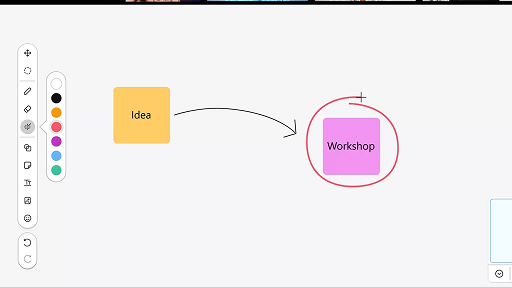
Bruke tavlen i møter
Webex Suite
Når du er opptatt eller har vært borte fra kontoret, kan det være utfordrende å få med deg aktiviteten i alle områdene dine. KI-assistenten kan generere sammendrag av områder for å hjelpe deg med å holde deg oppdatert på ubesvarte meldinger og samtaler i området. Hold deg informert om beslutninger, viktige punkter og få med deg diskusjonen i korte trekk.
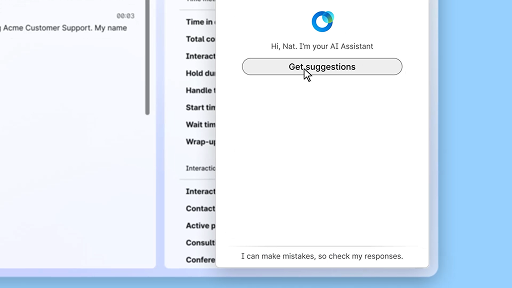
Svar med sikkerhet med sanntidsassistenten
Kundeopplevelse
Sanntidsassistenten er en Cisco KI-assistentfunksjon som er utformet for å støtte deg under direkte kundesamhandling ved kontinuerlig å forstå samtalens kontekst, identifisere kundens hensikt og umiddelbart gi deg relevante anbefalinger. Den veileder deg i sanntid ved å foreslå hva du kan si og gjøre, hjelpe deg med å navigere i komplekse prosedyrer og til og med igangsette arbeidsflyter automatisk.
Cisco KI-assistent i møter
Webex Suite
Noen ganger kan du bli med i et møte sent, ha behov å forlate møtet et øyeblikk eller kjøre flere oppgaver samtidig og bli distrahert. Med møtesammendrag fra KI-assistent kan du raskt ta igjen det du har gått glipp av, forstå diskusjonen, stille spørsmål uten å forstyrre møtet og holde deg oppdatert på samtalen. Du mottar også et sammendrag og avskrift etter møtet, uten å måtte gjøre opptak.
Opprett en autonom KI-agent
Kundeopplevelse
Autonome KI-agenter fungerer uavhengig uten direkte menneskelig inngripen. Autonome agenter har tilgang til og kan bruke et kunnskapslager for å gi informative og nøyaktige svar på brukerspørsmål. Disse agentene bruker avanserte algoritmer og maskinlæringsteknikker til å analysere data, lære fra miljøet de befinner seg i og tilpasser handlingene sine for å oppnå bestemte mål.
Del innhold i et møte
Webex Suite
Når du deler innhold i Webex-appen, kan alle i møtet enkelt se hva som diskuteres. Alle kan dele innhold, men bare én person kan dele om gangen.
Forbedre effektiviteten med KI-genererte sammendrag
Kundeopplevelse
Ciscos KI-assistent gir konsise oppsummeringer av tidligere samhandlinger, slik at agentene kan fortsette samtaler sømløst uten å måtte hente inn informasjon på nytt. Denne umiddelbare tilgangen lar agentene fokusere på å levere effektive løsninger, noe som fører til raskere løsninger og en mer sammenhengende kundeopplevelse.
Webex-app | Legg til profilbildet ditt
Webex Suite
Gjør det enklere for andre å gjenkjenne deg i Webex-appen ved å legge til et bilde i profilen din. Inntil du laster opp et bilde, viser profilen din bare initialene dine i en sirkel.
Varsler for velværepauser fra KI-assistenten
Kundeopplevelse
Når KI-assistenten anbefaler en velværepause, vises det en popup-varsling: Godta en pause: Klikk på Ta en pause for å godta pausen. Ciscos KI-assistentmodul åpnes automatisk for å bekrefte valget ditt. Etter at du er ferdig med den gjeldende samhandling, starter en pause på ett minutt automatisk. Statusen din endres til Pause for å hindre at neste samhandling sendes til deg. Det vises en fem sekunders nedtelling på skjermen når pausen på ett minutt er over. Når pausen er over, lukkes pausevinduet automatisk og statusen endres til Tilgjengelig, slik at du er klar til neste samhandling.
Generer områdesammendrag
Webex Suite
Når du er opptatt eller har vært borte fra kontoret, kan det være utfordrende å få med deg aktiviteten i alle områdene dine. KI-assistenten kan generere sammendrag av områder for å hjelpe deg med å holde deg oppdatert på ubesvarte meldinger og samtaler i området. Hold deg informert om beslutninger, viktige punkter og få med deg diskusjonen i korte trekk.
Forbedre effektiviteten med utskrifter i sanntid
Kundeopplevelse
Utskrifter i sanntid er utformet for å hjelpe deg med å optimalisere kommunikasjonseffektiviteten når du samhandler med kunder. Ved å tilby utskrifter direkte i Agent Desktop, bidrar funksjonen til å forbedre fokus, klarhet og svarnøyaktighet. Den er ment å forbedre forståelsen og effektiviteten under samtaler, redusere misforståelser og å støtte deg i å levere samhandlinger av høy kvalitet som forbedrer ytelsen og kundetilfredsheten.
Bruke tavlen i møter
Webex Suite
Når du er opptatt eller har vært borte fra kontoret, kan det være utfordrende å få med deg aktiviteten i alle områdene dine. KI-assistenten kan generere sammendrag av områder for å hjelpe deg med å holde deg oppdatert på ubesvarte meldinger og samtaler i området. Hold deg informert om beslutninger, viktige punkter og få med deg diskusjonen i korte trekk.
Svar med sikkerhet med sanntidsassistenten
Kundeopplevelse
Sanntidsassistenten er en Cisco KI-assistentfunksjon som er utformet for å støtte deg under direkte kundesamhandling ved kontinuerlig å forstå samtalens kontekst, identifisere kundens hensikt og umiddelbart gi deg relevante anbefalinger. Den veileder deg i sanntid ved å foreslå hva du kan si og gjøre, hjelpe deg med å navigere i komplekse prosedyrer og til og med igangsette arbeidsflyter automatisk.

Utforsk læringsverktøyene våre

Adoption Hub
Launch, train, and grow with these helpful resources.

Webex Academy
Lær når som helst med egenstyrte kurs og korte opplæringsvideoer.

Onboarding resources
Make onboarding easy with customizable self-serve resources.

Direktesendte hendelser
Lær med Webex: Hendelser, webinarer og daglige demonstrasjoner.
Andre ressurser

Last ned Webex
Én plattform, med alle kontaktmuligheter.


Webex-fellesskapet
Fellesskapet er et knutepunkt for kontakt med kolleger og Cisco-spesialister, der du kan be om hjelp, dele ekspertisen din, bygge et nettverk og vokse profesjonelt.

Webex Insider
Få kontakt med personer som deler lidenskapen din for Webex, og få innsidetilgang til de nye konseptene fra produkt- og opplevelsesteamene ansvarlig for Webex-porteføljen.

Webex for utviklere
Bygg fremtiden av forretningssamarbeid med Webex. Finn ut mer om API og SDK-er for Webex for å skape den neste store samarbeidsappen på Webex-plattformen.

Trenger du fortsatt hjelp?
Velg fra en rekke støtteressurser for å få den hjelpen du trenger.
Hvordan vil du vurdere opplevelsen din på denne siden?


Ikke nyttig
Nyttig
Hvordan kan vi gjøre denne siden mer nyttig for deg?
Takk for tilbakemeldingen.


