Thanks for your feedback.
 Feedback?
The following table lists the functional keys on the keyboard.
| Key | Description |
|---|---|
|
|
Caps key Tap it to toggle between uppercase and lowercase letters. |
|
|
Hide keyboard key Tap it to hide the soft keyboard. To revoke the soft keyboard again, tap in the input box. |
|
|
Delete key Tap it to delete your input by one character to the left of the insertion point. |
|
|
The numeric and special characters key Tap it to show the numeric keys and the special characters keys |
|
|
Language key The Language key isn't available when the phone language is set to English. Tap it to switch the soft keyboard layout between English and the system-language. |


Multilingual keyboard
The soft keyboard layout adjusts automatically to match the current system language. The keyboard supports the following 18 languages:
- Arabic: ar_AR
- Czech: cs_CZ
- Danish: da_DK
- Dutch: nl_NL
- English: en_US and en_GB
- French: fr_CA
- French: fr_FR
- German: de_DE
- Hebrew: he_IL
- Hungarian: hu_HU
- Italian: it_IT
- Norwegian: nb_NO
- Polish: pl_PL
- Portuguese: pt_PT
- Spanish: es_ES
- Swedish: sv_SE
- Turkish: tr_TR
- Ukrainian: uk_UA (supports both cyrillic and latin layout)
If you set your phone to a language that the soft keyboard doesn't support, the English
keyboard is used instead. You can manully switch between the system language and English
keyboard at any time by tapping  .
.
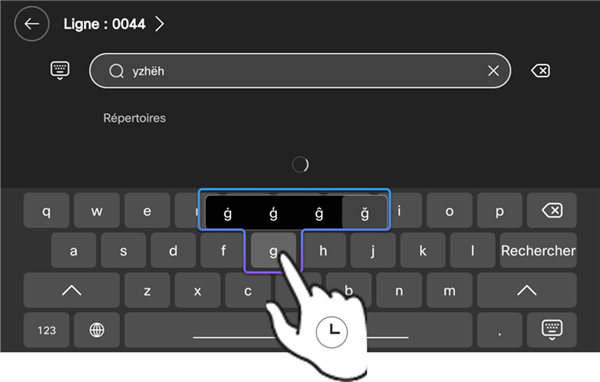
For languages that utilize diacritic marks or accents, press and hold the corresponding letter key. A pop-up menu will appear; slide your finger to select the desired character from the pop-up variants.