- Home
- /
- Article

Thanks for your feedback.

 In this article
 Feedback?
No more manual imports of your recordings! You can now effortlessly access and replay all of your Webex recordings directly within the Vidcast AI-powered platform.
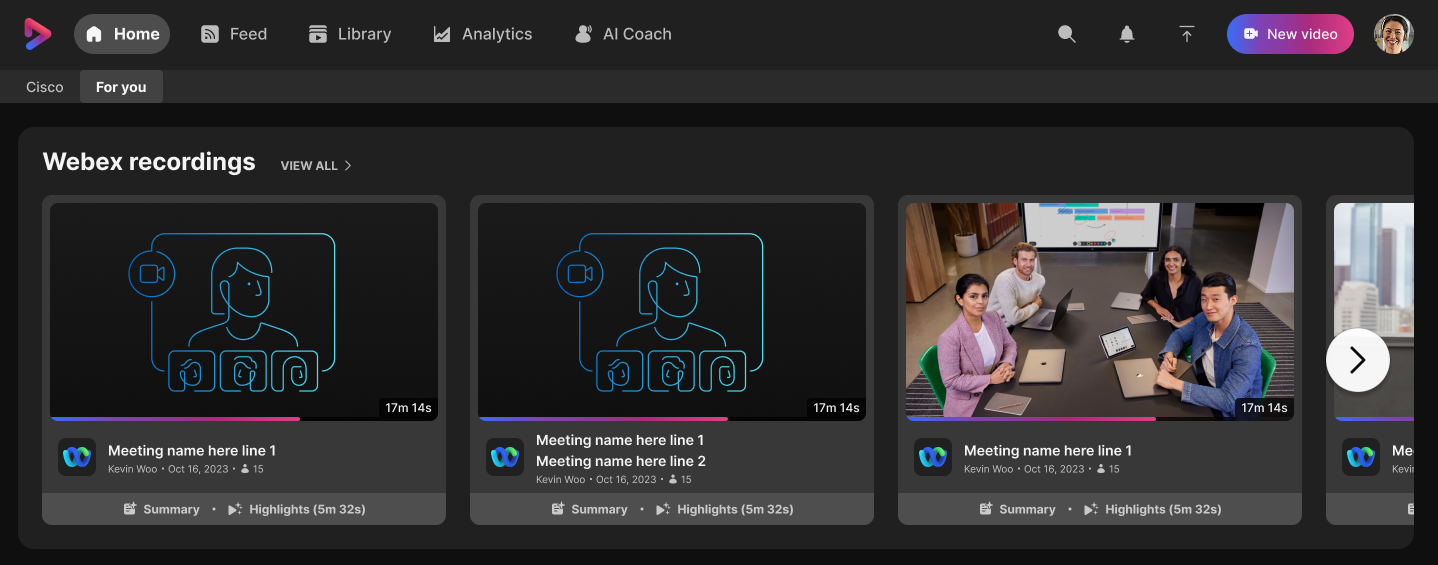
This feature is currently inbeta for select Cisco users. Should you want an early access to beta, please contact Vidcast team (Cisco only).
To get started, click on one of your available meetings in the Webex recordings ribbon on you home page- the recording will play immediately without the usual need to import it first. Alternatively, visit Webex meetings tab in Feed for overall list of your meetings.
This allows you to utilize all usual Webex recordings features (such as speaker identification , participants joined/ left and access to chat messages), together with the advanced Vidcast functionality:
-
Highlight Reels: Instantly catch up with playable AI-generated highlights
-
Clips: Easily clip and share specific, bite-sized portions of your recording
-
1-Click Sharing: Streamlined, effortless sharing directly from Vidcast to all attendees and invitees
-
Timestamped Comments & Reactions: Keep the conversation going asynchronously right on the video timeline
-
Ask Me Anything: Use the video assistant to ask questions and find exact moments within your recordings
-
Analytics: Get deep viewer insights on your recording
-
Embed video playback: Host your meeting recording anywhere
Current limitations
-
Password Protection: Cisco mandates password protection for open links by default, so that means you will encounter password prompts for embedded videos. Some usual Vidcast sharing options might be unavailable for the streamed recording, requiring further import.
-
Pages/ Playlists/ Slido: We currently do not support adding recordings to Playlists or Pages, or adding Slido polls. This will be resolved in future phases of the integration. At this time, you can still add a recording to Playlist/ Page, or add Slido polls, by importing the recording.
-
Space-Recorded Meetings: Due to current API limitations, meetings recorded in Webex Spaces will not automatically populate in your Vidcast meetings list. As a workaround, you can paste your Webex meeting URL into Vidcast and we will take you to your Meeting Playback experience.


