- Home
- /
- Article

Thanks for your feedback.


Best practices in preparation and migration process to Webex Calling - Dedicated Instance
 In this article
 Feedback?
Navigate the transition to Webex Calling - Dedicated Instance with a comprehensive, seven-gated migration framework designed for operational efficiency.
Scope
This article provides a structured, self‑service migration framework for Partners and Customers those migrate calling environments to Webex Calling - Dedicated Instance (DI).
The migration practices and milestones described in this article are based on the Webex Setup Assist program methodology and reflect the extensive real‑world experience of Cisco delivery, engineering, and development teams. These methods have been refined through hundreds of thousands unique customer location deployments over the past seven years, including migrations from BroadCloud, BroadWorks, Spark Calling, Unified CM (UCM), Hosted Collaboration Solution (HCS), and third‑party PBX platforms. The guidance applies to a wide range of customer environments, from single‑seat deployments to large‑scale implementations exceeding 100,000 seats and hundreds of locations, and follows long‑established, proven Cisco processes to ensure consistency, quality, and operational efficiency throughout the migration lifecycle.
The article assumes that readers are already familiar with Webex Calling - Dedicated Instance licensing, the Webex Control Hub administrative model, and the baseline Unified Communications Manager software and features.
Introduction
Let's be honest — the word migration rarely sparks excitement in an IT team. It sparks questions. "What breaks?" "Who does the work?" "What do we lose control over?" "Is this even realistic while we're already stretched thin keeping the lights on?" These are not signs of resistance to progress; they are the instincts of seasoned professionals who understand that moving a mission-critical calling platform is not a weekend project. Voice is the one service where users notice a two-second glitch before they notice a two-week outage planning effort — and that reality makes every change feel heavier than it should.
The good news? The numbers tell a very different story than the fear does. In well-structured cloud migrations, roughly 95% of engineering effort is invested in preparation, and only 5% in the actual change. Even better, most of that 95% is made up of activities your team already performs as part of normal Day 2 operations — inventory hygiene, certificate management, dial plan reviews, device lifecycle tracking, and documentation. In other words, the bulk of the "migration work" is work you are already doing. This structured approach simply channels it toward a defined outcome, at a pace that fits inside your existing operational rhythm rather than on top of it.
The "mission impossible" feeling also fades once you see that every migration can be fully rehearsed. A small, representative pilot lets you validate the end-to-end process, integrations, failover behavior, and user experience before a single production user is touched. Nothing is left to chance on cutover day — because cutover day is simply the repetition of a process you've already executed successfully. And should anything unexpected occur, rollback is a mirror of the cutover itself, bounded by a clear maintenance window. Predictability replaces anxiety.
Yes, moving to Dedicated Instance does mean letting go of some control — specifically over the infrastructure and virtualization layers. But consider what you gain back: the hours your team spends patching hypervisors, chasing hardware alerts, managing OS-level security, and planning capacity refreshes. That time returns to the business, where it can be spent on what actually differentiates your organization — user experience, adoption, integrations, and the services your stakeholders truly care about. You're not losing control; you're trading undifferentiated heavy lifting for strategic focus.
What you receive in exchange is a platform tightly integrated with the most advanced Calling, Meetings, and Contact Center portfolio on the market, backed by Cisco's engineering depth and a partner ecosystem refined through hundreds of thousands of deployments. You keep the full power of the familiar Unified CM ecosystem — the same features, the same reliability, the same administrative model your team already knows — now paired with Control Hub, a modern, user-oriented management and analytics umbrella that is genuinely simple to learn. Upgrades, updates, and critical vulnerability patching on the latest software are managed by Cisco, on Cisco-certified compute, with the same (or better) reliability you expect from your on-premises environment.
So, yes — change carries risk. But not changing carries its own, quieter risk: falling behind on features, addressing constant complexity of changes, release upgrades and vulnerabilities, stretching your team on infrastructure that no longer differentiates the business, and delaying an inevitable transition until it must be done under pressure. The structured, gated approach that follows is designed to make this migration what it should be: well-prepared, low-drama, and highly validated — executed mostly through work you're already doing, toward a platform built for where collaboration is heading next.
From Confidence to a Plan: How This Guide Is Organized
To turn that confidence into an executable roadmap, this guide walks you through a seven-gated migration process, each phase with clear entry and exit criteria, lessons learned from the field, and pre-checks that prevent the most common surprises:
- Project Initiation
- Discovery & Assessment
- Planning
- Implementation
- Freeze
- Go Live
- Transfer to Day 2
One of the reasons this model works so well is that the risk to your production environment is deliberately front-loaded to near zero and only rises in a controlled, final step. Here is what to expect at each stage:
| Production Impact | Phases |
|---|---|
| No impact | Project Initiation, Discovery & Assessment, Planning |
| Minimum impact | Implementation |
| Limited to operations processes | Freeze |
| Direct impact | Go Live |
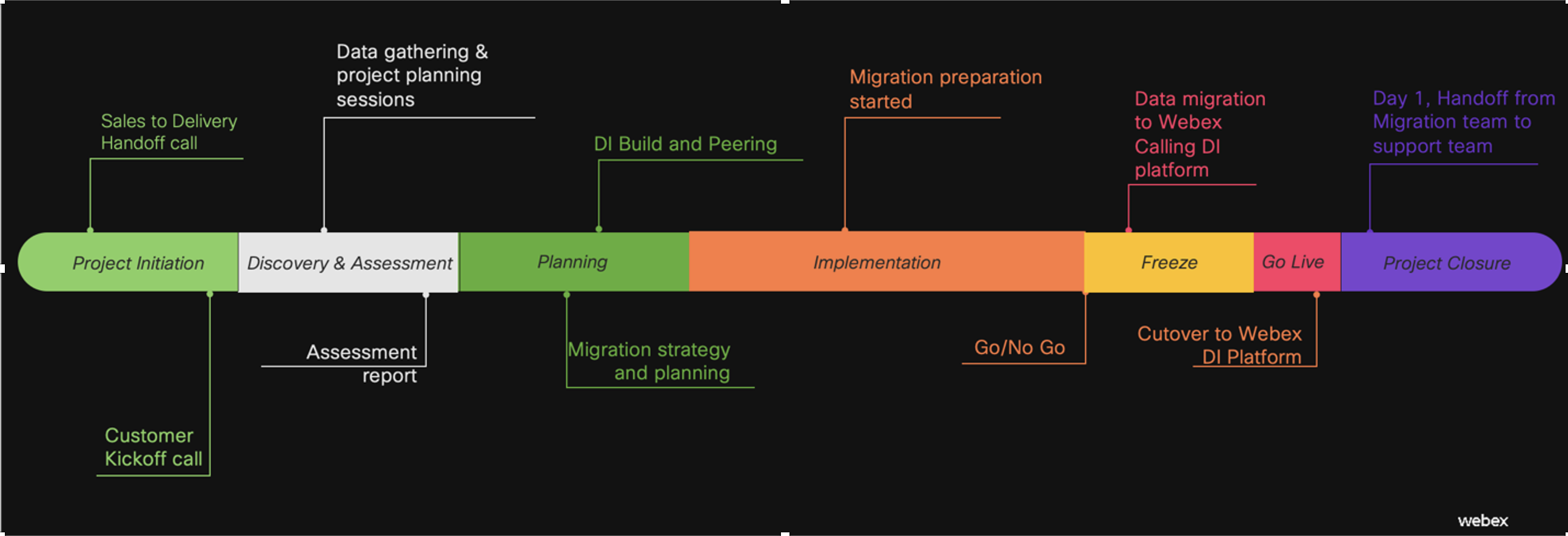
In practical terms: most of the journey happens safely alongside your existing environment. By the time you reach the moment that touches production, every integration has been built, every process has been rehearsed, and every fallback has been verified.
Throughout the guide, we reference the key information resources you'll rely on during the migration and well into Day 2:
- Cisco Calling Sales Connect — Cisco Calling Sales Connect Link
- Help.webex.com — authoritative product and configuration documentation
- Webex Spaces — direct access to Cisco experts and peer communities for real-time questions
With the framework set and the resources in hand, let's walk through each phase in detail — starting where every successful migration starts: Project Initiation.
Project initiation
Impact on production: NO impact
- Identify key stakeholders
Remember that it is not only about technical teams and impacted business teams, but also Partners involved. Here are the example of required stakeholders:
- IT management
- Business management
- Voice services team
- Contact centers team
- Networking team
- DNS/DHCP team
- Security team
- IAM team (eg Entra, AD, SSO)
- Change board
- MACD partner
- Managed services partner
- 3d party integration vendors (Paging, Fax, Recording etc)
- Local, on-prem support
- RedSky /Public safety team.
- Choice of Project leader or Project manager.
Considering that migrations to Dedicated Instance involve more complex coordination than traditional “Application level only” integrations it is desirable to have team member assigned to drive internal Project management and all associated tasks like weekly calls, internal teams coordination, external vendors engagement, coordination of changes etc.
- Sync on inputs you start project with
There are multiple advantages and reasons why there is a strategy taken to migrate to Dedicated Instance. It is important to baseline vision over future solution.
Are there any changes like clusters consolidation, dial plan, new features planned?
Do you migrate software endpoints “as is” or migration assume move to Webex App?
What is the relationship of users to Contact centers?
- Get up to the speed with Dedicated Instance
Introduction to Dedicated Instance: Introduction to Dedicated Instance
BDM (Business Decision Maker Slides) BDM
TDM (Technical Decision Maker Slides) TDM.
Discovery and assessment
Impact on production: NO impact
Discovery and assessment is a continuation and the utilization of the information that was obtained during previous team sync meetings on inputs with the goal to identify all the necessary scope elements those will be the basis for professional project and technical project plan development
- Existing Cluster setup
Define existing on-Prem setup with all the features and integrations done. Here are the examples to look at:
- Applications and sizing,
- Locations,
- IP addressing,
- How users synchronized/provisioned (local, ldap),
- Authentication configured (SSO),
- CA vs Self-signed certificates,
- Security mode,
- ILS/GDPR use,
- Features,
- Special focus on cross-site features like Extension Mobility,
- CER/911 integration,
- Use of MRA,
- CDRs,
- Voicemails and integration with O365,
- Jabber vs WebexApp
- In case Jabber migration, there should be close focus on how existing Jabber endpoints configured (eg xml configuration, voice service domain) and what are the options for reconfiguration like use of SCCM. Here are standard scenarios noted: Configure Jabber
- List of Devices with focus to check for
- Deprecated devices (there are no new devices added on deprecation list since Rel12.0x) Deprecated phones
- End of support devices (Devices could be still registered to any software release, but are not supported from Day2 perspective)
- CSR-Compatibility-Matrix-Interactive.html
- Special Restriction devices 7925, 7940, 7960 Register old phone models to
Dedicated-Instance
- Tools in help:
Dedicated Instance Pre-Migration Assistant: Generate Assessment reports
The Pre-Migration Assistant in Control Hub helps you gather source data and check prerequisites for migrating from UCM to Dedicated Instance using a third-party tool. Before migration, it assesses readiness, provides checklists, and lets you compare data between your on-premises cluster and Dedicated Instance.
To run Assistant, your on-prem Cluster must be on-boarded to Webex Cloud-Connected UC environment. Overall description and prerequisites you can find here: WebexCloud-ConnectedUC
On-boarding process for UCM: Set-up Webex Cloud Connected-UC
List of important insights you can get as output from Pre-Migration Assistant in xls easily readable format:
- Nodes and running software
- Enterprise parameters
- List of SIP trunks
- List of Application users, roles
- Number of devices (and full list of devices), Route groups and Partitions, Locations, End users
- CM Groups, Device pools
- Health status of DB replication
- Installed COPs
- Numbering plans
- Phone services
- Remote destinations
- Webex Spaces to support with your specific questions:
Ask UCM Cloud & Dedicated Instance: webexteams://im?space=5db6bb40-d3c7-11e9-a319-df8a35abe85a
Ask RedSky External - E911 Solutions Plus Partner Join: https://eurl.io/#fWfT1SnOz
Ask Webex Setup Assist - Webex Calling and DI: webexteams://im?space=76beab50-084b-11ed-abc8-ab581010b1de.
- Tools in help:
Planning and implementation
Impact on production: minimum impact on existing production environment
Cisco best practices in terms of Dedicated Instance Migration process represented down below:
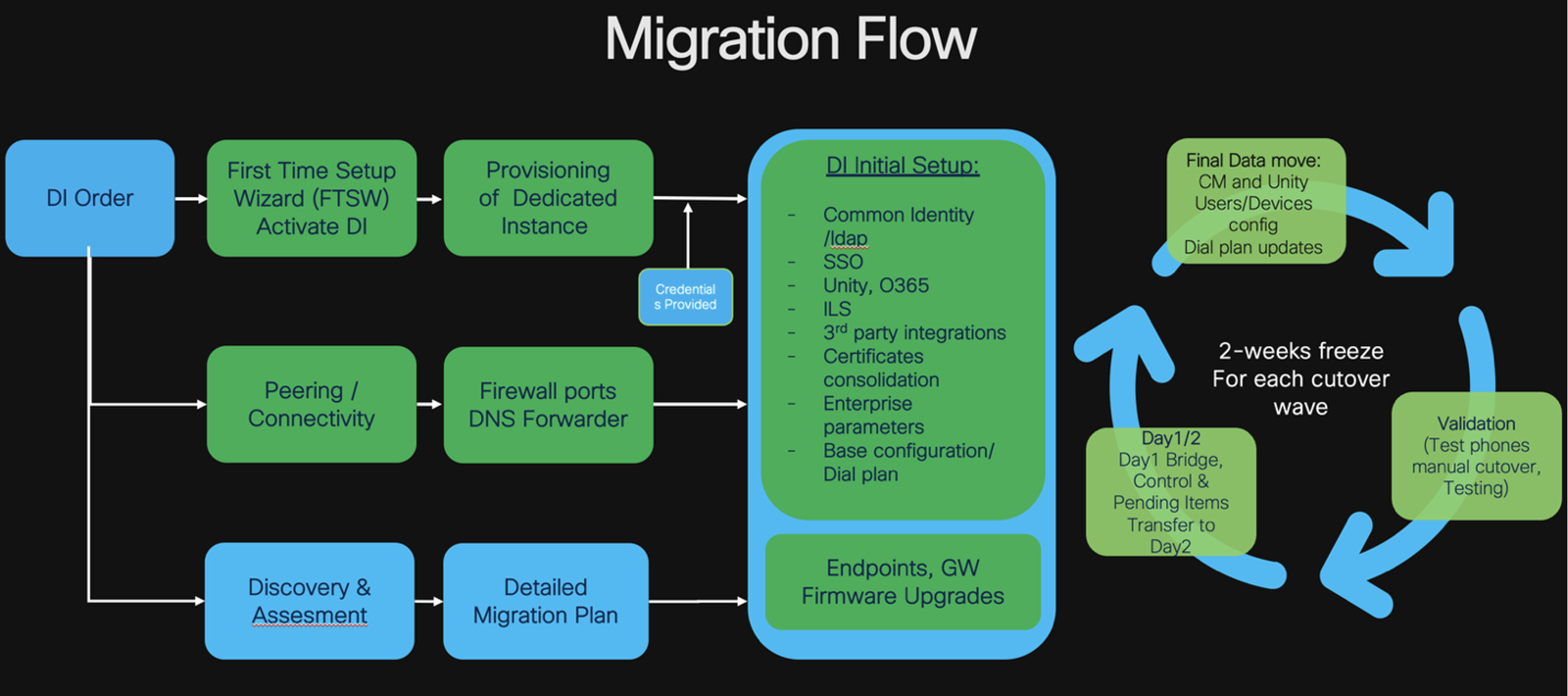
Activate Dedicated Instance (First Time Setup Wizard)
To activate Dedicated Instance, refer Activate Dedicated Instance.
Build DI environment (Provisioning of Dedicated Instance)
To build DI environment, refer Dedicated Instance for Webex Calling base configuration
Most common questions, notes:
- Build sizing explained here (Dedicated Instance Sizing): https://help.webex.com/en-us/article/dk3o5r/Introduction-to-Dedicated-Instance Number of Clusters and general sizing goes in-line with number of licenses purchased. In general sizing accommodate reserve growth as per Flex agreement (15% or 20% depends on the type) and provision of 3 active devices per knowledge worker). Cisco Cloud platform certified best-in-class compute with use of Medium OVAs for all builds and a fully deployed Dedicated Instance cluster can supports up to 8 call processing servers or approximately 50,000 devices
- SME is Optional, require purchase of minimum 3 Clusters and/or Regions. Require design and capacity review from Cisco side
- Initial MRA Capacity is 20% and could be increased up to 100% based on actual need via TAC ticket
- Configuration elements with “x” in front of name should not be renamed, as used within automation, serviceability and analytics integrations Dedicated Instance for Webex Calling base configuration
- In case of requirement to have more than 3 Clusters in one region, then standard IP addressing for DI Instances is NOT an option
Ref. Standard IP Addressing, Data centers location: Data centers location.
Access Dedicated Instance:
To access Dedicated Instance application, refer Access Dedicated Instance applications
Most common questions, notes:
- DI applications could be accessed via Control Hub or directly from Customer network. CLI access also provided except to Expressways.
- User Ranks:
- 3 - Partner Admin
- 4 – Customer Admin
- 5 – Enterprise User
- Credentials to access DI Applications shared in the created by automation Webex space, where ProAdmin .
Peering/Connectivity
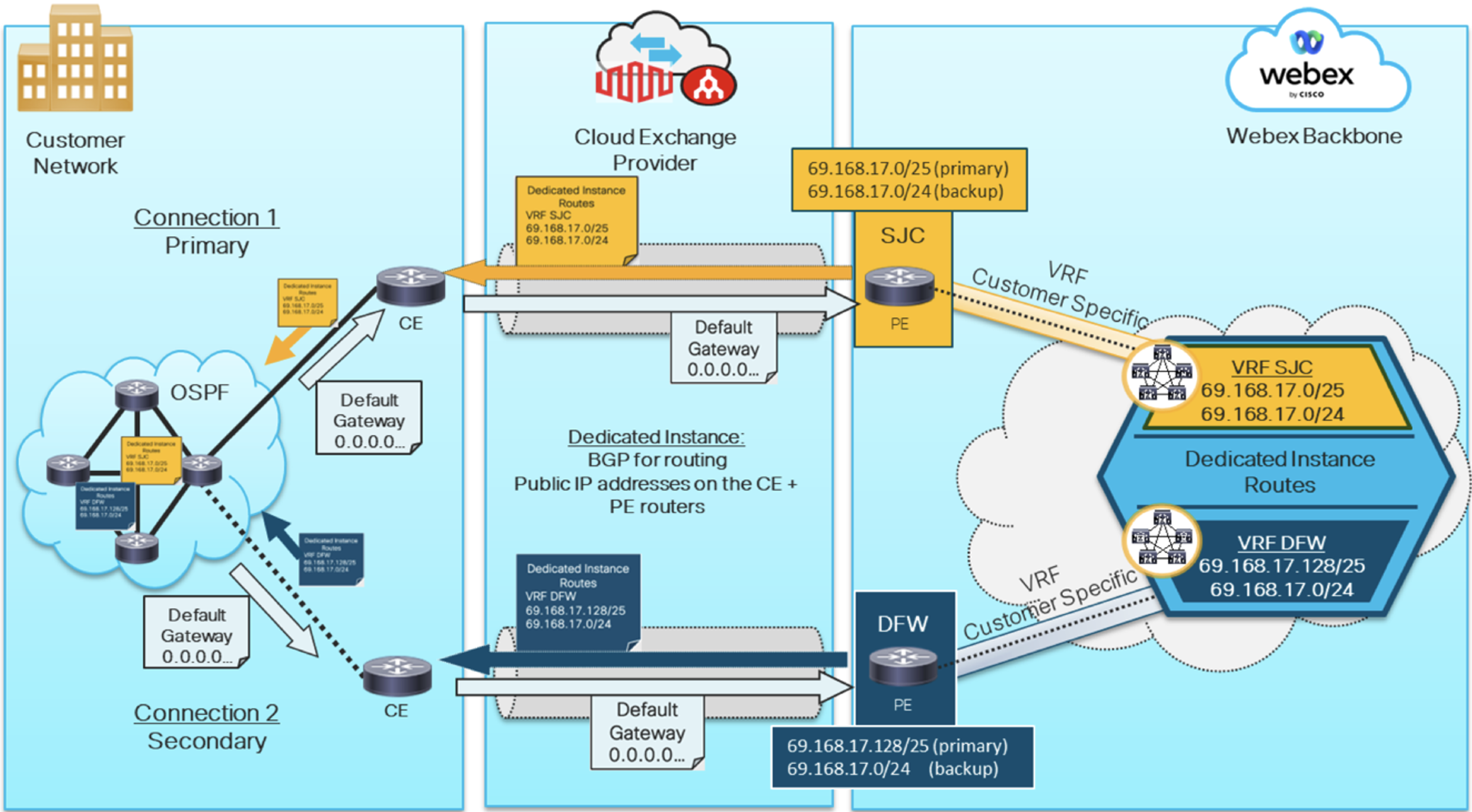
Network Architecture with detailed descriptions of Edge connect scenarios for Webex Calling, Dedicated Instance and Meetings. PA_Edge_Connect_Design.pdf
*Document should be used carefully, as describes multiple scenarios those could be conflicting or complementing to each other, depends on exact use case. Exact reference to Dedicated Instance can be found in chapter “Edge Connect for Dedicated Instance Architecture“
Webex Edge Connect
Webex Edge Connect Most common questions, notes:
- Dedicated Instance 2 links is a “must”
- 4 links is an option but “crossing” is not allowed, those are used in “pairs”
- Any DI traffic prioritization towards one of the links is NOT supported and generally not applicable, as each side/DC advertise its unique subnet /25 Dedicated Instance data center locations.
Webex Virtual connect
To know on Webex Virtual connect, refer Dedicated-Instance-Virtual-Connect
Most common questions, notes:
- Maximum supported bandwidth with Virtual Connect is 250Mbps
- This option is not suitable/not supported in case of ESN deployment.
Dedicated Instance Network and Security Requirements (Source for Network, Firewall Ports, DNS information)
To know on network and security requirements, refer Network and Security requirements
Most common questions, notes:
- SNMP monitoring is NOT allowed. SNMP exceptions are workflows of CER and Informacast those need service request via Control Hub
- There is no access from DI to external SFTP. SFTP used for updates, upgrades and other workflows is inside DI environment and access provided for limited scenarios (like access to new cop/firmware in-line with Control Hub Service Request).
ESN (Enhanced Survivability)
Get started with/ General info: Get-Started with Enhanced Survivability
Prerequisites: Enhanced Survivability prerequisites
For Activation: Activate enhanced survivability.
Most common questions, notes:
- ESN Flex SKU is on “per Region” basis. As example, if you need to integrate 5 ESN nodes in Americas, you need to order 1 ESN SKU that will allow to attach up to 8 ESN nodes to one Cluster without impact on max Call Processing Nodes allowed in the Cluster
- Customer is responsible for provisioning of necessary virtualized resources and installation of Medium OVA Publisher that will be further converted by automation to Subscriber and attached to the Cluster. https://www.cisco.com/c/dam/en/us/td/docs/voice_ip_comm/uc_system/virtualization/virtualization-cisco-unified-communications-manager.html
- Cisco is Responsible over CA certificates. Within process of activation you will be requested to authorize Cluster’s certificates renewal/update in order to include ESN node on the list.
Directory sync service
Alongside with traditional method used with UCM on-prem to sync users via ldap or to create local, there is an option with Dedicated Instance to sync users via Control Hub (Webex Common Identity Service) with Azure or via Directory Connector. Only SSO deployment is supported for Webex CI directory service.
Directory service integration through Webex Common Identity for Dedicated Instance
Most common questions, notes:
- After the Azure AD provisioning is completed for a certain cluster, you cannot create any new synchronization agreements nor modify any configuration settings for the same cluster except for the group settings. Contact Cisco TAC support to reset the Directory Service. You can then create a new agreement for provisioning.
- You must enable synchronization within 18 hours from the time the new agreement is created. LDAP synchronized users become inactive and removed after 24 hours of inactivity. Users won’t be able to log in and use the Unified CM services.
- Even Configuration at Call Manager appears as editable, it should not be change beyond what is created by automation during sync agreement provisioning. Although the settings show sync once, Control Hub syncs at 24-hour cycle changes on Common Identity to Unified CM or Cisco Unity Connection.
- Service is used for Directory Sync only(!). Authentication should be set via SSO being a prerequisite.
SSO
SSO is not mandatory for Dedicated Instance. Anyhow it is mandatory for some key services like Webex Common Identity, WebexApp use. SAML SSO deployment is no different than with UCM on-prem and described below. The only operational nuance is related to activation process that requires Rank 1 User for SSO test during activation. Partner and Customers limited by Rank3-5 privileges, thus Cisco support required for activation and should be requested via Service Request at Control Hub (UC Application Management type of the ticket)
CUCM_b_saml-sso-deployment-guide-release-15.html
To open Service request, refer How-to-raise-a-service-request.
Integration of Dedicated Instance Cluster with On-prem Cluster
Considering that most of the migration scenarios can’t happen as one-shot migration, needs for testing in advance, and certain level of cross-integration, we do recommend having intercluster trunk and related configuration set as one of the first steps. ILS if in use.
Certificates consolidation
One of the most important tasks to prepare system for migration is to exchange certificates in-between on-prem and cloud systems, all secure integrations. By doing this you allow phones to freely move to new cluster and back to old clusters without need of factory reset.
Most common questions, notes:
Usually this involves share of certificates from DI and upload them to On-prem side
- CallManager.pem (Multi-SAN)
- ITLRecovery.pem
- Intermediate Certificate of CA
- Root Certificate CA
From the customer CUCM Side towards DI:
- CallManager.pem (Multi-SAN) if it is not Multi-SAN include the Publisher & TFTP Servers Certificates.
- ITLRecovery.pem (Pub)
- Intermediate Certificate of CA (In case Certs are signed by CA)
- Root Certificate CA (In case Certs are signed by CA).
Plan for Webex App and/or Jabber Migration
Most common questions, notes:
- How to preserve user experience with Jabber login on a new system? What are the changes/scenarios possible to continue use Jabber as with on-prem system? Here are possible options: Configure Jabber in Dedicated Instance to use Customer's Domain for Login Configure Jabber in Dedicated Instance to use Customer's Domain for Login
E911
In a Dedicated Instance deployment, both the Cisco Emergency Responder (CER) and RedSky will be utilized to track phones and clients. On-premises phones will be tracked using the Emergency Responder to identify thelocation of the phone and setting the appropriate dispatch location before routing the call to RedSky for call delivery. Webex App users will be tracked in RedSky using HELD+ protocol.
Dedicated Instance comes with deployed CER in Americas region. Cisco adds the proxy information, whereas Partner/Customer responsibility is to add the RedSky details and configure the ELIN's. We add the LUA script and Partner/Customer should configure parameters to make it work. Most common questions, notes
- How to get RedSky account on RedSky portal:
- BOT available in Webex – E911 Customer Account Setup ( E911Account@webex.bot) Type “support” and fill in the form that comes up and submit. Account will be created and an email sent to administrator email provided in the BOT
- Configure E911 for Dedicated Instance, Configure E911
Webex Spaces in support:
Ask RedSky External - E911 Solutions Plus Partner Join: https://eurl.io/#fWfT1SnOz.
Engineering teams and Users readiness for a change
Here are recommended resources for engineering teams to get up to the speed with all aspects of Dedicated Instance:
- Cisco Calling sales connect
- Cisco Calling Sales Connect Link
- BDM (Business Decision Maker Slides) BDM
- TDM (Technical Decision Maker Slides) TDM
- Help.webex.com
- Webex Academy: Academy
- Adoption resources. Adoption resources are helpful for both: assistance in roll-out strategy of the service and features AND knowledge base of “How to” booklets and short videos those could be in great support to End users. resources.webex.com.
Freeze
Impact on production: with impact limited to operations processes
The purpose of Freeze phase is to move data from source system to target Dedicated Instance and execute necessary validations to assure successful cutover. We do recommend 2-3 weeks timeframe for the freeze to make sure that teams have necessary time for data move, data consistency checks, test failovers and related testing.
In case there is a need for MACD during freeze phase, required changes should be completed on both systems.
There are multiple ways and tools available for data move/copy. Generally, we do recommend use Active/Inactive partitions and tools as per below:
UCM:
BAT export/import and associated scripting
Bulk Administration Guide for Cisco Unified Communications Manager, Release 15 and SUs: CUCM_b_bulk-administration-guide-15.html.
External tools for UCM migrations like Yarnlab.
Unity:
- Cisco Unity Tools. Collection of free Cisco Unity and Cisco Unity Connection related tools.
https://www.ciscounitytools.com/index.html
We do recommend use of Cobras for Unity migrations.
CER:
Manual, Bulk Export/Import
Upon configuration data moved, consider next important items/actions:
- Manual or via Option 150 on DHCP in relation to test group re-pointing of different phone models to new DI TFTP. Having certificates consolidation done you can test both: migration and rollback scenario
- Reconfiguration of test gateway, if available
- Preparation of Gateways configuration templates for actual production cutovers. Scripting, if needed.
- Move of WebexApp user via change of Calling behavior at CH
- Move of Jabber via defined previously login method and home cluster change
- Test of basic call flows and functionality up to environment capabilities:
- Check of consistency of behavior being on-net or connected via VPN
- Test of MRA with phone and Software endpoint
- PSTN
- Test of 911 Service
Cutover Day or go-live
Every cutover is unique and plan should accommodate nuances of exact environment. Generally speaking process steps are:
- Create proactive TAC ticket (Scheduled dispatch)
- Cutover of the devices is done via change of Option 150 on all related subnets and Reset of the phones at on-prem call manager
- Verification of registered phones on the new system is a straightforward way to control process of successful registrations to new Dedicated Instance system
- Upon verification, Bulk update necessary configurations (Lines and Route patterns in terms of active vs null partitions, Home cluster, Advertisements) on the On-prem and Dedicated Instance
- Modify configurations of Gateways, SRST, Hardware media
- Execute defined test program:
- Test Intra-site, Inter-site, PSTN calls
- MRA
- 911
- Voicemail
- Applicable features
Day2
- Dedicated Instance Tier1 Support (TAC) Dedicated-Instance Tier-1 support
- Service requests associated with listed topics: How to raise a service request
- DNS entry
- Firewall Updates
- Firmware Upload
- Cloud Connectivity
- Audit Log Settings
- UC Application Management
- DI-MT Inter-op SIP trunks
- UC application lifecycle
- Infrastructure as a Service
- Partner Operations Guide
- Partner Operations Guide
This is one of the most important documents that explains Technical support, Change Management, Incident Management, Updates, Upgrades, Capacity management, Certificates management, DRS Partner-operations-guide
This is one of the most important documents that explains Technical support, Change Management, Incident Management, Updates, Upgrades, Capacity management, Certificates management, DRS Partner operations guide
- Responsibility Matrix
Document explains RACI split in-between Partner, Cisco and Customer during on-boarding and Operations Responsibility assignment matrix
- Ask RedSky Webex Space webexteams://im?space=7074fce0-489a-11ea-89f3-8f977dd07aa0.


