- Home
- /
- Article

Thanks for your feedback.


 In this article
 Feedback?
These instructions are for Partners intending to host a gateway. Read through to understand the best practices and recommendations.
Webex Calling allows a customer to configure a local gateway trunk to send and receive a PSTN call. If a partner hosts trunks from different customers, it’s recommended to set up a shared gateway for these trunks.
This document outlines a high-level scheme for implementing a partner hosted gateway and focuses on certificate-based trunking. The registration-based model is a simple model to use for a partner hosted gateway that provides a solution for smaller capacity trunks. This solution possesses inherent technical limitations for high-capacity trunks specifically for TCP based traffic and connection sharing model. The main reason for creating certificate-based trunking is to solve the scale limitations of the registration-based model.
The procedure for trunk creation and gateway configuration is similar to the customer hosted local gateway. For details, see: Get started with Local Gateway
Considerations for deployment
Lets consider a hypothetical Webex partner named TelSP to illustrate the different models of deployments that the partner can adopt.
Here are the high-level specifications & requirements of TelSP:
-
The partner plans on using
sip.telsp.comas the top-level domain that is shared across all the customers they manage. -
The partner owns
sip.telsp.comand can administer the DNS infrastructure and Certificate authorities, manage DNS addresses, and sign certificates for this domain and its sub domains. -
The partner can deploy two distinct session border controllers (physical or virtual) as Local Gateways for shared PSTN access among end customers.
-
The partner has two physical sites, and both these sites share PSTN connectivity:
-
Miami
-
Chicago
-
-
TelSP operates their local gateways on behalf of the two customers CustA and CustB as they are referred to from herewith.
In this article, the term partner refers to the managing Webex partner, specifically TelSP in this example. This entity has access to Webex partner hub.
| Location | CustA | Cust B |
|---|---|---|
|
Locations using Miami Gateway as primary PSTN destination |
Denver |
Dallas |
|
Locations using Chicago gateway as primary PSTN destination |
Detroit |
Boston |
|
Subdomain chosen for a customer | custa.sip.telsp.com | custb.sip.telsp.com |
The desired scenario is to have PSTN origination/termination for both customers using the Miami and Chicago gateways supplied by the partner, as shown in the illustration:
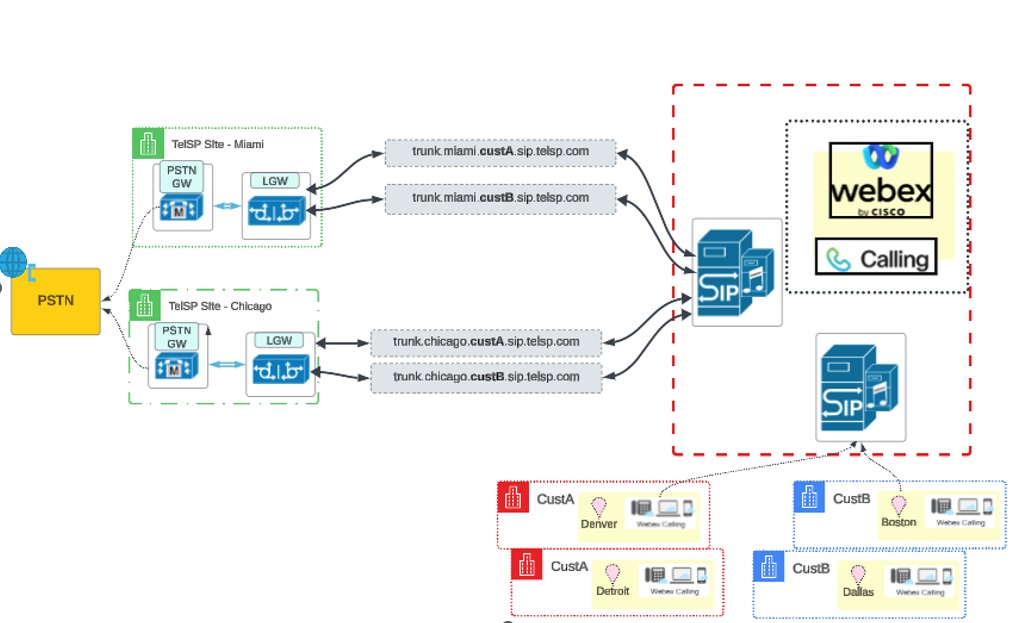
Simplified deployment example
The following simplified example demonstrates how Peer cert identity enables a single certificate to support multiple customer trunks:
-
Certificate—sip.telsp.com
- Trunks
-
custa.sip.telsp.com
-
custb.sip.telsp.com
-
-
Peer cert identity—sip.telsp.com
- Result
-
Single certificate is used
-
Multiple customer trunks are supported
-
Associating customer location to trunk and gateway
The following sections provide detailed configuration mappings for the deployment described above.
Webex Calling allows creation of trunks and sharing a trunk across multiple locations. When creating the trunk, associate the trunk with a location.
For CustA, the trunk details are as follows:
| Trunk name | FQDN | Associated location in trunk definition |
|---|---|---|
| trunk_miami | trunk.miami.custa.sip.telsp.com | Denver |
| trunk_chicago | trunk.chicago.custa.sip.telsp.com | Detroit |
The illustration shows the association of the customer location to Gateway and Trunk for CustA:
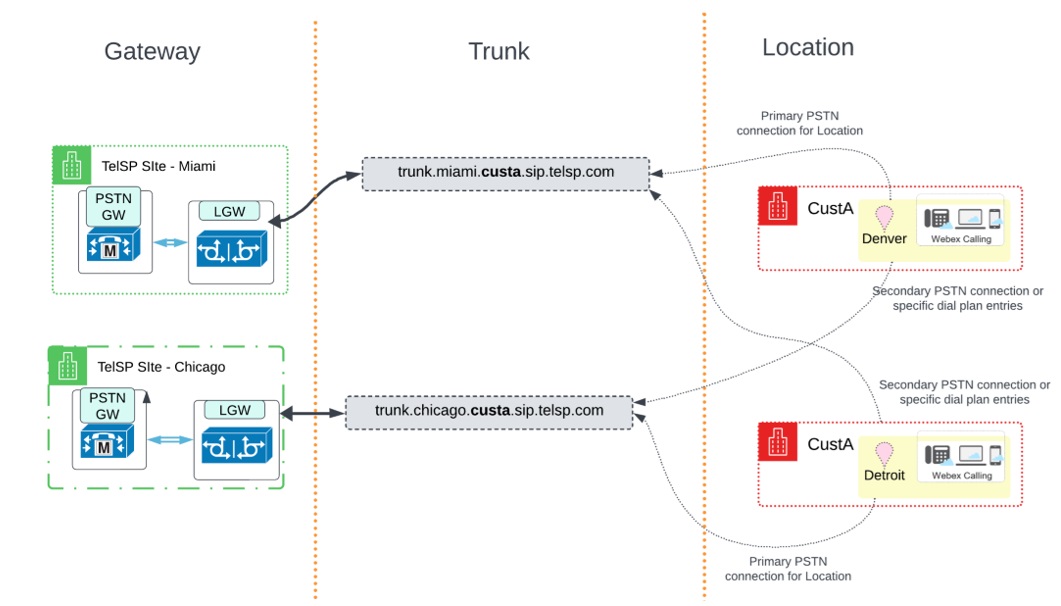
In this deployment, the trunk associated with the location is the primary PSTN connection for that location. The other trunk is used as a secondary PSTN connection or route for specific dial plan entries. The implementation of the primary and secondary PSTN connection relationship is through a Route Group concept. See the Configure gateway trunks in the Control Hub section for details.
For CustB, a similar setup with the following trunks is created:
| Trunk name | FQDN | Associated location in trunk definition |
|---|---|---|
| trunk_miami |
trunk.miami.custb.sip.telsp.com
|
Dallas |
| trunk_chicago |
trunk.chicago.custb.sip.telsp.com
|
Boston |
The illustration shows the association of the customer location to Gateway and Trunk for CustB:
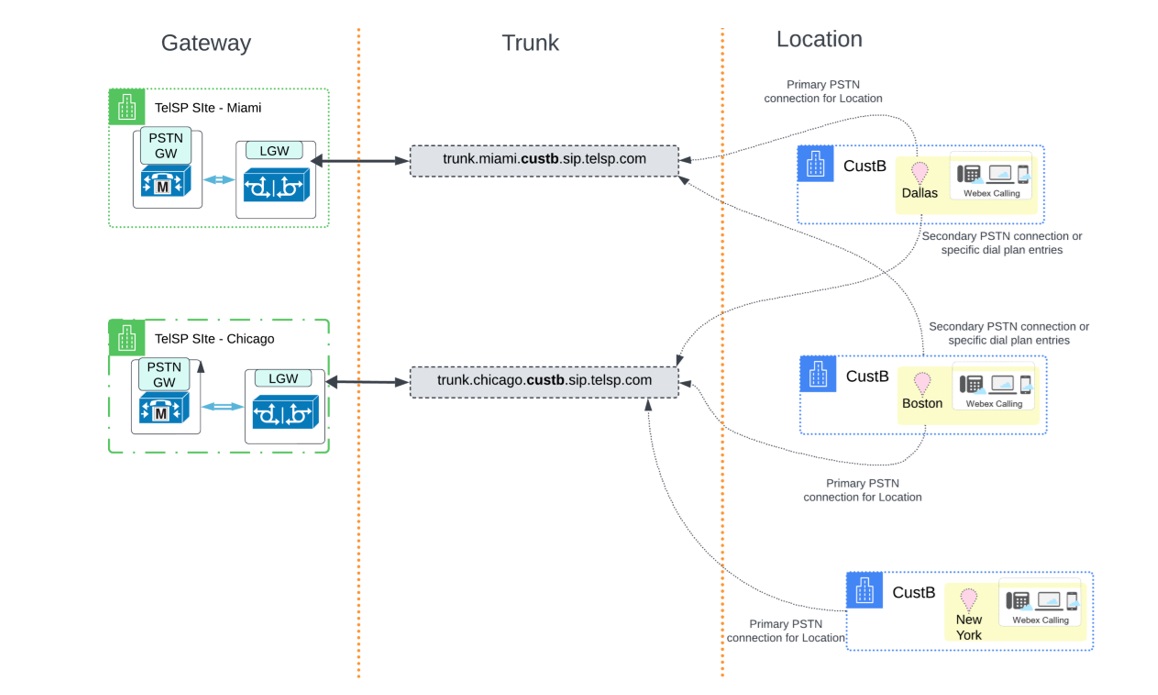
The illustration shows a third location namely New York, which you can add later and point to the trunk_chicago trunk as its primary PSTN connection.
Requirements to configure IP address
When deploying a local gateway that shares multiple trunks, Cisco mandates using a unique FQDN per trunk. See Configure-trunks,-route-groups,-and-dial-plans-for-Webex-Calling for details.
Using an IP address and a well-known port per trunk is an ideal choice. However, procuring a public IPv4 address can be challenging to some partners who wish to use one address per gateway per site.
Therefore read these important pointers:
-
Cisco doesn’t mandate an IP address per trunk.
-
A trunk address can resolve to a unique IP address or to the address shared between another trunk.
-
Cisco recommends to configure each trunk connection with a unique IP address and port combination on the Local Gateway for the following reasons:
-
Maintaining separate TCP connection links per trunk supports the maximum concurrent call capacity per trunk. Sharing IP address and port combinations across trunks can negatively impact call capacity.
-
Provides network level isolation between customers
-
It’s typical of Session border controllers to reuse the ephemeral TCP socket connection unless there’s isolation provided as a unique tenant partitioned by an IP address or a unique listen port for the tenant.
-
Connection or connections per trunk through tenant isolation provides better throughput specifically in network conditions with high data loss. Therefore traffic from one customer doesn’t impact the other.
-
IP Address per gateway: Trunk configuration and recommendations
Refer to these examples of different models for planning:
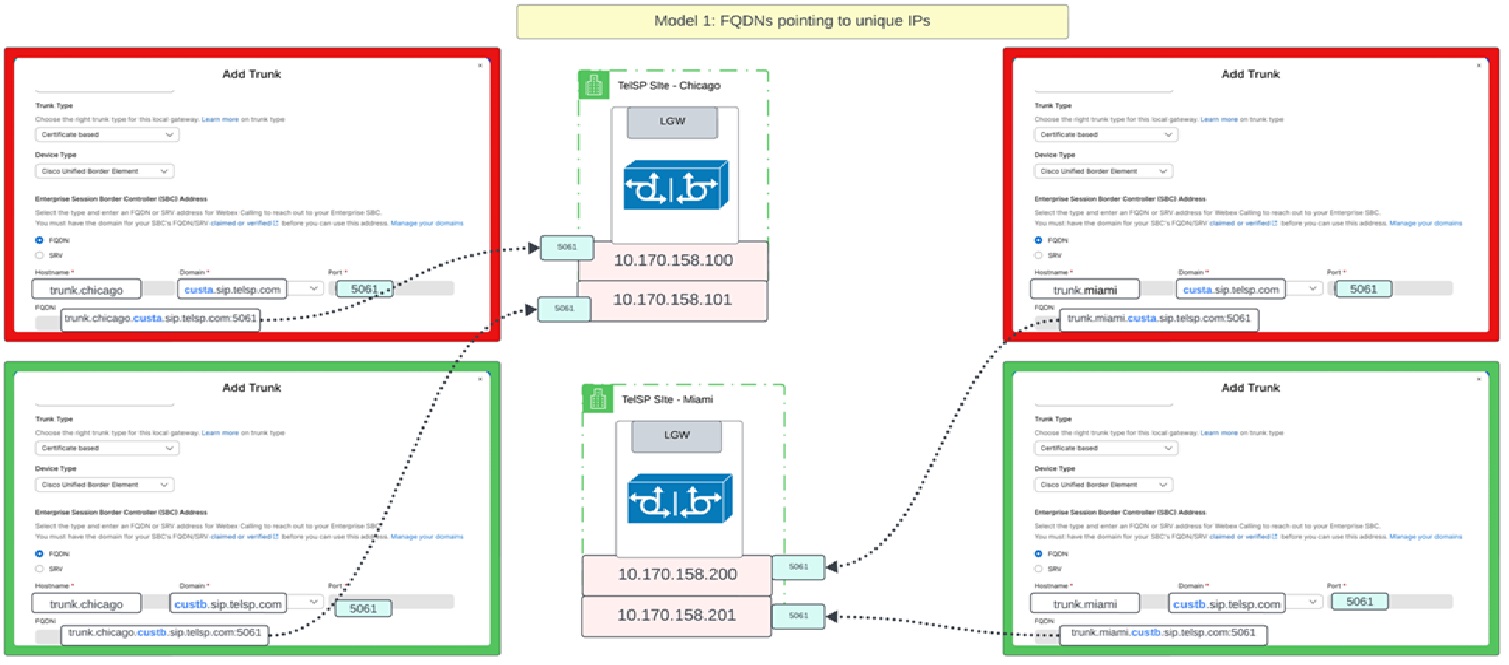
Model 1: Unique IP address per trunk
In this model, all trunks hosted by both gateways resolve to a unique IP address and each of these trunks may or may not use the same port but ideally the same port.
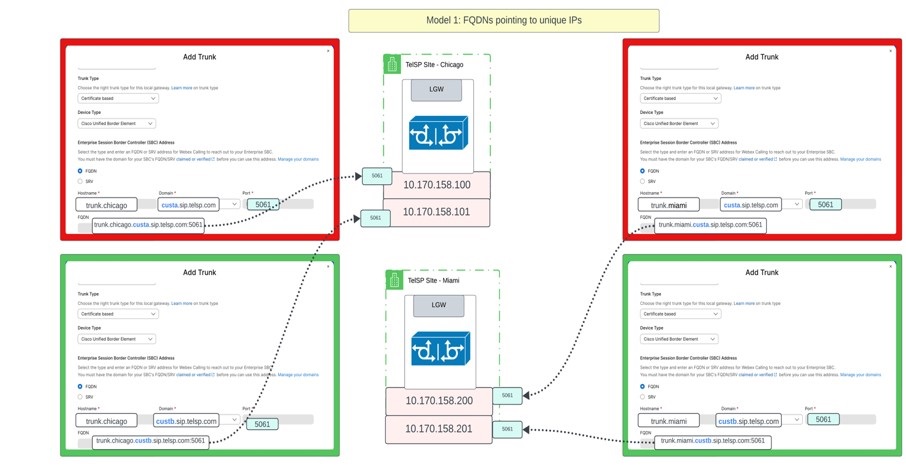
Representing the information in a tabular format:
| Trunk address (FQDN) | IP address | Port |
|---|---|---|
| trunk.miami.custa.sip.telsp.com | 10.170.158.200 | 5061 |
| trunk.miami.custb.sip.telsp.com | 10.170.158.201 | 5061 |
| trunk.chicago.custa.sip.telsp.com | 10.170.158.100 | 5061 |
| trunk.chicago.custb.sip.telsp.com | 10.170.158.101 | 5061 |
In this same model, the partner can use an SRV address. Webex Calling only allows “_sips._tcp” as the service and protocol combination to discover the peer address if it’s an SRV record.
| Trunk address (SRV) | SRV Address | A Record | IP Address | Port |
|---|---|---|---|---|
| trunk.miami.custa.sip.telsp.com | _sips._tcp.trunk.miami.custa.sip.telsp.com | miami.custa.sip.telsp.com | 10.170.158.200 | 5061 |
| trunk.miami.custb.sip.telsp.com | _sips._tcp.trunk.miami.custb.sip.telsp.com | miami.custb.sip.telsp.com | 10.170.158.201 | 5061 |
| trunk.chicago.custa.sip.telsp.com | _sips._tcp.trunk.chicago.custa.sip.telsp.com | chicago.custa.sip.telsp.com | 10.170.158.100 | 5061 |
| trunk.chicago.custb.sip.telsp.com | _sips._tcp.trunk.chicago.custb.sip.telsp.com | chicago.custb.sip.telsp.com | 10.170.158.101 | 5061 |
A sample of how an SRV record resolves
nslookup -type=srv _sips._tcp.trunk.miami.custa.sip.telsp.com
Server:		8.8.8.8
Address:	8.8.8.8#53

Non-authoritative answer:
_sips._tcp.trunk.miami.custa.sip.telsp.com = 3600 50 5061 miami.custa.sip.telsp.com
Model 2: Shared IP per gateway, unique listen ports
In this model, all trunks hosted on the Chicago local gateway resolves to the same IP address and all trunks hosted on the Miami local gateway resolves to a different IP. However, when using the same IP, each trunk is configured using an FQDN in the control hub and is configured with a unique port.
| Trunk address | IP Address | Port |
|---|---|---|
| trunk.miami.custa.sip.telsp.com | 10.170.158.200 | 5061 |
| trunk.miami.custb.sip.telsp.com | 10.170.158.200 | 5062 |
| trunk.chicago.custa.sip.telsp.com | 10.170.158.100 | 5061 |
| trunk.chicago.custb.sip.telsp.com | 10.170.158.100 | 5062 |
In this same model, the partner is using an SRV address. Webex Calling only allows “_sips._tcp” as the service and protocol combination to discover the peer address if it’s an SRV record.
| Trunk address (SRV) | SRV Address | A Record | IP Address | Port |
|---|---|---|---|---|
| trunk.miami.custa.sip.telsp.com | _sips._tcp.trunk.miami.custa.sip.telsp.com | miami.sip.telsp.com | 10.170.158.200 | 5061 |
| trunk.miami.custb.sip.telsp.com | _sips._tcp.trunk.miami.custb.sip.telsp.com | miami.sip.telsp.com | 10.170.158.200 | 5062 |
| trunk.chicago.custa.sip.telsp.com | _sips._tcp.trunk.chicago.custa.sip.telsp.com | chicago.sip.telsp.com | 10.170.158.100 | 5061 |
| trunk.chicago.custb.sip.telsp.com | _sips._tcp.trunk.chicago.custb.sip.telsp.com | chicago.sip.telsp.com | 10.170.158.100 | 5062 |
Another sample of how an SRV record resolves is as follows. In this example, there exists 1 A record per IP address. However, the port is unique per address and is represented through a specific DNS configuration linking an SRV address to the right port.
nslookup -type=srv _sips._tcp.trunk.miami.custa.sip.telsp.com
Server:		8.8.8.8
Address:	8.8.8.8#53

Non-authoritative answer:
_sips._tcp.trunk.miami.custa.sip.telsp.com = 3600 50 5061 miami.sip.telsp.com

nslookup -type=srv _sips._tcp.trunk.miami.custb.sip.telsp.com
Server:		8.8.8.8
Address:	8.8.8.8#53

Non-authoritative answer:
_sips._tcp.trunk.miami.custb.sip.telsp.com = 3600 50 5062 miami.sip.telsp.com
For SRV-based trunks, the Peer cert identity is initially populated from the configured SRV values and can be customized, subject to the same validation rules.
Set up a domain server and generate the certificate
The partner owns telsp.com and its subdomains. Therefore, the DNS server and the authority to get certificates signed by an approved Certificate authority lies with the partner.
-
Cisco Webex expects the partner to publish the FQDN or SRV address including A Records in the public domain.
-
Cisco Webex expects the partner to use one of the certificate authorities listed in this document.
When configuring trunks using FQDN or SRV:
-
Each trunk must still have a unique FQDN for routing and identification
-
DNS records (A Record or SRV) must be correctly configured and resolvable
-
These FQDNs are used for signalling and routing. Certificate validation is performed against the configured Peer cert identity, which defaults to the trunk FQDN values but can be customized to a shared, partner-owned identity.
The Peer cert identity field pre-populates from the trunk FQDN and can be overridden with a shared, partner-owned domain to use a single certificate across multiple customer trunks.
Set up the Gateway
Use these resources to set up a local gateway.
To set up Cisco CUBE, use this procedure: Configure Local Gateway on Cisco IOS XE for Webex Calling
You can set up approved third-party SBCs, see: Get started with Local Gateway
Set up the partner hosted gateway in accordance with these guidelines: Get started with Local Gateway
Set each trunk according to the relevant instructions for the SBC device. For the Cisco CUBE instructions, see: Configure Local Gateway on Cisco IOS XE for Webex Calling
Set up voice classes, dial peers, and dial peer groups for incoming and outgoing traffic for the trunk as per the image: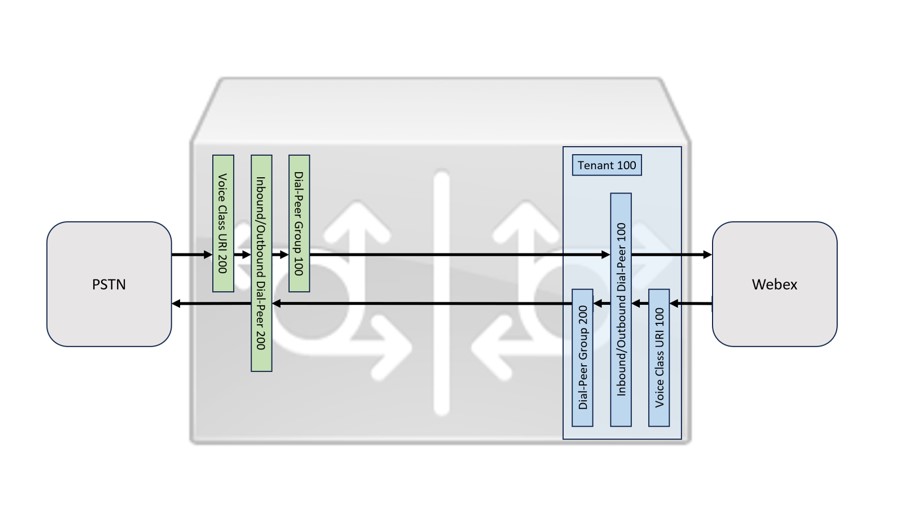
Partner hosted certificate-based gateway
While provisioning a trunk, Control Hub provides an option to configure Peer cert identity in the Add Trunk page. This enhancement simplifies the workflow by enabling partners to configure and reuse a single top-level domain across multiple customer organizations. This approach eliminates the need for separate certificates per customer or trunk, reducing operational effort and simplifying the setup process.
When configuring trunks in Control Hub, define a Peer cert identity to enable the use of a single certificate for your top-level domain across all customer organizations. Ensure that the certificate’s CN or SAN includes this top-level domain. With Peer cert identity, the local gateway uses a single certificate whose CN or SAN contains the partner’s shared domain (for example, sip.telsp.com). Wildcard certificates (for example, *.sip.telsp.com) are not supported. Webex Calling accepts this certificate for every customer trunk explicitly configured with that value as its Peer cert identity. The certificate must contain the exact configured Peer cert identity value in its CN or SAN. This eliminates the need to configure separate certificates or CN/SAN entries for individual trunk FQDNs.
Domain verification and certificate usage
It’s important to understand how domain verification differs from certificate usage:
-
Domain verification (Per customer)—Each customer organization must independently verify the domain (for example,
sip.telsp.com) by adding a unique TXT record in DNS. This ensures that the partner owns the domain and prevents unauthorized usage. -
Certificate management (Global)—A single certificate issued for the partner’s top-level domain can be shared across all customer trunks using Peer cert identity. There’s no requirement to maintain separate certificates per customer or per trunk.
Peer cert identity behaviour
Peer cert identity defines the identity that Webex Calling expects in the certificate presented by the local gateway.
When configured:
-
Webex Calling validates the certificate by matching the configured Peer cert identity against the CN or SAN in the certificate
-
If the values match, the TLS connection is accepted
-
If the values don’t match, the connection is rejected
Only trunks explicitly configured with the matching Peer cert identity are allowed to authenticate.
Certificate validation alone isn’t the only check performed during authentication. In addition to validating the certificate CN or SAN against the configured Peer cert identity, Webex Calling also verifies that the trunk FQDN is explicitly configured and associated with the matching Peer cert identity in Control Hub.
The Peer cert identity is pre-populated from the trunk FQDN/SRV values. If you keep the defaults, the existing per-trunk certificate behavior is unchanged. Existing certificate-based trunks continue to work without modification. You can adopt a shared Peer cert identity on new or existing trunks at your own pace, and both models can coexist.
-
Valid configuration example:
-
Certificate CN—sip.telsp.com
-
Certificate SAN—custa.sip.telsp.com
-
Peer cert identity—custa.sip.telsp.com
-
Trunk FQDN—trunk.miami.custa.sip.telsp.com
Result—The connection succeeds because the Peer cert identity (custa.sip.telsp.com) matches the SAN value in the certificate, and the trunk FQDN (trunk.miami.custa.sip.telsp.com) is a subdomain of the configured Peer cert identity.
-
-
Connection failure example:
-
Certificate CN—sip.telsp.com
-
Certificate SAN—custa.sip.telsp.com
-
Peer cert identity—custb.sip.telsp.com
-
Trunk FQDN—trunk.miami.custb.sip.telsp.com
Result—The connection fails at TLS handshake because the Peer cert identity (custb.sip.telsp.com) is not present in the certificate's CN or SAN. The trunk FQDN is correctly a subdomain of the Peer cert identity, but the certificate does not carry that identity.
-
-
Invalid configuration example:
-
Certificate CN—sip.telsp.com
-
Certificate SAN—custa.sip.telsp.com
-
Peer cert identity—custa.sip.telsp.com
-
Trunk FQDN—trunk.miami.custb.sip.telsp.com
Result—Control Hub rejects this configuration at save time because the trunk FQDN (trunk.miami.custb.sip.telsp.com) is not equal to or a subdomain of the configured Peer cert identity (custa.sip.telsp.com).
-
Configure gateway trunks in the Control Hub
From the Partner Hub, you can launch the Control Hub for either CustA or CustB and configure the gateway. Use this procedure to configure for each customer:
- Create the trunk—Add a trunk under Calling/Call Routing/Trunk for each partner shared gateway. To set up a trunk, see Configure trunks, route groups, and dial plans for Webex Calling
-
Add a domain and verify—Add and verify the following domain that is used to create a trunk under Management/Organization Settings/Domains.
CustomerB CustomerC sip.telsp.com sip.telsp.com On adding a domain, a token is generated and placed in the TXT record for the domain in the partner’s DNS server. This record allows Control Hub to verify that the domain is owned by the partner. For details, see Manage your domains
The common domain is used for verification on each customer. However, since this verification happens at the customer organization level, ensure that a different token is generated and used for verification on each customer organization. Because a single domain is used across customer organizations, and each customer organization must independently verify the domain using a unique TXT record, even when sharing the same domain.
Only domain verification is required for Peer cert identity. Don’t claim the shared domain into a customer organization. A domain can be claimed by only one organization, while the same domain can be verified in multiple organizations.
- Set up SBC address with FQDN—
For the Miami gateway:
Parameter CustomerB CustomerC Location Denver Boston Trunk Name trunk_miami trunk_miami Trunk Type Certificate based Certificate based Device Type e.g. Cisco Unified Border Element (or another supported device) e.g. Cisco Unified Border Element (or another supported device) SBC Address type FQDN FQDN Hostname lgw.miami lgw.miami Domain sip.telsp.com sip.telsp.com Port 5061 5062 FQDN lgw.miami.customerB.sip.telsp.com:5061 lgw.miami.customerC.sip.telsp.com:5062 Maximum number of concurrent calls (250-6500) 500 500 For the Chicago gateway:
Parameter CustomerB CustomerC Location Detroit Dallas Trunk Name trunk_chicago trunk_chicago Trunk Type Certificate based Certificate based Device Type e.g. Cisco Unified Border Element (or another supported device) e.g. Cisco Unified Border Element (or another supported device) SBC Address type FQDN FQDN Hostname lgw.chicago lgw.chicago Domain sip.telsp.com sip.telsp.com Port 5061 5062 FQDN lgw.chicago.customerB.sip.telsp.com:5061 lgw.chicago.customerC.sip.telsp.com:5062 Maximum number of concurrent calls (250-6500) 500 500 -
(Optional) Trunk names don’t need to be unique across customer organizations. Reusing the same name (for example, trunk_miami) makes the trunk easier to track.
-
Certain SBCs allow configuring the same port but this configuration can impact the capacity. Therefore, use different ports.
-
- Peer cert identity—
-
Prefix—The prefix is optional. Leave it empty to set the Peer cert identity to the domain alone. This is the shared-certificate model used in this article (Peer cert identity—sip.telsp.com, covering all customer trunks). Optionally, enter a prefix to define a more specific certificate identity (for example, prefix: customerB, Domain: customerB.sip.telsp.com for a per-customer certificate). The trunk FQDN itself remains defined by the SBC address Host name and Domain fields and must be equal to or a subdomain of the resulting Peer cert identity.
Example:
Prefix—customerB
Domain—sip.telsp.com
Result—customerB.sip.telsp.com
-
Domain: Select a domain from the list of domains verified in the customer organization. The resulting Peer cert identity (prefix + domain) must match the CN or SAN of the certificate your SBC presents. Webex Calling uses this value to authenticate the TLS connection.
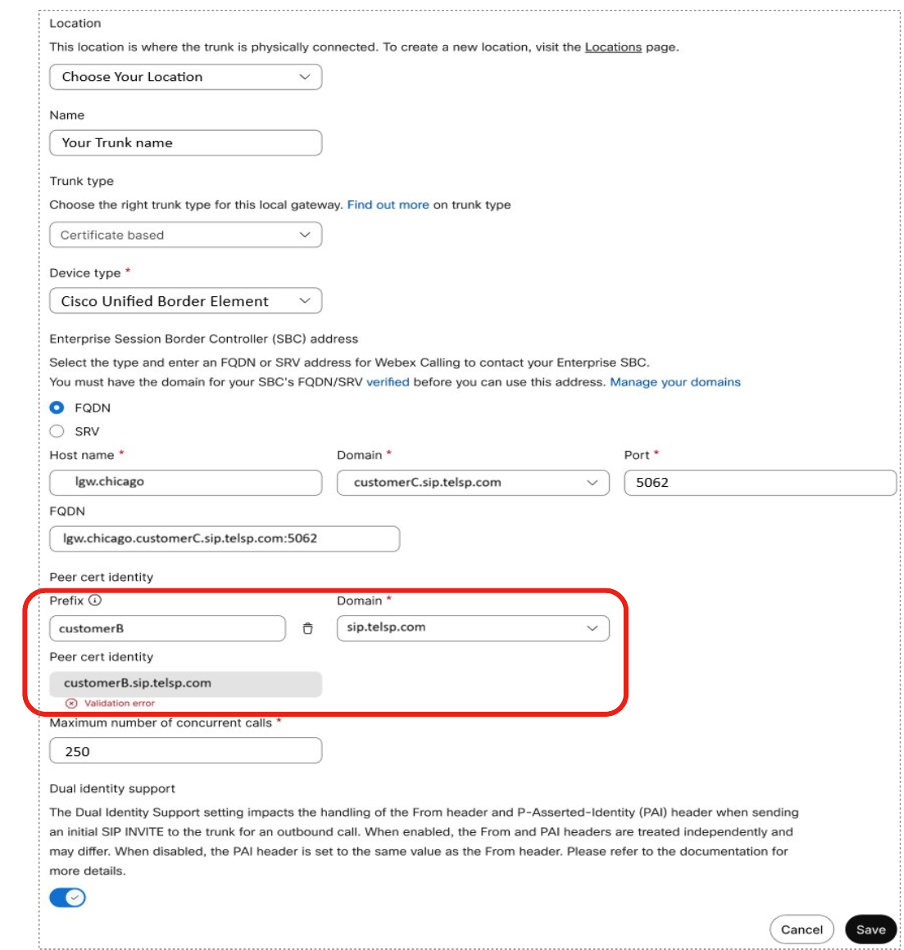
Control Hub rejects this configuration at save time because the trunk FQDN is not under the configured Peer cert identity.
If the Peer cert identity does not match the CN or SAN in the certificate presented by the SBC, Webex Calling rejects the TLS connection and the trunk fails to establish.
-
- Using Trunks—choose any arbitrary location for the trunk, due to the following:
-
Any location can use the trunk in a PSTN connection.
-
You can access the trunk through a route group.
-
Any dial plan can use the trunk.
-
See the trunk definitions with the associated locations:
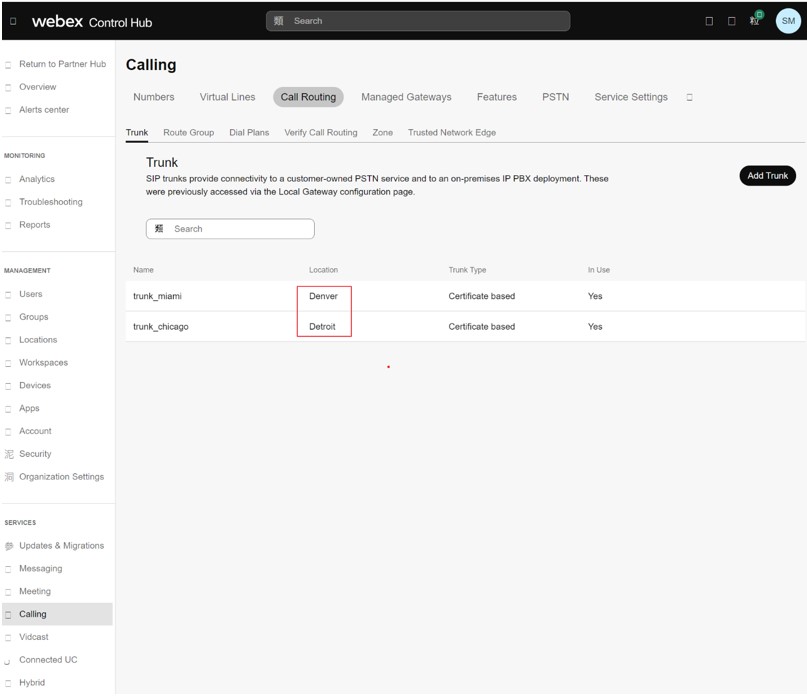
You can use these trunks to create route groups. In the image, a route group rg_miami_chicago is defined which routes calls to the trunk_miami trunk as the primary option and to the trunk_chicago trunk as a secondary option.
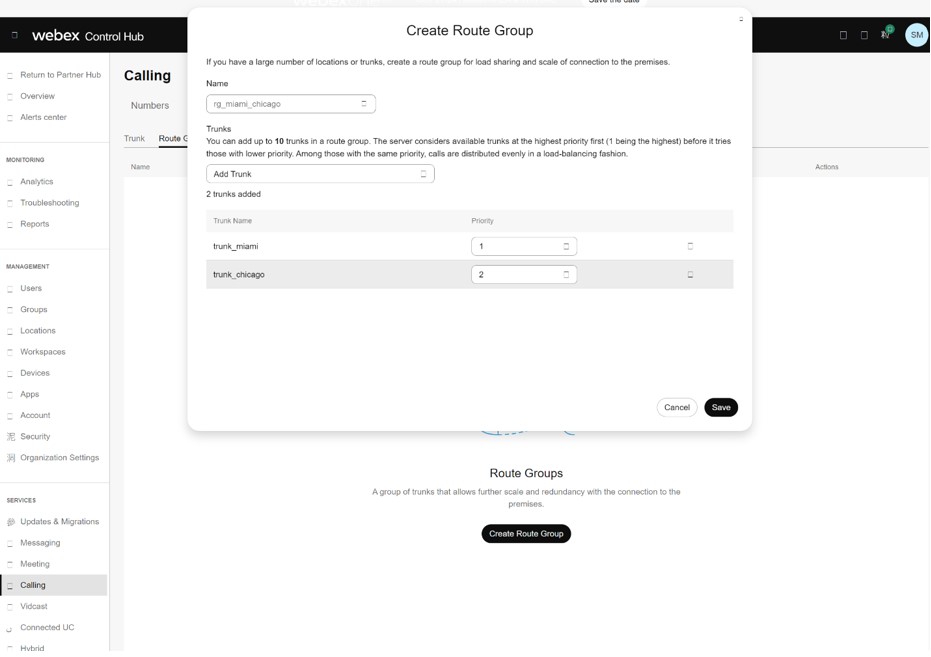
You can define a second route group rg_chicago_miami which routes calls to the trunk_chicago trunk as the primary option and to the trunk_miami trunk as a secondary option.
-
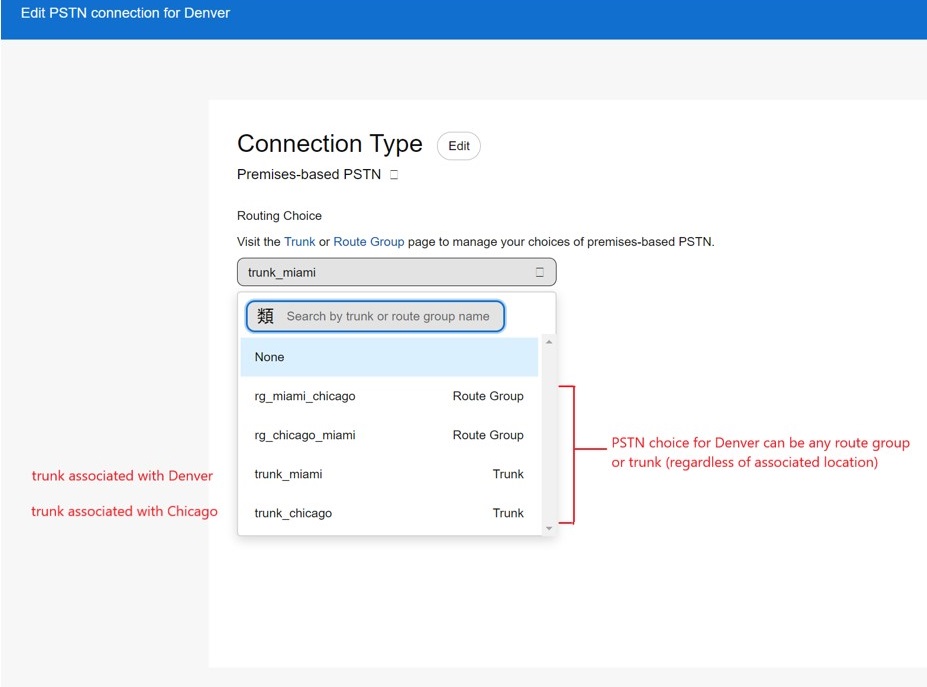
The trunks and route groups defined are now available in the Calling Connection PSTN option for each location. In the image, see the Denver location.
-
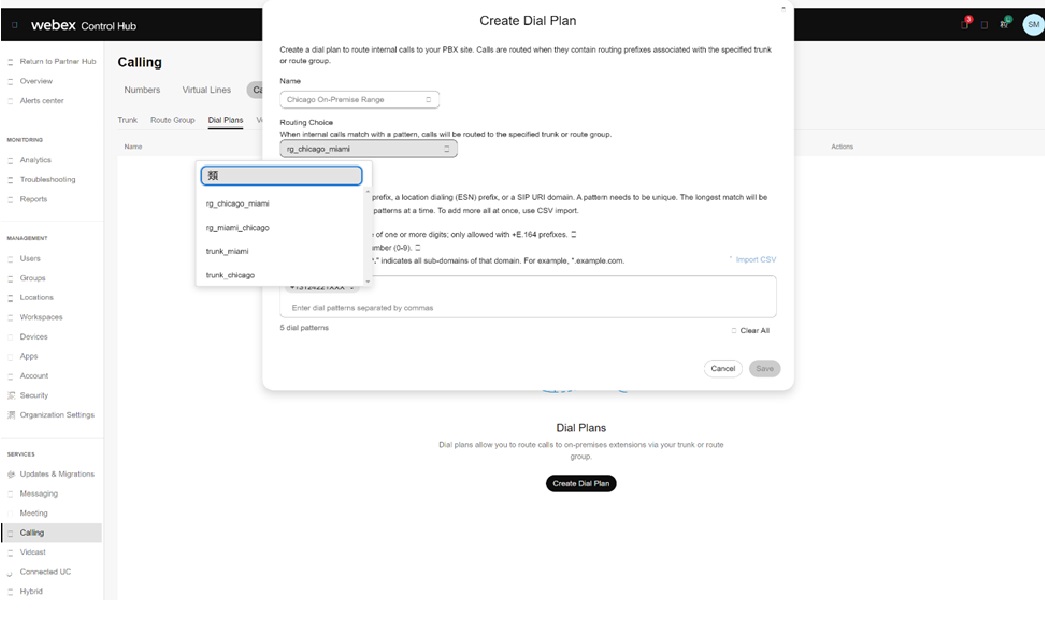
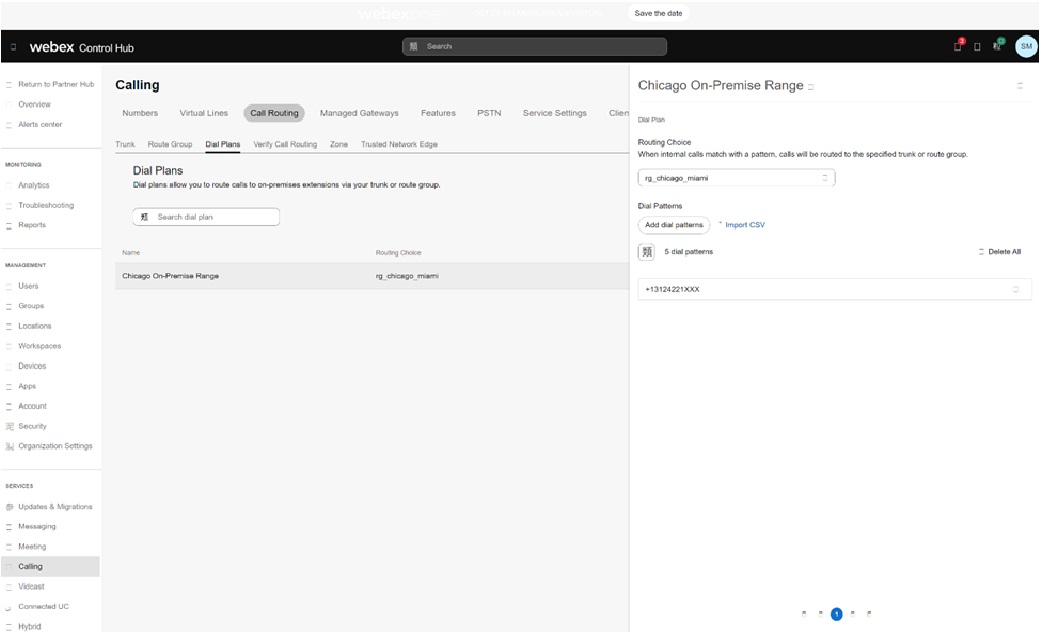
You can use the trunks and route groups in the dial plan definition. For example, an on-premise number range in Chicago for the customer are split out to terminate to the rg_chicago_miami route group (for all locations) in the image:
Provision at scale with APIs
Partners managing a large number of customer organizations can provision domains at scale using APIs instead of the UI.


