
Thanks for your feedback.
Closed captioning on Board, Desk, and Room Series
 Feedback?
Closed captioning isn’t available in space-backed meetings.
All participants can choose whether they want to have closed captioning on the screen of their own device. Tap the Captions  button in the call controls, and toggle closed captioning on or off.
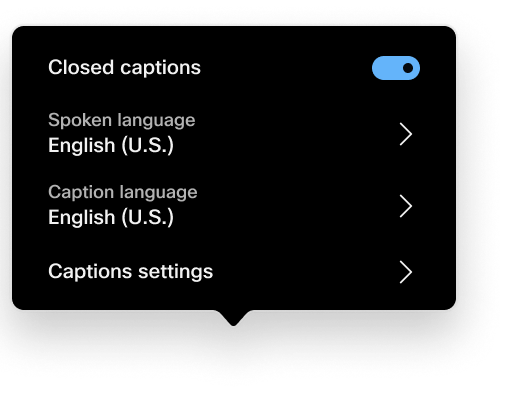
After toggling on closed captions, you can choose the language for the spoken language and the captions. The default language is English (U.S.).
To customize the closed captions, select Caption settings and choose Appearance and Font size.
-
Font sizes: Small, Medium, or Large.
Default size: Small.
-
Appearance: Light or Dark.
Default appearance: Dark.
An administrator can configure the font size and appearance to a different default value:
- Webex Meetings CaptionCustomization FontSize: Small/Medium/Large
- Webex Meetings CaptionCustomization FontColor: Light/Dark
The meeting host might turn on manual captions, for example to allow for translation during a meeting. If they do, you'll see a notification, and can choose to toggle the captions on or not.
If you're hosting, you can read more about manual captioning in this article.
Supported languages
Don't speak the language? You can now choose to translate from English to one of the 120+ languages that are supported on the RoomOS devices. We also support translation from 16 languages to English.
Real-time translation is an add-on, and purchase of this feature will include the Webex Assistant subscription.
Spoken languages
By default, 5 spoken languages for transcription are included for free to users with Webex Assistant or automated closed captions:
-
English
-
French
-
German
-
Italian
-
Spanish
With the Real-time Translation license , these features are expanded to 16 total spoken languages and 120+ caption languages:
-
Arabic
-
Chinese, Mandarin (Simplified)
-
Chinese, Mandarin (Traditional)
-
Danish
-
Dutch
-
English
-
French
-
German
-
Hindi
-
Italian
-
Japanese
-
Korean
-
Polish
-
Portuguese
-
Spanish
-
Turkish
- The maximum number of unique caption languages that can be used at the same time in a meeting or webinar is five.
- Not all dialects are included in translation.
Caption languages:
-
Afrikaans
-
Albanian
-
Amharic
-
Arabic
-
Armenian
-
Azerbaijani
-
Basque
-
Belarusian
-
Bengali
-
Bosnian
-
Bulgarian
-
Cantonese (Traditional)
-
Catalan
-
Cebuano
-
Chinese (Simplified)
-
Chinese (Traditional)
-
Corsican
-
Croatian
-
Czech
-
Danish
-
Dutch
-
English
-
Esperanto
-
Estonian
-
Finnish
-
French
-
French (Canadian)
-
Frisian
-
Galician
-
Georgian
-
German
-
Greek
-
Gujarati
-
Haitian Creole
-
Hausa
-
Hawaiian
-
Hebrew
-
Hindi
-
Hmong
-
Hungarian
-
Icelandic
-
Igbo
-
Indonesian
-
Irish
-
Italian
-
Japanese
-
Javanese
-
Kannada
-
Kazakh
-
Khmer
-
Kinyarwanda
-
Korean
-
Kurdish
-
Kyrgyz
-
Lao
-
Latin
-
Latvian
-
Lithuanian
-
Luxembourgish
-
Macedonian
-
Malagasy
-
Malay
-
Malayalam
-
Maltese
-
Maori
-
Marathi
-
Mongolian
-
Myanmar (Burmese)
-
Nepali
-
Norwegian
-
Nyanja (Chichewa)
-
Odia (Oriya)
-
Pashto
-
Persian
-
Polish
-
Portuguese (Portugal, Brazil)
-
Punjabi
-
Romanian
-
Russian
-
Samoan
-
Scots Gaelic
-
Serbian
-
Sesotho
-
Shona
-
Sindhi
-
Sinhala (Sinhalese)
-
Slovak
-
Slovenian
-
Somali
-
Spanish
-
Sundanese
-
Swahili
-
Swedish
-
Tagalog (Filipino)
-
Tajik
-
Tamil
-
Tatar
-
Telugu
-
Thai
-
Turkish
-
Turkmen
-
Ukrainian
-
Urdu
-
Uyghur
-
Uzbek
-
Vietnamese
-
Welsh
-
Xhosa
-
Yiddish
-
Yoruba
-
Zulu


