Miten voimme auttaa?

Yritätkö liittyä neuvotteluun?


5.–8.10.2026, Austin, Texas, ja virtuaalisesti | Rekisteröityminen WebexOne 2026 -tapahtumaan on nyt avattu.
5.–8.10.2026, Austin, Texas, ja virtuaalisesti | Rekisteröityminen WebexOne 2026 -tapahtumaan on nyt avattu.


Aloittaminen
Kaikki, mitä sinun tarvitsee tietää, jotta voit aloittaa Webexin käytön.


Ohjeet tuotteen mukaan
Tutustu tuotekohtaisiin ohjeisiin.

Hallinta
Webexin hallinta Control Hubissa ja Partner Hubissa.

Webex AI
Edistyksellisin generatiiviseen tekoälyyn pohjautuva alusta hybridityöhön ja asiakaskokemukseen.


Uudet ominaisuudet
Uutta Webexissä. Lue lisää uusista ominaisuuksista, ongelmista, korjauksista ja muista päivityksistä.

Suositut artikkelit
Kirjautumisongelmat Webexissä


Webex Suite
Paikallisen yhdyskäytävän määrittäminen Cisco IOS XE:ssä Webex Callingia varten

Calling
Webex Callingin porttiopastiedot
Calling
Virtuaalisten taustojen käyttö Webex Meetingsissä ja Webex Webinarsissa
Webex Suite
Rakenna ja hallinnoi Flow Designeria

Asiakaskokemus
Webexin tekoälyasiakaspalvelijan hallintaopas
Asiakaskokemus
Ota yhteys Webex-sovelluslaitteeseen

Laitteet

Videoresurssit


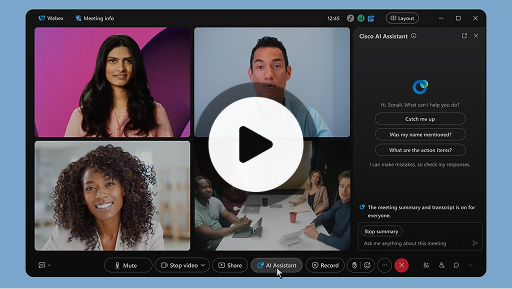
Ciscon tekoälyavustaja kokouksissa
Webex Suite
Joskus saatat liittyä kokoukseen myöhässä, sinun on poistuttava hetkeksi tai teet useaa tehtävää yhtä aikaa ja keskittymisesi herpaantuu. Tekoälyavustajan kokousyhteenvetojen avulla voit nopeasti selvittää, mistä olet jäänyt paitsi, kerrata keskustelun, esittää kysymyksiä häiritsemättä kokousta ja pysyä keskustelun tasalla. Saat myös yhteenvedon ja transkription kokouksen jälkeen ilman, että sinun tarvitsee tallentaa kokousta.
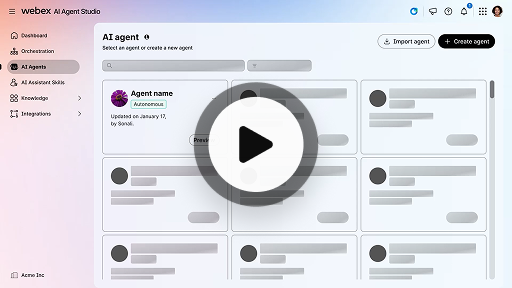
Autonomisen tekoälyasiakaspalvelijan luonti
Asiakaskokemus
Autonomiset tekoälyasiakaspalvelijat työskentelevät itsenäisesti ilman suoraa ihmisen väliintuloa. Autonomiset tekoälyasiakaspalvelijat voivat hyödyntää ja käyttää tietovarastoa antaakseen tietoa sisältäviä ja paikkansapitäviä vastauksia käyttäjien kysymyksiin. Nämä tekoälyasiakaspalvelijat käyttävät edistyneitä algoritmeja ja koneoppimisen tekniikoita tietojen analysoimiseen, oppiakseen ympäristöstään ja muuttaakseen toimintaansa tiettyjen tavoitteiden saavuttamiseksi.
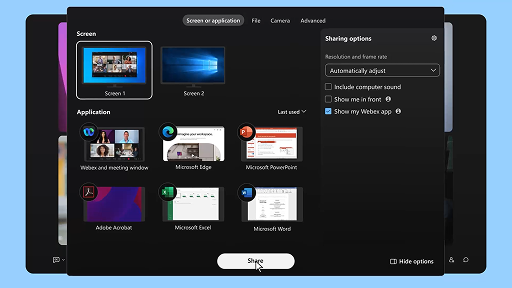
Sisällön jakaminen kokouksessa
Webex Suite
Kun jaat sisältöä Webex-sovelluksessa, kaikki kokouksessa olevat näkevät helposti, mistä keskustellaan. Kuka tahansa voi jakaa sisältöä, mutta vain yksi henkilö voi jakaa sisältöä kerrallaan.
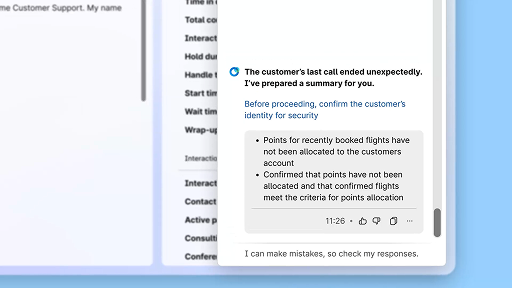
Paranna tehokkuutta tekoälyn luomien yhteenvetojen avulla
Asiakaskokemus
Cisco-tekoälyasiakaspalvelija tarjoaa selkeitä yhteenvetoja aikaisemmista keskusteluista, minkä ansiosta asiakaspalvelijat voivat jatkaa keskusteluja saumattomasti ilman tietojen keräämistä uudelleen. Tämän välittömän tietoihin pääsyn ansiosta asiakaspalvelijat voivat keskittyä tarjoamaan tehokkaita ratkaisuja. Tämä mahdollistaa nopeammat ratkaisuajat ja selkeämmän asiakaskokemuksen.
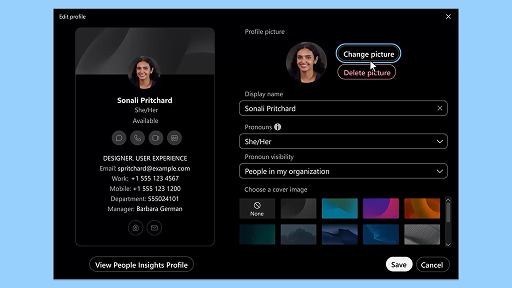
Webex-sovellus | Profiilikuvan lisääminen
Webex Suite
Lisäämällä Webex-sovelluksessa kuvan profiiliisi helpotat tunnistamistasi. Ennen kuin lataat kuvan, profiilisi näyttää vain nimikirjaimesi ympyrän sisällä.
Tekoälyasiakaspalvelijan hyvinvointitaukomuistutukset (Wellness Break)
Asiakaskokemus
Kun tekoälyasiakaspalvelija suosittelee hyvinvointitaukoa, näkyviin tulee toast-ilmoitus: Tauon hyväksyminen: Hyväksy tauko napsauttamalla kohtaa Pidä tauko. Ciscon tekoälyasiakaspalvelija-widgetti avautuu automaattisesti valintasi vahvistamiseksi. Kun päätät meneillään olevan keskustelun, yhden minuutin pituinen hyvinvointitauko alkaa automaattisesti. Tilaksesi vaihtuu Hyvinvointitauko (Wellbeing Break), jotta seuraava keskustelu ei siirry sinulle jonoon. Näytölle tulee näkyviin 5 sekunnin laskuri, kun yhden minuutin taukosi päättyy. Kun taukosi on valmis, ikkuna katoaa automaattisesti ja tilaksi vaihtuu Käytettävissä (Available), jolloin voit aloittaa seuraavan keskustelun.
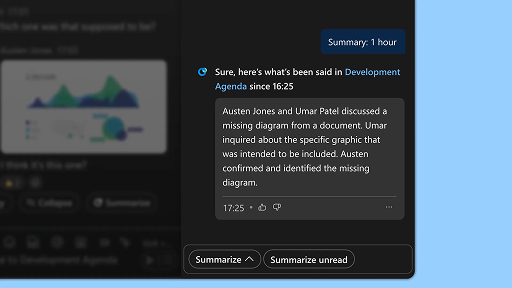
Luo tilayhteenvetoja
Webex Suite
Jos olet kiireinen tai poissa toimistolta, ajan tasalla pysyminen kaikista tiloista voi olla haastavaa. Tekoälyavustaja voi luoda tiloista yhteenvetoja, jotka auttavat sinut nopeasti ajan tasalle tilan viesteistä ja keskusteluista. Pysyt päätöksien, pääkohtien ja keskusteluiden tasalla yhdellä silmäyksellä.
Paranna tehokkuutta ja viestintää reaaliaikaisilla tallenteilla
Asiakaskokemus
Reaaliaikaisten tallenteiden tarkoituksena on auttaa sinua optimoimaan asiakaskeskusteluja tehokkaasti. Koska reaaliaikaiset tallenteet ovat saatavilla suoraan Agent Desktopillasi, ne auttavat parantamaan keskittymistäsi, viestinnän selkeyttä ja vastauksen paikkansapitävyyttä. Niiden tarkoituksena on parantaa ymmärrystäsi ja tehokkuuttasi puheluiden aikana, vähentää väärinkäsityksiä ja tukea sinua korkealaatuisten keskusteluiden tuottamisessa tuottavuuden ja asiakastyytyväisyyden kasvattamiseksi.
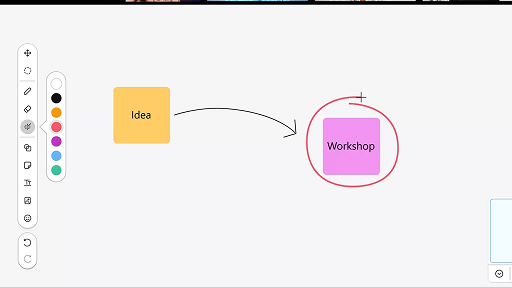
Piirtotaulun käyttäminen kokouksissa
Webex Suite
Jos olet kiireinen tai poissa toimistolta, ajan tasalla pysyminen kaikista tiloista voi olla haastavaa. Tekoälyavustaja voi luoda tiloista yhteenvetoja, jotka auttavat sinut nopeasti ajan tasalle tilan viesteistä ja keskusteluista. Pysyt päätöksien, pääkohtien ja keskusteluiden tasalla yhdellä silmäyksellä.
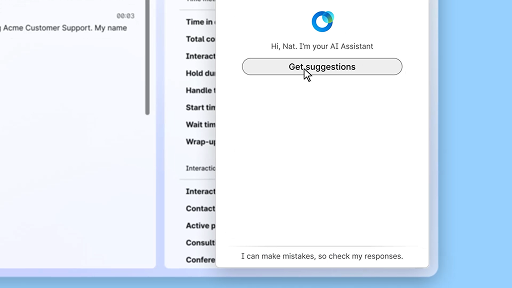
Vastaa varmuudella reaaliaikaisella avulla
Asiakaskokemus
Reaaliaikainen apu on Ciscon tekoälyasiakaspalvelijan toiminto, joka auttaa sinua ymmärtämään asiakaspalvelukeskustelun kontekstin, tunnistamaan asiakkaan aikomuksen ja antamaan välittömästi asiaan liittyviä suosituksia. Se ohjaa työtäsi reaaliajassa ehdottaen mitä sanoa tai tehdä ja auttaen monimutkaisissa toimenpiteissä. Lisäksi se voi tarvittaessa jopa aloittaa työnkulun automaattisesti.
Ciscon tekoälyavustaja kokouksissa
Webex Suite
Joskus saatat liittyä kokoukseen myöhässä, sinun on poistuttava hetkeksi tai teet useaa tehtävää yhtä aikaa ja keskittymisesi herpaantuu. Tekoälyavustajan kokousyhteenvetojen avulla voit nopeasti selvittää, mistä olet jäänyt paitsi, kerrata keskustelun, esittää kysymyksiä häiritsemättä kokousta ja pysyä keskustelun tasalla. Saat myös yhteenvedon ja transkription kokouksen jälkeen ilman, että sinun tarvitsee tallentaa kokousta.
Autonomisen tekoälyasiakaspalvelijan luonti
Asiakaskokemus
Autonomiset tekoälyasiakaspalvelijat työskentelevät itsenäisesti ilman suoraa ihmisen väliintuloa. Autonomiset tekoälyasiakaspalvelijat voivat hyödyntää ja käyttää tietovarastoa antaakseen tietoa sisältäviä ja paikkansapitäviä vastauksia käyttäjien kysymyksiin. Nämä tekoälyasiakaspalvelijat käyttävät edistyneitä algoritmeja ja koneoppimisen tekniikoita tietojen analysoimiseen, oppiakseen ympäristöstään ja muuttaakseen toimintaansa tiettyjen tavoitteiden saavuttamiseksi.
Sisällön jakaminen kokouksessa
Webex Suite
Kun jaat sisältöä Webex-sovelluksessa, kaikki kokouksessa olevat näkevät helposti, mistä keskustellaan. Kuka tahansa voi jakaa sisältöä, mutta vain yksi henkilö voi jakaa sisältöä kerrallaan.
Paranna tehokkuutta tekoälyn luomien yhteenvetojen avulla
Asiakaskokemus
Cisco-tekoälyasiakaspalvelija tarjoaa selkeitä yhteenvetoja aikaisemmista keskusteluista, minkä ansiosta asiakaspalvelijat voivat jatkaa keskusteluja saumattomasti ilman tietojen keräämistä uudelleen. Tämän välittömän tietoihin pääsyn ansiosta asiakaspalvelijat voivat keskittyä tarjoamaan tehokkaita ratkaisuja. Tämä mahdollistaa nopeammat ratkaisuajat ja selkeämmän asiakaskokemuksen.
Webex-sovellus | Profiilikuvan lisääminen
Webex Suite
Lisäämällä Webex-sovelluksessa kuvan profiiliisi helpotat tunnistamistasi. Ennen kuin lataat kuvan, profiilisi näyttää vain nimikirjaimesi ympyrän sisällä.
Tekoälyasiakaspalvelijan hyvinvointitaukomuistutukset (Wellness Break)
Asiakaskokemus
Kun tekoälyasiakaspalvelija suosittelee hyvinvointitaukoa, näkyviin tulee toast-ilmoitus: Tauon hyväksyminen: Hyväksy tauko napsauttamalla kohtaa Pidä tauko. Ciscon tekoälyasiakaspalvelija-widgetti avautuu automaattisesti valintasi vahvistamiseksi. Kun päätät meneillään olevan keskustelun, yhden minuutin pituinen hyvinvointitauko alkaa automaattisesti. Tilaksesi vaihtuu Hyvinvointitauko (Wellbeing Break), jotta seuraava keskustelu ei siirry sinulle jonoon. Näytölle tulee näkyviin 5 sekunnin laskuri, kun yhden minuutin taukosi päättyy. Kun taukosi on valmis, ikkuna katoaa automaattisesti ja tilaksi vaihtuu Käytettävissä (Available), jolloin voit aloittaa seuraavan keskustelun.
Luo tilayhteenvetoja
Webex Suite
Jos olet kiireinen tai poissa toimistolta, ajan tasalla pysyminen kaikista tiloista voi olla haastavaa. Tekoälyavustaja voi luoda tiloista yhteenvetoja, jotka auttavat sinut nopeasti ajan tasalle tilan viesteistä ja keskusteluista. Pysyt päätöksien, pääkohtien ja keskusteluiden tasalla yhdellä silmäyksellä.
Paranna tehokkuutta ja viestintää reaaliaikaisilla tallenteilla
Asiakaskokemus
Reaaliaikaisten tallenteiden tarkoituksena on auttaa sinua optimoimaan asiakaskeskusteluja tehokkaasti. Koska reaaliaikaiset tallenteet ovat saatavilla suoraan Agent Desktopillasi, ne auttavat parantamaan keskittymistäsi, viestinnän selkeyttä ja vastauksen paikkansapitävyyttä. Niiden tarkoituksena on parantaa ymmärrystäsi ja tehokkuuttasi puheluiden aikana, vähentää väärinkäsityksiä ja tukea sinua korkealaatuisten keskusteluiden tuottamisessa tuottavuuden ja asiakastyytyväisyyden kasvattamiseksi.
Piirtotaulun käyttäminen kokouksissa
Webex Suite
Jos olet kiireinen tai poissa toimistolta, ajan tasalla pysyminen kaikista tiloista voi olla haastavaa. Tekoälyavustaja voi luoda tiloista yhteenvetoja, jotka auttavat sinut nopeasti ajan tasalle tilan viesteistä ja keskusteluista. Pysyt päätöksien, pääkohtien ja keskusteluiden tasalla yhdellä silmäyksellä.
Vastaa varmuudella reaaliaikaisella avulla
Asiakaskokemus
Reaaliaikainen apu on Ciscon tekoälyasiakaspalvelijan toiminto, joka auttaa sinua ymmärtämään asiakaspalvelukeskustelun kontekstin, tunnistamaan asiakkaan aikomuksen ja antamaan välittömästi asiaan liittyviä suosituksia. Se ohjaa työtäsi reaaliajassa ehdottaen mitä sanoa tai tehdä ja auttaen monimutkaisissa toimenpiteissä. Lisäksi se voi tarvittaessa jopa aloittaa työnkulun automaattisesti.

Tutustu oppimistyökaluihimme

Adoption Hub
Launch, train, and grow with these helpful resources.

Webex Academy
Itsenäiset kurssit ja nopeat videotutoriaalit mahdollistavat opiskelun milloin tahansa.

Onboarding resources
Make onboarding easy with customizable self-serve resources.

Live-tapahtumat
Opi Webexillä: Tapahtumat, verkkoseminaarit ja päivittäiset esittelyt.
Muut resurssit

Webexin lataaminen
Kaikki tavat luoda kontakteja yhdellä alustalla.


Webex-yhteisö
Yhteisö on keskus, jossa voit olla vuorovaikutuksessa muiden käyttäjien kanssa, pyytää apua Cisco-asiantuntijoilta, jakaa asiantuntemustasi, laajentaa verkostoasi ja kasvaa ammattilaisena.

Webex Insider
Ole yhteydessä ihmisiin, jotka jakavat intohimosi Webexiä kohtaan. Hanki sisäpiirin katsaus uusiin konsepteihin Webexin tuoteportfolio- ja kokemustiimeiltä.

Webex kehittäjille
Kehitä Webexin kanssa yritysyhteistyön tulevaisuutta. Lue lisää Webex API:stä ja SDK:ista ja luo seuraava suuri yhteistyösovellus Webex-alustalla.

Tarvitsetko vielä apua?
Etsi tarvitsemasi apu erilaisista tukiresursseista.
Miten arvioisit kokemuksesi tästä sivusta?


Hyödytön
Hyödyllinen
Miten tästä sivusta voitaisiin tehdä sinulle hyödyllisempi?
Kiitos palautteestasi.


