Jak możemy pomóc?

Próbujesz dołączyć do spotkania?

Migracja z Unified CM do Webex Calling
Przeprowadź bezproblemową migrację do platformy Webex Calling w chmurze klasy korporacyjnej przy użyciu naszego szczegółowego przewodnika
Przeprowadź bezproblemową migrację do platformy Webex Calling w chmurze klasy korporacyjnej przy użyciu naszego szczegółowego przewodnika

Rozpocznij
Wszystko, co musisz wiedzieć, aby zacząć korzystać z usługi Webex.


Pomoc według produktu
Uzyskaj pomoc dotyczącą naszych poszczególnych produktów.

Administrowanie
Zarządzanie Webex w usłudze Control Hub i Partner Hub.

AI Webex
Najbardziej zaawansowana obsługiwana przez generatywną sztuczną inteligencję platforma pracy hybrydowej i środowiska klientów.


Co nowego
Zobacz, co nowego w Webex. Dowiedz się więcej o nowych funkcjach, błędach, poprawkach i innych nowościach.

Popularne artykuły
Problemy z logowaniem do Webex


Webex Suite
Konfigurowanie bramy lokalnej w rozwiązaniu Cisco IOS XE dla usługi Webex Calling

Calling
Informacje o portach używanych przez Webex Calling
Calling
Korzystanie z wirtualnych teł w aplikacjach Webex Meetings i Webex Webinars
Webex Suite
Twórz przepływy i zarządzaj nimi za pomocą Flow Designera

Środowisko klienta
Podręcznik administratora Webex AI Agent Studio
Środowisko klienta
Nawiąż połączenie z urządzeniem z aplikacją Webex

Urządzenia

Zasoby wideo


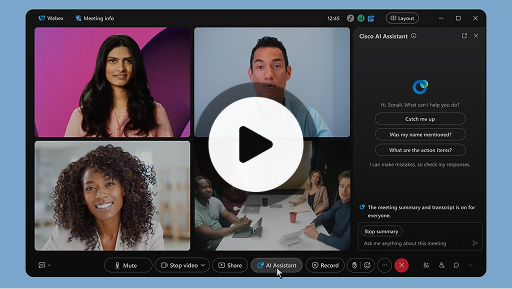
Cisco AI Assistant na spotkaniach
Webex Suite
Może zdarzyć się, że spóźnisz się na spotkanie, będziesz potrzebować na chwilę je opuścić bądź będziesz wykonywać więcej niż jedno zadanie jednocześnie i z tego powodu się zdekoncentrujesz. Dzięki asystentowi SI możesz teraz szybko nadrobić zaległości, korzystając z podsumowań spotkań, jak również dowiedzieć się, czego aktualnie dotyczy rozmowa, zadawać pytania bez zakłócania spotkania i być na bieżąco z jego przebiegiem. Ponadto po spotkaniu otrzymasz jego podsumowanie i transkrypcję — bez konieczności nagrywania spotkania.
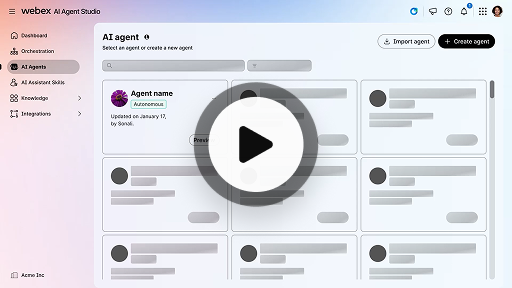
Tworzenie autonomicznego agenta AI
Środowisko klienta
Autonomiczni agenci AI działają niezależnie, bez bezpośredniej ludzkiej interwencji. Autonomiczni agenci uzyskują dostęp do repozytorium wiedzy i korzystają z niego, aby precyzyjnie odpowiadać na pytania użytkowników i podawać im informacje. Agenci ci wykorzystują zaawansowane algorytmy i techniki uczenia maszynowego do analizowania danych, wyciągania wniosków z danego środowiska i podejmowania działań w celu osiągnięcia określonych rezultatów.
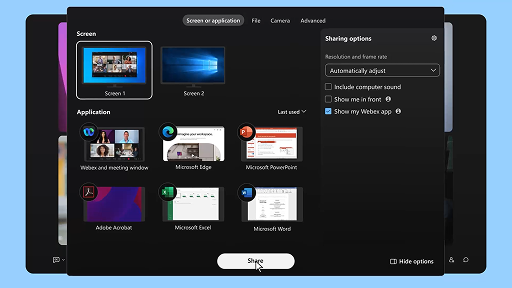
Udostępnij zawartość podczas spotkania
Webex Suite
Kiedy udostępniasz zawartość w aplikacji Webex, wszyscy uczestnicy mogą łatwo dowiedzieć się, o czym mowa na spotkaniu. Udostępniać zawartość może każdy, jednak tylko jedna osoba na raz.
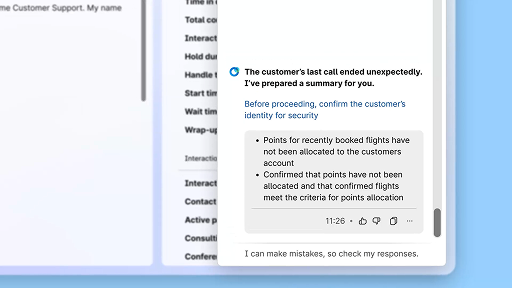
Poprawa efektywności za pomocą streszczeń wygenerowanych przez AI
Środowisko klienta
Cisco AI Assistant zapewnia zwięzłe podsumowania wcześniejszych interakcji, co umożliwia agentom bezproblemowe kontynuowanie konwersacji bez konieczności ponownego gromadzenia danych. Ten natychmiastowy dostęp do informacji pozwala agentom skupić się na dostarczaniu efektywnych rozwiązań, co przekłada się na szybsze eliminowanie problemów i spójniejszą obsługę klienta.
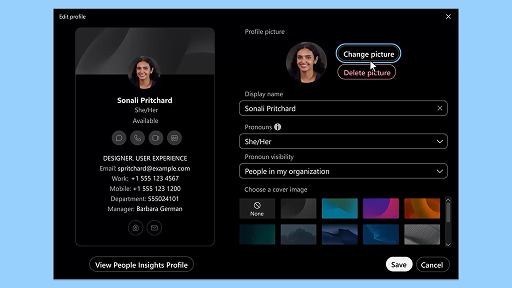
Aplikacja Webex | Dodawanie zdjęcia profilowego
Webex Suite
Ułatw innym rozpoznanie Cię w aplikacji Webex, dodając zdjęcie do swojego profilu. Przed dodaniem zdjęcia na jego miejscu widnieją Twoje inicjały w kole.
Powiadomienia asystenta AI Assistant o przerwie na poprawę kondycji
Środowisko klienta
Gdy AI Assistant zaleca przerwę na poprawę kondycji, wyświetla się powiadomienie: Akceptacja przerwy: Kliknij Take a break (Zrób przerwę), aby zaakceptować przerwę. Widget Cisco AI Assistant otwiera się automatycznie, aby potwierdzić wybór. Po zakończeniu bieżącej interakcji 1-minutowa przerwa na poprawę kondycji rozpocznie się automatycznie. Status zmieni się na Wellbeing Break (Przerwa na poprawę kondycji), aby zapobiec przekazaniu kolejnej interakcji do Twojej kolejki. Gdy 1-minutowa przerwa będzie dobiegała końca, na ekranie wyświetli się licznik odliczający 5 sekund. Po zakończeniu okno przerwy zamknie się automatycznie, a status zmieni się na Available (Dostępny), co świadczy o gotowości do kolejnej interakcji.
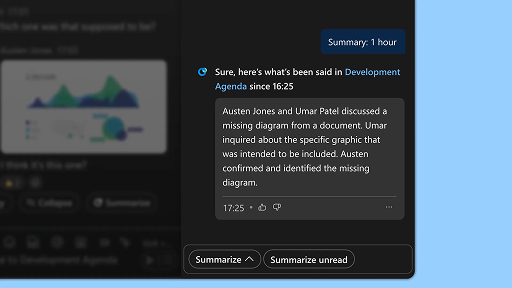
Generuj podsumowania obszaru
Webex Suite
Gdy masz mało czasu lub jesteś poza biurem, nadrobienie zaległości dotyczących obszarów może być dużym wyzwaniem. Asystent SI generuje podsumowania obszarów, by pomóc Ci szybko nadrobić zaległości dotyczące pominiętych wiadomości i konwersacji w danym obszarze. Nie przegap żadnych decyzji ani kluczowych punktów i bądź od razu na bieżąco z dyskusją.
Zwiększ wydajność dzięki transkrypcjom w czasie rzeczywistym
Środowisko klienta
Transkrypcje w czasie rzeczywistym pomagają w optymalizacji wydajności komunikacji podczas interakcji z klientami. Oferując transkrypcje na żywo bezpośrednio na pulpicie agenta, funkcja ta może pomóc w zwiększeniu skupienia, przejrzystości i dokładności odpowiedzi. Funkcja ma na celu zapewnienie lepszego zrozumienia i wydajności podczas połączeń, ograniczenie nieporozumień i wspieranie w dbaniu o wysokiej jakości interakcje, które polepszają wyniki i podnoszą poziom satysfakcji klientów.
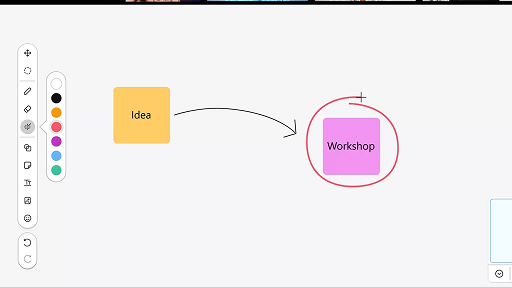
Korzystaj z tablicy podczas spotkań
Webex Suite
Gdy masz mało czasu lub jesteś poza biurem, nadrobienie zaległości dotyczących obszarów może być dużym wyzwaniem. Asystent SI generuje podsumowania obszarów, by pomóc Ci szybko nadrobić zaległości dotyczące pominiętych wiadomości i konwersacji w danym obszarze. Nie przegap żadnych decyzji ani kluczowych punktów i bądź od razu na bieżąco z dyskusją.
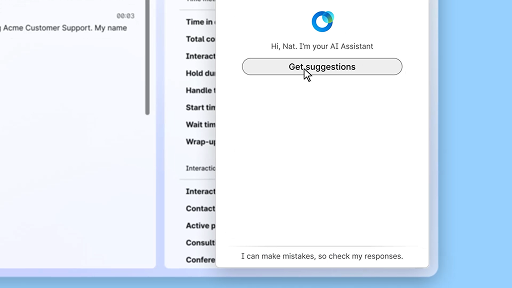
Pewnie udzielaj odpowiedzi dzięki wsparciu w czasie rzeczywistym
Środowisko klienta
Wsparcie w czasie rzeczywistym to funkcja asystenta Cisco AI Assistant, którą opracowano z myślą o zapewnieniu pomocy w interakcjach z klientami na żywo poprzez ciągłą analizę kontekstu rozmowy, rozpoznawanie zamiarów klienta oraz natychmiastowe przedstawianie odpowiednich rekomendacji. Gwarantuje wsparcie w czasie rzeczywistym, sugerując Ci, co powiedzieć i zrobić podczas złożonych procedur. Umożliwia również automatyczne inicjowanie przepływów pracy.
Cisco AI Assistant na spotkaniach
Webex Suite
Może zdarzyć się, że spóźnisz się na spotkanie, będziesz potrzebować na chwilę je opuścić bądź będziesz wykonywać więcej niż jedno zadanie jednocześnie i z tego powodu się zdekoncentrujesz. Dzięki asystentowi SI możesz teraz szybko nadrobić zaległości, korzystając z podsumowań spotkań, jak również dowiedzieć się, czego aktualnie dotyczy rozmowa, zadawać pytania bez zakłócania spotkania i być na bieżąco z jego przebiegiem. Ponadto po spotkaniu otrzymasz jego podsumowanie i transkrypcję — bez konieczności nagrywania spotkania.
Tworzenie autonomicznego agenta AI
Środowisko klienta
Autonomiczni agenci AI działają niezależnie, bez bezpośredniej ludzkiej interwencji. Autonomiczni agenci uzyskują dostęp do repozytorium wiedzy i korzystają z niego, aby precyzyjnie odpowiadać na pytania użytkowników i podawać im informacje. Agenci ci wykorzystują zaawansowane algorytmy i techniki uczenia maszynowego do analizowania danych, wyciągania wniosków z danego środowiska i podejmowania działań w celu osiągnięcia określonych rezultatów.
Udostępnij zawartość podczas spotkania
Webex Suite
Kiedy udostępniasz zawartość w aplikacji Webex, wszyscy uczestnicy mogą łatwo dowiedzieć się, o czym mowa na spotkaniu. Udostępniać zawartość może każdy, jednak tylko jedna osoba na raz.
Poprawa efektywności za pomocą streszczeń wygenerowanych przez AI
Środowisko klienta
Cisco AI Assistant zapewnia zwięzłe podsumowania wcześniejszych interakcji, co umożliwia agentom bezproblemowe kontynuowanie konwersacji bez konieczności ponownego gromadzenia danych. Ten natychmiastowy dostęp do informacji pozwala agentom skupić się na dostarczaniu efektywnych rozwiązań, co przekłada się na szybsze eliminowanie problemów i spójniejszą obsługę klienta.
Aplikacja Webex | Dodawanie zdjęcia profilowego
Webex Suite
Ułatw innym rozpoznanie Cię w aplikacji Webex, dodając zdjęcie do swojego profilu. Przed dodaniem zdjęcia na jego miejscu widnieją Twoje inicjały w kole.
Powiadomienia asystenta AI Assistant o przerwie na poprawę kondycji
Środowisko klienta
Gdy AI Assistant zaleca przerwę na poprawę kondycji, wyświetla się powiadomienie: Akceptacja przerwy: Kliknij Take a break (Zrób przerwę), aby zaakceptować przerwę. Widget Cisco AI Assistant otwiera się automatycznie, aby potwierdzić wybór. Po zakończeniu bieżącej interakcji 1-minutowa przerwa na poprawę kondycji rozpocznie się automatycznie. Status zmieni się na Wellbeing Break (Przerwa na poprawę kondycji), aby zapobiec przekazaniu kolejnej interakcji do Twojej kolejki. Gdy 1-minutowa przerwa będzie dobiegała końca, na ekranie wyświetli się licznik odliczający 5 sekund. Po zakończeniu okno przerwy zamknie się automatycznie, a status zmieni się na Available (Dostępny), co świadczy o gotowości do kolejnej interakcji.
Generuj podsumowania obszaru
Webex Suite
Gdy masz mało czasu lub jesteś poza biurem, nadrobienie zaległości dotyczących obszarów może być dużym wyzwaniem. Asystent SI generuje podsumowania obszarów, by pomóc Ci szybko nadrobić zaległości dotyczące pominiętych wiadomości i konwersacji w danym obszarze. Nie przegap żadnych decyzji ani kluczowych punktów i bądź od razu na bieżąco z dyskusją.
Zwiększ wydajność dzięki transkrypcjom w czasie rzeczywistym
Środowisko klienta
Transkrypcje w czasie rzeczywistym pomagają w optymalizacji wydajności komunikacji podczas interakcji z klientami. Oferując transkrypcje na żywo bezpośrednio na pulpicie agenta, funkcja ta może pomóc w zwiększeniu skupienia, przejrzystości i dokładności odpowiedzi. Funkcja ma na celu zapewnienie lepszego zrozumienia i wydajności podczas połączeń, ograniczenie nieporozumień i wspieranie w dbaniu o wysokiej jakości interakcje, które polepszają wyniki i podnoszą poziom satysfakcji klientów.
Korzystaj z tablicy podczas spotkań
Webex Suite
Gdy masz mało czasu lub jesteś poza biurem, nadrobienie zaległości dotyczących obszarów może być dużym wyzwaniem. Asystent SI generuje podsumowania obszarów, by pomóc Ci szybko nadrobić zaległości dotyczące pominiętych wiadomości i konwersacji w danym obszarze. Nie przegap żadnych decyzji ani kluczowych punktów i bądź od razu na bieżąco z dyskusją.
Pewnie udzielaj odpowiedzi dzięki wsparciu w czasie rzeczywistym
Środowisko klienta
Wsparcie w czasie rzeczywistym to funkcja asystenta Cisco AI Assistant, którą opracowano z myślą o zapewnieniu pomocy w interakcjach z klientami na żywo poprzez ciągłą analizę kontekstu rozmowy, rozpoznawanie zamiarów klienta oraz natychmiastowe przedstawianie odpowiednich rekomendacji. Gwarantuje wsparcie w czasie rzeczywistym, sugerując Ci, co powiedzieć i zrobić podczas złożonych procedur. Umożliwia również automatyczne inicjowanie przepływów pracy.

Poznaj nasze narzędzia edukacyjne

Adoption Hub
Launch, train, and grow with these helpful resources.

Akademia Webex
Naucz się wszystkiego z samodzielnych szkoleń oraz szybkich samouczków wideo.

Onboarding resources
Make onboarding easy with customizable self-serve resources.

Wydarzenia na żywo
Ucz się z Webex: Wydarzenia, webinaria i codzienne demonstracje.
Inne zasoby

Pobierz aplikację Webex
Jedna platforma — wiele sposobów połączeń.


Społeczność Webex
Społeczność stanowi centrum kontaktu z innymi użytkownikami oraz specjalistami z firmy Cisco, w którym można poprosić o pomoc, podzielić się wiedzą, nawiązać kontakty i rozwijać się profesjonalnie.

Webex Insider
Nawiązuj kontakty z ludźmi podzielającymi Twoje zainteresowanie produktami Webex, z pierwszej ręki poznawaj nowe koncepcje tych produktów i korzystaj z zespołowego doświadczenia.

Webex dla deweloperów
Buduj przyszłość profesjonalnej współpracy dzięki Webex. Dowiedz się więcej o interfejsie API i zestawach SDK Webex, aby tworzyć nowe, wspaniałe aplikacje do współpracy na platformie Webex.

Nadal potrzebujesz pomocy?
Wyszukuj potrzebne Ci informacje w różnych zasobach wsparcia.
Jak oceniasz środowisko tej strony?


Niepomocne
Pomocne
Co moglibyśmy zrobić, żeby ta strona była bardziej przydatna?
Dziękujemy za opinię.


