Wie können wir Ihnen helfen?

Sie möchten einem Meeting beitreten?


5.–8. Oktober 2026, Austin, TX & virtuell | Die Registrierung für WebexOne 2026 ist jetzt freigegeben.
5.–8. Oktober 2026, Austin, TX & virtuell | Die Registrierung für WebexOne 2026 ist jetzt freigegeben.


Erste Schritte
Alles, was Sie benötigen, um Webex nutzen zu können.


Hilfe nach Produkt
Sie erhalten spezielle Hilfe für jedes unserer Produkte.

Administration
Webex Management in Control Hub und Partner Hub.

Webex AI
Die fortschrittlichste, auf generative KI gestützte Plattform für Hybrid-Arbeit und eine optimale Kundenerfahrung.


Neuerungen
Entdecken Sie die Neuerungen in Webex. Erfahren Sie mehr über neue Funktionen, Probleme, Fehlerbehebungen und andere Aktualisierungen.

Beliebte Artikel
Probleme bei der Anmeldung bei Webex


Webex Suite
Lokales Gateway unter Cisco IOS-XE für Webex Calling konfigurieren

Calling
Port-Referenzinformationen für Webex Calling
Calling
Verwendung von virtuellen Hintergründen für Webex Meetings und Webex Webinars
Webex Suite
Mit dem Flow Designer Abläufe erstellen und verwalten

Kundenerfahrung
Administratorhandbuch für Webex AI Agent Studio
Kundenerfahrung
Mit einem Webex-App-Gerät verbinden

Geräte

Videoressourcen


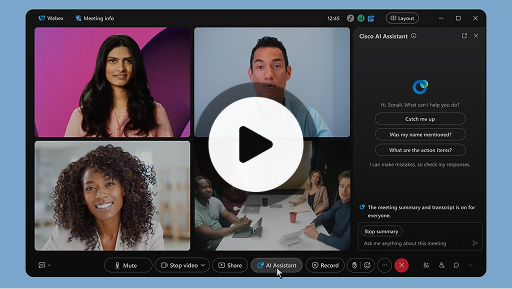
Cisco AI Assistant in meetings
Webex Suite
Manchmal treten Sie Meeting verspätet bei, müssen kurz weggehen oder sind durch Multitasking abgelenkt. Durch die Meeting-Zusammenfassungen des KI-Assistenten können Sie sich schnelle darüber informieren, was Sie verpasst haben, der Diskussion folgen und Fragen stellen, ohne das Meeting zu stören, oder bei der Unterhaltung auf dem Laufenden bleiben. Außerdem erhalten Sie nach dem Meeting eine Zusammenfassung und ein Transkript, ohne das Sie es aufzeichnen müssen.
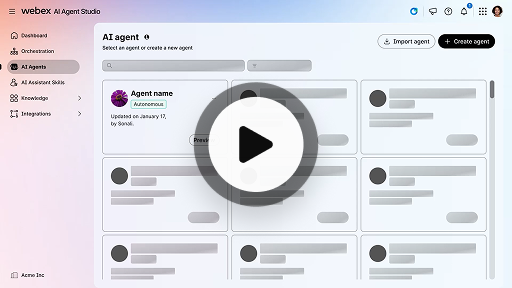
Autonomen KI-Agenten erstellen
Kundenerfahrung
Autonome KI-Agenten arbeiten unabhängig und ohne direkten Eingriff von einem Menschen. Autonome KI-Agenten können auf eine Wissensdatenbank zugreifen und diese nutzen, um informative und genaue Antworten auf Benutzeranfragen zu geben. Diese Agenten nutzen fortschrittliche Algorithmen und Techniken des maschinellen Lernens, um Daten zu analysieren, aus ihrer Umgebung zu lernen und ihr Verhalten anzupassen, um bestimmte Ziele zu erreichen.
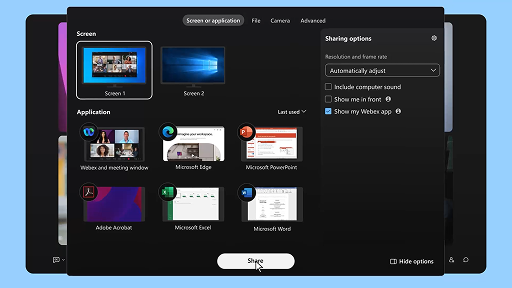
Freigeben von Inhalten während eines Meetings
Webex Suite
Wenn Sie Inhalte in der Webex-App freigeben, können alle Meeting-Teilnehmer leicht sehen, was gerade besprochen wird. Jeder kann Inhalte freigeben, es kann jedoch jeweils nur ein Bildschirm freigegeben werden.
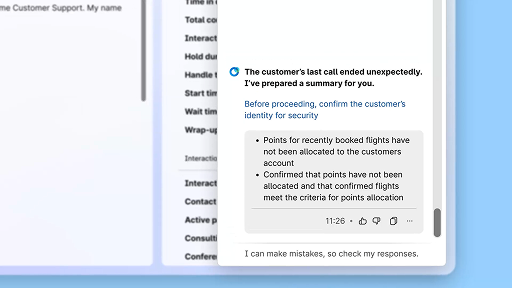
Effizienzsteigerung mit KI-generierten Zusammenfassungen
Kundenerfahrung
Der Cisco AI Assistant bietet prägnante Zusammenfassungen früherer Interaktionen, sodass die Agenten Gespräche nahtlos fortsetzen können, ohne Informationen erneut einholen zu müssen. Durch diesen sofortigen Zugriff können sich die Agenten darauf konzentrieren, effektive Lösungen anzubieten, was zu einer schnelleren Problemlösung und einem einheitlicheren Kundenerlebnis führt.
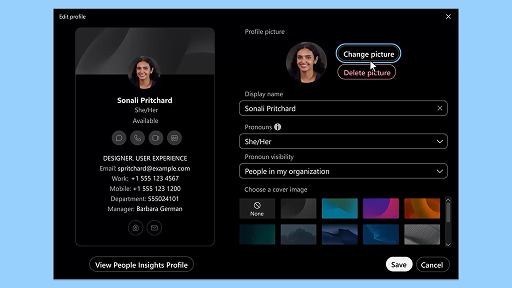
Webex-App | Hinzufügen Ihres Profilbilds
Webex Suite
Erleichtern Sie es anderen, Sie in de Webex-App zu erkennen, indem Sie Ihrem Profil ein Foto hinzufügen. Solange Sie kein Foto hochgeladen haben, werden als Profilfoto nur Ihre Initialen in einem Kreis angezeigt.
Benachrichtigungen des AI Assistant zu Erholungspausen
Kundenerfahrung
Wenn der AI Assistant eine Erholungspause empfiehlt, erscheint eine Toaster-Benachrichtigung: Eine Pause annehmen: Klicken Sie auf die Schaltfläche für eine Pause, um die Pause anzunehmen. Das Cisco AI Assistant-Widget öffnet sich automatisch, um Ihre Auswahl zu bestätigen. Nachdem Sie die aktuelle Interaktion beendet haben, beginnt automatisch Ihre 1-minütige Erholungspause. Ihr Status ändert sich zu „Erholungspause“, damit Ihnen nicht die nächste Interaktion zugewiesen wird. Wenn Ihre 1-minütige Pause zu Ende geht, erscheint ein 5-Sekunden-Countdown auf dem Bildschirm. Sobald die Pause beendet ist, schließt sich das Pausenfenster automatisch und Ihr Status ändert sich zu „Verfügbar“, sodass Sie für die nächste Interaktion bereitstehen.
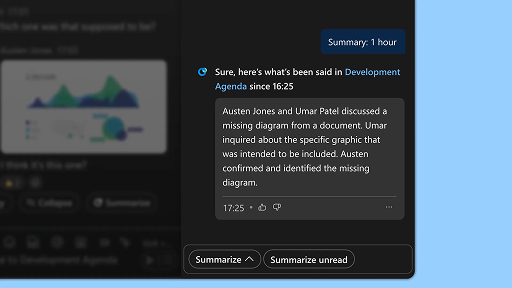
Zusammenfassungen von Bereichen erstellen
Webex Suite
Wenn Sie beschäftig sind oder einige Zeit nicht im Büro waren, kann es mühsam sein, in allen Bereich wieder auf den neuesten Stand zu kommen. Der KI-Assistent kann Bereichszusammenfassungen generieren, damit Sie schnell einen Überblick über alle verpassten Nachrichten und Unterhaltungen im Bereich erhalten und wieder auf dem Laufenden sind. Bleiben Sie informiert, was Entscheidungen und wichtige Punkte betrifft, und sehen Sie auf einen Blick, wo die Diskussion gerade steht.
Höhere Effizienz mit Abschriften in Echtzeit
Kundenerfahrung
Abschriften in Echtzeit sollen Ihnen dabei helfen, Ihre Kommunikationseffizienz während Interaktionen mit Kunden zu optimieren. Durch die Bereitstellung von Live-Transkripten direkt auf Ihrem Agent Desktop können Sie Ihre Konzentration sowie die Klarheit und die Genauigkeit Ihrer Antworten verbessern. Das Ziel besteht darin, Ihr Verständnis und Ihre Effizienz bei Telefonaten zu verbessern, Missverständnisse zu vermeiden und Sie dabei zu unterstützen, hochwertige Interaktionen zu liefern, die die Leistung und die Kundenzufriedenheit steigern.
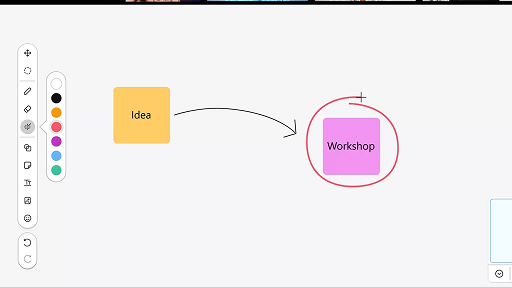
Whiteboard in Meetings verwenden
Webex Suite
Wenn Sie beschäftig sind oder einige Zeit nicht im Büro waren, kann es mühsam sein, in allen Bereich wieder auf den neuesten Stand zu kommen. Der KI-Assistent kann Bereichszusammenfassungen generieren, damit Sie schnell einen Überblick über alle verpassten Nachrichten und Unterhaltungen im Bereich erhalten und wieder auf dem Laufenden sind. Bleiben Sie informiert, was Entscheidungen und wichtige Punkte betrifft, und sehen Sie auf einen Blick, wo die Diskussion gerade steht.
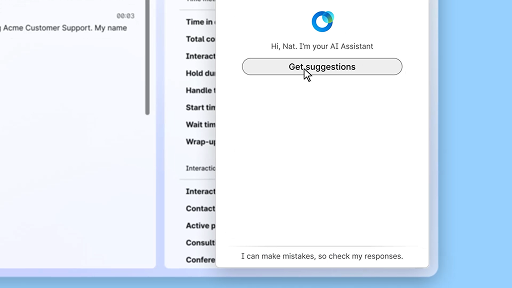
Mit der Echtzeitunterstützung souverän antworten
Kundenerfahrung
Die Echtzeitunterstützung ist eine Funktion von Cisco AI Assistant, die Sie während Live-Kundeninteraktionen unterstützt, indem sie kontinuierlich den Gesprächskontext erfasst, die Absicht des Kunden erkennt und sofort relevante Empfehlungen gibt. Sie unterstützt Sie in Echtzeit, indem sie Ihnen Vorschläge macht, was Sie sagen oder tun sollen, Ihnen hilft, komplexe Abläufe zu bewältigen, und sogar automatisch Arbeitsabläufe beginnt.
Cisco AI Assistant in meetings
Webex Suite
Manchmal treten Sie Meeting verspätet bei, müssen kurz weggehen oder sind durch Multitasking abgelenkt. Durch die Meeting-Zusammenfassungen des KI-Assistenten können Sie sich schnelle darüber informieren, was Sie verpasst haben, der Diskussion folgen und Fragen stellen, ohne das Meeting zu stören, oder bei der Unterhaltung auf dem Laufenden bleiben. Außerdem erhalten Sie nach dem Meeting eine Zusammenfassung und ein Transkript, ohne das Sie es aufzeichnen müssen.
Autonomen KI-Agenten erstellen
Kundenerfahrung
Autonome KI-Agenten arbeiten unabhängig und ohne direkten Eingriff von einem Menschen. Autonome KI-Agenten können auf eine Wissensdatenbank zugreifen und diese nutzen, um informative und genaue Antworten auf Benutzeranfragen zu geben. Diese Agenten nutzen fortschrittliche Algorithmen und Techniken des maschinellen Lernens, um Daten zu analysieren, aus ihrer Umgebung zu lernen und ihr Verhalten anzupassen, um bestimmte Ziele zu erreichen.
Freigeben von Inhalten während eines Meetings
Webex Suite
Wenn Sie Inhalte in der Webex-App freigeben, können alle Meeting-Teilnehmer leicht sehen, was gerade besprochen wird. Jeder kann Inhalte freigeben, es kann jedoch jeweils nur ein Bildschirm freigegeben werden.
Effizienzsteigerung mit KI-generierten Zusammenfassungen
Kundenerfahrung
Der Cisco AI Assistant bietet prägnante Zusammenfassungen früherer Interaktionen, sodass die Agenten Gespräche nahtlos fortsetzen können, ohne Informationen erneut einholen zu müssen. Durch diesen sofortigen Zugriff können sich die Agenten darauf konzentrieren, effektive Lösungen anzubieten, was zu einer schnelleren Problemlösung und einem einheitlicheren Kundenerlebnis führt.
Webex-App | Hinzufügen Ihres Profilbilds
Webex Suite
Erleichtern Sie es anderen, Sie in de Webex-App zu erkennen, indem Sie Ihrem Profil ein Foto hinzufügen. Solange Sie kein Foto hochgeladen haben, werden als Profilfoto nur Ihre Initialen in einem Kreis angezeigt.
Benachrichtigungen des AI Assistant zu Erholungspausen
Kundenerfahrung
Wenn der AI Assistant eine Erholungspause empfiehlt, erscheint eine Toaster-Benachrichtigung: Eine Pause annehmen: Klicken Sie auf die Schaltfläche für eine Pause, um die Pause anzunehmen. Das Cisco AI Assistant-Widget öffnet sich automatisch, um Ihre Auswahl zu bestätigen. Nachdem Sie die aktuelle Interaktion beendet haben, beginnt automatisch Ihre 1-minütige Erholungspause. Ihr Status ändert sich zu „Erholungspause“, damit Ihnen nicht die nächste Interaktion zugewiesen wird. Wenn Ihre 1-minütige Pause zu Ende geht, erscheint ein 5-Sekunden-Countdown auf dem Bildschirm. Sobald die Pause beendet ist, schließt sich das Pausenfenster automatisch und Ihr Status ändert sich zu „Verfügbar“, sodass Sie für die nächste Interaktion bereitstehen.
Zusammenfassungen von Bereichen erstellen
Webex Suite
Wenn Sie beschäftig sind oder einige Zeit nicht im Büro waren, kann es mühsam sein, in allen Bereich wieder auf den neuesten Stand zu kommen. Der KI-Assistent kann Bereichszusammenfassungen generieren, damit Sie schnell einen Überblick über alle verpassten Nachrichten und Unterhaltungen im Bereich erhalten und wieder auf dem Laufenden sind. Bleiben Sie informiert, was Entscheidungen und wichtige Punkte betrifft, und sehen Sie auf einen Blick, wo die Diskussion gerade steht.
Höhere Effizienz mit Abschriften in Echtzeit
Kundenerfahrung
Abschriften in Echtzeit sollen Ihnen dabei helfen, Ihre Kommunikationseffizienz während Interaktionen mit Kunden zu optimieren. Durch die Bereitstellung von Live-Transkripten direkt auf Ihrem Agent Desktop können Sie Ihre Konzentration sowie die Klarheit und die Genauigkeit Ihrer Antworten verbessern. Das Ziel besteht darin, Ihr Verständnis und Ihre Effizienz bei Telefonaten zu verbessern, Missverständnisse zu vermeiden und Sie dabei zu unterstützen, hochwertige Interaktionen zu liefern, die die Leistung und die Kundenzufriedenheit steigern.
Whiteboard in Meetings verwenden
Webex Suite
Wenn Sie beschäftig sind oder einige Zeit nicht im Büro waren, kann es mühsam sein, in allen Bereich wieder auf den neuesten Stand zu kommen. Der KI-Assistent kann Bereichszusammenfassungen generieren, damit Sie schnell einen Überblick über alle verpassten Nachrichten und Unterhaltungen im Bereich erhalten und wieder auf dem Laufenden sind. Bleiben Sie informiert, was Entscheidungen und wichtige Punkte betrifft, und sehen Sie auf einen Blick, wo die Diskussion gerade steht.
Mit der Echtzeitunterstützung souverän antworten
Kundenerfahrung
Die Echtzeitunterstützung ist eine Funktion von Cisco AI Assistant, die Sie während Live-Kundeninteraktionen unterstützt, indem sie kontinuierlich den Gesprächskontext erfasst, die Absicht des Kunden erkennt und sofort relevante Empfehlungen gibt. Sie unterstützt Sie in Echtzeit, indem sie Ihnen Vorschläge macht, was Sie sagen oder tun sollen, Ihnen hilft, komplexe Abläufe zu bewältigen, und sogar automatisch Arbeitsabläufe beginnt.

Unsere Lernwerkzeuge entdecken

Adoption Hub
Launch, train, and grow with these helpful resources.

Webex Academy
Lernen Sie jederzeit mit Kursen zum Selbststudium und kurzen Videotutorials.

Onboarding resources
Make onboarding easy with customizable self-serve resources.

Live-Events
Lernen mit Webex: Events, Webinare und tägliche Demos.
Andere Ressourcen

Webex herunterladen
Eine Plattform mit allen Vernetzungsoptionen:


Webex-Community
Die Community ist ein Hub, auf dem Sie sich mit Ihren Peers vernetzen und Cisco-Spezialisten um Hilfe bitten, Ihr Fachwissen teilen, ein Netzwerk aufbauen und sich beruflich weiterentwickeln können.

Webex Insider
Vernetzen Sie sich mit anderen Personen, die Ihre Leidenschaft für Webex teilen, und erhalten Sie Insiderzugang zu den neuen Konzepten der Webex-Produktportfolio- und -Erfahrungsteams.

Webex für Entwickler:
Entwickeln Sie die Zukunft der geschäftlichen Zusammenarbeit mit Webex. Erfahren Sie mehr über die Webex API und SDKs, um die nächste großartige Zusammenarbeits-App auf der Webex-Plattform zu erstellen.

Benötigen Sie weiterhin Hilfe?
Wählen Sie aus einer Vielzahl von Support-Ressourcen, um die benötige Hilfe zu erhalten.
Wie bewerten Sie Ihr Erlebnis auf dieser Seite?


Nicht hilfreich
Hilfreich
Wie können wir diese Seite für Sie hilfreicher gestalten?
Danke für Ihr Feedback.


