Size nasıl yardımcı olabiliriz?

Bir toplantıya katılmaya mı deniyorsunuz?


5–8 Ekim 2026, Austin, TX ve Sanal | WebexOne 2026 için kayıtlar başladı.
5–8 Ekim 2026, Austin, TX ve Sanal | WebexOne 2026 için kayıtlar başladı.


Başlama
Webex'i kullanmaya başlamak için bilmeniz gereken her şey.


Ürüne göre yardım
Her bir ayrı ürünümüz için özel yardım alın.

Yönetim
Control Hub ve Partner Hub'da Webex yönetimi.

Webex Yapay Zeka
Hibrit çalışma ve müşteri deneyimi için en gelişmiş üretken yapay zeka destekli platform.


Neler yeni
Webex'teki yenilikleri keşfedin. Yeni özellikler, sorunlar, düzeltmeler ve diğer güncellemeler hakkında bilgi edinin.

Popüler makaleler
Webex ile ilgili oturum açma sorunları


Webex Suite
Cisco IOS XE Üzerinde Webex Calling için Yerel Ağ Geçidini Yapılandırma

Calling
Webex Calling için Port Referans Bilgileri
Calling
Webex Meetings ve Webex Webinars'ta sanal arka plan kullanın
Webex Suite
Akış Tasarımcısı ile akışları oluşturun ve yönetin.

Müşteri Deneyimi
Webex Yapay Zeka Aracısı Stüdyosu Yönetim Kılavuzu
Müşteri Deneyimi
Bir Webex Uygulaması cihazına bağlanın

Cihazlar

Video kaynakları


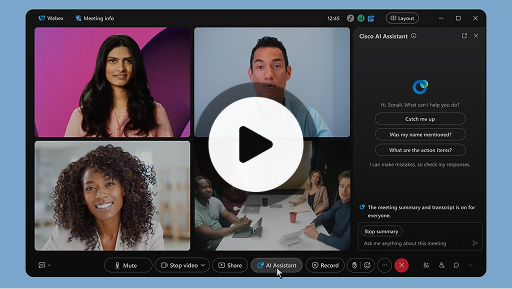
Toplantılarda Cisco Yapay Zeka Asistanı
Webex Suite
Bazen bir toplantıya geç katılabilir, kısa bir süreliğine ayrılmanız gerekebilir veya birden fazla işle uğraşırken dikkatiniz dağılabilir. Yapay Zeka Asistanı toplantı özetleri sayesinde kaçırılan konulara hızlıca hakim olabilir, tartışmaları anlayabilir, sorularınızı doğrudan yöneltebilir ve toplantıyı bölmeden konuşma akışını takip edebilirsiniz. Ayrıca toplantı sonrasında kayıt yapmanıza gerek kalmadan bir özet ve transkript alabilirsiniz.
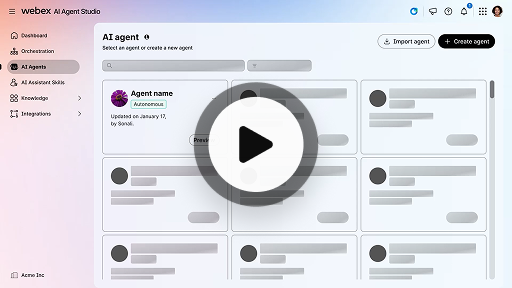
Otonom yapay zeka aracısı oluşturun
Müşteri Deneyimi
Otonom yapay zeka aracıları doğrudan insan müdahalesi olmadan bağımsız olarak çalışır. Otonom aracılar, kullanıcı sorularına bilgilendirici ve doğru yanıtlar sağlamak için bir bilgi havuzuna erişebilir ve bunu kullanabilir. Bu aracılar, verileri analiz etmek, çevrelerinden öğrenmek ve belirli hedeflere ulaşmak için eylemlerini uyarlamak amacıyla gelişmiş algoritmalar ve makine öğrenimi teknikleri kullanır.
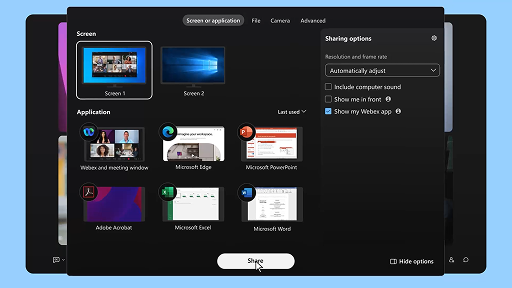
Toplantı sırasında içerik paylaşın
Webex Suite
Webex Uygulaması üzerinde içerik paylaştığınızda, toplantıdaki tüm katılımcılar gündemdeki konuları net bir şekilde takip edebilir. Her katılımcının içerik paylaşma imkânı var ancak aynı anda yalnızca bir kişi paylaşımda bulunabilir.
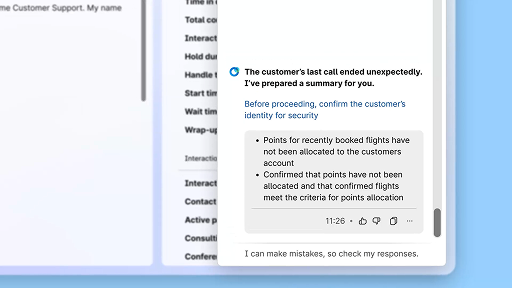
Yapay zeka tarafından oluşturulan özetleri kullanarak verimliliği artırın
Müşteri Deneyimi
Cisco Yapay Zeka Asistanı, önceki etkileşimlerin kısa özetlerini sunar ve böylece aracıların bilgileri yeniden toplamaya gerek kalmadan konuşmalara sorunsuz bir şekilde devam etmesini sağlar. Bu anında erişim, aracıların etkili çözümler sunmaya odaklanmasını sağlar; bu da daha hızlı çözümlere ve daha tutarlı bir müşteri deneyimine yol açar.
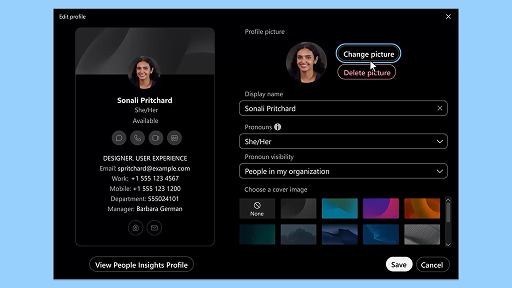
Webex Uygulaması | Profil resminizi ekleyin
Webex Suite
Profilinize bir resim ekleyerek Webex App'te insanların sizi tanımasını kolaylaştırın. Resim yükleyene kadar profiliniz yalnızca baş harflerinizi içeren bir daire olarak görüntülenir.
Yapay Zeka Asistanı esenlik molası bildirimleri
Müşteri Deneyimi
Yapay Zeka Asistanı bir esenlik molası önerdiğinde, açılır bir bildirim görüntülenecektir: Mola kabul etme: Molayı kabul etmek için Mola ver'e tıklayın. Cisco Yapay Zeka Asistanı mini uygulaması, seçiminizi onaylamak için otomatik olarak açılır. Mevcut etkileşimi tamamladıktan sonra, 1 dakikalık esenlik molanız otomatik olarak başlar. Durumunuz Esenlik Molası olarak değişir ve bir sonraki etkileşimin size atanmak üzere sıraya alınması engellenir. 1 dakikalık molanız sona ererken ekranda 5 saniyelik bir geri sayım görüntülenir. İşlem tamamlandığında mola penceresi otomatik olarak kapanır ve durumunuz Müsait olarak değişir; böylece bir sonraki etkileşim için hazır hale gelirsiniz.
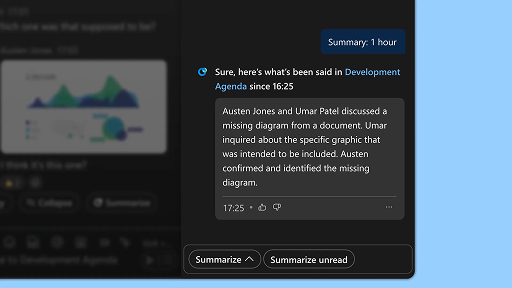
Alan özetleri oluşturun
Webex Suite
Yoğun olduğunuzda veya ofis dışında bulunduğunuzda, tüm alanlardaki gelişmeleri takip etmek zor olabilir. Yapay Zeka Asistanı, alanınızdaki cevapsız mesajları ve konuşmaları hızlıca yakalayabilmeniz için özetler oluşturabilir. Böylece kararlar ve önemli noktalar hakkında bilgi sahibi olur, tartışmaları kolaylıkla takip edebilirsiniz.
Verimliliği gerçek zamanlı dökümlerle artırın
Müşteri Deneyimi
Gerçek zamanlı dökümler, müşteri etkileşimleri sırasında iletişim verimliliğini optimize etmenize yardımcı olmak için tasarlanmıştır. Gerçek zamanlı dökümleri doğrudan Aracı Masaüstü’nde sunarak odağınızı, netliğinizi ve yanıt doğruluğunuzu artırmaya yardımcı olur. Görüşmeler sırasında anlayışınızı ve verimliliğinizi artırmayı, yanlış anlamaları azaltmayı ve performansı ile müşteri memnuniyetini iyileştiren yüksek kaliteli etkileşimler sunmanızı desteklemeyi amaçlar.
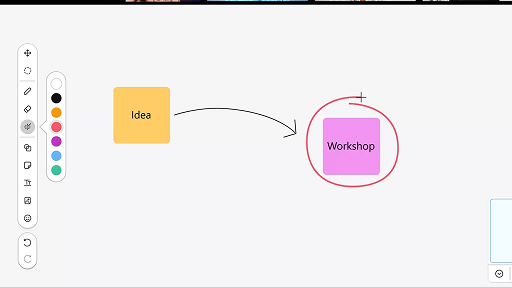
Toplantılarda beyaz tahta kullanımı
Webex Suite
Yoğun olduğunuzda veya ofis dışında bulunduğunuzda, tüm alanlardaki gelişmeleri takip etmek zor olabilir. Yapay Zeka Asistanı, alanınızdaki cevapsız mesajları ve konuşmaları hızlıca yakalayabilmeniz için özetler oluşturabilir. Böylece kararlar ve önemli noktalar hakkında bilgi sahibi olur, tartışmaları kolaylıkla takip edebilirsiniz.
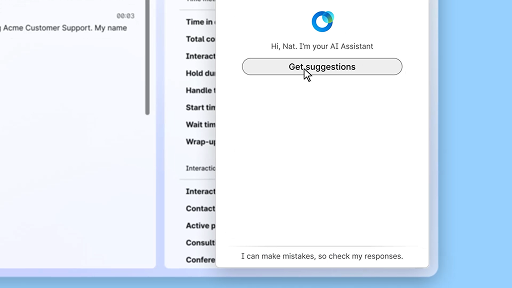
Gerçek zamanlı destek ile güvenle yanıt verin.
Müşteri Deneyimi
Gerçek zamanlı destek, canlı müşteri etkileşimleri sırasında konuşma bağlamını sürekli olarak anlayan, müşteri niyetini tespit eden ve anında ilgili öneriler sunan Cisco Yapay Zeka özelliğidir. Gerçek zamanlı olarak ne söyleyeceğinizi veya ne yapacağınızı önererek sizi yönlendirir, karmaşık süreçlerde yol bulmanıza yardımcı olur ve hatta iş akışlarını otomatik olarak başlatabilir.
Toplantılarda Cisco Yapay Zeka Asistanı
Webex Suite
Bazen bir toplantıya geç katılabilir, kısa bir süreliğine ayrılmanız gerekebilir veya birden fazla işle uğraşırken dikkatiniz dağılabilir. Yapay Zeka Asistanı toplantı özetleri sayesinde kaçırılan konulara hızlıca hakim olabilir, tartışmaları anlayabilir, sorularınızı doğrudan yöneltebilir ve toplantıyı bölmeden konuşma akışını takip edebilirsiniz. Ayrıca toplantı sonrasında kayıt yapmanıza gerek kalmadan bir özet ve transkript alabilirsiniz.
Otonom yapay zeka aracısı oluşturun
Müşteri Deneyimi
Otonom yapay zeka aracıları doğrudan insan müdahalesi olmadan bağımsız olarak çalışır. Otonom aracılar, kullanıcı sorularına bilgilendirici ve doğru yanıtlar sağlamak için bir bilgi havuzuna erişebilir ve bunu kullanabilir. Bu aracılar, verileri analiz etmek, çevrelerinden öğrenmek ve belirli hedeflere ulaşmak için eylemlerini uyarlamak amacıyla gelişmiş algoritmalar ve makine öğrenimi teknikleri kullanır.
Toplantı sırasında içerik paylaşın
Webex Suite
Webex Uygulaması üzerinde içerik paylaştığınızda, toplantıdaki tüm katılımcılar gündemdeki konuları net bir şekilde takip edebilir. Her katılımcının içerik paylaşma imkânı var ancak aynı anda yalnızca bir kişi paylaşımda bulunabilir.
Yapay zeka tarafından oluşturulan özetleri kullanarak verimliliği artırın
Müşteri Deneyimi
Cisco Yapay Zeka Asistanı, önceki etkileşimlerin kısa özetlerini sunar ve böylece aracıların bilgileri yeniden toplamaya gerek kalmadan konuşmalara sorunsuz bir şekilde devam etmesini sağlar. Bu anında erişim, aracıların etkili çözümler sunmaya odaklanmasını sağlar; bu da daha hızlı çözümlere ve daha tutarlı bir müşteri deneyimine yol açar.
Webex Uygulaması | Profil resminizi ekleyin
Webex Suite
Profilinize bir resim ekleyerek Webex App'te insanların sizi tanımasını kolaylaştırın. Resim yükleyene kadar profiliniz yalnızca baş harflerinizi içeren bir daire olarak görüntülenir.
Yapay Zeka Asistanı esenlik molası bildirimleri
Müşteri Deneyimi
Yapay Zeka Asistanı bir esenlik molası önerdiğinde, açılır bir bildirim görüntülenecektir: Mola kabul etme: Molayı kabul etmek için Mola ver'e tıklayın. Cisco Yapay Zeka Asistanı mini uygulaması, seçiminizi onaylamak için otomatik olarak açılır. Mevcut etkileşimi tamamladıktan sonra, 1 dakikalık esenlik molanız otomatik olarak başlar. Durumunuz Esenlik Molası olarak değişir ve bir sonraki etkileşimin size atanmak üzere sıraya alınması engellenir. 1 dakikalık molanız sona ererken ekranda 5 saniyelik bir geri sayım görüntülenir. İşlem tamamlandığında mola penceresi otomatik olarak kapanır ve durumunuz Müsait olarak değişir; böylece bir sonraki etkileşim için hazır hale gelirsiniz.
Alan özetleri oluşturun
Webex Suite
Yoğun olduğunuzda veya ofis dışında bulunduğunuzda, tüm alanlardaki gelişmeleri takip etmek zor olabilir. Yapay Zeka Asistanı, alanınızdaki cevapsız mesajları ve konuşmaları hızlıca yakalayabilmeniz için özetler oluşturabilir. Böylece kararlar ve önemli noktalar hakkında bilgi sahibi olur, tartışmaları kolaylıkla takip edebilirsiniz.
Verimliliği gerçek zamanlı dökümlerle artırın
Müşteri Deneyimi
Gerçek zamanlı dökümler, müşteri etkileşimleri sırasında iletişim verimliliğini optimize etmenize yardımcı olmak için tasarlanmıştır. Gerçek zamanlı dökümleri doğrudan Aracı Masaüstü’nde sunarak odağınızı, netliğinizi ve yanıt doğruluğunuzu artırmaya yardımcı olur. Görüşmeler sırasında anlayışınızı ve verimliliğinizi artırmayı, yanlış anlamaları azaltmayı ve performansı ile müşteri memnuniyetini iyileştiren yüksek kaliteli etkileşimler sunmanızı desteklemeyi amaçlar.
Toplantılarda beyaz tahta kullanımı
Webex Suite
Yoğun olduğunuzda veya ofis dışında bulunduğunuzda, tüm alanlardaki gelişmeleri takip etmek zor olabilir. Yapay Zeka Asistanı, alanınızdaki cevapsız mesajları ve konuşmaları hızlıca yakalayabilmeniz için özetler oluşturabilir. Böylece kararlar ve önemli noktalar hakkında bilgi sahibi olur, tartışmaları kolaylıkla takip edebilirsiniz.
Gerçek zamanlı destek ile güvenle yanıt verin.
Müşteri Deneyimi
Gerçek zamanlı destek, canlı müşteri etkileşimleri sırasında konuşma bağlamını sürekli olarak anlayan, müşteri niyetini tespit eden ve anında ilgili öneriler sunan Cisco Yapay Zeka özelliğidir. Gerçek zamanlı olarak ne söyleyeceğinizi veya ne yapacağınızı önererek sizi yönlendirir, karmaşık süreçlerde yol bulmanıza yardımcı olur ve hatta iş akışlarını otomatik olarak başlatabilir.

Öğrenme araçlarımızı keşfedin

Adoption Hub
Launch, train, and grow with these helpful resources.

Webex Akademi
Kendi hızınızda ilerlediğiniz kurslar ve hızlı video eğitimleri ile istediğiniz zaman öğrenin.

Onboarding resources
Make onboarding easy with customizable self-serve resources.

Canlı etkinlikler
Webex ile öğrenin: Etkinlikler, web seminerleri ve günlük demolar.
Diğer kaynaklar

Webex’i İndirin
Bağlantı kurmanın tüm yollarını sunan tek bir platform.


Webex Topluluğu
Topluluk; yardım istemek, uzmanlığınızı paylaşmak, ağ oluşturmak ve profesyonel olarak büyümek için meslektaşlarınızla ve Cisco uzmanlarıyla bağlantı kurabileceğiniz bir merkezdir.

Webex Insider
Webex ile aynı tutkuyu paylaşan kişilerle bağlantı kurun, Webex portföyü ürün ve deneyim ekiplerinin yeni konseptlerine içeriden erişim sağlayın.

Geliştiriciler için Webex
Webex ile iş birliğinin geleceğini inşa edin. Webex Platformunda bir sonraki harika iş birliği uygulamasını oluşturmak için Webex API ve SDK'ları hakkında daha fazla bilgi edinin.

Hâlâ yardıma mı ihtiyacınız var?
İhtiyacınız olan yardımı almak için çeşitli destek kaynakları arasında seçiminizi yapın.
Bu sayfadaki deneyiminizi nasıl değerlendirirsiniz?


Yararlı değil
Yararlı
Bu sayfayı sizin için nasıl daha kullanışlı hale getirebiliriz?
Geri bildiriminiz için teşekkürler.


