- Home
- /
- Article

Thanks for your feedback.


Introduction
 In this article
 Feedback?
This guide helps organizations move from on-premises Cisco Unified Communications Manager (Unified CM) to Webex Calling multi-tenant. It explains the key Webex Calling components, PSTN options, supported endpoints, and security features. The guide also uses Cisco’s PPDIO (Prepare, Plan, Design, Implement, Optimize) methodology to provide a clear and structured approach to migration. Overall, it helps customers understand what changes when they move calling to the cloud and shows them how to plan, carry out, and optimize a successful transition to Webex Calling.
Before you begin
This guide is intended for teams or individuals with experience configuring and administering Cisco Unified Communications Manager (Unified CM) and Cisco endpoints, including IP desk phones, video devices, and Jabber soft clients. Throughout this document, there are links to product and support documentation to assist.
This document focuses on transitions from Unified CM to Webex Calling multi-tenant only. The term Webex Calling in this document always refers to Webex Calling multi-tenant.
Before beginning the migration from Unified CM to Webex Calling, it is imperative to have a comprehensive understanding of the Webex Calling solution and its respective components. A successful migration requires familiarity with the Webex Calling architecture, service models, deployment options, and associated features to properly map existing Unified CM workloads and design an effective transition plan.
A thorough understanding of the following Webex Calling components is essential to inform an effective transition strategy and operational readiness.
-
Control Hub
-
Directory and user provisioning
-
Webex Calling platform
-
Supported calling endpoints
-
PSTN connectivity options
-
Webex Calling dial plan and number management
-
Security and compliance features.
For more information, see Cisco Preferred Architecture for Webex Calling.
This guide will highlight tools and processes to use throughout the transition lifecycle. However, a transition from on-premises calling, Unified CM, to a new cloud calling platform, Webex Calling, can be a significant effort with potential business, technical and complex challenges. To help overcome these challenges Cisco has a few different options available to assist you with your journey. It is important to review the information at Enterprise cloud calling - Calling migration and understand each option and how each one can possibly help you with your own migration.
-
Webex migration tools: self-service, free tools built into Control Hub to streamline your transition to Webex Calling
-
Certified migration providers: Cisco validated software and tool providers who have developed migration solutions to help Webex partners and customers with complex and large migrations. These solutions can help simplify, manage and accelerate the transition to Webex Calling
-
Webex Setup Assist: a Cisco-led migration service that guides customers and partners through the Webex Calling deployment and configuration, which is needed to successfully migrate Unified CM users and services to Webex Calling.
Overview
With the growth of cloud-delivered collaboration services, more customers are looking to move their existing collaboration workloads to the cloud given the promises of reduced total cost of ownership, simplified management, continuous feature delivery, increased scale, and superior reliability inherent in cloud-based services. As customers look to make the transition from on-premises to cloud collaboration services, it's important for them to understand what the transition entails, and the steps required to make the transition.
The purpose of this document is to provide deployment guidance for customers specifically looking to transition from on-premises Unified CM to Webex Calling in the cloud. This deployment guide assumes that the reader has a basic understanding of the calling transition between Unified CM and Webex Calling, including what changes when making this transition and what the differences are when moving the calling workload from on-premises to the cloud. Before proceeding, ensure you have reviewed and are familiar with the information available in the Transition map. This transition map document provides information about the changes and differences of this transition.
As shown in Figure On-premises collaboration architecture: call control and remote access, a typical on-premises deployment includes different collaboration infrastructure components on the network, a call control platform, an edge platform, hardware and software endpoints, and in some cases even conferencing and scheduling platforms. In the Cisco architecture this would include Unified CM for call control, Expressway for remote access and business-to-business (B2B) edge services, Cisco Meeting Server / Cisco Meeting Management for on-premises conferencing, Unity Connection for voice messaging, and user-facing hardware (Cisco IP Phones, Cisco Desk and Room video systems) and software (Cisco Jabber) IP-based endpoints. These components may vary slightly in some environments, but this is the starting point for the transition described in the rest of this document.
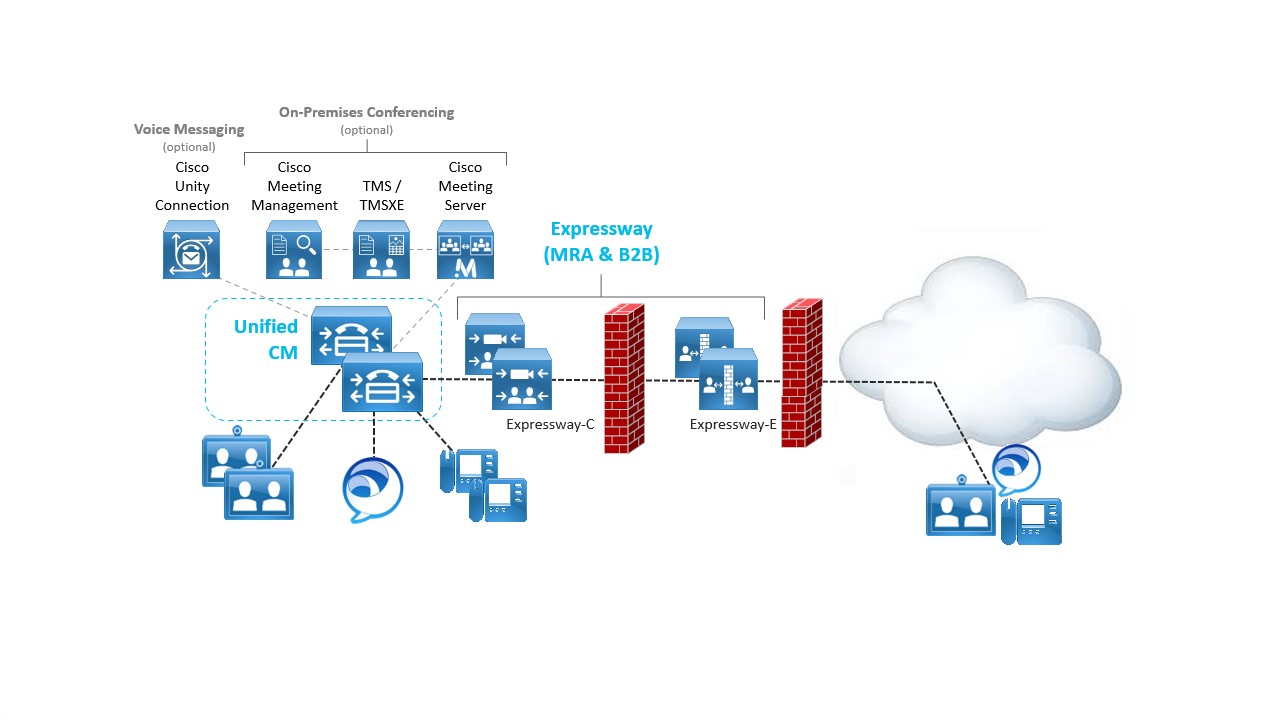
The architecture shown in Figure On-premises collaboration architecture: call control and remote access is based on the Preferred Architecture (PA) for Cisco Collaboration Enterprise On-Premises Deployments. For more information on the Enterprise On-premise, see Cisco collaboration preferred architectures.
Before: On-premises calling infrastructure components table lists the key elements of the on-premises architecture prior to transitioning to Webex Calling in the cloud.
| Product | Description |
|---|---|
| Unified CM | On-premises call control providing device registration and call routing services |
| Cisco Expressway-C/E | Edge infrastructure providing Mobile and Remote Access (MRA) and business-to-business (B2B) functionality enabling remote endpoints to connect securely from outside the organization. Expressway is deployed in pairs to provide firewall traversal for external endpoints. |
| Cisco Meeting Server (CMS), Cisco Meeting Management (CMM), and Cisco Telepresence Management Suite (TMS) | On-premises voice, video, and web conferencing infrastructure providing multipoint meetings, meeting management, and scheduling capabilities. [Optional] |
| Cisco Unity Connection | On-premises voice messaging platform providing voicemail and unified messaging capabilities. [Optional] |
| Cisco Desk, Cisco Room, Cisco Board, Cisco IP Phones, and Cisco Jabber | IP-based devices registered to Unified CM and providing voice and video calling capabilities |
As illustrated in Figure Transition decision: on-premises calling to Webex Calling, customers who have an on-premises call control with Unified CM and desk and video IP endpoints have a choice of transitioning the architecture toward a Webex Calling cloud architecture.
The decision needs to be made based on customer’s functionality requirements. Customers who have the following requirements should consider carefully before making this decision and may ultimately decide to keep call control on-premises:
- Phone models not supported by Webex Calling
- Complex or numerous integrations with other on-premises systems or solutions, especially where replicating these integrations with Webex Calling is difficult or no equivalent alternative solutions are available
- Complex dial plan, highly granular classes of service or both
- Restrictive, limited, or unreliable Internet access
- Stringent data privacy and ownership policies
- Compliance requirement for on-premises or in-country media recording and storage
- Third party integrations without viable alternate Webex Calling integration
- Contact center integrations where the contact center inter is not moving to the cloud just yet.
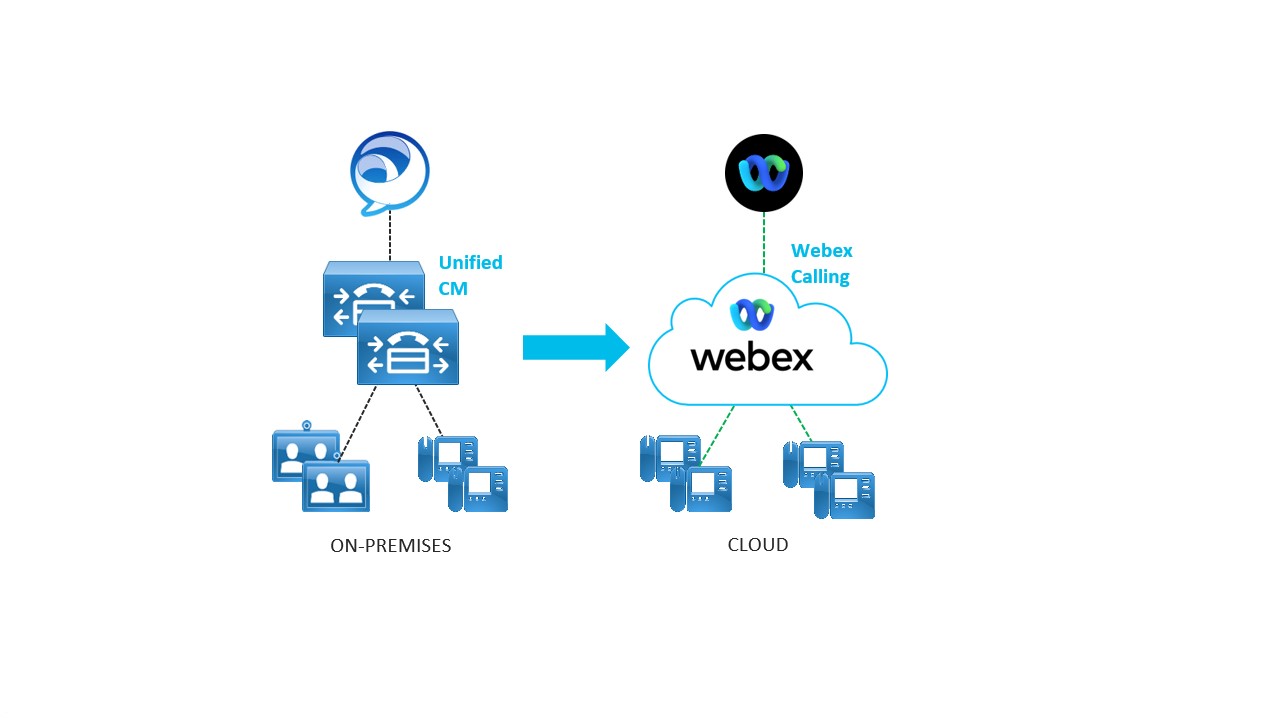
This document focuses on customers with Unified CM call control deployments who wants to understand the general steps, considerations, and requirements for enabling Webex Calling deployment as depicted in the next section.
Core components
The target architecture for this migration includes several new components. This includes the Webex Calling service for cloud-based calling, Webex App, Cisco Directory Connector for identity integration, and Local Gateway (LGW) for PSTN access, as well as on-premises to cloud calling integration. Cisco Calling Plans or Cloud Connected PSTN (CCP) facilitated by a Cloud Connect for Webex Calling partner are additional options for PSTN access.
As shown in Figure After: Webex Calling Architecture, the new components (Webex Calling, Directory connector, Local gateway, and Survivability gateway) are added to the existing on-premises deployment.
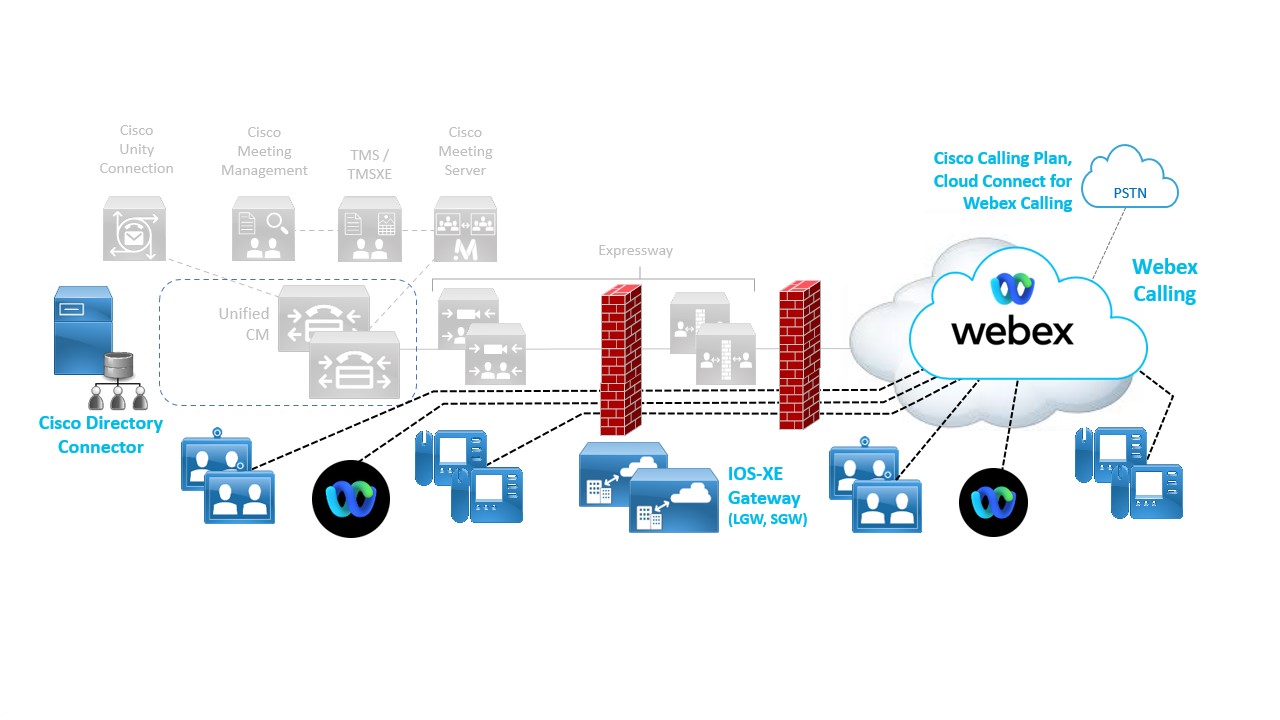
After: Cloud calling infrastructure components table lists the new elements of the architecture after transitioning to Webex.
| Product | Description |
|---|---|
| Webex Calling | Cloud-based call service delivered from the Webex platform and providing endpoint registration and call routing |
| Cisco Directory Connector | Windows application running on a Windows domain machine providing identity
synchronization between the enterprise on-premises Active Directory and the identity
store of the Webex organization. For customers moving from on-premises Active Directory to Entra ID, the identity integration with Webex instead of Cisco Directory Connector uses the Entra ID Wizard app. |
| Local Gateway | A Local gateway acts as a bridge between a customer's on-premises unified communications network and the Webex Calling cloud. It can be deployed on-premises or hosted by a partner, delivering PSTN access for cloud-registered endpoints as well as calling integration between Unified CM registered and cloud registered endpoints. Cisco IOS-XE Integrated Services Router (ISR 1100 and 4000 series), Cisco Catalyst 8200/8300 Series, Cisco Catalyst 8000V Edge Software, and various certified third-party Session Border Controllers (SBCs) can be used as a LGW for a phased migration approach. |
| Survivability Gateway | Survivability Gateway (SGW) is a local network IOS-XE based gateway that provides fallback calling services to on-site Webex Calling endpoints during network outages. |
| Cisco Calling Plan, Cloud Connect for Webex Calling | Cisco Calling Plan and Cloud Connect for Webex Calling are cloud-based options for PSTN access for Webex Calling endpoints. PSTN access is facilitated by a cloud PSTN provider and requires no on-premises equipment. |
| Webex App | Client application running on desktop OS (Windows, Mac) or mobile OS (Android, iOS) and registered directly to Webex Calling platform for calling functionality. |
PPDIO process overview
The PPDIO process stands for Prepare, Plan, Design, Implement, and Optimize. It is a structured Cisco methodology that guides projects from initial assessment through continuous improvement, ensuring efficient and successful deployments or migrations.
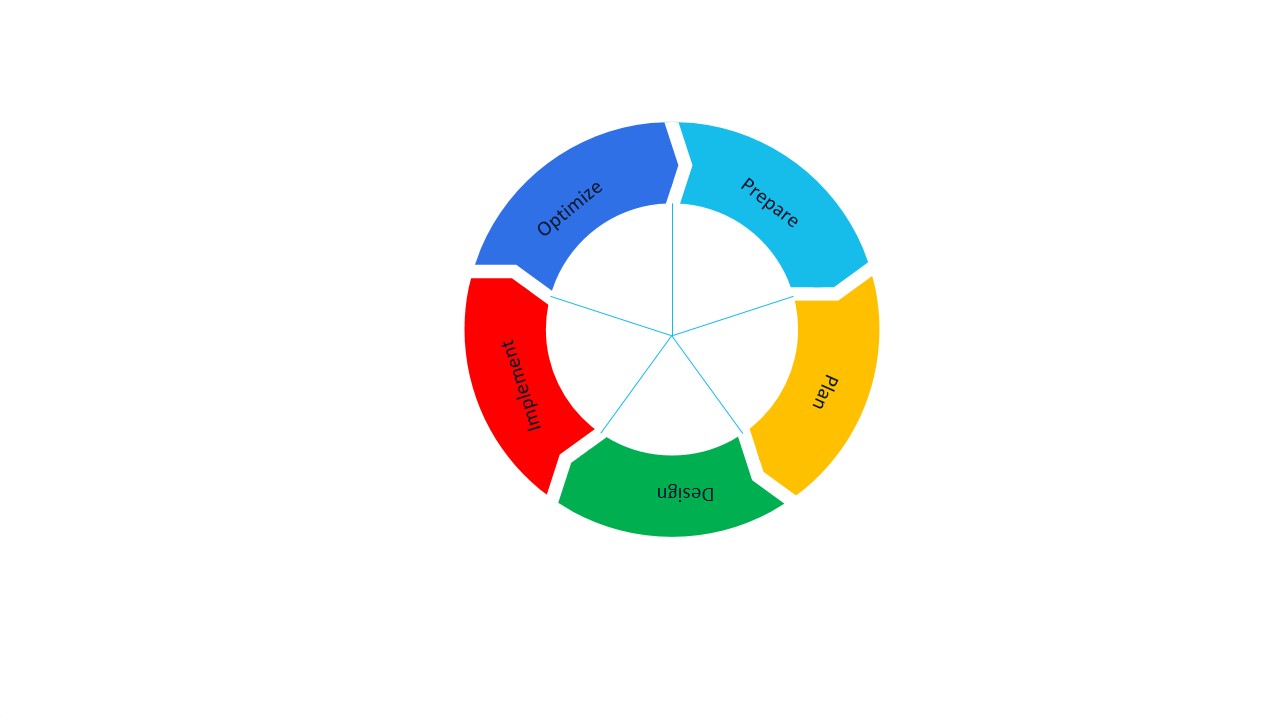
General description of PPDIO
-
Prepare: Assess the current environment, gather requirements, and align stakeholders to establish a solid foundation.
-
Plan: Develop detailed project plans including timelines, resources, and risk mitigation strategies.
-
Design: Architect the target solution tailored to business and technical needs.
-
Implement: Execute the deployment or migration according to the design, validating functionality and performance.
-
Optimize: Continuously improve the solution post-implementation by monitoring performance, refining configurations, and leveraging automation and integration tools.
Using PPDIO for Unified CM to Webex Calling migration projects
When transitioning from Unified CM to Webex Calling, the PPDIO process provides a clear roadmap to ensure a smooth and efficient transition:
Prepare
-
Assess the existing Unified CM environment and migration readiness
-
Collect detailed data on users, devices, network, and dependencies
-
Collect location details including emergency response address, number of users, internet access, PSTN access
-
Identify risks and define project scope to align all stakeholders.
Plan
-
Create a comprehensive migration plan with batch schedules, resource assignments, and timelines
-
Define tasks such as device firmware upgrades, license provisioning, and user onboarding
-
Coordinate migration windows with Cisco and partners to minimize disruption.
Design
-
Map current Unified CM configurations, dial plans, and user profiles to Webex Calling equivalents
-
Design the Webex Calling environment, including PSTN strategy (interim and final), locations, user roles, and integration points like Local Gateway (CUBE) and directory synchronization
-
Plan for coexistence scenarios where Unified CM and Webex Calling operate simultaneously during migration.
Implement
-
Use Control Hub migration tools alongside 3rd party tools to perform device firmware mode changes, feature configuration and user migrations
-
Employ bulk operations and provisioning using Webex APIs to streamline large-scale migrations and configurations
-
Execute license provisioning, device registration, and configuration updates
-
Validate migration success through testing and operational verification.
Optimize
-
Continuously monitor Webex Calling performance and user experience
-
Refine configurations and workflows based on operational data and feedback
-
Leverage automation and integration capabilities to enhance efficiency and scalability
-
Decommission legacy Unified CM components as appropriate and provide ongoing support for day-2 operations.
This enhanced PPDIO approach ensures a controlled, transparent, and efficient migration from Unified CM to Webex Calling, leveraging Cisco's tools, APIs, and partner ecosystem to maintain business continuity and improve collaboration capabilities.
PPDIO feedback loops
The high-level overview depicted in Figure Iterations while executing PPDIO illustrates a single feedback loop from the optimize phase back to the prepare phase. This signifies that, following the initial implementation, there is an ongoing opportunity for continuous improvement. Each cycle of optimization can identify new requirements or areas for enhancement, which may be addressed through subsequent projects or initiatives. These individual projects, in turn, each follow the established PPDIO (Prepare, Plan, Design, Implement, Optimize) lifecycle. This iterative approach ensures that the system remains aligned with evolving business objectives and technological advancements, fostering a culture of ongoing refinement and adaptability.

During the execution of the PPDIO process, it is common for findings in the later phases to necessitate revisiting and potentially revising decisions made in earlier stages. For instance, issues encountered during the implementation phase, such as the identification of design ambiguities or missing details, may reveal that certain aspects were not fully addressed during the design phase. In such cases, it becomes necessary to iterate back to the relevant earlier phase to resolve these issues before proceeding. This iterative feedback mechanism, as illustrated in Figure Unified CM assisted PPDIO process ensures that the solution is thoroughly validated and refined, ultimately contributing to a more robust and effective deployment.
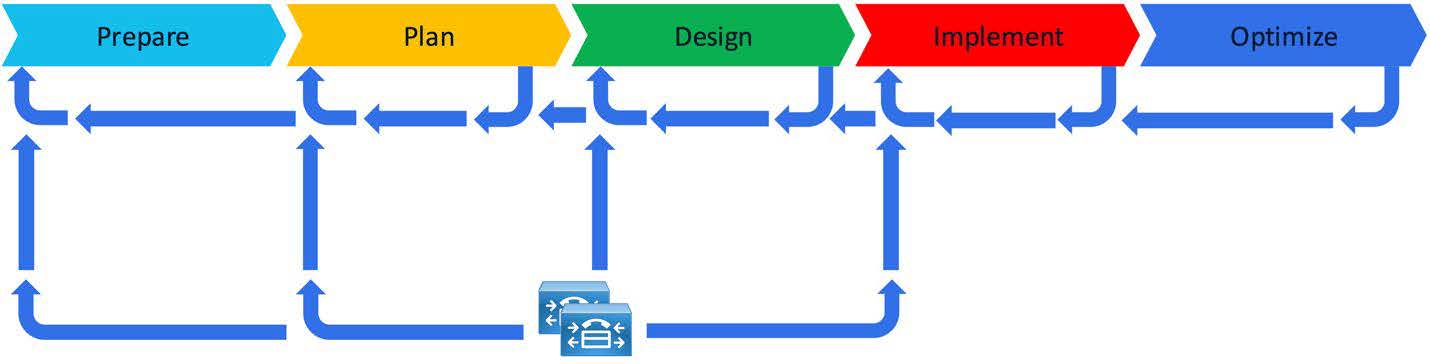
When undertaking a transition from Unified CM to Webex Calling, each phase of the PPDIO process can benefit significantly from information gathered from the existing Unified CM environment. For example, comprehensive inventories of users, phone numbers, calling features, and dial plan components can be extracted from the current Unified CM configuration. This data supplements information provided directly by stakeholders and helps streamline planning and design activities. Leveraging appropriate tools to automate data extraction and analysis not only enhances accuracy but also accelerates the overall process. By utilizing insights from the existing deployment, the transition to Webex Calling can be executed more efficiently than a traditional greenfield implementation, while still adhering to the structured PPDIO methodology. This process is illustrated in Figure Unified CM assisted PPDIO process.
Migration approach
As you plan your transition from on-premises Unified CM to Webex Calling, you need to determine how you will approach this journey. First you will need to decide if the migration will be a flash-cut (everything at once) or a phased approach (migrate groups of users/devices over an extended period).
Doing a flash-cut migration moves all your users and devices the fastest. With this method, you will move all users and devices from on-premises Unified CM to Webex Calling at the same time. In essence, it is one single migration window for all users and devices. After this migration is completed, all your users and devices will be on the Webex Calling platform and all your Unified CM infrastructure can be decommissioned. However, many organizations cannot use this approach due to the scale and size of their calling deployment.
The second approach is a phased migration. Most organizations will use this approach as it provides better control, management, and scale with the migration. Also, it is better suited for larger UC deployments and/or deployments across multiple regions. Therefore, this document focuses on the phased approach with two steps in the transition.
As shown in below Figure Phased calling transition: Hybrid and cloud, the first transition phase (Phase 1) results in a co-existence deployment with dual calling environments. In this phase, some users, devices, and soft clients are transitioned to Webex Calling while others are still on the on-premises Unified CM call control. The final transition phase (Phase 2) results in a pure cloud calling environment where all users, devices, and soft clients have been fully transitioned to the Webex Calling platform.
How long it takes an organization to completely transition to cloud calling will vary based on its current deployment. In some cases, an organization may make the initial transition and remain in the co-existence dual call control phase (Phase 1) for an extended period (months or even years), while in other cases, an organization may fully transition to Webex Calling (Phase 2) in a very short period (weeks or months). This document is intended to cover both phases (Phase 1 - coexistence and Phase 2 - fully transitioned).
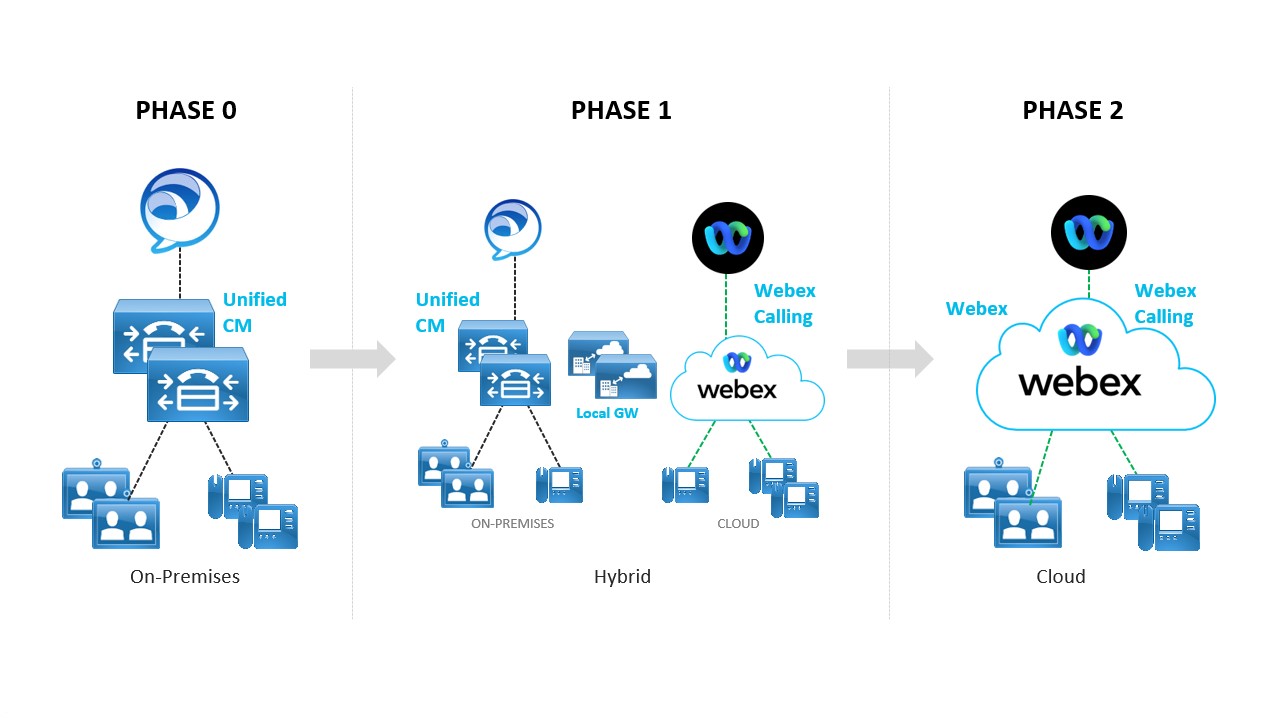
It is possible that some organizations may maintain a coexistence dual call control deployment indefinitely with no plans to ever fully transition to cloud calling.
The second consideration is how you will transition users, devices, and soft clients from the on-premises call control to the cloud call control. The recommended approach is a 3-Phased Transition. The figure Recommended 3-phase transition below breaks down this approach into the 3 phases.
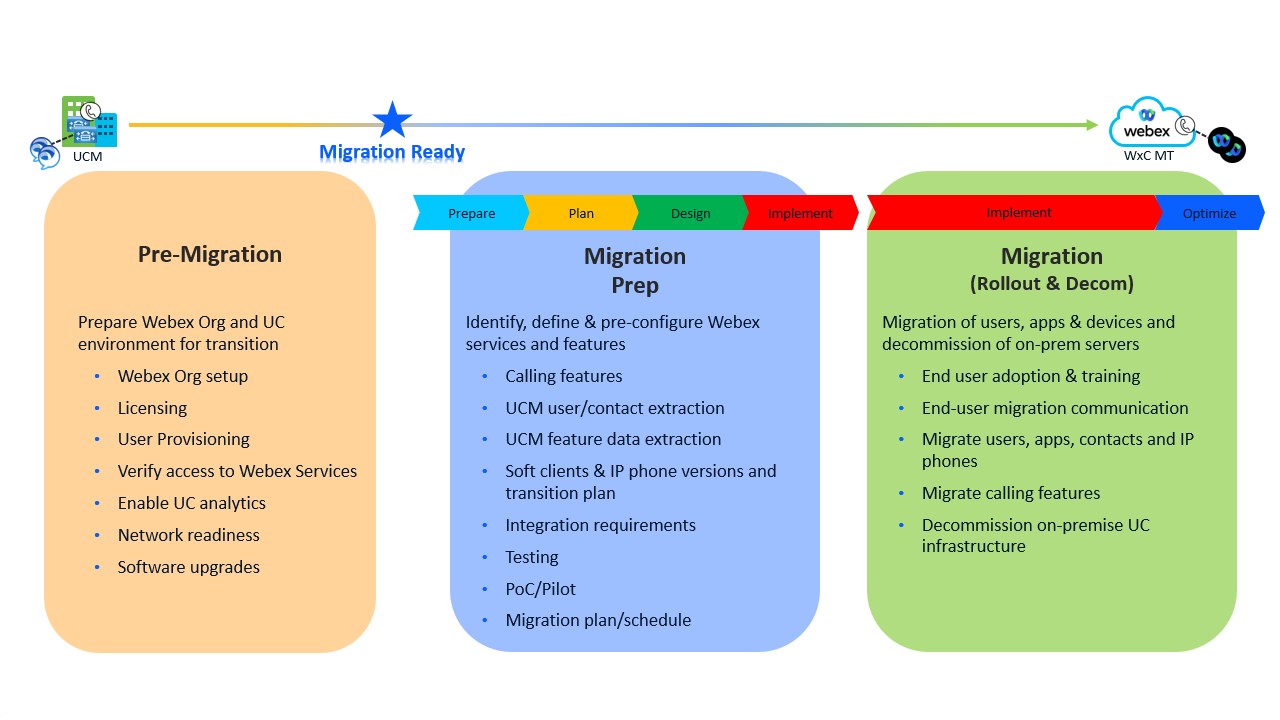
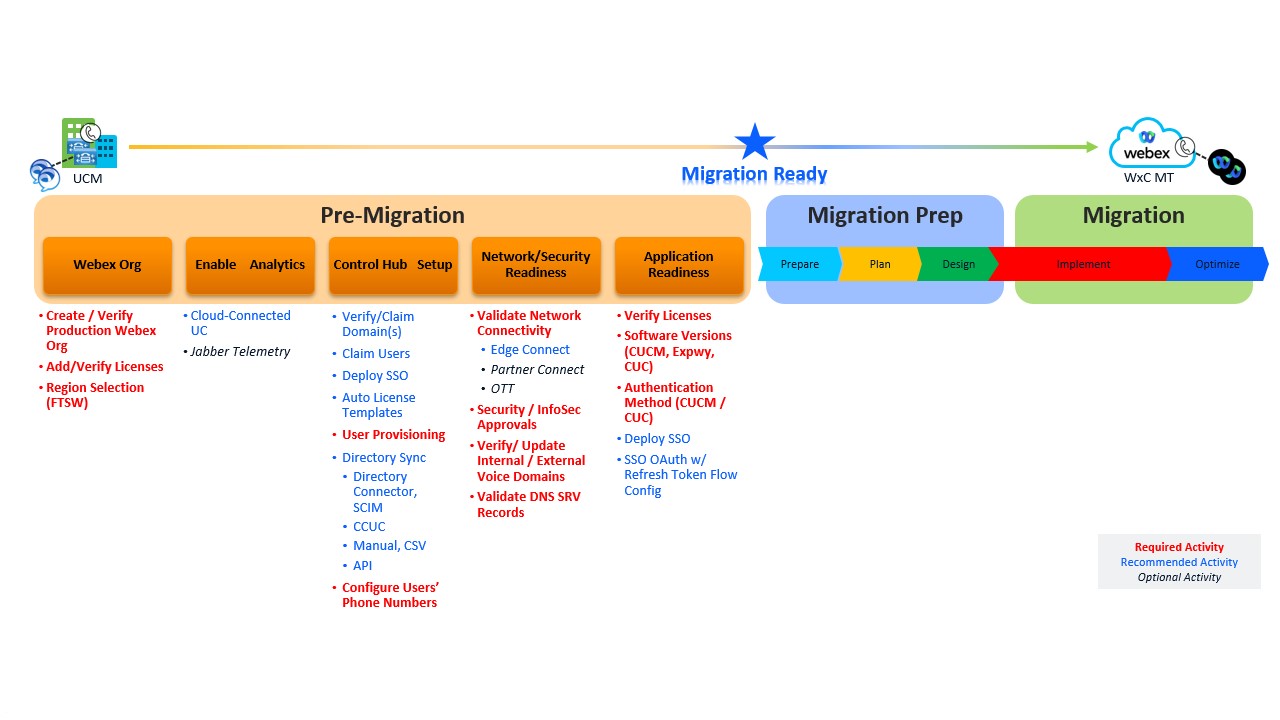
Pre-Migration: This phase focuses on getting both the Webex and Unified CM environments ready for the migration. This is not about calling specific planning or configurations and focuses on completing activities that can be done now and before any Webex Calling migration project starts. The goal is to build the foundation for the two environments to prepare for the migration.
Migration Prep: This phase is where the effort begins to prepare for the migration to Webex Calling. Here, business and technical requirements need to be reviewed and updated. Do not just do a lift and shift of what is currently deployed with Unified CM and instead redefine the business and technical requirements that your company needs today and in the future by leveraging the power of Webex Calling. In addition, this is the phase where you will complete your design, configuration planning, and migration planning/schedule.
Migration (Rollout and decommission): This phase is where the actual migration of users, devices, phone numbers, and soft clients happens. As discussed above this phase can be completed for everyone at one time (flash-cut) or over multiple change windows (phased-cut). End-user adoption plans, training, and communications are critical, so your users are aware of the changes, how to use the new calling platform, and know when the change will happen. The last step is to decommission all the on-premises UC infrastructure that is no longer being used.
The pre-migration phase has activities (required, recommended, and optional) that you can start working on immediately. It is recommended to complete these sooner rather than later and preferably before your project begins. Some of the activities can take longer to complete, therefore starting them earlier will help streamline your actual migration project.
The Figure Pre-Migration Activities below highlights five specific categories of activities that are related to a Webex Calling migration.