- Home
- /
- Article

Thanks for your feedback.

Optimize to migrate from Unified CM to Webex Calling
 In this article
 Feedback?
This phase focuses on optimizing and sustaining Webex Calling after deployment. It involves continuous monitoring of call performance and user experience to ensure reliability and quality. Operational data is used to refine configurations, workflows, and policies over time. As part of this phase, legacy Unified CM components are decommissioned where appropriate, while ensuring continuity of service. For a high-level overview of your migration journey, with quick links to explore detailed documentation, see Migrate Unified CM to Webex Calling.
PSTN migration to Cloud Connect for Webex Calling
Once all endpoints and users are migrated to cloud calling the single purpose of Unified CM is to act as a transit between the PSTN gateways and Webex Calling via Local Gateway. Removing PSTN gateways, Unified CM, and Local Gateway from the picture by using Cloud Connect for Webex Calling as the PSTN access for all Webex Calling users has several benefits, including cost reduction and improved reliability. To transition on-premises PSTN access to Cloud Connect for Webex Calling, follow these steps:
-
Cloud Connect for Webex Calling partner selection.
Refer to the list of Cloud Connect for Webex Calling partners and select from the available partner(s) available for your organization's location.
-
Cloud Connect for Webex Calling validation.
Before switching PSTN access for Webex Calling locations to Cloud Connect, connectivity to PSTN via the selected Cloud Connect partner should be verified and validated. For this purpose, a test location needs to be provisioned in Webex Calling with some test users provisioned in that test location. PSTN access for this test location is then set to the Cloud Connect partner before validating PSTN connectivity using the test phones. Upon successful validation, the test location can be deprovisioned.
-
Number porting.
To prepare for the cut-over to Cloud Connect a port order for all numbers currently assigned to the PSTN trunk terminating on Unified CM needs to be placed. All numbers need to be ported to the Cloud Connect partner. To maintain inter-location reachability, all numbers of all locations need to be ported at the same time.
-
Switch to Cloud Connect partner.
At date of the cutover, PSTN access for all locations in Webex Calling needs to be set to the Cloud Connected PSTN provider, and inbound and outbound connectivity should be verified.
As discussed in the PSTN section of the design chapter customers can also choose to move their PSTN access to Cloud Connect for Webex Calling at the start of the transition using PSTN trunking for hybrid Webex Calling deployments. For more information, see PSTN trunking for hybrid Webex Calling deployments. In that case during the transition PSTN access for Unified CM is via Local Gateway and Webex Calling and after moving all users to Webex Calling there is no additional PSTN related migration step other than decommissioning Unified CM and the Local Gateways.
Optimize on-premises infrastructure
Once all users have been transitioned to Webex Calling and all endpoints have been transitioned to cloud registration (or have been decommissioned), update appropriate on-premises infrastructure now that cloud calling is in use. Updates to the infrastructure include:
-
Remove on-premises call control and messaging DNS SRV records from the on-premises DNS server(s) including cisco_uds._tcp.<domain>, cup_login._tcp.<domain>. These SRV records are no longer required for client service discovery.
-
Remove edge-related DNS SRV records from the public DNS system including collab_edge._tls.<domain>. These SRV records are no longer required for client service discovery of collaboration edge services.
-
Update all relevant DHCP scopes to remove option 66 and option 150 TFTP/boot server addresses. These scopes are no longer required for endpoint call control configuration discovery and download.
-
Update/remove appropriate dial-peers in Local Gateway/CUBE that route calls to and from Unified CM. These dial-peers are no longer required for on-premises call routing.
-
Delete or remove all Unified CM and Expressway cluster node virtual machines and/or servers. Repurpose compute resources and hardware as needed. These resources are no longer needed for call control and edge services.
-
Delete or remove all Unity Connection cluster node virtual machines and/or servers. Repurpose compute resources and hardware as needed. These resources are no longer needed for voicemail and unified messaging services.
-
Clean-up: After migrating PSTN access to Cloud Connected PSTN Unified CM, PSTN trunks, PSTN gateways, and Local Gateway can be decommissioned.
-
For any existing on-premises E911 solution, delete any locations or numbers that have migrated to Webex Calling and once full transition is complete, remove application virtual machines or servers. Repurpose compute resources and hardware as needed. These resources are no longer needed for emergency calling and location services.
-
DNs belonging to migrated users should be placed in a hidden partition to avoid call routing failures and to ensure all CSS' have priority access to the cloud path of the same DNs.
-
Update the physical dispatchable location and network element in horizon mobility whenever changes occur. Common activities that require updates are:
-
Network switch replacement
-
Wireless access point replacement
-
DHCP scope changes
-
Physical changes inside the building (if resolving to cubical/office)
-
Physical office space expansion or contraction inside a building.
-
Utilize Webex Calling analytics and troubleshooting
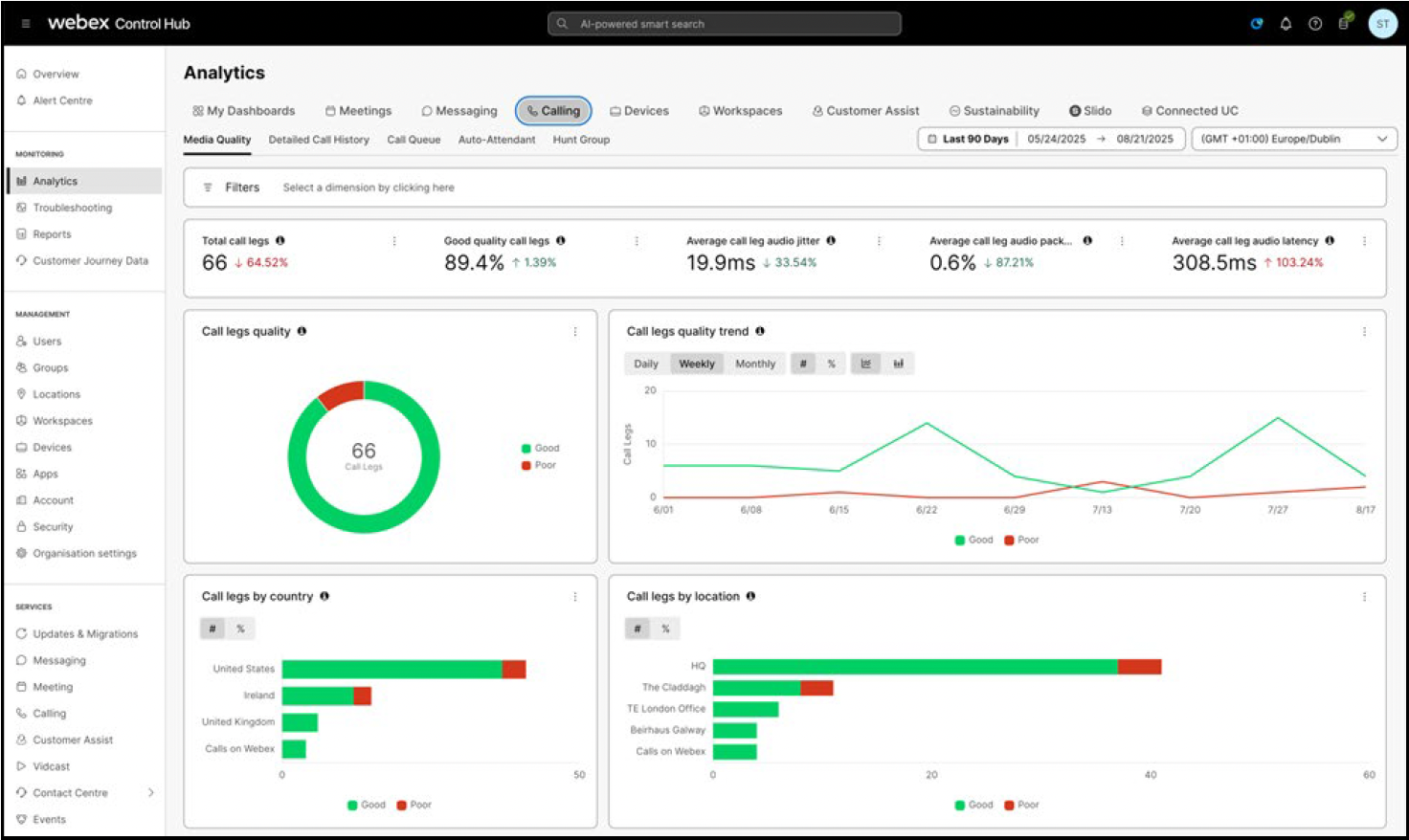
Webex Calling provides comprehensive analytics and troubleshooting capabilities to help you visualize and track your deployment. These cover media quality, detailed call history, call queue, hunt group, and auto attendant analytics. An example of Webex Calling media quality analytics is shown in figure Webex Calling media quality analytics.
Under troubleshooting, each call made using Webex Calling can be viewed with detailed information about key media quality and signaling-related issues to help pinpoint media issues as well as failed calls, as shown in figure Webex Calling media quality troubleshooting.
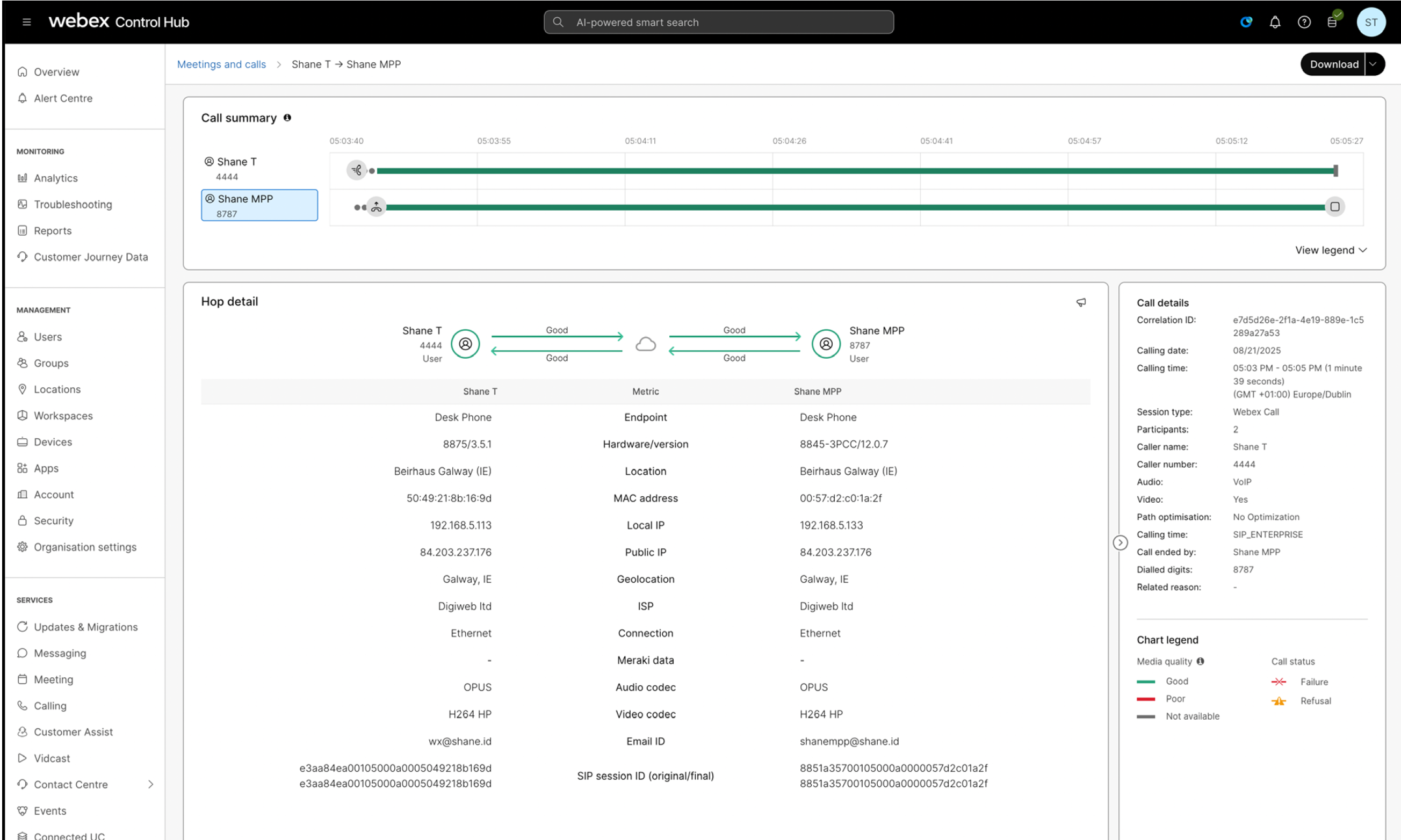
Webex Calling troubleshooting can also integrate with other Cisco products like ThousandEyes and Meraki switches to provide an even richer integrated experience in Control Hub. For more information on using Webex Calling analytics and troubleshooting, see Troubleshoot Webex Calling calls in Control Hub.


