- Home
- /
- Article

Thanks for your feedback.


Plan to migrate from Unified CM to Webex Calling
 In this article
 Feedback?
The plan phase establishes the strategic direction and scope for the transition project. It translates requirements identified during the prepare phase into actionable technical objectives and project parameters. For a high-level overview of your migration journey, with quick links to explore detailed documentation, see Migrate Unified CM to Webex Calling.
High-level project plan
When developing a high-level project plan for migrating from Unified CM to Webex Calling, it is essential to establish clear phases and milestones that align with both business objectives and technical requirements. The plan should begin with a comprehensive assessment phase, including gathering detailed technical and business requirements, as well as identifying stakeholders and defining success criteria. Key considerations include resource allocation, timeline estimation, risk management, and communication strategies to ensure all parties are informed and engaged throughout the migration. Additionally, the plan should incorporate validation checkpoints such as pilot testing and phased rollouts to minimize disruption and allow for adjustments based on feedback.
Examples of elements to include in the project plan are:
-
Defining the scope of migration (e.g., which users, devices, and features will transition)
-
Scheduling training sessions for end-users and support teams
-
Coordinating network readiness assessments, and
-
Planning for cutover activities with fallback options. It is also important to integrate compliance and security reviews, as well as post-migration support and optimization phases.
By structuring the project plan with these considerations, organizations can better manage complexity, reduce risks, and achieve a smoother transition to Webex Calling.
Migration journey - one or two steps?
Webex Calling requires users to use the Webex App for their calling soft client. Therefore, if any users are still using Jabber, you have two options on when you can move them to the Webex App. You can either do a single step user migration or a dual step user migration.
Option 1: Single step user migration
In a single step migration, users transition from Jabber to the Webex App at the same time they are transitioned from Unified CM to Webex Calling. This option is typically for customers with a small number of users to migrate and can manage moving both the user's soft client and calling service to Webex at the same time. The figure User’s calling service, soft client & phone migrates to Webex Calling at same time below highlights this type of migration. With this option a user will have the following completed all at the same time:
-
Calling services moved from Unified CM to Webex Calling
-
Phone numbers and extensions moved from Unified CM to Webex Calling
-
Soft client transitioned from Jabber to the Webex App - Webex App will register to Webex Calling
-
Phone registration moved from Unified CM to Webex Calling.
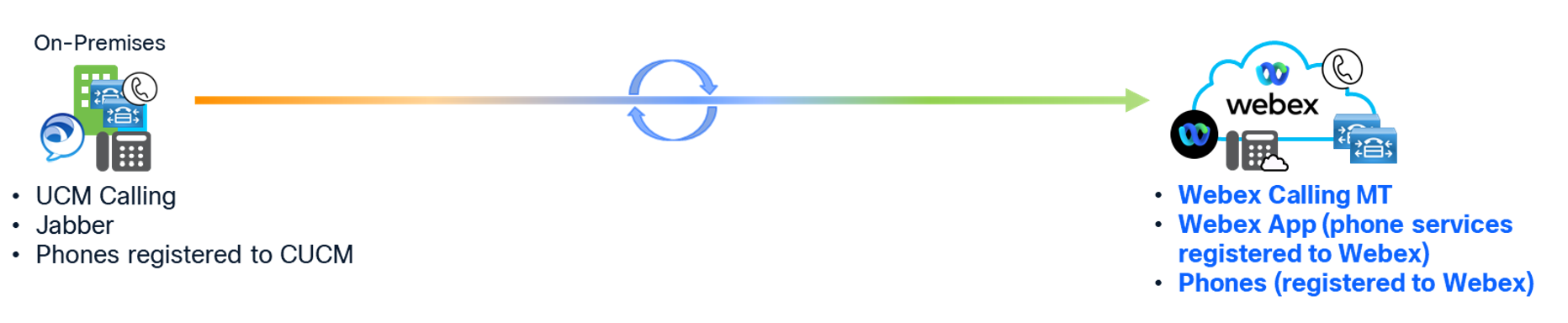
This can still be a phased migration where groups of users are moved at different times, but when each user is moved all of these happen at the same time.
Option 2: Dual step user migration
The other approach is a dual step migration. In step 1, users are transitioned from Jabber to the Webex App but stay on Unified CM for calling services. Then in step 2, users are moved from Unified CM to Webex Calling. This option is recommended for larger customers to manage the end user changes and want to separate the user's soft client change from the calling service change. The following figure Migrate soft client; then migrate calling service, soft client & phone to Webex Calling below highlights this type of migration.
Step 1
-
Soft client transitioned from Jabber to Webex App - Webex App will register to Unified CM.
Step 2
-
Calling services moved from Unified CM to Webex Calling.
-
Phone numbers and extensions moved from Unified CM to Webex Calling.
-
Webex App registration moved from Unified CM to Webex Calling.
-
Phone registration moved from Unified CM to Webex Calling.

This can still be a phased migration where groups of users are moved at different times in both steps.
The option you choose depends on how you want to manage your users' transition to the Webex App and Webex Calling. The recommendation is to take it in steps (Option 2). This allows you to minimize the end user's changes at one time and divide the effort up across different parts of the project. However, if you prefer to have users only impacted once, then using Option 1 is also valid.
Looking at the recommended journey (Option 1), Jabber to Webex App high-level transition map figure below shows the high-level transition for Step 1.
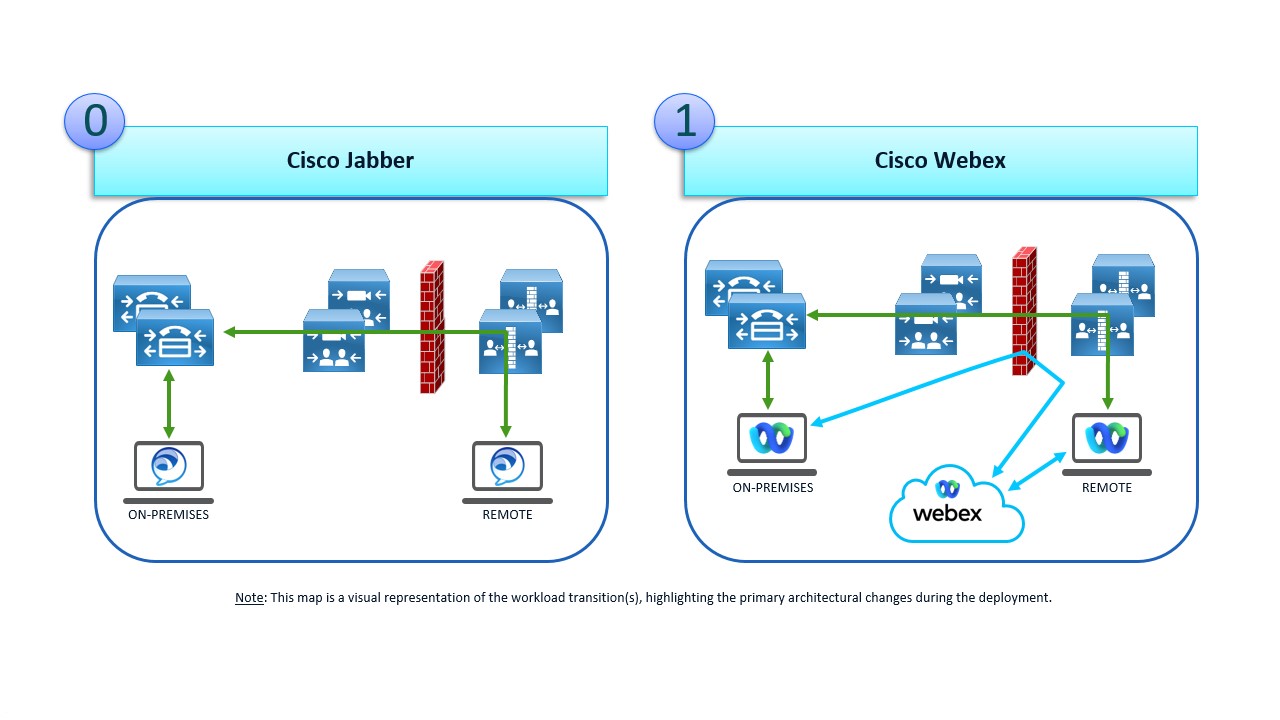
In this step users are transitioned from Jabber to the Webex App for all their calling services. However, the calling platform is still Unified CM and the Webex App will register its calling services to Unified CM. As seen in the Jabber to Webex App high-level transition map figure the on-premises infrastructure does not change, and the Webex App works the same way Jabber does. The only change is the Webex App requires a connection out to Webex.
For more information about this transition, see Jabber to Webex Transition Map and Deployment Guide under the Client section on the Collaboration Transition page.
Unified CM to Webex Calling high-level transition map figure is the high-level transition from Unified CM to Webex Calling. This is Step 2 of the recommended journey.
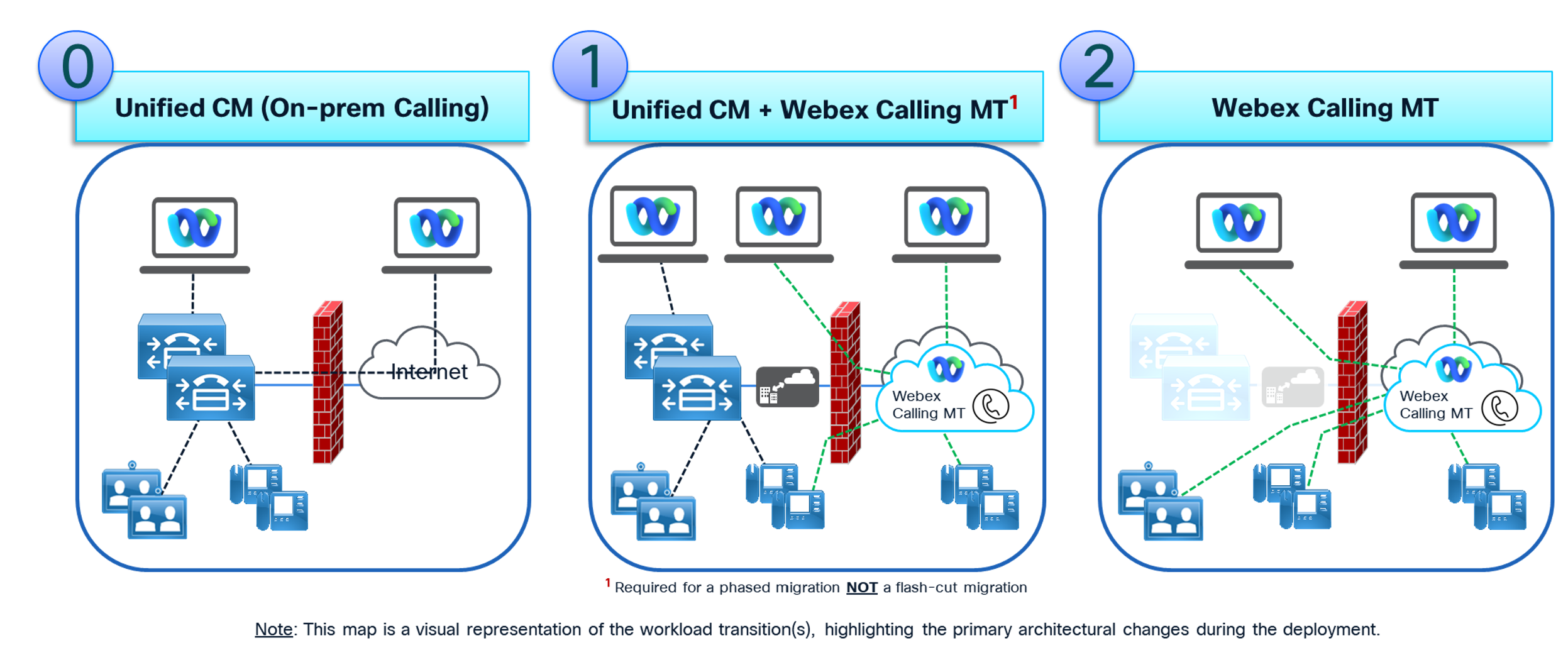
If you decide to use the single step approach, this applies too.
In this step users are transitioned to Webex Calling in groups. At this point the users start using Webex for their calling services, Webex App calling registration and IP Phone registration.
Since users are moving in groups, Enterprise users will be split between the two calling platforms during the transition. Phase 1 in Unified CM to Webex Calling high-level transition map figure depicts this state. During this phase planning is required for how to manage calls between users on the two platforms and how PSTN calls will be routed. Each time a group of users is transitioned to Webex Calling, dial-plans and call routing updates will be required on Unified CM, Webex Calling and the Local Gateway(s).
Once all users, soft clients and devices have been transitioned to Webex Calling (Phase 2), then all on-premises UC infrastructure can be removed and decommissioned.
What do you do next?
To design the Webex Calling environment, document the high- and low-level requirements specifications, and plan for contingency, refer to Design phase.


