- Home
- /
- Article

Thanks for your feedback.


Prepare to migrate from Unified CM to Webex Calling
 In this article
 Feedback?
The Prepare phase in the PPDIO lifecycle ensures readiness for migrating from Unified CM to Webex Calling by assessing the current environment, procuring licenses, and preparing endpoints and teams. This foundational step mitigates risks and aligns technical and business requirements for a smooth transition to the cloud calling solution. For a high-level overview of your migration journey, with quick links to explore detailed documentation, see Migrate Unified CM to Webex Calling.
Business and technical requirements
When planning a migration from Unified CM to Webex Calling, it's crucial to thoroughly gather both technical and business requirements during the planning phase. This step ensures that migration aligns with your organization's operational goals and technical capabilities, minimizing risks and disruptions.
Why gathering requirements is important:
-
Aligns business objectives: Understanding business needs helps tailor the migration to support key workflows, user experience, and growth plans.
-
Ensures technical compatibility: Identifying technical requirements early prevents integration issues with existing infrastructure, network, and endpoints.
-
Facilitates resource planning: Clear requirements help estimate timelines, costs, and necessary resources accurately.
-
Mitigates risks: Early detection of potential challenges allows for proactive solutions, reducing downtime and service interruptions.
Business requirements
Typical business requirements include:
-
Number of users and locations to be migrated
-
Desired features and services (example, call routing, voicemail, conferencing, auto attendants, call queues)
-
Compliance and security policies
-
Budget constraints and cost expectations
-
User training and support needs
-
Migration timeline and business continuity considerations.
Gathering desired features and services is a critical step to ensure the new system meets business needs. When gathering these requirements, it's important to not only consider what's currently configured in Unified CM but try to gather the actual requirements from the business entities that are going to use the system. Otherwise, there is a risk that the plan is based on non-current assumptions. Make sure to evaluate additional or enhanced features available in Webex Calling that may not exist in Unified CM, such as cloud-based calling, advanced call queues, Webex Calling Customer Assist, and Webex Go. This helps in leveraging the full benefits of the cloud platform.
When evaluating the current configuration in Unified CM, it is important to recognize that not all existing settings may remain necessary due to evolving requirements throughout the system's lifecycle. The focus should be on identifying and retaining only those configurations that align with the current and future needs of the deployment.
Focus more on what you need than what you have.
Compliance and security policies are critical considerations during the migration from Unified CM to Webex Calling to ensure that the new cloud-based communication system adheres to legal, regulatory, and organizational standards.
-
Regulatory compliance: Organizations must verify that Webex Calling meets industry-specific regulations such as GDPR, HIPAA, or SOX, addressing requirements for data privacy, retention, and handling, as well as country-specific mandates related to data residency, toll bypass, and media locality.
-
Data security: Ensuring that voice and signaling data are encrypted both in transit and at rest to protect against interception or unauthorized access.
-
Access controls: Defining and enforcing user authentication, authorization, and role-based access to prevent unauthorized use of communication resources.
-
Audit and monitoring: Implementing logging and monitoring capabilities to track access and usage for compliance audits and security incident investigations.
-
Policy alignment: Aligning the migration with existing corporate security policies, including endpoint security, network segmentation, and incident response plans.
-
Vendor security assurance: Evaluating Cisco's security certifications and compliance attestations for Webex Calling to ensure trustworthiness.
Addressing these compliance and security policies during the planning phase helps mitigate risks, avoid legal penalties, and maintain the integrity and confidentiality of communications throughout and after the migration.
User training and support needs are essential components during the migration from Unified CM to Webex Calling to ensure a smooth transition and user adoption. Key considerations include:
-
Training programs: Develop tailored training sessions for different user groups (end users, administrators, help desk staff) to familiarize them with Webex Calling features, user interfaces, and new workflows.
-
Documentation: Provide clear, accessible user guides, FAQs, and quick reference materials, including What's New and Different resources and step-by-step Before and After how-to guides (in video or quick guide format), to support users as they adapt to the updated experience post-migration.
-
Change management: Communicate changes proactively to manage user expectations and reduce resistance.
-
Support structure: Establish a dedicated support team or escalation path to address user issues promptly during and after the migration.
-
Ongoing education: Plan for continuous training updates as new features or updates are released in Webex Calling.
-
Feedback mechanisms: Implement channels for users to report issues and provide feedback to improve training and support processes.
Addressing these training and support needs during the planning phase helps minimize disruption, enhances user confidence, and maximizes the benefits of migrating to Webex Calling.
Technical requirements
Several key technical requirements need to be collected and documented for a successful migration from Unified CM to Webex Calling, including details for:
-
Network readiness and bandwidth capacity
A comprehensive network assessment is critical to ensure your existing infrastructure can support the new Webex Calling environment. This includes:
-
Bandwidth analysis: Evaluating current and projected bandwidth usage to handle voice, video, and data traffic without congestion.
-
Quality of Service (QoS): Implementing QoS policies to prioritize voice traffic and minimize latency, jitter, and packet loss.
-
WAN and internet connectivity: Verifying that WAN links and internet connections meet the requirements for cloud-based calling, including redundancy and failover capabilities.
-
Firewall and NAT configuration: Ensuring that firewall and NAT settings permit required signaling and media traffic for Webex Calling.
-
-
Integration with existing system
Seamless integration with existing business systems is essential for user experience and workflow continuity:
-
Directory services: Assessing integration with an enterprise directory for automated user provisioning and authentication.
-
CRM and business applications: Identifying integration points with customer relationship management systems and other business-critical applications.
-
Legacy PBX interworking: Planning for coexistence or phased migration strategies if any legacy telephony systems will remain during the transition.
-
-
Endpoint compatibility and provisioning
All endpoints including desk phones, softphones, and mobile devices should be evaluated for compatibility:
-
Device support: Confirming that existing IP phones and devices are supported by Webex Calling or identifying required replacements.
-
Provisioning processes: Establishing automated or streamlined provisioning methods for efficient onboarding of endpoints.
-
Firmware and software updates: Planning for necessary updates to ensure interoperability and security.
-
-
Security configurations and encryption standards
Security is paramount in cloud communications:
-
Encryption: Enforcing end-to-end encryption for signaling and media streams, in line with Cisco security best practices.
-
Authentication and access control: Implementing secure authentication mechanisms (such as SSO, multifactor authentication) and granular user access controls.
-
Compliance: Ensuring the solution meets relevant regulatory and industry compliance standards (example, GDPR, HIPAA).
-
Security monitoring: Integrating with SIEM tools and setting up alerting for potential security incidents.
-
| Requirement | Key considerations |
|---|---|
| Network readiness and bandwidth | Bandwidth, QoS, WAN/Internet, Firewall/NAT |
| Integration with existing systems | Directory, CRM, PBX, Email/Calendar |
| Endpoint compatibility and provisioning | Device support, provisioning, firmware updates |
| Security configurations and encryption | Encryption, authentication, compliance, security monitoring |
| User training and change management | Training programs, documentation, change communication |
| Number portability and dial plan | Number migration/porting, dial plan translation |
| Third-party integrations | Paging, contact center, fax, analog devices |
Network readiness and requirements
Network readiness is critical to a successful migration to any cloud-based calling solution like Webex Calling. Poor network planning can lead to degraded call quality, dropped calls, and unhappy users. Customers need to conduct a network assessment prior to migrating to Webex Calling. It is recommended to confirm network bandwidth availability for expected call volume, ensure quality of service (QoS) requirements are met, and understand the various ports that must be opened in the edge firewall(s).
Reliable network connectivity with sufficient quality of service (bandwidth, packet loss, RTT) is a base requirement to ensure the best possible user experience end-to-end for all voice and video capable endpoints, clients, and applications using Webex Calling.
Customers and partners have access connectivity options beyond Over-the-top (OTT) Internet that can optimize the connection to Webex Calling including Webex Edge Connect. For more information on Webex Edge Connect design details, see Cisco Preferred Architecture for Webex Edge Connect for Webex Meetings, Calling Multi-Tenant, and Dedicated Instance.
Customers can utilize CScan for network assessment which gives information on customer's network quality, how many calls can be established, latency, and so on. For more information on the CScan tool, see Use CScan to test Webex Calling network quality.
To ensure the network is ready for migration to Webex Calling, consider the following checklist:
-
Bandwidth planning
Calculate concurrent calls per site to ensure you have enough upstream and downstream bandwidth and include headroom for other business-critical traffic and future growth.
The Webex Calling call type bandwidth calculations table shows the call types available with a Webex Calling deployment along with the codec and maximum bandwidth required for each call type. As shown in the Webex Calling call type bandwidth calculations table required audio call bandwidth for each call type can be calculated using the following general formula:
Number of expected concurrent calls * Bandwidth per call based on codec = Required network throughput.
Table 2. Webex Calling call type bandwidth calculations Call types Codec - bandwidth Bandwidth calculations Webex App / Desk phone -> Webex App OPUS - 70 kbps Number of concurrent calls * 70 kbps = Required network throughput Webex App / Desk phone -> Desk Phone OPUS – 70 kbps Number of concurrent calls * 70 kbps = Required network throughput Webex App / Desk phone -> PSTN via LGW G.711 – 80 kbps Number of concurrent calls * 80 kbps = Required network throughput Webex App / Desk phone -> PSTN via Cloud PSTN (e.g. Cisco calling plan) G.711 – 80 kbps Number of concurrent calls * 80 kbps = Required network throughput Webex App / Desk phone -> Enterprise via LGW G.722 – 80 kbps Number of concurrent calls * 80 kbps = Required network throughput Webex App / Desk phone -> Webex Calling voicemail OPUS – 70 kbps Number of concurrent calls * 70 kbps = Required network throughput By summing the concurrent required network throughput per call type, the total potential bandwidth requirement for a specific site can be determined.
All call legs are always anchored on the Webex Calling access SBCs. To determine the required internet bandwidth for any given Webex Calling location not only the inter-location calls need to be considered, but also intra-location calls and calls to and from a Local Gateway at that location. For example, an intra-site call between two MPP phones would need up to 2 x 70 kbps full duplex on the location's internet access.
The Webex Calling bandwidth calculation examples table shows an example of a complete bandwidth calculation exercise, assuming that all devices are in the same site.
Table 3. Webex Calling bandwidth calculation examples Call types Number of concurrent calls Total bandwidth Webex App / Desk Phone → Webex App 15 2 * 15 * 70 kbps = 2,100 kbps Webex App / Desk Phone → Desk Phone 15 2 * 15 * 70 kbps = 2,100 kbps Webex App / Desk Phone → PSTN via LGW 50 2 * 50 * 80 kbps = 8,000 kbps Webex App / Desk Phone → PSTN via Cloud Connect for Webex Calling 0 0 * 80 Kbps Webex App / Desk Phone → Enterprise via LGW 15 2 * 15 * 80 kbps = 2,400 kbps Webex App / Desk Phone → Webex Calling Voicemail 5 5 * 70 kbps = 350 kbps Total calls / Bandwidth 100 calls 14,950 kbps / 14.95 Mbps -
All bandwidth values in the above tables refer to IP bandwidth. Link bandwidth is higher depending on WAN encapsulations.
-
The bandwidth in the above tables is for audio calls. For video call bandwidth, Webex App and the MPP 8845/65 phones support H.264 video with maximum resolution of 720p at a maximum bandwidth of 1,500 kbps per call. However, the amount of bandwidth consumed at any point during the call will fluctuate based on variable bit rate inherent in video communications.
-
-
Quality of Service (QoS)
Implement QoS policies within your on-premises environment to prioritize real-time traffic, and ensure QoS is maintained across switches, routers, and firewalls.
-
Latency, jitter, and packet loss targets
The following thresholds are recommended for optimal voice quality when calls go Over-the-Top (OTT) and across the internet:
-
Latency - less than 100ms one-way
-
Jitter - less than 10ms
-
Packet Loss - 0.5% or less.
-
-
Firewall and NAT
Ensure the firewall is configured to allow Webex Calling traffic as listed in the article available at Port reference information for Webex Calling. Additionally, allow access to Webex domains and IP ranges listed in the same guide and avoid SIP ALG as it interferes with SIP signaling. Media traffic through proxies should be avoided.
-
DNS and NTP
Ensure proper DNS resolution of Webex domains and reliable NTP servers to sync device clocks for TLS certificate verification and logging.
-
Failover planning
Consider existing provider data connections (MPLS, SD-WAN, and so on) and generally plan for direct internet access at each location within your deployment. Plan for redundant internet links where high availability is required. Because you will be consuming cloud-based services, reliable internet connectivity with sufficient bandwidth is a base requirement. You should reconsider making this transition if your organization locations' internet connection(s) are not generally reliable with low latency and adequate up and downstream throughput.
-
Site survivability
Site survivability ensures that your business is always reachable, even if your network connection to Webex breaks. Site Survivability uses a gateway in your local network to provide a fallback calling service to on-site endpoints for situations where the network connection to Webex breaks. Consider site survivability with a local Survivability Gateway (SGW) if business requirements require continuous calling in the event of network outage. For more information about site survivability check, see Site survivability for Webex Calling.
Set up Cloud-Connected UC
Cloud Connected UC (CCUC) is a cloud-based management and analytics solution designed to provide centralized visibility, administration, and insights for Unified CM deployments both on-premises (such as Unified CM) and cloud (Webex Calling - Dedicated Instance). It acts as a bridge between traditional on-premises environments and Cisco's cloud services, supporting organizations throughout the migration journey from Unified CM to Webex Calling.
During the transition to Webex Calling, CCUC plays a vital role in streamlining the migration process by facilitating the collection of comprehensive data from the existing Unified Communications deployment. CCUC assists with key transition tasks such as migrating devices, features and user contacts, as well as automating firmware updates for supported IP phones. By providing centralized visibility and management, CCUC helps ensure a smoother and more efficient migration experience.
Cisco highly recommends that CCUC be deployed and deployed early in the transition project, ideally before or during the preparation phase. This will enable the insights and capabilities needed to thoroughly assess, inventory, and plan for subsequent migration activities and to start your journey to Webex and future hybrid capabilities.
Assessing the current environment
A key activity in planning for your migration is assessing the current on-premises environment and deployment. This provides insights into what potential changes may be required to successfully transition to Webex Calling. It also allows you to assess the key elements of Webex Calling platform in comparison to the existing on-premises deployment. You can use this information to help identify what specific tasks are required for the transition and what changes you want to make to meet your business and technical requirements and use cases.
The following aspects are important to review as part of this effort.
Licensing
Understanding the current licensing structure of the existing deployment is key when preparing to migrate to Webex Calling. Perform a license assessment of the following areas of your existing Cisco on-premises solution.
-
Platform
The ability to fully articulate what is currently licensed on your core platform will be critical when working with your account team or partner to determine the best path to flex licensing. Webex Calling is licensed using flex licensing. For more information on flex licensing, see Cisco collaboration flex plan.
-
Users and devices
Identify what license category your existing users and devices require. This will be used to determine which type of Webex Calling license is required for the users and devices. Webex Calling offers multiple licensing types, including Professional and Standard licenses for users and Professional and common area licenses for workspaces. For more information on Webex Calling device licensing, see the data sheet available at Device licensing.
-
Local gateway
If the Cisco Unified Border Element (CUBE) is required for PSTN access for this transition, CUBE licensing must also be considered. CUBE licensing considerations are covered later in this document.
Locations/Sites
The number and types of sites (large central, regional, branch, and so on) within your existing deployment should be considered when planning this transition. A full understanding of the existing deployment sites will aid in strategically planning for a successful transition particularly when it comes to determining what sites to migrate and in what order. Understanding in detail dial plan requirements (numbering, dialing habits, classes of restriction, and so on), site network connectivity and bandwidth (Internet, WAN, LAN), and PSTN access (local or centralized, IP or TDM) for each site will be critical when making migration decisions. For more information on common deployment models and key considerations, see the collaboration deployment models information available in the Collaboration SRND.
Another important deployment consideration when transitioning to Webex Calling is location availability. Webex Calling has different capabilities, subscriptions and devices that are available depending on where your deployment is located. For more information on Webex Calling geographic availability, see Where is Webex available?.
Finally, it is important to understand the impact the transition to Webex Calling will have on other collaboration services. Based on the objective of this document, the general assumption is that if existing collaboration services outside of the calling workload are to be maintained, then transition to the phase 1 hybrid deployment mentioned above is expected. Examples of collaboration services that may require hybrid deployment include on-premises contact center not yet migrated to Webex contact center and tight integrations into systems like paging systems and billing. For more information on the transition of additional collaboration workloads and services, see Collaboration transitions.
Inventory existing devices/clients
Before beginning the transition it's important to inventory your existing hardware and software endpoints. Having a complete list of device types/models, hardware versions, soft client OS types and quantities will ensure that you can adequately plan for transitioning the devices and mitigating the impact for those devices that cannot be migrated to cloud calling. The inventory should be used to determine the devices to transition and the devices to replace prior to the transition.
Desk phones
For audio and video desk phones only the 6800, 7800, 8800 and 9800 series desk phones are supported with Webex Calling. This is a subset of the Cisco IP Phones that are supported with Unified CM. There are some models and versions of the 6800, 7800 and 8800 phones that cannot be used with Webex Calling. For more information on which models and hardware versions are supported, see Supported devices for Webex Calling.
The Cisco 6800 series IP phones cannot be upgraded from Enterprise firmware to Multiplatform (MPP) firmware, which is required for Webex Calling. Therefore any 6800 phones registered to Unified CM running enterprise firmware must be replaced with a 6800 MPP model or with another supported phone model.
The Cisco 7800 and 8800 series IP phones must be upgraded to the Multiplatform Phone (MPP) firmware prior to transition and registering them to Webex Calling. To determine which 7800 and 8800 models and hardware versions support the MPP firmware, see Convert Cisco 7800 and 8800 series IP phones between Enterprise and MPP Firmware.
The 8845, 8865 and 8865NR have reached End-of-Sale and are not recommended to be migrated to Webex Calling.
Older versions of the 8800 series phones (8811, 8841, 8851, 8851NR, 8861) are not recommended to use with Webex Calling. Phones with hardware versions VID 14 or earlier will register with Webex Calling but may experience some performance issues due to the hardware.
The 9800 series desk phones run PhoneOS, which supports both Unified CM and Webex Calling registration. Therefore, these phones can be transitioned to Webex Calling without a firmware upgrade.
All other IP phones will need to be replaced with a 6800, 7800, 8800 or 9800 series phones supported by Webex Calling. For more information on the supported IP and Desk Phones with Webex Calling, see the article at Supported devices for Webex Calling.
Video endpoints
Personal and room video endpoints, including the Cisco Board series, Room series, and Desk series, can natively SIP register to Webex Calling. Any of these endpoints that need to make audio and/or PSTN calls require a calling license:
-
Shared devices in conference rooms, huddle spaces, etc. require either a Webex Calling Professional Workspace or Webex Calling Workspace license.
-
An end user's personal device requires a Webex Calling professional or Webex Calling standard license.
Determine how many video endpoints are registered to Unified CM and are used to make audio calls. It is possible some of the video endpoints may only be used for joining meetings or making SIP video calls. In either case, the endpoints still need to migrate to Webex before the Unified CM servers are decommissioned, however this will help determine how many of them will need a Webex Calling licenses to continue to make phone calls.
-
When video devices are moved from Unified CM registration to Webex, the URI for these endpoints will change as they are now cloud registered.
-
Phone models 8845, 8865 and 8875 are personal video phones that are supported with Webex Calling.
Soft clients
The Webex App is the only soft client supported by Webex Calling, unlike Unified CM which supports both the Webex App and Jabber, and is the new default soft client for end users.
Depending on the deployment mode(s) implemented for Jabber (IM-only, phone-only, and/or full UC modes), you may also need to consider the transition of the Messaging and/or Meetings workloads from Jabber to the Webex App. The Webex App can be deployed in phone-only mode if it will be used as a calling only client or it can be deployed as the full Webex Suite if other workloads, e.g. Webex Messaging and/or Webex Meetings, are being transitioned to the app with calling.
The Webex App enhances the end-user's experience by providing AI features like audio/video intelligence, call transcription, and others. For more information, see Webex App.
Before moving users to Webex Calling you will need to transition their Jabber clients to the Webex App. You have two options to complete this transition.
-
Before you transition them to Webex Calling
-
When you transition them to Webex Calling.
To ease the initial transition to the Webex App, it is recommended to use option 1 and move users to the Webex App with Unified CM calling first. This gives users time to familiarize themselves with the new application while they are still using the existing on-premises Unified CM calling platform. Once you are ready to move users to Webex Calling, you will configure their Webex App to register with the cloud calling platform.
For more information, about these two options see Migration journey - one or two steps?.
For a complete list of the supported devices for Webex Calling, see Supported devices for Webex Calling.
Verify device eligibility
As mentioned previously, Webex Calling supports a subset of the Cisco IP Phones and requires a different firmware type for the 7800 and 8800 series phones. Unified CM phones run the Enterprise firmware whereas Webex Calling Phones run the Multiplatform Phone (MPP) firmware. It is recommended to verify which Unified CM registered phones are eligible to upgrade to the MPP firmware during the Prepare phase. This gives you time to replace ineligible phones with one of the supported phone models or to identify an alternative plan, like moving a user to the Webex App only.
To help with determining the eligibility of the Unified CM phones, Control Hub has a built-in tool called Migrate Your Phone to Webex Calling. When using this tool to check device eligibility, select the Migration option Generate device license only.
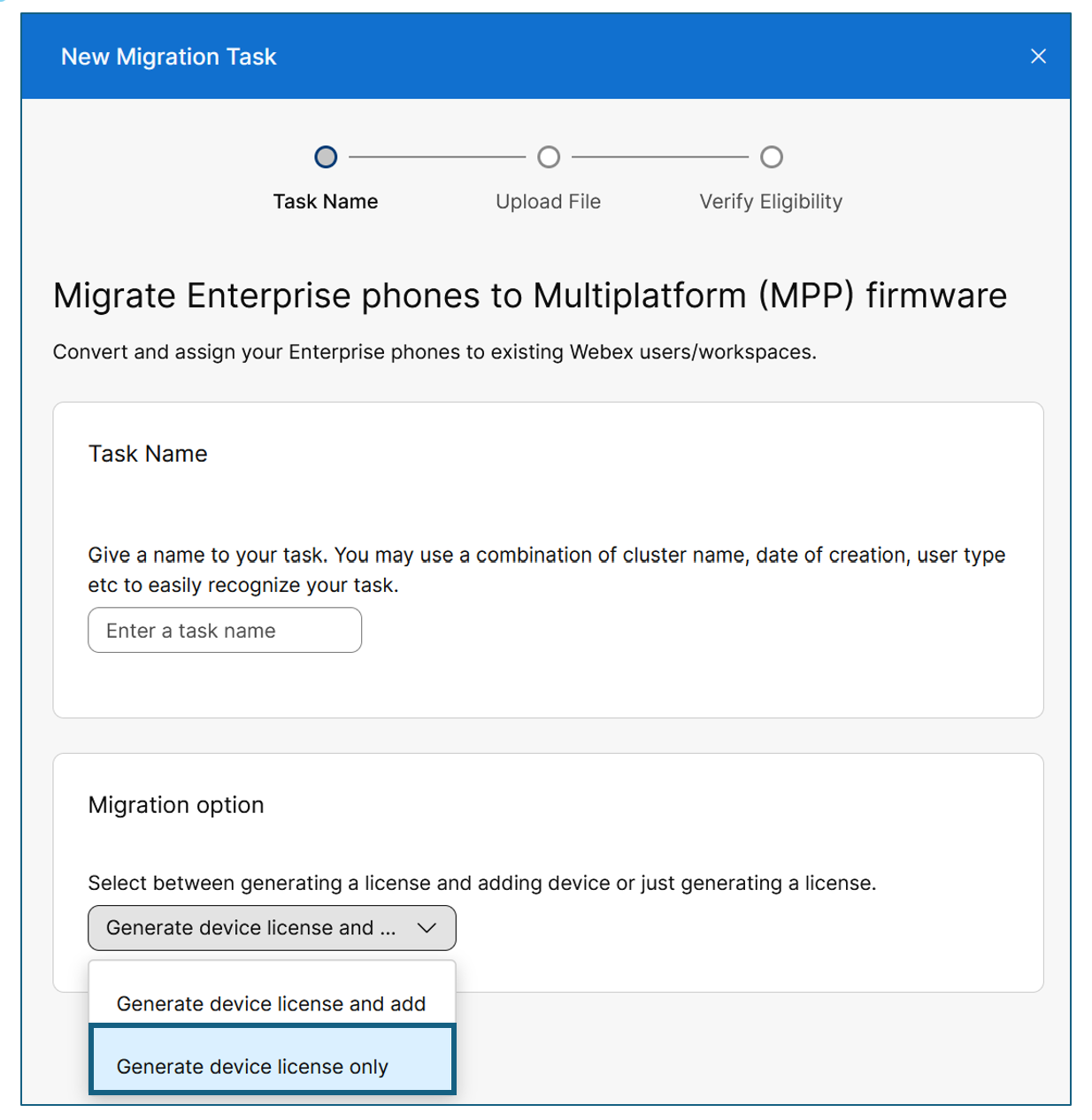
This option allows you to upload a CSV file containing the Unified CM phones so Webex can check the eligibility of each phone. By selecting this Migration option, it does not add the phones to Webex since you are still in the prepare phase and not ready to do this yet. For more information, see Migrate your phone to Webex Calling.
It is possible that some of the phones may come back with an Unknown eligibility. This is typically because Webex is unable to validate some information about the phone in the back-end system. For any phones that have an Unknown status, you have two options to verify if they are eligible to upgrade to the MPP firmware.
-
Manually check each phone and verify the model and hardware version (PID VID)
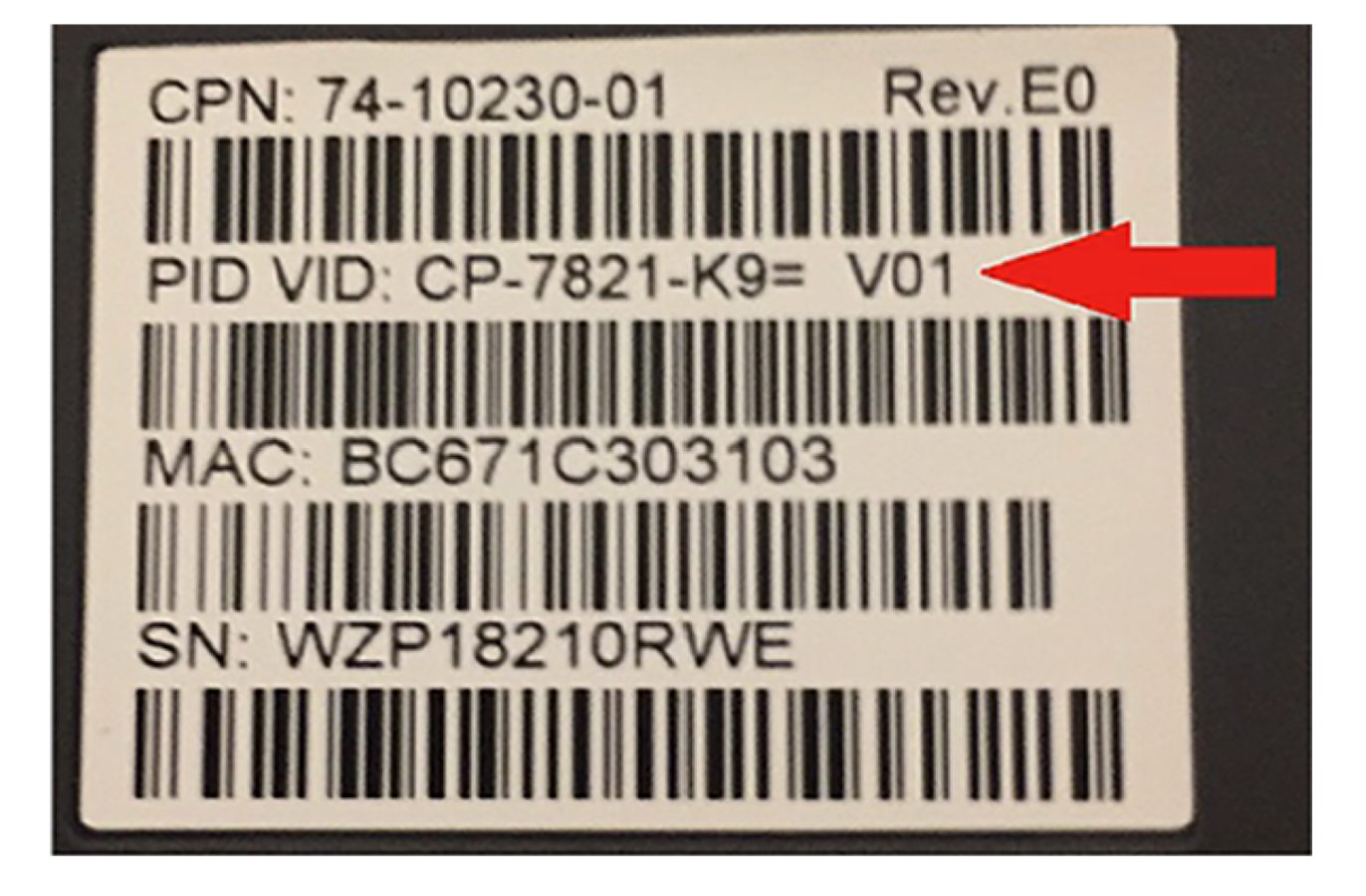
7800/8800 phone label with model and hardware version info -
Use the Cisco IP phone readiness tool
Download the tool from https://github.com/joemar2/mpp_readiness_check.
This tool is not an official Cisco tool nor is it TAC supported. It has best-effort support but is free to use.
This tool must be run on a machine that is on-premises and can access the Unified CM servers and the IP Phones. It has an option to enable web access on the IP Phones, which is recommended and needed to get the best results. Therefore, it should be used during off hours to avoid disruption to the end users. The output of the tool provides a report listing which of the Unified CM 7800 and 8800 series phones are eligible to upgrade to the MPP firmware. Because it directly accesses the phone it can verify the Unknown devices that were reported from the Control Hub tool.
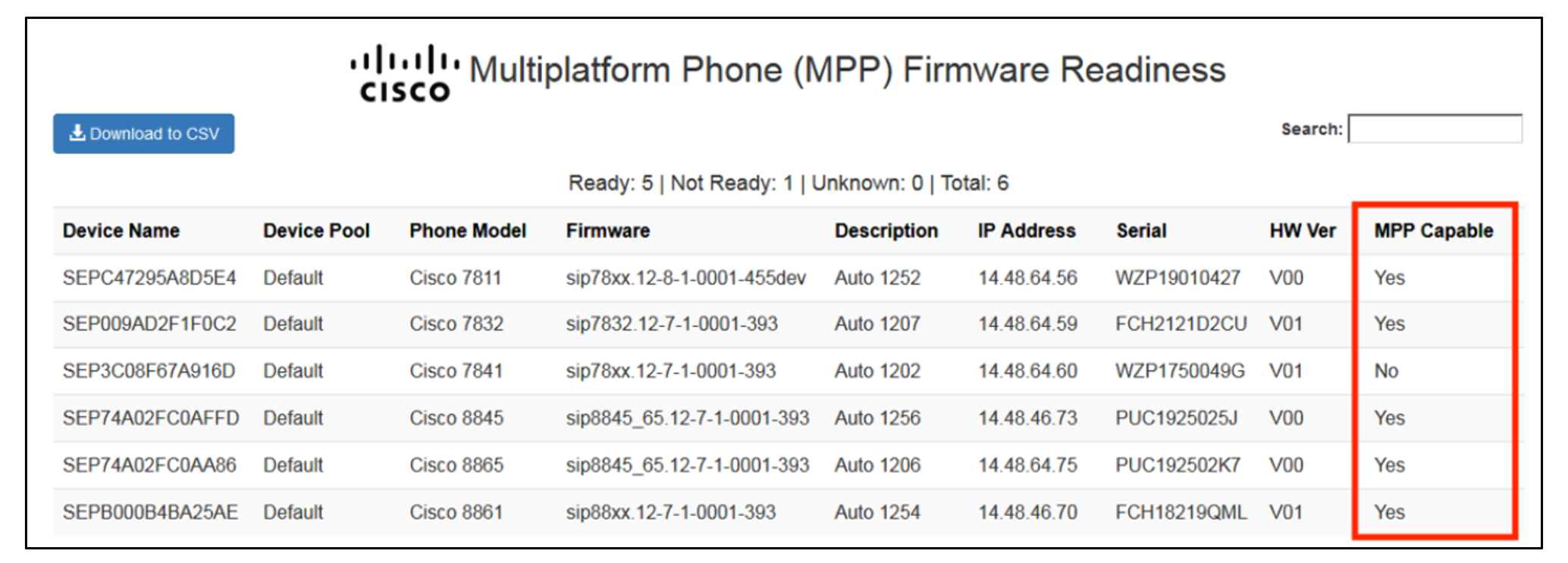
Cisco IP phone readiness tool report
Users
One of the most important prepare steps to ensure you have a successful migration is proper user provisioning. You need to properly plan for all users even if you are doing a phased migration. Users must be provisioned in Webex for any of the following:
-
Deploying the Webex App with Unified CM Calling
-
Deploying the Webex App with Webex Calling
-
Configuring Webex Calling services for a user
-
To make users searchable in the Webex directory (Webex App click-to-call, User contact info, phone directory search).
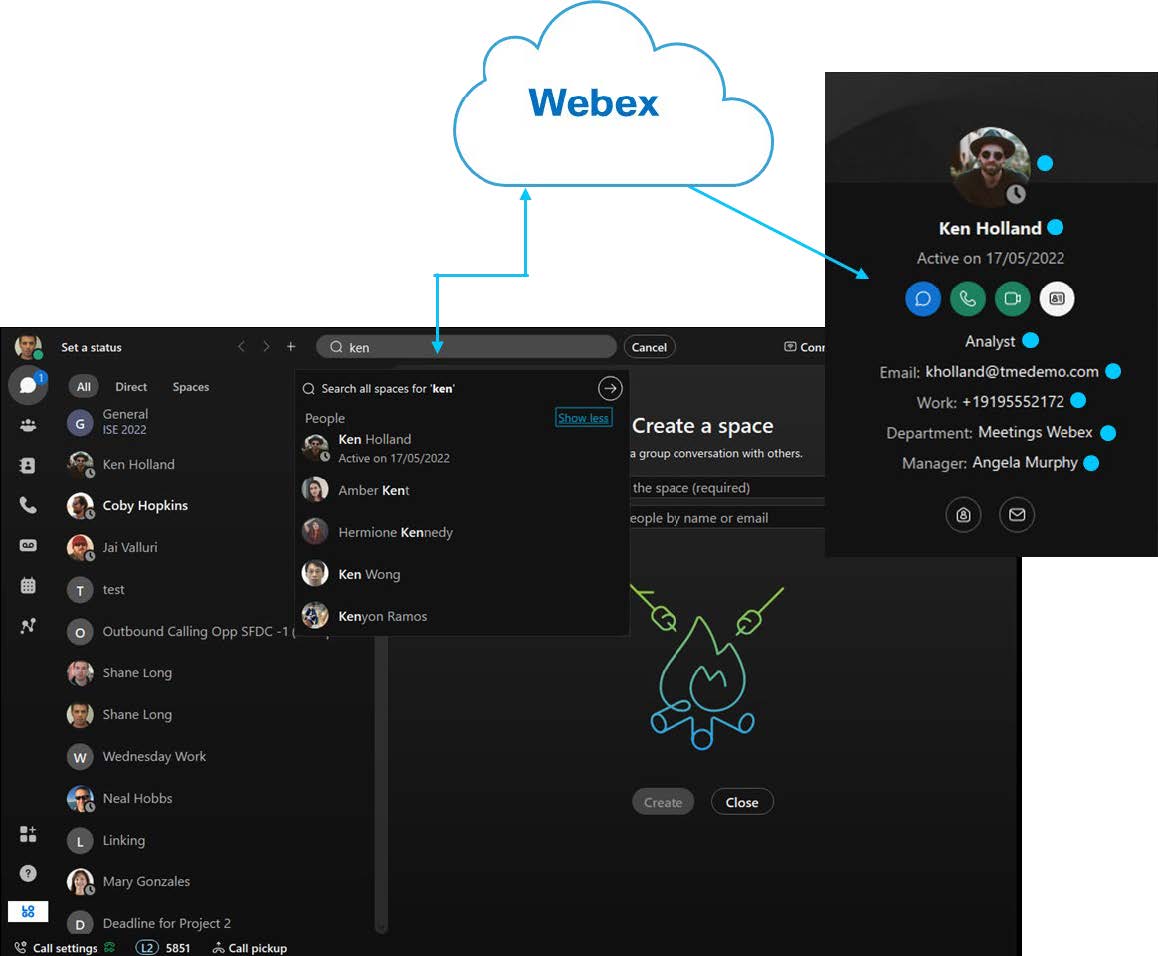
It is recommended that you provision all users in Webex before or at the start of your project. This includes users who are still using Unified CM for their calling platform is independent of their calling device (IP phone, Jabber, Webex App). As users get migrated to Webex Calling (and/or the Webex App) you will update their Webex licenses to enable the services they need. By provisioning all enterprise calling users before starting your transition, it allows a user who has transitioned to the Webex App or to Webex Calling to search the Webex directory for an enterprise calling user who is still on Jabber and/or on Unified CM. This ensures transitioned users can find any other user's contact information and make a call to them using the directory lookup.
The figure Webex App directory search show an example of a Webex App user searching for another user. The search results show the user's contact information and can be for a user who is still on Jabber and Unified CM or for a user who has transitioned to the Webex App and/or Webex Calling.
Next determine which of the existing on-premises calling users will be transitioned to Webex Calling. If all or a large number of users will be transitioned, then it is recommended to move users in groups to ensure that project team, IT staff and support personnel are able to handle the transition and any issues that may arise. You should also allocate some time to provide initial information and training sessions to prepare users for this transition. User transition grouping can be done based on a variety of criteria including the location or site users are assigned to, users' departments, or even user types (knowledge workers, executives, mobile workers, and so on).
As an example, if users in the deployment are divided across three main sites, New York (NYC), San Francisco (SFC), and Research Triangle Park (RTP), a user transition plan may look like the plan outlined in User transition plan by site table.
| User site / location | Pre-transition information and training sessions | Transition period | Post-transition support |
|---|---|---|---|
| NYC (1,525 users) | Week of April 1 | April 15 – April 27 | Week of April 29 |
| SFO (1,600 users) | Week of May 6 | May 20 – May 31 | Week of June 3 |
| RTP (1,275 users) | Week of June 3 | June 17 – June 28 | Week of July 1 |
Another important factor is transitioning users together who have dependencies between each other. This could include but is not limited to the following:
-
BLF monitoring
-
Same hunt pilot/group
-
Share lines
-
Part of the same Call pick-up group
-
Using the same call-park numbers
-
Intercom
-
Admin/Exec.
You can review the Unified CM configuration (GUI or export) or use the Control Hub Migration Insights tool to help identify the groups of users with these dependencies.
PSTN connectivity
Webex Calling can access the PSTN in three ways: Cisco calling plans, Cloud connect for Webex Calling (formerly Cloud Connected PSTN), and on-premises PSTN (Local gateway). However, a single location as defined within the Control Hub can only be assigned to a single PSTN option.
On-premises PSTN with a local gateway (LGW) is an essential component of the transition strategy. It provides connectivity between the on-premises deployment and/or PSTN and the Webex Calling platform. Webex Calling supports both Cisco and certified third-party session border controllers (SBC) that can be used as local gateway. For the latest list of supported SBCs, see List of supported SBCs.
Webex Calling supports up to 250 concurrent calls from a single local gateway that is registration-based and more than 250 concurrent calls from a single Local Gateway that is certificate-based. Certificate-based Local Gateways can support up to 6500 concurrent calls, but this is based on the type of connectivity the local gateway has to Webex (Over-the-Top vs interconnect peering) and the SBC model the Local Gateway is deployed on. These limits are in essence the default count limit for both local gateway-based PSTN calls and inter-site calls between Unified CM and Webex Calling endpoints. For more information, see Get started with local gateway.
Any calls exceeding this limit are rejected with a 403 Forbidden. The show call active voice command can be run on the local gateway at any instance to determine the total number of active calls.
Poor network conditions between a local gateway and the Webex Calling access SBC can limit the performance of the signaling connection, leading to an even lower concurrent calls limit. One-way latency between the local gateway and the Webex Calling data center should not exceed 100 ms and jitter should be less than 10 ms while packet loss is less than 0.5 %.
Features & feature usage
When assessing the current environment, it is important to identify and review which Unified CM features are configured. In addition, it is important to understand the usage of the features so you can (re)define your business and technical requirements for your Webex Calling deployment.
To determine which features are configured, analyze the Unified CM configuration. This is all static data that is set when a feature or setting is configured on the system. The following options can be used to complete this analysis:
-
Review Unified CM configuration in admin GUI
-
Unified CM config export -- bulk export or AXL
-
Control Hub migration insights tool (Recommended)
-
Cisco 3rd party partner tools (Recommended).
To analyze feature utilization effectively, it is essential to examine dynamic system data such as utilization, registrations, and call activity. Various analytical tools and dashboards provide insights into these metrics, enabling a comprehensive understanding of system performance and capacity, which supports informed decision-making during migration and optimization efforts. The following options can be used to complete this type of analysis:
-
Review of raw CDR records
-
Review of Unified CM RTMT data
-
Control Hub migration Insights tool using Unified CM CDR data
-
Review of Cloud-Connected UC analytics in Control Hub
-
Call volume
-
Registered endpoints
-
(CAC) locations
-
Trunk utilization.
-
-
Cisco 3rd party partner tools.
Cisco recommends starting with the Webex Control Hub Migration Insights tool for this analysis. You will import your Unified CM export .TAR file and the Unified CM CDR files (optional, but required for feature utilization analysis) into the tool. The tool will generate the following CSV based reports that can be used to start the analysis:
| Report name Report description |
|---|
| ImportedDataBulk.csv
All users and devices from Unified CM data |
| DeviceEligibility.csv
Identifies devices eligible to Migrate to Webex Calling (IP phones, Room OS devices, ATAs, and Third-Party) |
| DevicePoolNumbers.txt List of all numbers in a particular device pool |
| HuntGroup_CallQueue_CallPark_CallPickUpGroups.csv Details about devices and users that should be migrated together based on shared lines, hunt pilot, call queue, call park and call pickup group config |
| HuntGroupMigrationInsight.csv Detailed information on assigned hunt lines, line groups, and associated agents |
| SharedlineGroupMigrationReport.csv Overview of how phone numbers (directory numbers) are shared between users |
| Report name Report description |
|---|
| FeatureUsageBasedDeviceEligibilityReport.csv Information about device migration eligibility based on the feature usage |
| FeatureUsageWithLastUsageDateReport.csv Usage count for the number of times hunt pilot(s) and call queue(s) have been called along with the last usage date |
| UserWorkspaceLastUsage.csv Last usage date for users and workspaces for both soft clients and hard phones |
| DIDUsageReport.csv DID usage for both assigned and unassigned DIDs |
For more details about the Migration Insights reports, see Migration insights.
If you need more information about the Unified CM features and usage after reviewing the information in the Migration Insights reports, Cisco recommends considering one of Cisco's 3rd party partner migration tools and/or to review the Unified CM configurations in the GUI or in the config export data.
Cisco integrations: Unity Connection UCCX UCCE
Voicemail is an integral part of the Webex Calling offer and natively build-in to the solution. Webex Calling cannot integrate with a premise-based voicemail solution such as Unity Connection or Unity Connection Express. Further, there is no native way to migrate existing Unity connection voicemail messages or greetings to the native voicemail service available with Webex Calling. Some of Cisco's 3rd party partner's migration tools do have capabilities to migrate some of this data. For more information on voicemail for Webex Calling, see Configure and manage voicemail settings for a Webex Calling user.
Webex Calling also supports shared voicemail and fax mailboxes. For more information, see Manage a shared voicemail and inbound fax box for Webex Calling.
Webex Calling has a built-in Auto Attendant feature that is included as part of the core platform. This feature allows for the transition of your Unity Connection's call handlers and auto-attendant functionality. The Control Hub tool, Migrate Features from Unified CM, supports migrating the Unity Connection configurations to Webex Calling Auto-Attendants. For more information about using this tool, see Migration of devices and features from Unified CM to Webex Calling.
Call recording
Webex Calling includes two options for call recording at no additional cost.
-
Webex call recording
-
Dubber Go recording (partner offer) - an integration between Webex Calling and dubber where all recorded media is securely kept in the cloud.
Webex Calling included recording options table highlights some key features of the two call recording options that are available at no additional cost.
| Webex | Dubber Go |
|---|---|
| Available to all users | Available to all users |
| Unlimited recordings | Unlimited recordings |
| 1 year retention period* | 30-day retention period |
| 100 GB storage per Org | - |
| Compliance officers can access and manage call recordings | - |
| APIs to manage recordings | - |
Admins can configure and manage users’ access to their call recordings
|
Only users can access and manage their recordings
|
If your organization requires additional recording capabilities like compliance call recording, longer retention periods, more storage, AI analysis, and/or administrator access, paid offers or add-ons exist from both Cisco and 3rd parties recording providers. For more information on Webex Calling recording providers, configurations and add-on partner services, see Manage call recording for Webex Calling.
Third party integrations
Webex Calling supports a variety of 3rd party integrations including but not limited to SBCs for Local Gateways, IP phones, Intercom phones, Speaker/Pagers, ATAs, etc. In addition to these 3rd party devices, Webex Calling supports different 3rd party solutions for customer support, analytics, recording, billing, etc. For more information on 3rd party solutions, see Webex App Hub.
What do you do next?
To review the current environment and define scope for the transition project based on future requirements for your organization, refer to Plan phase.


