
Thanks for your feedback.
Show real-time translation in meetings and webinars
 Feedback?
This article is about Webex meetings and webinars. For information on Webex devices, see Closed captioning on Board, Desk, and Room Series.
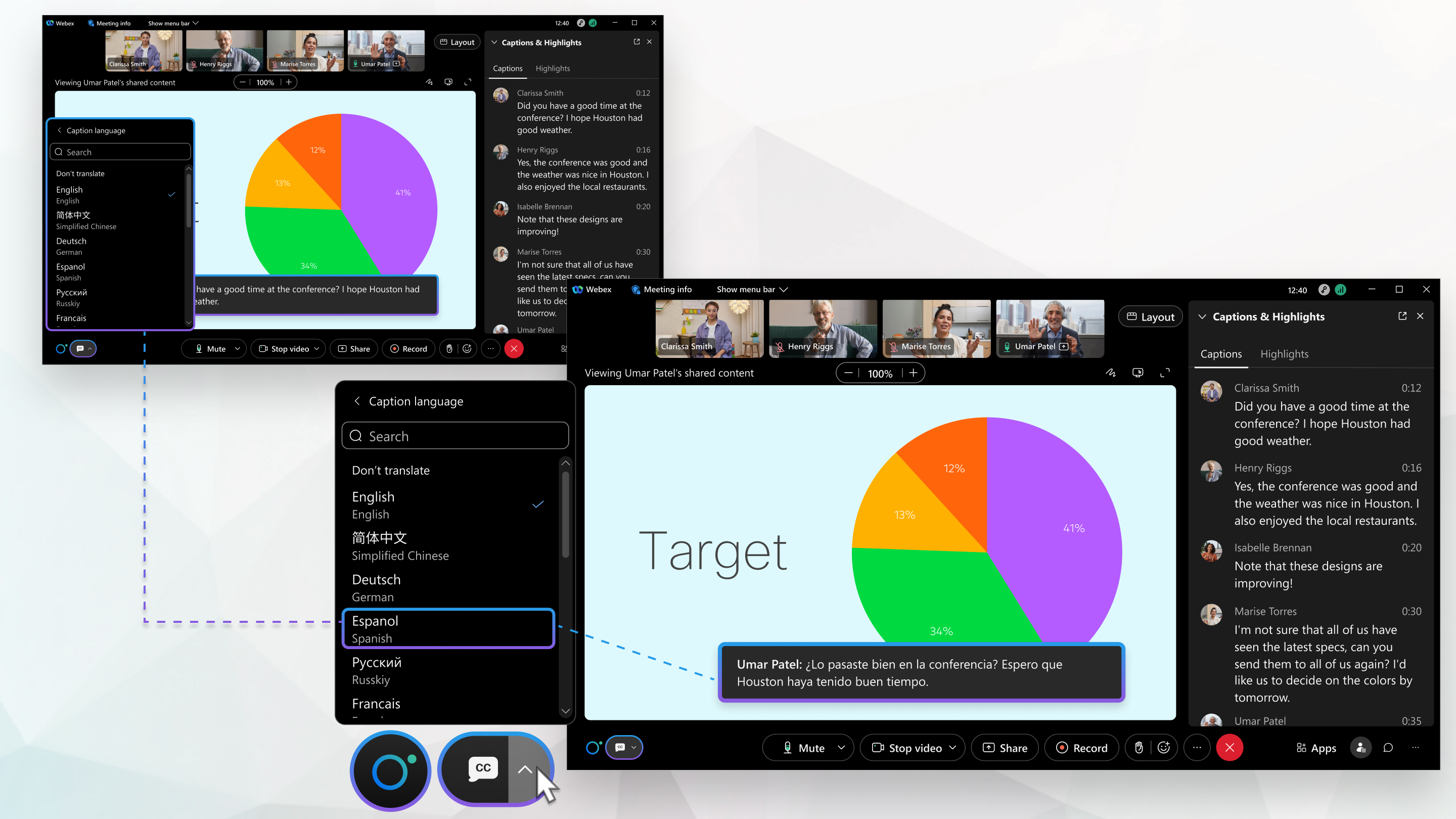
When real-time translation is on, the system automatically translates a person's speech into captions that appear above the meeting or webinar controls. The captions panel on the right side shows the transcription for the selected spoken language not the translation, (the 16 supported spoken languages are for transcription only, not translation).
Real-time translation is a paid add-on license, without this license, translation into multiple caption languages is not available.
We support 16 spoken languages for transcription only, in Webex Meetings, Webex Webinars (not available for webinars in webcast view), and meetings started from Webex App. These 16 spoken languages do not include translation capabilities and are available without requiring a Real-time Translation license.
The spoken language for transcription can be selected only by the host or automatically changed with auto-detection of spoken language. On Webex App, cohosts who join a meeting from a device can select the spoken language for transcription. Each and every participant can select their own preferred caption language for translations.
The translation doesn't include all dialects. A meeting or webinar can use a maximum of 15 unique caption languages at the same time.
For free Webex account users, Webex Assistant or automated closed captions only include 5 spoken languages for transcription.
Webex for Government provides the default 5 spoken languages translated to 120+ caption languages.
The table below outlines the capabilities included with each license type:
|
License type |
Capability |
|---|---|
|
With real-time translation license |
16 spoken languages for closed captions and translations, and 120+ translation languages for closed captions. |
|
Without real-time translation licence |
16 spoken languages for closed captions and transcription, no translation. |
|
Free |
5 spoken languages for closed captions and transcription. |
Your site administrator must enable real-time translation for meetings and webinars.
You can generate the following types of post-meeting transcripts:
- A transcript embedded with the video recording. This transcript supports English transcription only.
- A transcript available on the post-meeting site page for the duration that recording is on AND Webex Assistant or Closed Captions is on. This transcript and any Webex Assistant highlights support transcription in all spoken languages (see Supported Languages below to see which languages are available to you).
-
To access this transcript, sign in your Webex account, click Calendar, then select Review.
-
On Webex App, if you prefer, turn on manual captioning and assign a captioner or use a manual captioning service to add captions to your meeting.
| 1 |
In a meeting or webinar, select Show closed captions |
| 2 |
Select Caption language and choose the desired language. Each participant can select their own preferred caption language for translations. The translation doesn't include all dialects. A meeting or webinar can use a maximum of 15 unique caption languages at the same time. |
 .
. | 1 |
Tap More options |
| 2 |
Toggle on Closed Captions. |
| 3 |
Tap Choose Language and select the language you want to translate speech. Each participant can select their own preferred caption language for translations. The translation doesn't include all dialects. A meeting or webinar can use a maximum of 15 unique caption languages at the same time. |
| 4 |
Exit out of the options to save these settings. |

You can choose from the following 16 different spoken languages for your meetings or webinars, for closed captions and transcriptions without requiring a Real-time Translation license. However, if you want access to the 120+ caption languages, you'll need to have a Real-time Translation license.
Webex for Government uses a slightly different language list for caption languages.
-
Arabic
-
Chinese, Mandarin (Simplified)
-
Chinese, Mandarin (Traditional)
-
Danish
-
Dutch
-
English
-
French
-
German
-
Hindi
-
Italian
-
Japanese
-
Korean
-
Polish
-
Portuguese
-
Spanish
-
Turkish
With a free Webex account, Webex assistant or automated closed captions only includes the following default spoken languages for transcription.
-
English
-
French
-
German
-
Spanish
-
Italian
Caption Languages:
When Real-time Translation is on, participants can select from 120+ languages for their own preferred caption language for translations. The translation doesn't include all dialects. A meeting or webinar can use a maximum of 15 unique caption languages at the same time.
| Caption languages | Supported in Webex | Supported in Webex for Government |
|---|---|---|
| Afrikaans | ✓ | ✓ |
| Albanian | ✓ | ✓ |
| Amharic | ✓ | ✓ |
| Arabic | ✓ | ✓ |
| Armenian | ✓ | ✓ |
| Assamese | ✓ | ✓ |
| Azerbaijani | ✓ | — |
| Azerbaijani (Latin) | — | ✓ |
| Bangla | — | ✓ |
| Bashkir | ✓ | ✓ |
| Basque | ✓ | ✓ |
| Belarusian | ✓ | — |
| Bengali | ✓ | — |
| Bosnian | ✓ | — |
| Bosnian (Latin) | — | ✓ |
| Bulgarian | ✓ | ✓ |
| Cantonese (Traditional) | ✓ | ✓ |
| Catalan | ✓ | ✓ |
| Cebuano | ✓ | — |
| Chinese (Literary) | ✓ | ✓ |
| Chinese (Simplified) | ✓ | ✓ |
| Chinese (Traditional) | ✓ | ✓ |
| Chinese Simplified | ✓ | ✓ |
| Chinese Traditional | ✓ | ✓ |
| Corsican | ✓ | — |
| Croatian | ✓ | ✓ |
| Czech | ✓ | ✓ |
| Danish | ✓ | ✓ |
| Dari | ✓ | ✓ |
| Divehi | ✓ | ✓ |
| Dutch | ✓ | ✓ |
| English | ✓ | ✓ |
| Esperanto | ✓ | — |
| Estonian | ✓ | ✓ |
| Faroese | ✓ | ✓ |
| Fijian | ✓ | ✓ |
| Filipino | ✓ | ✓ |
| Finnish | ✓ | ✓ |
| French | ✓ | ✓ |
| French (Canada) | ✓ | ✓ |
| Frisian | ✓ | — |
| Galician | ✓ | ✓ |
| Georgian | ✓ | ✓ |
| German | ✓ | ✓ |
| Greek | ✓ | ✓ |
| Gujarati | ✓ | ✓ |
| Haitian Creole | ✓ | ✓ |
| Hausa | ✓ | — |
| Hawaiian | ✓ | — |
| Hebrew | ✓ | ✓ |
| Hindi | ✓ | ✓ |
| Hmong | ✓ | — |
| Hmong Daw (Latin) | ✓ | ✓ |
| Hungarian | ✓ | ✓ |
| Icelandic | ✓ | ✓ |
| Igbo | ✓ | — |
| Indonesian | ✓ | ✓ |
| Inuinnaqtun | ✓ | ✓ |
| Inuktitut | ✓ | — |
| Inuktitut (Latin) | ✓ | ✓ |
| Irish | ✓ | ✓ |
| Italian | ✓ | ✓ |
| Japanese | ✓ | ✓ |
| Javanese | ✓ | — |
| Kannada | ✓ | ✓ |
| Kazakh | ✓ | ✓ |
| Khmer | ✓ | ✓ |
| Kinyarwanda | ✓ | — |
| Klingon | ✓ | |
| Klingon (plqad) | ✓ | |
| Korean | ✓ | ✓ |
| Kurdish | ✓ | — |
| Kurdish Kurmanji (Northern) | — | ✓ |
| Kurdish Sorani (Central) | — | ✓ |
| Kyrgyz | ✓ | — |
| Kyrgyz (Cyrillic) | — | ✓ |
| Lao | ✓ | ✓ |
| Latin | ✓ | — |
| Latvian | ✓ | ✓ |
| Lithuanian | ✓ | ✓ |
| Luxembourgish | ✓ | — |
| Macedonian | ✓ | ✓ |
| Malagasy | ✓ | ✓ |
| Malay | ✓ | — |
| Malay (Latin) | — | ✓ |
| Malayalam | ✓ | ✓ |
| Maltese | ✓ | ✓ |
| Maori | ✓ | ✓ |
| Marathi | ✓ | ✓ |
| Mongolian | ✓ | — |
| Mongolian (Cyrillic) | — | ✓ |
| Mongolian (Traditional) | ✓ | ✓ |
| Myanmar | — | ✓ |
| Myanmar (Burmese) | ✓ | — |
| Nepali | ✓ | ✓ |
| Norwegian | ✓ | ✓ |
| Nyanja (Chichewa) | ✓ | — |
| Odia | ✓ | ✓ |
| Pashto | ✓ | ✓ |
| Persian | ✓ | ✓ |
| Polish | ✓ | ✓ |
| Portuguese (Brazil) | ✓ | ✓ |
| Portuguese (Portugal) | ✓ | ✓ |
| Punjabi | ✓ | ✓ |
| Queretaro Otomi | ✓ | ✓ |
| Romanian | ✓ | ✓ |
| Russian | ✓ | ✓ |
| Samoan | ✓ | — |
| Samoan (Latin) | — | ✓ |
| Scots Gaelic | ✓ | — |
| Serbian | ✓ | — |
| Serbian (Cyrillic) | ✓ | ✓ |
| Serbian (Latin) | ✓ | ✓ |
| Sesotho | ✓ | — |
| Shona | ✓ | — |
| Sindhi | ✓ | — |
| Sinhala (Sinhalese) | ✓ | — |
| Slovak | ✓ | ✓ |
| Slovenian | ✓ | ✓ |
| Somali | ✓ | — |
| Somali (Arabic) | — | ✓ |
| Spanish | ✓ | ✓ |
| Sundanese | ✓ | — |
| Swahili | ✓ | — |
| Swahili (Latin) | — | ✓ |
| Swedish | ✓ | ✓ |
| Tagalog (Filipino) | ✓ | — |
| Tahitian | ✓ | ✓ |
| Tajik | ✓ | — |
| Tamil | ✓ | ✓ |
| Tatar | ✓ | — |
| Tatar (Latin) | — | ✓ |
| Telugu | ✓ | ✓ |
| Thai | ✓ | ✓ |
| Tibetan | ✓ | ✓ |
| Tigrinya | ✓ | ✓ |
| Tongan | ✓ | ✓ |
| Turkish | ✓ | ✓ |
| Turkmen | ✓ | — |
| Turkmen (Latin) | — | ✓ |
| Ukrainian | ✓ | ✓ |
| Upper Sorbian | ✓ | ✓ |
| Urdu | ✓ | ✓ |
| Uyghur | ✓ | — |
| Uyghur (Arabic) | — | ✓ |
| Uzbek | ✓ | — |
| Uzbek (Latin) | — | ✓ |
| Vietnamese | ✓ | ✓ |
| Welsh | ✓ | ✓ |
| Xhosa | ✓ | — |
| Yiddish | ✓ | — |
| Yoruba | ✓ | — |
| Yucatec Maya | ✓ | ✓ |
| Zulu | ✓ | ✓ |
Inuktitut isn’t supported for Webex for Government.
Real-time translation isn't supported on Webex App for web on the Webex Suite meeting platform.


