
Thanks for your feedback.
IPv6 support for Webex suite meetings using DNS64 and NAT64
 Feedback?
Overview
Webex Suite Meetings Platform supports Webex App and RoomOS devices on IPv6-only subnets by leveraging DNS64 and NAT64 technologies deployed within the customer’s network or by their network provider.
- Clients and devices detect IPv6-only subnets via DHCP6.
- Communicate with the IPv4-only Webex backend services through NAT64 and DNS64.
- DNS64 synthesizes IPv6 addresses from IPv4 addresses by prefixing the IPv4 address.
- NAT64 translates IPv6 addresses back to IPv4 for backend communication.
- Webex services recognize IPv6 addresses in signaling and use the NAT64-generated IPv4 address for media return.
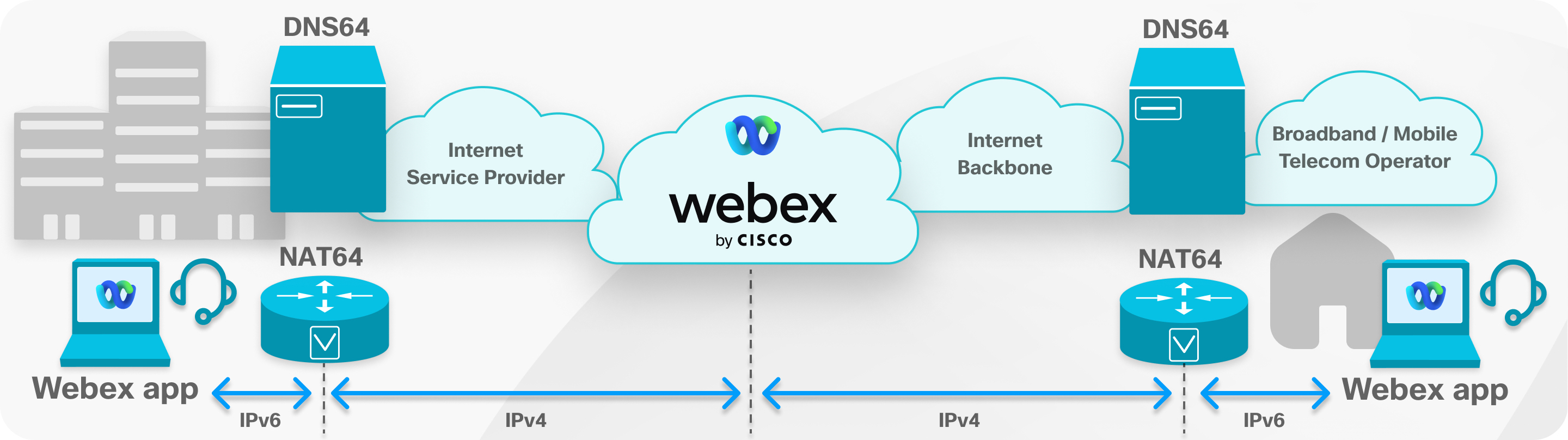
The solution supports Webex Suite Meetings Platform cloud services, including Webex Edge Video Mesh, which requires additional configuration.
Supported Clients and Devices
Webex App
- Desktop Client: Supported on version 43.9 or later for Windows, MacOS, and Linux.
- Mobile Client: Supported on version 43.9 or later for Android and iOS.
- No additional configuration is required in the Webex App.
- Devices with both IPv4 and IPv6 addresses use IPv4 to communicate with the platform.
- IPv6-only devices use DNS64 to obtain synthetic IPv6 addresses for Webex services.
Webex Web App
- Supported browsers on IPv6 subnets:
-
Google Chrome (last two major versions)
- Microsoft Edge (last two major versions)
- Apple Safari (version 17 and later)
-
- No additional configuration is needed to enable IPv6 support.
Webex Edge Video Mesh requires additional configuration to support the Webex Web App on IPv6 networks.
RoomOS Devices
- Supported RoomOS devices from version 11.11.1.9 connected to IPv6-only networks.
- Devices on dual-stack networks (IPv4 and IPv6) use IPv4 by default.
- To restrict RoomOS devices to IPv6-onlyfcommunication:
- Set
xConfiguration Network[1] IPStack: IPv6for all network communication. - Alternatively, set
xConfiguration Conference Webex CallProtocolIPStack:
                IPv6
to use IPv6 only for Webex Meetings communication.
- Set
Webex Edge Video Mesh
To support Webex Web App from IPv6-registered devices, Webex Edge Video Mesh must have a Fully Qualified Domain Name (FQDN). This can be set up at initial deployment, or added later by following the instructions here.
Diagnostics
- For Webex App or RoomOS devices on IPv6-only networks, Control Hub displays both the IPv6 local address and the corresponding IPv4 public address provided by NAT64.
- Webex Web App is not yet fully supported in Control Hub diagnostics.
Exclusions
- Webex Web App on Mozilla Firefox is not supported on IPv6 subnets.
- Webex Meetings Virtual Desktop Software is not supported on IPv6 subnets.
- RoomOS integration with ThousandEyes Endpoint Agent is not supported on IPv6-only networks.
Deploying DNS64 and NAT64
You can find more information on DNS64 and NAT64 here: Understand And Configure DNS64 and NAT64.


