- Home
- /
- Article

Thanks for your feedback.


 In this article
 Feedback?
This Help article is for Cisco Wireless Phone 9821 registered to Cisco Unified Communications Manager (Unified CM).
Network requirements
For the phone to successfully operate as an endpoint in your network, your network must meet the following requirements:
-
VoIP Network
-
VoIP is configured on your Cisco routers and gateways.
-
Cisco Unified Communications Manager (Unified CM) is installed in your network and is configured to handle call processing.
-
-
IP network that supports DHCP or manual assignment of IP address, gateway, and subnet mask.
The phone displays the date and time from Cisco Unified CM. If the user turns off Automatic date and time in the Settings application, the time may become out of sync with the server time.
Network protocols
Cisco Wireless Phone 9821 supports several industry-standard and Cisco network protocols required for voice communication. The following table provides an overview of the network protocols that the phones support.
|
Network protocol |
Purpose |
Usage notes |
|---|---|---|
|
Dynamic Host Configuration Protocol (DHCP) |
DHCP dynamically allocates and assigns an IP address to network devices. DHCP enables you to connect an IP phone into the network and the phone to become operational without the need to manually assign an IP address or to configure additional network parameters. |
DHCP is enabled by default. If disabled, you must manually configure the IP address, subnet mask, gateway, and a TFTP server on each phone locally. We recommend that you use DHCP custom option 150. With this method, you configure the TFTP server IP address as the option value. For more information, see the documentation for your particular Cisco Unified CM release. If you cannot use option 150, you may try using DHCP option 66. |
|
Hypertext Transfer Protocol (HTTP) |
HTTP is the standard way of transferring information and moving documents across the Internet and the web. |
The phones use HTTP for XML services and for troubleshooting purposes. |
|
Hypertext Transfer Protocol Secure (HTTPS) |
Hypertext Transfer Protocol Secure (HTTPS) is a combination of the Hypertext Transfer Protocol with the SSL/TLS protocol to provide encryption and secure identification of servers. |
Web applications with both HTTP and HTTPS support have two URLs configured. Phones that support HTTPS choose the HTTPS URL. |
|
IEEE 802.1X |
The IEEE 802.1X standard defines a client-server-based access control and authentication protocol that restricts unauthorized clients from connecting to a LAN through publicly accessible ports. Until the client is authenticated, 802.1X access control allows only Extensible Authentication Protocol over LAN (EAPOL) traffic through the port to which the client is connected. After authentication is successful, normal traffic can pass through the port. |
The phones implement the IEEE 802.1X standard by providing support for the following authentication methods:
|
|
IEEE 802.11n/802.11ac/802.11ax |
The IEEE 802.11 standard specifies how devices communication over a wireless local area network (WLAN). |
802.11n operates in the 2.4 GHz and 5 GHz band. 802.11ac operates in the 5 GHz band. 802.11ax operates in the 2.4 GHz, 5 GHz, and 6 GHz band. |
|
Internet Protocol (IP) |
IP is a messaging protocol that addresses and sends packets across the network. |
To communicate using IP, network devices must have an assigned IP address, subnet, and gateway. IP addresses, subnets, and gateway identifications are automatically assigned if you are using the phone with Dynamic Host Configuration Protocol (DHCP). If you are not using DHCP, you must manually assign these properties to each phone locally. The phone does not support IPv6. |
|
Real-Time Transport Protocol (RTP) |
RTP is a standard protocol for transporting real-time data, such as interactive voice, over data networks. |
The phones use the RTP protocol to send and receive real-time voice traffic from other phones and gateways. |
|
Real-Time Control Protocol (RTCP) |
RTCP works in conjunction with RTP to provide QoS data (such as jitter, latency, and round-trip delay) on RTP streams. |
RTCP is enabled by default. |
|
Session Description Protocol (SDP) |
SDP is the portion of the SIP protocol that determines which parameters are available during a connection between two endpoints. Conferences are established by using only the SDP capabilities that all endpoints in the conference support. |
SDP capabilities, such as codec types, DTMF detection, and comfort noise, are normally configured on a global basis by Cisco Unified CM or Media Gateway in operation. Some SIP endpoints may allow configuration of these parameters on the endpoint itself. |
|
Session Initiation Protocol (SIP) |
SIP is the Internet Engineering Task Force (IETF) standard for multimedia conferencing over IP. SIP is an ASCII-based application-layer control protocol (defined in RFC 3261) that can be used to establish, maintain, and terminate calls between two or more endpoints. |
Like other VoIP protocols, SIP addresses the functions of signaling and session management within a packet telephony network. Signaling allows transportation of call information across network boundaries. Session management provides the ability to control the attributes of an end-to-end call. |
|
Transmission Control Protocol (TCP) |
TCP is a connection-oriented transport protocol. |
The phones use TCP to connect to Cisco Unified CM and to access XML services. |
|
Transport Layer Security (TLS) |
TLS is a standard protocol for securing and authenticating communications. |
Upon security implementation, the phones use the TLS protocol when securely registering with Cisco Unified CM. |
|
Trivial File Transfer Protocol (TFTP) |
TFTP allows you to transfer files over the network. On the Cisco IP Phone, TFTP enables you to obtain a configuration file specific to the phone type. |
TFTP requires a TFTP server in your network that the DHCP server can automatically identify. If you want a phone to use a TFTP server other than the one that the DHCP server specifies, you must manually assign the IP address of the TFTP server by using the Network Configuration menu on the phone. For more information, see the documentation for your particular Cisco Unified CM release. |
|
User Datagram Protocol (UDP) |
UDP is a connectionless messaging protocol for delivery of data packets. |
UDP is used by the phones for signaling. |
Cisco Wireless Phone 9821 deployment and connection guide
The Cisco Wireless Phone 9821 deployment and connection guide contains useful information about the wireless phone in the Wi-Fi environment. You can find the guide at this location:
Wireless LAN
For detailed Cisco Wireless Phone 9821 deployment and configuration instructions, see the Cisco Wireless Phone 9821 deployment and connection guide.
Devices with wireless capability can provide voice communication within the corporate WLAN. The device depends on and interacts with wireless access points (AP) and key Cisco IP Telephony components, including Cisco Unified Communications Manager (Unified CM) administration, to provide wireless voice communication.
The wireless phones exhibit Wi-Fi capabilities that can use 802.11a, 802.11b, 802.11g, 802.11n, 802.11ac, and 802.11ax Wi-Fi.
The following figure shows a typical WLAN topology that enables the wireless transmission of voice for wireless IP telephony.
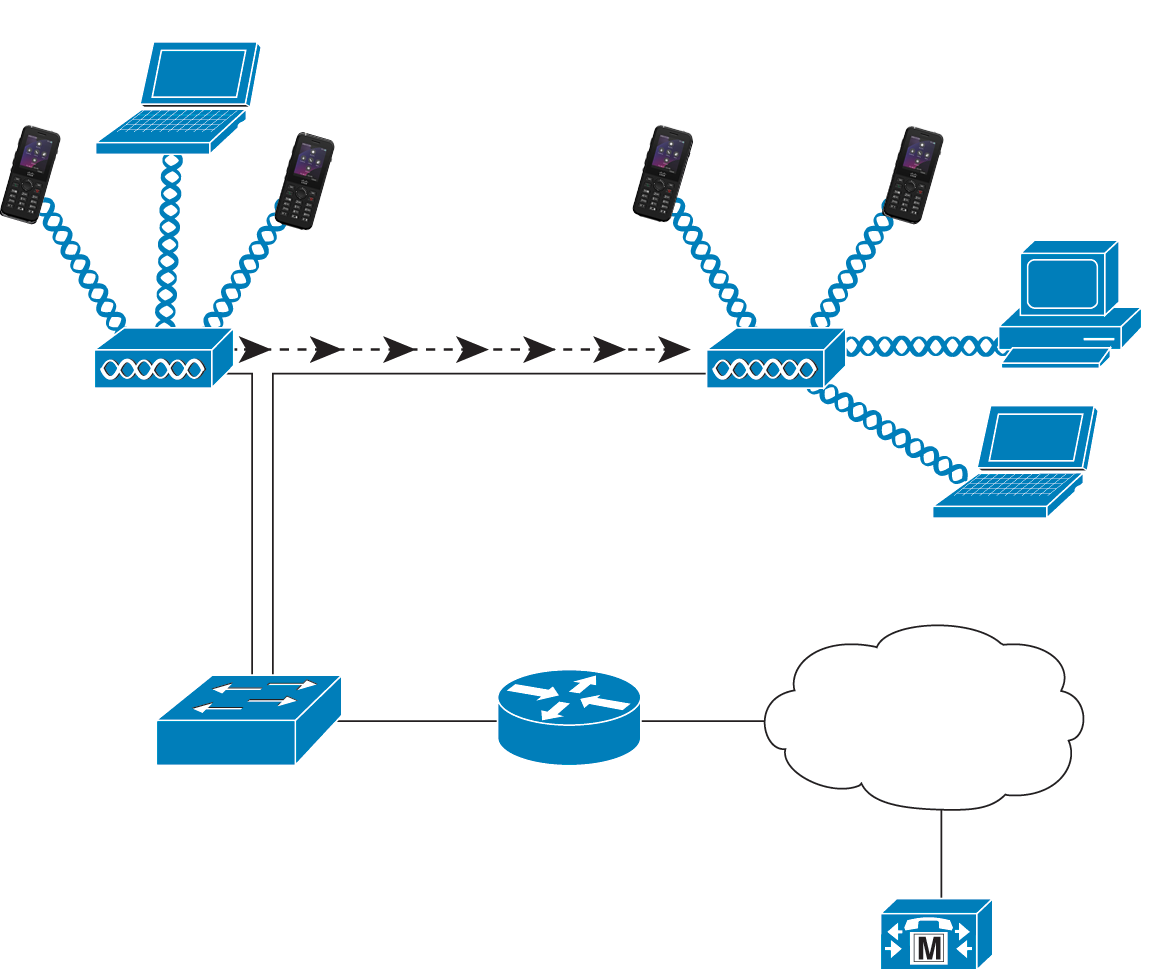
When a phone powers on, it searches for and associates with an AP if the device wireless access is set to On. If remembered networks are not within range, you can select a broadcasted network or manually add a network.
The AP uses the connection to the wired network to transmit data and voice packets to and from the switches and routers. Voice signaling is transmitted to the call control server for call processing and routing.
APs are critical components in a WLAN because they provide the wireless links or hot spots to the network. In some WLANs, each AP has a wired connection to an Ethernet switch, such as a Cisco Catalyst 3750, that is configured on a LAN. The switch provides access to gateways and the call control server to support wireless IP telephony.
Some networks contain wired components that support wireless components. The wired components can comprise switches, routers, and bridges with special modules to enable wireless capability.
For more information about Cisco Unified Wireless Networks, see https://www.cisco.com/c/en/us/products/wireless/index.html.
Wi-Fi network components
The phone must interact with several network components in the WLAN to successfully place and receive calls.
AP channel and domain relationships
Access points (APs) transmit and receive RF signals over channels within the 2.4 GHz, 5 GHz, or 6 GHz frequency band. To provide a stable wireless environment and reduce channel interference, you must specify nonoverlapping channels for each AP.
For more information about AP channel and domain relationships, see the Wireless LAN design section in the Cisco Wireless Phone 9821 deployment and connection guide.
AP interactions
Wireless phones use the same APs as wireless data devices. However, voice traffic over a WLAN requires different equipment configurations and layouts than a WLAN that is used exclusively for data traffic. Data transmission can tolerate a higher level of RF noise, packet loss, and channel contention than voice transmission. Packet loss during voice transmission can cause choppy or broken audio and can make the call inaudible. Packet errors can also cause blocky or frozen video.
Wireless phones users are mobile and often roam across a campus or between floors in a building while connected to a call. In contrast, data users remain in one place or occasionally move to another location. The ability to roam while maintaining a call is one of the advantages of wireless voice, so RF coverage needs to include stairwells, elevators, quiet corners outside conference rooms, and passageways.
To ensure good voice quality and optimal RF signal coverage, you must perform a site survey. The site survey determines settings that are suitable to wireless voice and assists in the design and layout of the WLAN; for example AP placement, power levels, and channel assignments.
After deploying and using wireless voice, you should continue to perform postinstallation site surveys. When you add a group of new users, install more equipment, or stack large amounts of inventory, you are changing the wireless environment. A postinstallation survey verifies that the AP coverage is still adequate for optimal voice communications.
Packet loss occurs during roaming; however, the security mode and the presence of fast roaming determines how many packets are lost during transmission.
For more information about Voice QoS in a wireless network, see the Cisco Wireless Phone 9821 deployment and connection guide.
AP association
At startup, the phone scans for APs with SSIDs and encryption types that it recognizes. The phone builds and maintains a list of eligible APs and selects the best AP, based on the current configuration.
QoS in a wireless network
Voice and video traffic on the wireless LAN, like data traffic, is susceptible to delay, jitter, and packet loss. These issues do not impact the data end user, but can seriously impact a voice or video call. To ensure that voice and video traffic receives timely and reliable treatment with low delay and low jitter, you must use Quality of Service (QoS).
By separating the devices into a voice VLAN and marking voice packets with higher QoS, you can ensure that voice traffic gets priority treatment over data traffic, which results in lower packet delay and fewer lost packets.
Unlike wired networks with dedicated bandwidths, wireless LANs consider traffic direction when implementing QoS. Traffic is classified as upstream or downstream relative to the AP as shown in the following figure.
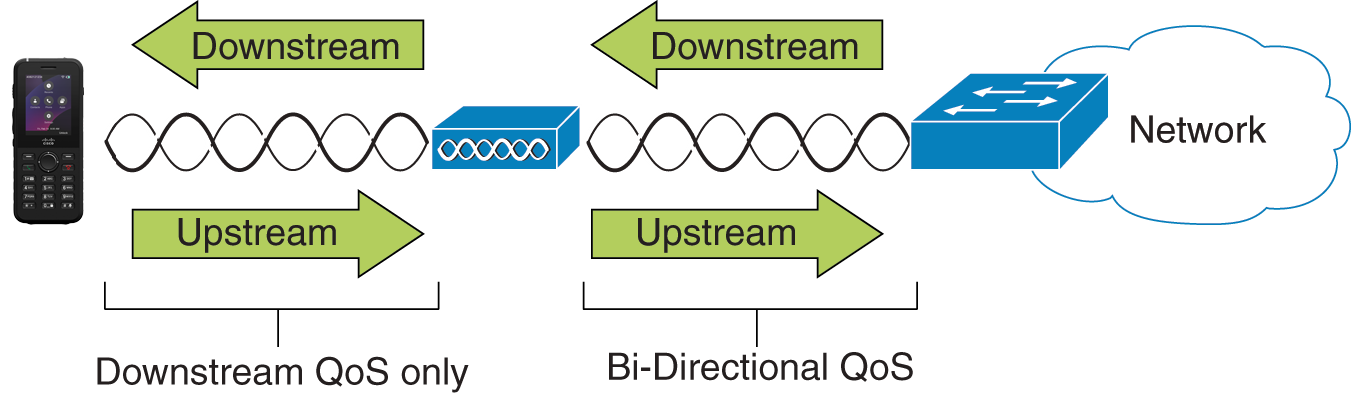
The Enhanced Distributed Coordination Function (EDCF) type of QoS has up to eight queues for downstream (toward the 802.11b/g clients) QoS. You can allocate the queues based on these options:
-
QoS or Differentiated Services Code Point (DSCP) settings for the packets
-
Layer 2 or Layer 3 access lists
-
VLANs for specific traffic
-
Dynamic registration of devices
Although up to eight queues on the AP can be set up, you should use only three queues for voice, video, and signaling traffic to ensure the best possible QoS. Place voice in the Voice queue (UP6), video in the Video queue (UP5), signaling (SIP) traffic in the Video queue (UP4), and place data traffic in a best-effort queue (UP0). Although 802.11b/g EDCF does not guarantee that voice traffic is protected from data traffic, you should get the best statistical results by using this queuing model.
The queues are:
-
Best Effort (BE) - 0, 3
-
Background (BK) - 1, 2
-
Video (VI) - 4, 5
-
Voice (VO) - 6, 7
The device marks the SIP signaling packets with a DSCP value of 24 (CS3) and RTP packets with DSCP value of 46 (EF).
Call Control (SIP) is sent as UP4 (VI). Video is sent as UP5 (VI) when Admission Control Mandatory (ACM) is disabled for video (Traffic Specification [TSpec] disabled). Voice is sent as UP6 (VO) when ACM is disabled for voice (TSpec disabled).
The following table provides a QoS profile on the AP that gives priority to voice, video, and call control (SIP) traffic.
|
Traffic Type |
DSCP |
802.1p |
WMM UP |
Port Range |
|---|---|---|---|---|
|
Voice |
EF (46) |
5 |
6 |
UDP 16384-32767 |
|
Interactive Video |
AF41 (34) |
4 |
5 |
UDP 16384-32767 |
|
Call Control |
CS3 (24) |
3 |
4 |
TCP 5060-5061 |
To improve reliability of voice transmissions in a nondeterministic environment, the device supports the IEEE 802.11e industry standard and is Wi-Fi Multimedia (WMM) capable. WMM enables differentiated services for voice, video, best effort data and other traffic. For these differentiated services to provide sufficient QoS for voice packets, only a certain amount of voice bandwidth can be serviced or admitted on a channel at one time. If the network can handle N voice calls with reserved bandwidth, when the amount of voice traffic is increased beyond this limit (to N+1 calls), the quality of all calls suffers.
Set up flexible DSCP
- In Cisco Unified Communications Manager Administration, go to .
- In Clusterwide Parameters (System - Location and Region), set Use Video BandwidthPool for Immersive Video Calls to False.
- In Clusterwide Parameters (Call Admission Control), set Video Call QoS Marking Policy to Promote to Immersive.
- Save your changes.
802.11 standards for WLAN communications
Wireless LANs must follow the Institute of Electrical and Electronics Engineers (IEEE) 802.11 standards that define the protocols that govern all Ethernet-based wireless traffic. The wireless phones support the following standards:
-
802.11a: Uses the 5 GHz band that provides more channels and improved data rates by using OFDM technology. Dynamic Frequency Selection (DFS) and Transmit Power Control (TPC) support this standard.
-
802.11b: Specifies the radio frequency (RF) of 2.4 Ghz for both transmission and receipt of data at lower data rates (1, 2, 5.5, 11 Mbps).
-
802.11d: Enables access points to advertise their currently supported radio channels and transmit power levels. The 802.11d-enabled client then uses that information to determine the channels and powers to use. The phone requires World mode (802.11d) to determine which channels are legally allowed for any given country. For supported channels, see the table that follows. Ensure that 802.11d is properly configured on the Cisco IOS Access Points or Cisco Unified Wireless LAN Controller.
-
802.11e: Defines a set of Quality of Service (QoS) enhancements for wireless LAN applications.
-
802.11g: Uses the same unlicensed 2.4 Ghz band as 802.11b, but extends the data rates to provide greater performance by using Orthogonal Frequency Division Multiplexing (OFDM) technology. OFDM is a physical-layer encoding technology for transmission of signals through use of RF.
-
802.11h: Supports 5 GHz spectrum and transmit power management. Provides DFS and TPC to the 802.11a Media Access Control (MAC).
-
802.11i: Specifies security mechanisms for wireless networks.
-
802.11n: Uses the radio frequency of 2.4 GHz or 5 GHz for both transmission and receipt of data with speeds up to 150 Mbps, and enhances data transfer through the use of multiple input, multiple output (MIMO) technology, channel bonding, and payload optimization.
-
802.11r: Specifies requirements for fast secure roaming.
-
802.11ac: Uses the radio frequency of 5 GHz for both transmission and receipt of data with speeds up to 433 Mbps.
-
802.11ax: Capable of Wi-Fi 6 and 6E standard, supports HE0 to HE11 with data bitrate up to 600 Mbps.
|
Band range |
Available channels |
Channel set |
Channel width |
|---|---|---|---|
|
2.412 - 2.472 GHz |
13 |
1 - 13 |
20 MHz |
|
5.180 - 5.240 GHz |
4 |
36, 40, 44, 48 |
20, 40, 80 MHz |
|
5.260 - 5.320 GHz |
4 |
52, 56, 60, 64 |
20, 40, 80 MHz |
|
5. 500 - 5.700 GHz |
11 |
100 - 140 |
20, 40, 80 MHz |
|
5.745 - 5.825 GHz |
5 |
149, 153, 157, 161, 165 |
20, 40, 80 MHz |
| 5.955 - 6.415 GHz | 24 | 1, 5, 9, 13, ..., 93 |
20, 40, 80 MHz |
| 6.435 - 6.515 GHz | 5 | 97, 101, 105, 109, 113 |
20, 40, 80 MHz |
| 6.535 - 6.875 GHz | 18 | 117, 121, ..., 185 |
20, 40, 80 MHz |
| 6.895 - 7.115 GHz | 12 | 189, 193, ..., 233 |
20, 40, 80 MHz |
Channels 120, 124, 128 are not supported in the Americas, Europe, or Japan, but may be in other regions around the world.
For information about supported data rates, Tx power and Rx sensitivity for WLANs, see the Cisco Wireless Phone 9821 deployment and connection guide.
World mode (802.11d)
The wireless phones use 802.11d to determine the channels and transmit power levels to use. The phone inherits its client configuration from the associated AP. Enable World mode (802.11d) on the AP to use the phone in World mode.
Enablement of World mode (802.11d) may not be necessary if the frequency is 2.4 GHz and the current access point is transmitting on a channel from 1 to 11.
Because all countries support these frequencies, you can attempt to scan these channels regardless of World mode (802.11d) support.
For more information on enabling World mode and 2.4 GHz support, see the Cisco Wireless Phone 9821 deployment and connection guide.
Enable World mode (802.11d) for the corresponding country where the access point is located. World mode is enabled automatically for the Cisco Unified Wireless LAN Controller.
Radio frequency ranges
WLAN communications use the following radio frequency (RF) ranges:
- 2.4 GHz—Many devices that use 2.4 GHz can potentially interfere with the 802.11b/g connection. Interference can produce a Denial of Service (DoS) scenario, which may prevent successful 802.11 transmissions.
- 5 GHz—This range divides into several sections called Unlicensed National Information Infrastructure (UNII) bands, each of which has four channels. The channels are spaced at 20 MHz to provide nonoverlapping channels and more channels than 2.4 GHz provides.
- 6 GHz—More available channels in 6G bands to deliver significantly lower latency and higher network capacity in dense, high-traffic environments. The bandwidth can be 20 M, 40 M, and 80 M. 80 M is highly reconmmended.
Security for Communications in WLANs
Because all WLAN devices that are within range can receive all other WLAN traffic, security of voice communications is critical in WLANs. To ensure that intruders do not manipulate or intercept voice traffic, the Cisco SAFE Security Architecture supports wireless phones and Cisco Aironet APs. For more information about security in networks, see https://www.cisco.com/c/en/us/solutions/enterprise/design-zone-security/index.html.
Wireless security features
The Cisco Wireless IP Telephony solution provides wireless network security that prevents unauthorized sign-ins and compromised communications through use of the following authentication and encryption methods that wireless phones support.
-
WLAN Authentication
-
WPA2 and WPA3 enterprise (802.1x authentication)
-
WPA2-PSK (Pre-Shared key)
-
WPA3-SAE (Simultaneous Authentication of Equals)
-
EAP-FAST (Extensible Authentication Protocol - Flexible Authentication via Secure Tunneling)
-
EAP-TLS (Extensible Authentication Protocol - Transport Layer Security)
-
PEAP (Protected Extensible Authentication Protocol - Generic Token Card/ Microsoft Challenge Handshake Authentication Protocol version 2)
-
Open (None)
-
-
WLAN Encryption
-
AES (minimum 128-bit Advanced Encryption Standard)
-
AES-GCM (AES with Galois/Counter Mode)
-
TKIP / MIC (Temporal Key Integrity Protocol / Message Integrity Check)
-
PMF (Protected Management Frames)
-
-
WPA3-Enterprise
-
Key derivation and confirmation
Minimum 256-bit Hashed Message Authentication Mode (HMAC) with Secure Hash Algorithm (HMAC-SHA256)
-
Robust management frame
Minimum 128-bit Broadcast/Multicast Integrity Protocol Cipher-based Message Authentication Code (BIP-CMAC-128)
-
Suite-B (Encryption with GCMP, Digital Signature with ECDSA, Key Exchange with ECDH and Hashing with SHA2)
-
Suite-B-192 (longer bits of security strength)
-
CCMP256 encryption cipher is not supported.
Cisco Wireless Phone 9821 also supports the following additional security features.
- Image authentication
- Device authentication
- File authentication
- Signaling authentication
- Media encryption (SRTP)
- Signaling encryption (TLS)
- Certificate authority proxy function (CAPF)
- Secure profiles
- Encrypted configuration files
Extensible Authentication Protocol - Flexible Authentication via Secure Tunneling (EAP-FAST)
Extensible Authentication Protocol - Flexible Authentication via Secure Tunneling (EAP-FAST) encrypts EAP transactions within a Transport Layer Security (TLS) tunnel established between the access point and the Remote Authentication Dial-in User Service (RADIUS) server, such as the Cisco Identity Services Engine (ISE).
The TLS tunnel uses Protected Access Credentials (PACs) for authentication between Cisco Wireless Phone 9821 and the RADIUS server. The server sends an Authority ID (AID) to the phone, which selects the appropriate PAC. The phone returns a PAC-Opaque to the RADIUS server, which decrypts the PAC using its primary key. Both endpoints then share the PAC key, and the TLS tunnel is established. EAP-FAST supports automatic PAC provisioning, which must be enabled on the RADIUS server.
To enable EAP-FAST, you must install a certificate on the RADIUS server.
The Cisco Wireless Phone 9821 currently supports automatic provisioning of the PAC only; therefore, you must enable Allow anonymous in-band PAC provisioning on the RADIUS server. When this option is enabled, both EAP-GTC and EAP-MSCHAPv2 must be active.
EAP-FAST requires that a user account be created on the authentication server.
If anonymous PAC provisioning is not permitted in the production wireless LAN environment, a staging RADIUS server can be set up for initial PAC provisioning of Cisco Wireless Phone 9821. This staging server should be configured as a secondary EAP-FAST server, replicating components from the production primary EAP-FAST server, including the user and group database, EAP-FAST primary key, and policy information.
Ensure the production primary EAP-FAST RADIUS server is configured to send the EAP-FAST primary keys and policies to the staging secondary server. This setup allows Cisco Wireless Phone 9821 to use the provisioned PAC in the production environment where Allow anonymous in-band PAC provisioning is disabled.
When renewing the PAC, authenticated in-band PAC provisioning is used; therefore, ensure Allow anonymous in-band PAC provisioning is enabled.
Also, ensure the Cisco Wireless Phone 9821 connects to the network during the grace period to use its existing PAC—created with either the active or retired primary key—to obtain a new PAC.
It is recommended to point the staging wireless LAN only to the staging RADIUS server and to disable the staging access point radios when not in use.
Extensible Authentication Protocol - Transport Layer Security (EAP-TLS)
Extensible Authentication Protocol - Transport Layer Security (EAP-TLS) uses the TLS protocol with Public Key Infrastructure (PKI) to secure communications with the authentication server. TLS enables the use of certificates for both user and server authentication, as well as for dynamic session key generation. A certificate must be installed on the client.
EAP-TLS provides strong security but requires management of client certificates. It may also require a user account on the authentication server that matches the common name of the certificate imported into Cisco Wireless Phone 9821.
It is recommended that EAP-TLS be the only EAP type enabled on the RADIUS server to ensure optimal security.
Protected Extensible Authentication Protocol (PEAP)
Protected Extensible Authentication Protocol (PEAP) uses server-side public key certificates to authenticate clients by establishing an encrypted SSL/TLS tunnel between the client and the authentication server. This tunnel protects the subsequent exchange of authentication information, ensuring that user credentials remain confidential and secure from eavesdropping.
PEAP supports inner authentication protocols such as PEAP-GTC and PEAP-MSCHAPv2. It requires that a user account be created on the authentication server to facilitate authentication.
Certificates
The phones support the following certificates.
-
X.509 digital certificate for EAP-TLS or to enable PEAP + Server Validation for WLAN authentication
-
Simple Certificate Enrollment Protocol (SCEP) for certificate enrollment and auto-renewal
-
1024, 2048, 4096 bit keys
-
SHA-256 signature types
-
DER and Base-64 (PEM) encoding types
-
User Installed Certificate in PKCS #12 format (.p12 or .pfx extension), which also contains the private key
-
Server (Root CA) Certificate with .crt or .cer extension
You install certificates on the phones in one of these ways:
-
Use the Administration web page. For more information, see Cisco Wireless Phone 9821 security (Unified CM).
-
Use an SCEP server to manage and install the certificates. For more information, see Set up SCEP.
If your users set up their phones themselves and their phones need certificates, you need to give them the type of certificate when you give them the other configuration settings. If you don't use SCEP for certificate installation, then you need to install the certificates yourself.
WLANs and roaming
Cisco Wireless Phone 9821 supports three frequency bands—6 GHz, 5 GHz, and 2.4 GHz—enabling it to connect across these bands and providing interband roaming support. Cisco Wireless Phone 9821 support fast roaming 802.11k, 802.11v, 802.11r and legacy roaming.
For more information, see the Cisco Wireless Phone 9821 deployment and connection guide.
Cisco Unified Communications Manager interaction
Cisco Unified Communications Manager (Unified CM) is an open, industry-standard call processing system.Cisco Unified CM software sets up and tears down calls between phones, integrating traditional PBX functionality with the corporate IP network. It manages the components of the telephony system, such as the phones, the access gateways, and the resources necessary for features such as call conferencing and route planning. Cisco Unified CM also provides:
-
Firmware for phones
-
Certificate Trust List (CTL) and Identity Trust List (ITL) files using the TFTP service
-
Phone registration
-
Call preservation, so that a media session continues if signaling is lost between the primary Communications Manager and a phone
For information about configuring Cisco Unified CM to work with Cisco phones, see the documentation for your particular Cisco Unified CM release.
If the phone model that you want to configure does not appear in the Phone Type drop-down list in Cisco Unified Communications Manager Administration, install the latest device package for your version of Cisco Unified CM from Cisco Unified Communications Manager Device Package Compatibility Matrix.
Voice messaging system interaction
Cisco Unified Communications Manager (Unified CM) lets you integrate with different voice messaging systems, including the Cisco Unity Connection voice messaging system. Since you can integrate with various systems, you must provide users with information about how to use your specific system.
To enable the ability for a user to transfer to voicemail, set up a *xxxxx
dialing pattern and configure it as Call Forward All to Voicemail. For more information, see
Feature Configuration Guide for Cisco Unified
Communications Manager, Release 15 and SUs or later.
Provide the following information to each user:
-
How to access the voice messaging system account.
-
Initial password for accessing the voice messaging system.
Configure a default voice messaging system password for all users.
-
How the phone indicates that voice messages are waiting.
Use Cisco Unified CM to set up a message waiting indicator (MWI) method.


