- Home
- /
- Article

Thanks for your feedback.


Set up Webex Contact Center in India
 In this article
 Feedback?
This article helps you in setting up Webex Contact Center for the India Data Center (DC).
Overview
Cisco Webex Contact Center is now available as a regulated service in India, enabling both multinational and domestic organizations to operate BPO and contact center services in full compliance with Department of Telecommunications (DoT), Government of India regulations.
Webex Contact Center in India is built upon the Webex Calling foundation. This integrated approach allows organizations to leverage a unified cloud architecture for both enterprise telephony and advanced customer engagement. Before enabling Contact Center features, it is essential to ensure that your base Webex Calling environment is configured specifically for the India Data Center to meet regulatory requirements.
For information on tariff plans, see Webex Contact Center India Tariff Plan article.
Important Compliance Notice
Compliance with India's Department of Telecommunications (DoT) regulations is a shared responsibility between Cisco and its customers. To ensure your specific deployment aligns with all local legal requirements, we recommend consulting with your legal or regulatory counsel.
India WxCC Deployment Models
To get started with your India setup, it is best to first understand the standard technical foundation for Webex Contact Center. We recommend reviewing the Set up voice channels for Webex Contact Center article, which explains the three-layer architecture we use globally:
-
Access Layer: This is the edge where your PSTN or local gateways connect to Webex.
-
Media Processing Layer: This is where the actual audio (media) is handled and terminated.
-
Application Layer: This is the brain that manages call routing, prompts, and agent assignments.
In the India DC, these layers help you stay compliant with DoT regulations. Depending on where your agents and customers are, you will choose one of three models: International BPO, Indian Tenant, or Multinational Tenant.
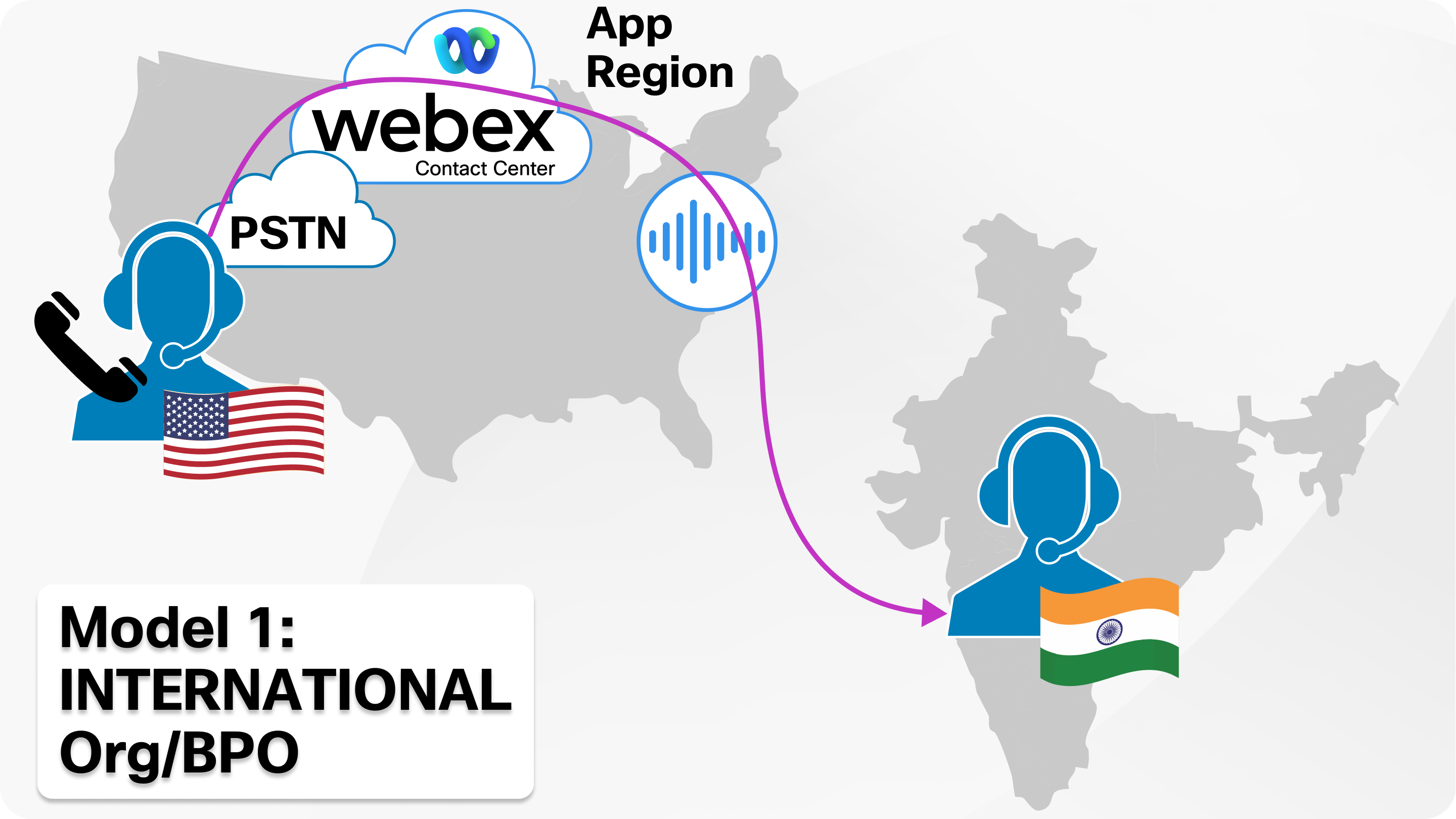
Model 1: International BPO
Overview
For international Business Process Outsourced (BPO) operations where the tenant and telephony resources are registered outside India, follow these guidelines:
-
The tenant is registered from a country outside India.
-
The Entry Point Dialed Number (EPDN) is associated with a location outside India.
-
Agents and their phones (Webex Calling extensions or on-premises Call Manager extensions) are configured for a foreign location.
-
Agents are physically located in India but handle calls coming from the foreign country's Entry Point (EP) number.
Administration and Configuration
-
Agents in India must not be connected to India PSTN services (that is their telephony service should be configured as a location outside India).
-
India PSTN must not be used for any Bridge DN, Blind Transfer Flow events, or any Webex Contact Center operations within an interaction.
-
Agents may use WebRTC for connectivity.
-
No special restrictions are required on queues or teams.
Compliance
To stay compliant with local regulations, please follow these key requirements within your chosen deployment model:
-
Office Connectivity: If your agents are working from the office, their media must flow over a dedicated network connection.
-
Work from Home: Agents working from home can use the Internet directly. They don't have to connect to their office network in India using a VPN.
-
Data Retention: You are responsible for downloading your Call Detail Records (CDR) and audit logs. These must be stored on a server located in India for at least one year.
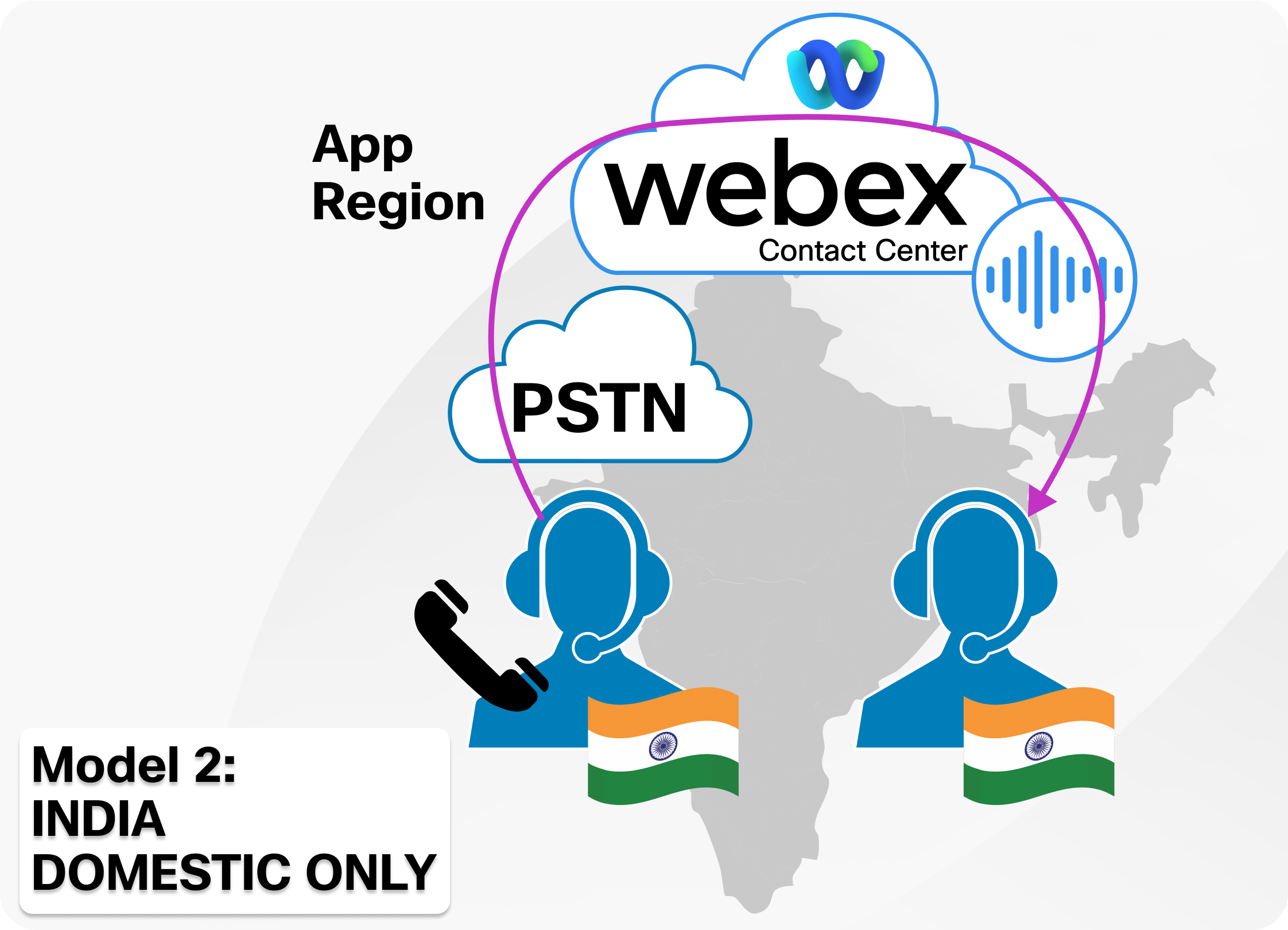
Model 2: Indian Tenant with Contact Center for India customers only
Overview
Use this model if your organization operates a domestic contact center in India and serves only Indian customers. In this scenario, both your agents and telephony resources must be associated with locations in India.
Administration and Configuration
-
Create a headquarters (HQ) location within India. The first location you create determines the Webex Calling data center for your organization.
-
Create zones and configure Trusted Network Edge as per Webex Calling guidelines for Indian locations.
-
Complete KYC (Know Your Customer) procedures to activate the location.
-
Ensure any Bring Your Own AI (BYOAI) linked to flows with Indian numbers connects only to services within India.
-
Establish a dedicated queue and team of agents for serving India EPs; do not mix these agents with those handling calls from EP outside India.
-
For each zone:
-
Create an Outdial Automated Number Identification (ANI) list and set the default ANI to a number within that zone.
-
Associate the Outdial ANI list with the team of agents serving the EP from that zone.
-
This avoids call failures during outdial when agents use the default ANI.
-
When setting up courtesy callbacks, ensure the ANI matches the specific Indian zone where the agents in that queue are located.
-
-
When creating campaigns, reserve agents from a specific zone and use the ANI from that same zone.
Compliance
To stay compliant with local regulations, please follow these key requirements within your chosen deployment model:
-
Office Connectivity: If your agents are working from the office, their media must flow over a dedicated network connection.
-
Work from Home: Agents working from home can use the Internet directly. They don't have to connect to their office network in India using a VPN.
-
Data Retention: You are responsible for downloading your Call Detail Records (CDR) and audit logs. These must be stored on a server located in India for at least one year.
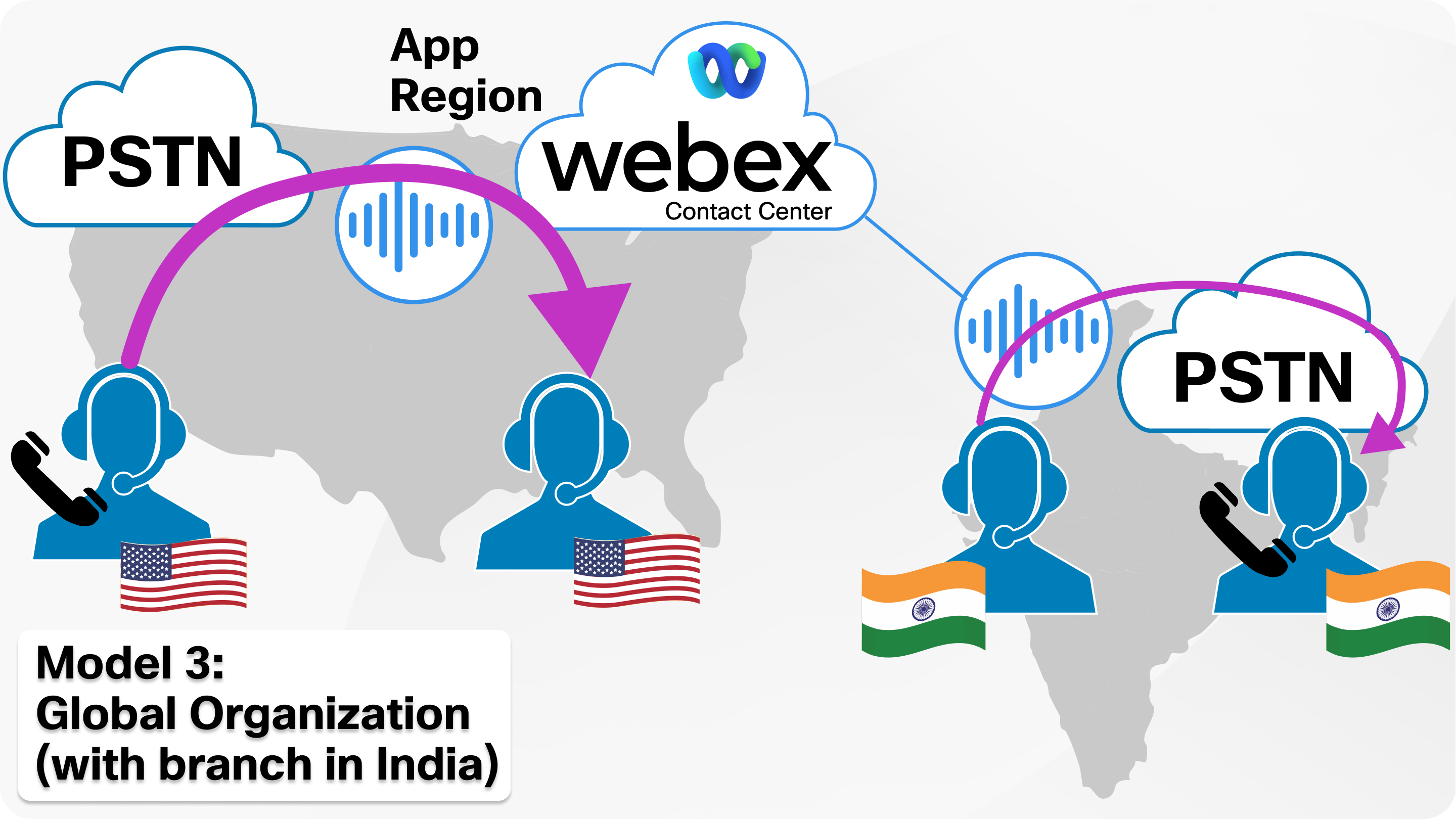
Model 3: Multinational Tenant with India domestic Contact Center
Overview
The following guidelines are applicable for multinational tenants hosted outside India, but with a domestic contact center serving India EPs:
-
The tenant is registered outside India and has a team of agents to serve EPDN from multiple countries, including India.
-
The EPDN number for India is associated with a location within India.
-
Agents servicing India EPDNs are physically located in India.
-
Agents and their phones (either Webex Calling extension phones or on-premises extensions) are linked to the India location.
Administration and Configuration
-
Create zones and configure Trusted Network Edge as per Webex Calling guidelines for Indian locations.
-
Complete the Webex Calling KYC (Know Your Customer) process to activate location in India.
-
Ensure any BYOAI solutions associated with Indian number flows connect only to services within India.
-
Establish a dedicated queue and team of agents to serve the India EP; do not mix these agents with those handling calls from EPs outside India. This configuration could be achieved using contact center agents teams or skills.
-
For each zone:
-
Create an Outdial ANI list and set the default ANI to a number within that zone.
-
Associate the Outdial ANI list with the team of agents serving the EP from that zone.
-
This setup helps avoid call failures during outdial when agents use the default ANI.
-
During courtesy callbacks, ensure the ANI matches the zone of the agent phone in the queue.
-
-
When creating campaigns, reserve agents from a specific zone and use the ANI from that zone.
Compliance
To stay compliant with local regulations, please follow these key requirements within your chosen deployment model:
-
Office Connectivity: If your agents are working from the office, their media must flow over a dedicated network connection.
-
Work from Home: Agents working from home can use the Internet directly. They don't have to connect to their office network in India using a VPN.
-
Data Retention: You are responsible for downloading your Call Detail Records (CDR) and audit logs. These must be stored on a server located in India for at least one year.
Set up Webex Contact Center for India Locations
Prerequisites
Before you begin the setup, ensure you meet the following requirements:
-
Regulatory Documentation: You must submit the Know Your Customer (KYC) and Customer Application Form (CAF). Refer to the Overview of regulations to know more about KYC and CAF.
Even if you have already completed KYC for Webex Calling, a separate submission may be required for Contact Center services to comply with the Unified Telecom License. -
Platform: Webex Contact Center India supports Webex Calling only. Legacy VPOP or other telephony connections are not supported.
Set up Calling
You must first configure your telephony environment. To avoid duplication of steps, please refer to the following Webex Calling articles to complete your base setup:
-
PSTN Connectivity: Configure your Local Gateway or Cloud Connected PSTN (CCP) as described in Enable Webex Calling in India.
-
Zones and Trusted Edge: Define your network zones to ensure media residency compliance. Refer to Created Trusted Network and Create a zone and Edge section for detailed information.
Call Operations and Toll Bypass Control
To ensure your operation remains compliant, Webex Contact Center enforces the following Toll Bypass rules:
-
Inbound Routing: Agents in India can consult with an agent located outside of India on an inbound PSTN call, but they can't transfer or conference the call.
-
Outbound Dialing: For all PSTN calls (domestic or international), agents must use a verified India PSTN Caller Line Identification (CLI). They are required to use the ANI associated with the zone their phone belongs to, even if they are configured to dial international calls by an admin.
-
Policy Exceptions: If a call flow violates DoT regulations, the agent will see a Policy Exception error on the Agent Desktop, and the call will be terminated.
For detailed information refer to Apply toll bypass policy configuration on Webex Calling section.
Configure Contact Center Settings
Once the Calling foundation is ready, perform the following in Control Hub:
-
Country of Operation: Go to Contact Center > Settings > General and ensure the Country of Operation is set to India
-
Location Mapping: Ensure that your Contact Center locations match the Zones created during the Calling setup.
Configuration Recommendations
Ideal Configuration Models
To keep your setup compliant and avoid errors, you should follow a geographically based configuration model.
-
Geographical Teams: To avoid policy errors, we recommend setting up your configuration using geographical teams. For example, create a Bangalore Team and a Chennai Team. By assigning these teams to queues in the same region, you will ensure the system behaves as expected and agents do not trigger unnecessary toll restrictions.
-
Queue Mapping: Do not assign a team from one region to a queue in another region if it breaks DoT rules. For example, do not assign a US-based team to an Indian queue.
-
The Logic: By linking teams to specific sites and queues in the same region, you are less likely to trigger a policy error. The system is designed to protect itself, but a smart design makes the admin's job much easier.
ANI Routing and Configuration
Managing Automatic Number Identification (ANI) is critical. Every number must be mapped to an inbound EP. For multinational tenants, we have enhanced the Outdial ANI list so you can set a regional default. This ensures agents in India do not accidentally use a global tenant default that violates local rules.
-
Mapping Numbers: To use a number as an ANI, it must first be mapped to an inbound EP.
-
Outbound EP: Agents are assigned an outbound EP and an ANI list (or they can use a default ANI).
-
Regional Constraints: The ANI is mapped to an inbound EP, which provides the Real-Time Media Service (RTMS) region and the Webex Calling location. This location defines the default PSTN for that region.
-
Admin Control: Admins should control access to outbound ANIs to ensure agents in India do not use a default ANI from outside their region.
Inbound Call Flow Example
On-net call
When an internal On-Net call comes in (for example, to an IT support line), the system follows a specific path to stay compliant.
-
The Path: The call enters through a specific location (like the Bangalore Zone) and moves through the EP to the Queue.
-
Team Delivery: The call is then routed to a team. Internal on-net calls are flexible and can be delivered to an agent inside India, an agent roaming outside India, or even an agent configured outside of India—as long as they are using a Webex Calling (WxC) extension and not a Public Switched Telephone Network (PSTN) phone.
-
PSTN Restrictions: Note that these internal calls can't be routed to PSTN destinations or MS Teams as they are considered out of scope for this specific setup.
Off-net call
When a call enters from the PSTN, the system enforces strict toll bypass controls to ensure compliance.
-
The Path: The call enters through a specific PSTN zone (like the Bangalore Zone) and moves through the EP to the Queue.
-
Team Delivery: The system validates the agent's location against the PSTN zone. If the agent is in the correct zone (e.g., Bangalore) and is not roaming, the call is allowed. If the system detects the agent is in an invalid or non-zone location (e.g., New York), the call is restricted.
-
System Action: When a call is blocked due to a policy violation, the system automatically returns the caller to the queue and displays a policy error message on the agent's desktop.
-
Best Practice: To avoid these blocks, use Teams in Webex Contact Center to strictly allocate agents to the correct sites and queues.
Agent Behavior and Policy Exceptions
Understanding Toll Restrictions and Desktop Behavior
When a call or operation violates India's DoT rules, the system triggers a Toll Restriction. Here is how the Agent Desktop behaves in different scenarios.
Inbound Call Rejections
If an inbound call violates a policy, the agent sees a error and their state changes to Calling Restriction. However, for outdial or consult rejections, their state does not change. This happens if they are using a Public Switched Telephone Network (PSTN) phone, WebRTC, or are roaming outside India.
-
Why it happens:
-
The agent is using a PSTN phone number.
-
The agent is using WebRTC to handle an India-based call.
-
The agent is using a Webex extension but is roaming outside India. (The system performs a Geo-IP lookup to determine if the phone is physically inside or outside the country).
-
The agent using a PSTN phone is consulted by another agent.
-
Outdial (Outbound) Rejections
If an outdial call is rejected, the agent sees a Policy Error, but their state does not change.
-
Why it happens:
-
The agent tries to use an ANI from a different zone.
-
The agent is using a PSTN phone.
-
The agent is using WebRTC while trying to call a customer in India.
-
Consult and Transfer Failures
If a consult or transfer to a DN or another agent fails, the agent sees a Policy Error, but their state does not change.
-
Why it happens:
-
The person being consulted is using a PSTN phone.
-
The person being consulted is using WebRTC.
-
The agent receiving the transfer is physically located outside India.
-
Desktop: Disabled Buttons and Tooltips
To prevent errors, the Desktop often disables the Transfer and Merge buttons if the system determines the operation is not allowed.
-
If you hover over a disabled button, a tooltip will appear explaining the reason.
-
In rare cases, a call's state might change while a consult is already in progress. If that change causes the call to violate India Toll Restriction rules, the system will not allow the connection to continue. When this happens, call legs may be dropped, or operations like Transfer or Conference will fail—even if the buttons on the desktop have not been disabled yet.
Supervisor Monitoring
A Supervisor's request to monitor a call will be rejected if a toll restriction is triggered.
-
Why it happens:
-
The Supervisor is using a PSTN phone.
-
The Supervisor is using a Webex extension from a location outside of India.
-
| Operation | Scenario | System Action | Agent Experience |
|---|---|---|---|
| Inbound Call | Call from India region to an agent in New York. | Blocked. The system detects a zone violation. | Agent receives an error message; call returns to the queue. |
| Consultation | India-based agent consults with a non-India agent. | Allowed. You can talk to the other agent. | Normal consult behavior. |
| Transfer | India-based agent tries to transfer an Indian call to a US agent. | Blocked. This would break DoT rules. | Transfer fails; agent sees a compliance error. |
| Roaming | Agent in an Indian team tries to take a call while roaming abroad. | Blocked. The system checks the agent's location. | The call will not go through; error message displayed. |
| Outbound/Campaign | Agent tries to use an ANI from a different region. | Blocked. | The call will not go through; error message displayed. |
Error Handling and Aux Codes
Technical Error and AUX Code Handling
When a call is rejected due to an India Toll Restriction, the system uses specific technical codes to identify the issue. This helps with troubleshooting in the logs and allows you to build smarter logic in your call flows.
SIP and System Identifiers
If you are looking at the technical logs or Session Initiation Protocol (SIP) headers (specifically in SIP BYE or SIP 403 messages), you will see the call tagged as:
-
SIP Header: X-Cisco-RTMS: zone-restricted-error
-
System Reason: CALLING_RESTRICTION
-
Reason Code: 119
New Agent AUX Code
We have added a new system-defined Idle AUX code for agents who hit a toll restriction error. If an agent is blocked from a call due to compliance rules, their state will automatically change to this new code:
-
AUX Code: calling_restriction
Using Code 119 in Flow Designer
You can use the new reason code 119 (CALLING_RESTRICTION) to handle errors automatically within your call flows. By checking for this specific failure code, you can decide the next best action in various Flow activities, such as:
-
BridgeTransfer or BlindTransfer: If a transfer fails with code 119, you can script the flow to try a different route or play a specific announcement to the caller.
-
Outbound Campaigns: Use this code to determine if a campaign call was blocked by a policy restriction and handle the record accordingly.
Limitations
ANI and Outdial Management
-
Zone Alignment: Always use ANIs and Agents from the same zone for:
-
Courtesy Callback: The callback ANI must match the agent's regulatory zone.
-
Outdial ANI Lists: ANIs in an outdial list must match the zone of the agents assigned to that Desktop Profile.
-
Campaigns: Ensure the campaign ANI and assigned agents reside in the same zone.
-
-
Default ANI: You must select one ANI in the outdial list as a Default ANI.
-
No Custom ANIs: The use of custom ANIs is prohibited in India. Using custom ANIs will cause outdial failures and create auditing confusion in Webex Calling call detail records (CDR).
Agent Connectivity and Tools
-
WebRTC: This is supported for BPO agents, but it is not supported if an agent has access to India PSTN.
-
Extensions: Agents must always use their assigned Webex Calling extension for all contact center activities.
-
Work from Home (WFH): If agents work from home, instruct them to use a VPN connection to their configured office location to maintain compliance with their assigned regulatory zone.
-
Multiple Offices: Organizations with multiple offices must have a PSTN trunk in each zone if agents in that specific zone require outdial capabilities.
Technical and Error Handling
-
On-Premises Configurations: For on-premises agent configurations, the Tenant Admin is responsible for ensuring the on-premises PBX adheres to India Toll restrictions.
-
Agent Idle Codes: A new system value for Agent Idle Codes has been introduced for the India region to track regulatory compliance states.
-
Transfer Failure Codes: Activities like Bridge Transfer or Blind Transfer will return new error response codes if a toll restriction is violated.
-
Reference: For a summary of failure codes, see the Flow Designer Guide: Bridge and Blind Transfer Activities.
-
Data Residency and Auditing
-
Media Anchoring: Media for domestic calls is anchored in India and can't leave the country.
-
Storage: Call recordings and transcripts for India-based tenants are stored within the India Data Center.
-
CDR Auditing: Webex Calling CDRs capture all caller information. Ensure ANIs are configured correctly to avoid discrepancies during DoT audits.


