- Home
- /
- Article

Thanks for your feedback.


Dedicated Instance – customer deployment models
 In this article
 Feedback?
This document explores several hypothetical customers and their Unified Communications (UC) requirements. It outlines key customer data points and business needs, followed by an analysis of how Webex Calling Dedicated Instance (Dedicated Instance) can address these requirements. These scenarios are specifically selected to showcase the diverse features and flexibility that Dedicated Instance provides.
Introduction
Webex Calling Dedicated Instance (Dedicated Instance) is a private cloud option for customers who need a dedicated UC solution deployed in the Cisco cloud. Dedicated Instance is an add-on to Webex Calling. Dedicated Instance includes the standard UC applications that are traditionally deployed on-premises such as Unified Communications Manager, Unity Connection, IM & Presence, Expressway, and CER (U.S. customers). This solution offers customers the ability to customize their dial plan and integrate with a plethora of third-party applications that integrate with Cisco today.
General considerations
Dedicated Instance Activation
Cisco deploys a private customer instance in the Dedicated Instance cloud that is geo-redundant within the region. Cisco is responsible for the cluster sizing based on the licenses purchased and the input provided by partner/customer in the First Time Setup Wizard (FTSW). Unified CM call control, IM&P for message and presence, Cisco Unity Connection for voicemail and Expressway for Mobile Remote Access are the core dedicated applications deployed for the customer. Cisco Emergency Responder (CER) is deployed for North American customers for emergency calling.
User synchronization
In Dedicated Instance, customer end-user data is synchronized with the Control Hub cloud (also known as the identity service), and Dedicated Instance Unified CM subsequently synchronizes from the Control Hub. The Control Hub directory synchronization is a shared feature across all Webex services, including Webex Meetings, Webex Calling, and Dedicated Instance. For authentication, the user synchronization feature functions only when Single Sign-On (SSO) is enabled. Without SSO, the directory synchronization feature is not supported.
Additionally, Dedicated Instance supports native user data synchronization options available with on-premises Unified CM integration.
Domain
For Dedicated Instance, Cisco provides the FQDN for the service in each region with the following format <customer>.<region>.wxc-di.webex.com (for example, xyz.amer.wxc-di.webex.com).
DNS records for this FQDN needs to be resolvable from the customer’s internal DNS server to support on-premises devices connecting to the Dedicated Instance. To facilitate resolution, the customer needs to configure a Conditional Forwarder, for this FQDN, on their DNS server pointing to the Dedicated Instance DNS service.
Refer to DNS requirements for more information.
Deployment models
You should be familiar with the technical aspects of the Webex Calling Dedicated Instance( Dedicated Instance) for a deeper understanding of the various choices explained in these scenarios.
For each case study we’ll provide a high-level view and analyze the following Dedicated Instance aspects based on the customer data points:
- Dedicated Instance service high-level view
- Connectivity
- PSTN
- Integrations
Dedicated Instance customer (CCP, Redsky)
Customer data:
-
Number of users: 25,000
-
Existing solution: on-premises Unified CM
-
PSTN: SP provided
-
Related services: Webex Meetings, O365 email
-
Network: MPLS WAN with Equinix peering locations including SJC, DFW
A U.S.-based enterprise with a national presence and a workforce of approximately 25,000 users. The organization operates from multiple office locations across the country, supporting a large-scale collaboration infrastructure.
Current State:
The customer maintains a complex on-premises Unified Communications (UC) environment, including:
-
Three Cisco Unified Communications Manager (Unified CM) clusters, tightly integrated with various internal business applications.
-
Avaya UC systems inherited through a corporate merger, which are interoperating with the existing Cisco infrastructure.
-
MPLS WAN backbone connecting all major offices, with Equinix peering points in San Jose (SJC) and Dallas-Fort Worth (DFW) for cloud interconnectivity.
-
PSTN services are provided by a third-party Service Provider (SP).
-
Utilizes Webex Meetings for conferencing and Microsoft Office 365 (O365) for email and productivity.
Business Drivers:
-
Corporate directive to transition to cloud-based solutions as part of a digital transformation initiative.
-
Goal to reduce on-premises hardware footprint and associated operational costs (maintenance, upgrades, IT staff overhead).
-
Desire to streamline the mixed UC landscape (Cisco and Avaya) and standardize on a unified platform.
Dedicated Instance - high-level view
The Dedicated Instance solution addresses the customer's cloud migration and cost reduction goals by consolidating their three on-premises Unified CM clusters into two Dedicated Instance UC clusters located in the North America region. This solution offers tight integration with Webex Meetings, providing end users with a seamless experience to upgrade calls to meetings. Additionally, Dedicated Instance includes an HTTP proxy to facilitate integration with Office 365. Dedicated Instance environment supports integration of UC applications with existing business systems and Avaya UC, thus preserving the end-user experience. PSTN connectivity is delivered through Webex Calling Cloud Connected PSTN (CCP), enabling smooth cloud-based telephony services.
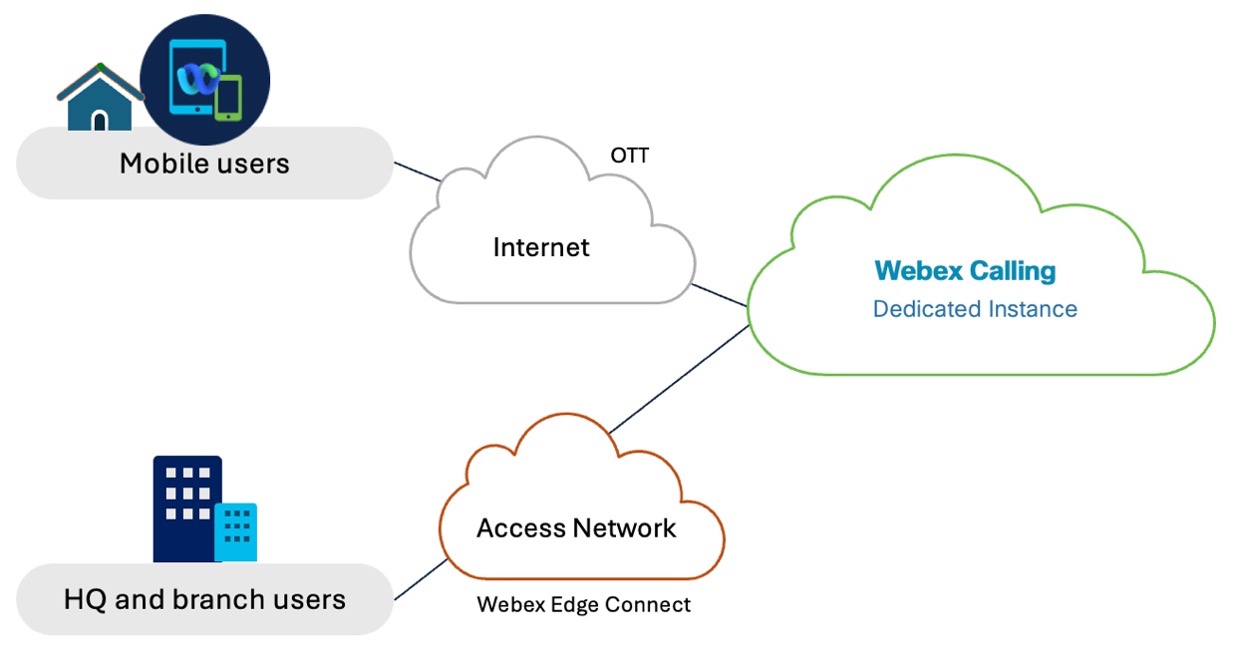
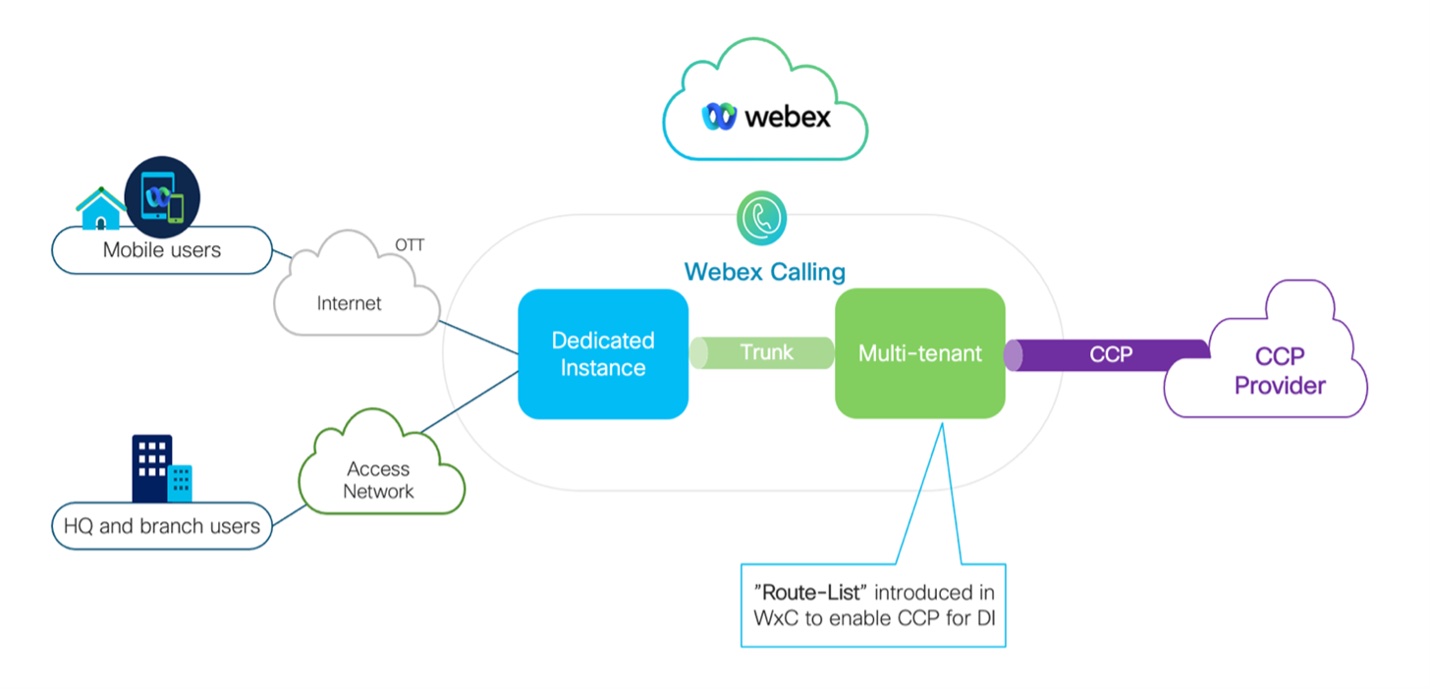
The diagram shows the Dedicated Instance deployment where all users are in Dedicated Instance and PSTN is through Webex Calling Cloud Connected PSTN (CCP).
Connectivity considerations
The customer can extend their WAN to the Dedicated Instance environment using Edge Connect. In the North America region, Dedicated Instance supports Edge Connect peering at Equinix or Megaport locations. Since the customer already has a presence in Equinix, they can extend their WAN network to two Equinix sites and connect to Dedicated Instance and Webex Meetings via Edge Connect. If the customers Equinix or Megaport locations are not where the Webex POP resides, they will have to extend the connection Equinix and Megaport at their cost. Cisco requires peering at two sites within a region to ensure network-based redundancy, providing a resilient and reliable connection to the cloud environment. This setup supports the customer's cloud migration while maintaining high availability and network performance.
PSTN service
With the migration to Dedicated Instance, the customer can transition their existing PSTN service to the Webex Calling Cloud Connected PSTN (CCP) service. In the provided architecture, PSTN calls are routed from the Dedicated Instance cloud through the Webex Calling Multi-Tenant (Multi-Tenant) environment to the PSTN provider. CCP offers global cloud PSTN calling capabilities for Dedicated Instance by leveraging established CCP partner peering with Webex Calling. This setup aggregates the customer’s PSTN traffic from all locations, including Mobile and Remote Access (MRA) users, through the Webex Calling CCP service, ensuring seamless and centralized PSTN connectivity.
Refer to Cloud Connected PSTN for more information.
Integrations
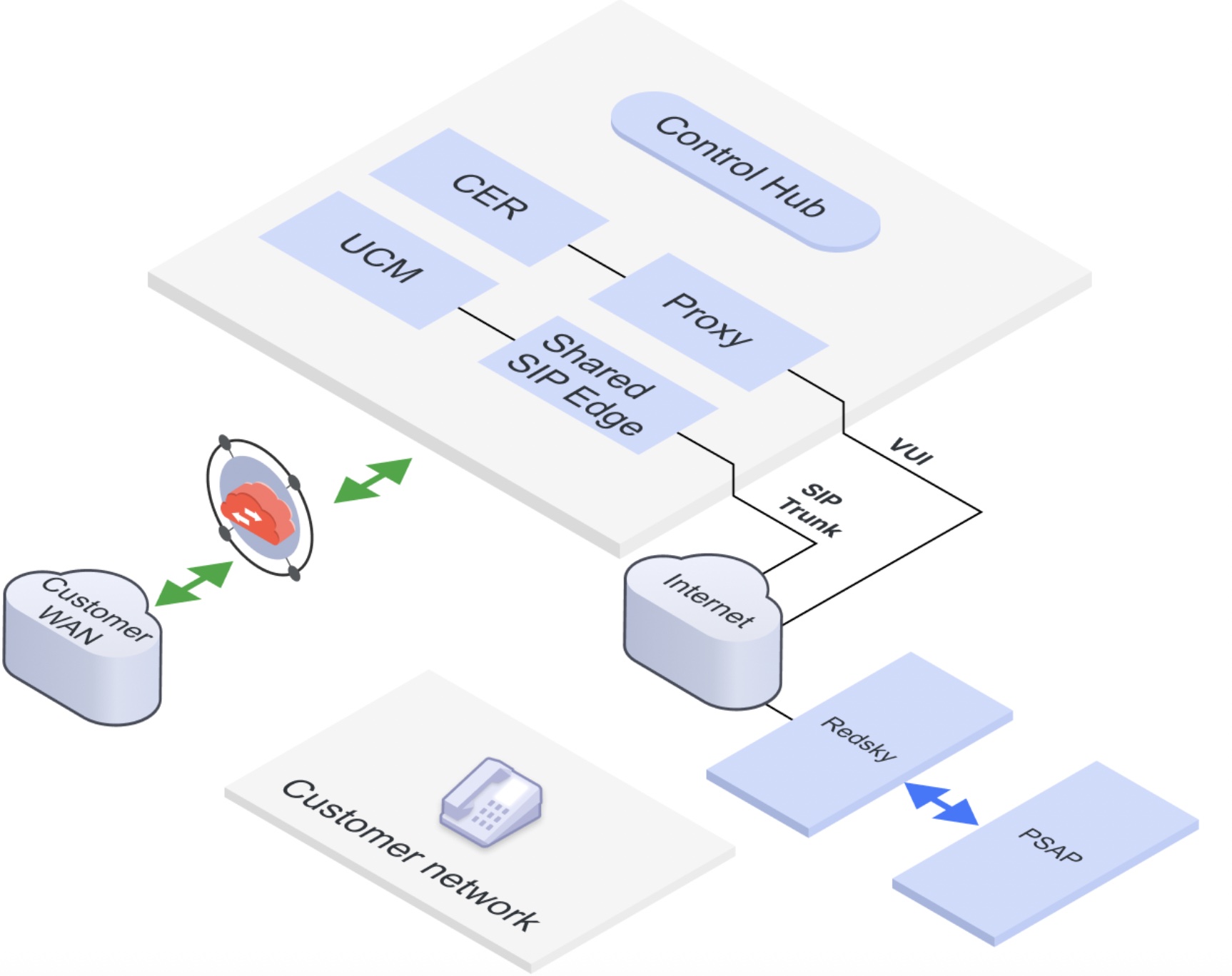
RedSky for E911 is an emergency call service that provides precise location services and routes emergency calls to the appropriate PSAP. This cloud-based RedSky service is tightly integrated with the Dedicated Instance environment. In a Dedicated Instance deployment, both Cisco Emergency Responder (CER) and RedSky work together to track devices and clients. On-premises phones are tracked using CER, which identifies the phone’s location and sets the correct dispatch location before routing the call to RedSky for delivery. Webex App users are tracked directly in RedSky using the HELD+ protocol, ensuring accurate location information for emergency response.
Refer to Configure E911 for Dedicated Instance for more information.
Webex Calling Multi-Tenant, Dedicated Instance and Meetings customer (single peering over Edge Connect)
Customer data:
-
The customer has a WAN infrastructure capable of peering at multiple locations, leveraging private network connections through cloud exchange providers such as Equinix and Megaport.
-
The customer’s user base includes personas that align with both Multi-Tenant and Dedicated Instance deployment models, enabling flexible adoption of Cisco Webex services.
-
Webex Meetings is a required collaboration tool for the customer, integrated seamlessly with both Multi-Tenant and Dedicated Instance environments.
A multinational financial services firm with a global footprint and a highly distributed workforce. The organization operates across North America, Europe, and Asia-Pacific, and prioritizes secure, reliable communication and collaboration for internal and client-facing teams.
Network Infrastructure:
The firm has a robust WAN architecture designed for high availability and low-latency connectivity. They leverage private network interconnections through top cloud exchange providers such as Equinix and Megaport, enabling peering at multiple strategic locations globally. This setup provides consistent and secure access to cloud-based services and applications.
User Personas & Deployment Needs:
The organization supports a diverse user base:
-
Corporate employees and general staffbenefit from the agility and scalability of the Multi-Tenant Webex model.
-
Regulated teams such as investment banking, legal, and compliance—who require data residency, tenant isolation, and enhanced control—are aligned to the Dedicated Instance deployment model.
This hybrid model supports flexible onboarding, tailored security, and operational segmentation aligned with departmental needs.
Collaboration Strategy:
Webex Meetings is the company’s standard collaboration platform for all internal meetings, client engagements, and cross-regional communication.
Key integration benefits include:
-
Unified calendar and scheduling through Outlook/Exchange.
-
Consistent meeting quality and feature set, irrespective of user location or infrastructure backend.
-
Integrated security policies aligned with internal governance frameworks.
Dedicated Instance - high-level view
This hybrid Webex deployment, underpinned by a resilient WAN and private peering, enables the firm to:
-
Ensure high-quality, secure collaboration.
-
Meet compliance requirements for sensitive business units.
-
Scale flexibly across departments and regions without compromising performance or control.
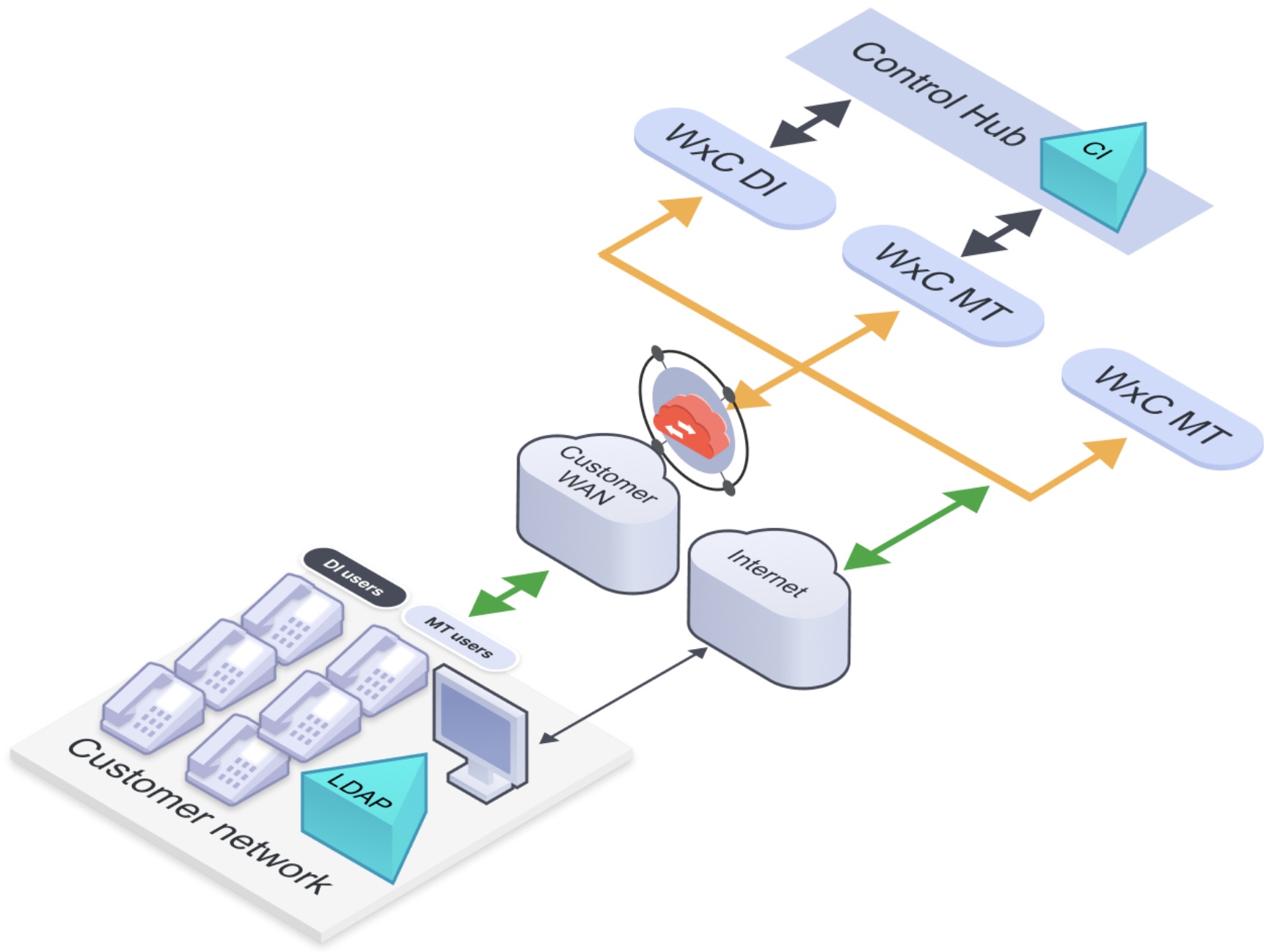
Dedicated Instance peering
Customer can utilize the Edge Connect 3.0 peering capability to consolidate Multi-Tenant, Dedicated Instance, and Webex Meetings traffic over a single peering path. This capability is supported by both Equinix and Megaport providers, enabling streamlined and efficient network connectivity for all these services through one unified peering connection.
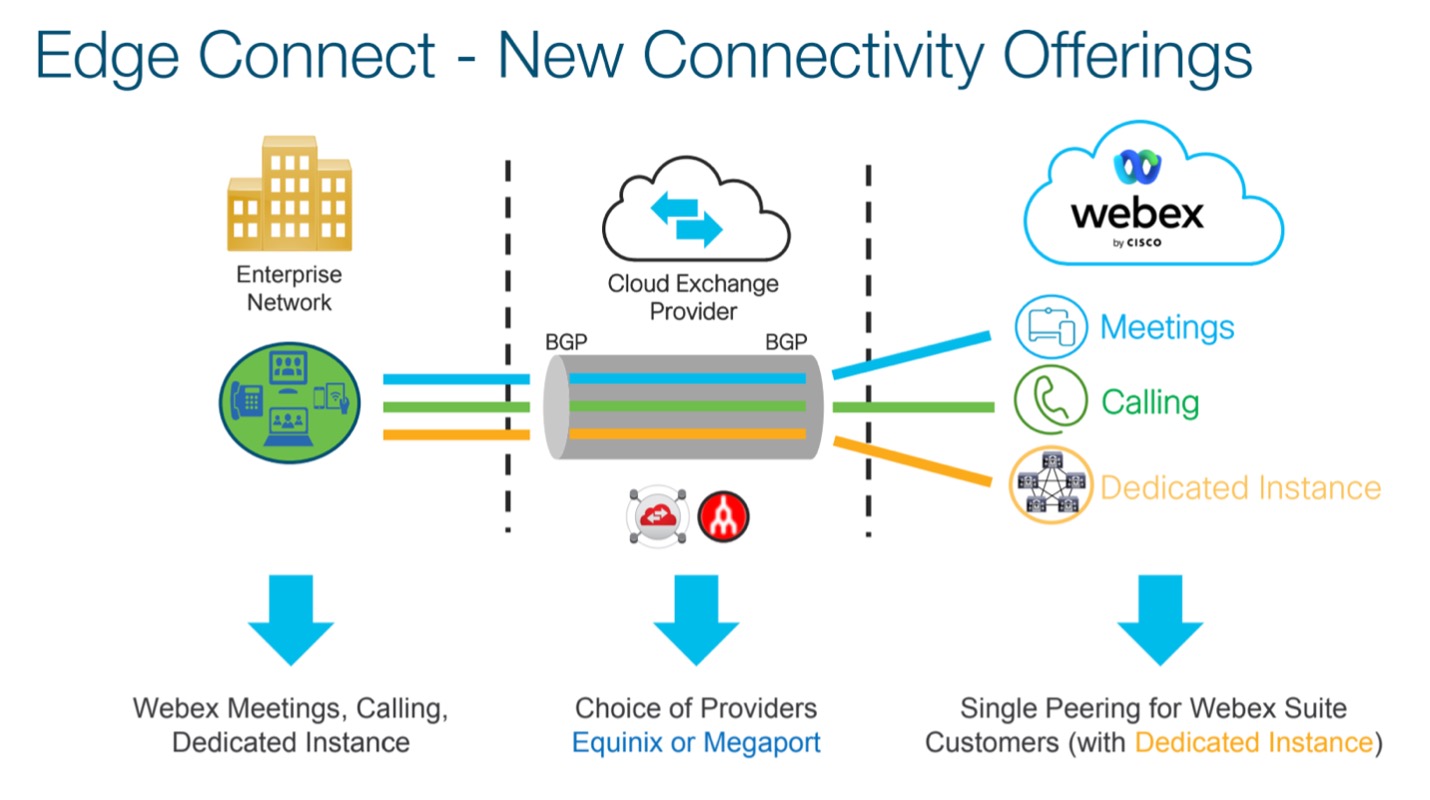
Refer to Dedicated Instance Edge Connect for more information.
UC application consideration
Dedicated Instance integrates seamlessly with Webex Meetings through a SIP trunk established between the Dedicated Instance Unified CM and Webex over the Webex network. With this setup, the Webex Meetings cloud treats Dedicated Instance in a manner similar to Edge Audio.
This configuration enables features like "Call me" and "Call back" to route calls through Dedicated Instance. For example, when an end-user selects the "Call me" option to join a Webex Meeting, Webex initiates the call through Cisco's internal SIP trunk to the Dedicated Instance, which then connects to the user's phone. Similarly, when an end-user uses the "Call in" option, they make a call from their phone through the Dedicated Instance, which routes it via the internal SIP trunk to Webex Meetings.
This integration ensures that audio traffic for Meetings flows through the same Dedicated Instance peering from the customer's WAN to Cisco Webex, enhancing the quality and reliability of the call.
Dedicated Instance and Multi-Tenant customer
Customer Overview:
Customer is a U.S.-based company with a large site which is their headquarters and several regional offices where the sales teams are distributed.
Current Environment:
- Calling: On-premises Cisco Unified Communications Manager (Unified CM)
- PSTN: Provided by a third-party service provider
- Network: MPLS WAN with Equinix peering at SJC and DFW
- Integrations: Many business applications are integrated with Unified CM
Needs:
- Improve calling experience for distributed sales teams
- Reduce dependency on on-prem infrastructure
- Maintain existing app integrations and PSTN provider
- Support hybrid and remote work
Dedicated Instance service high-level view
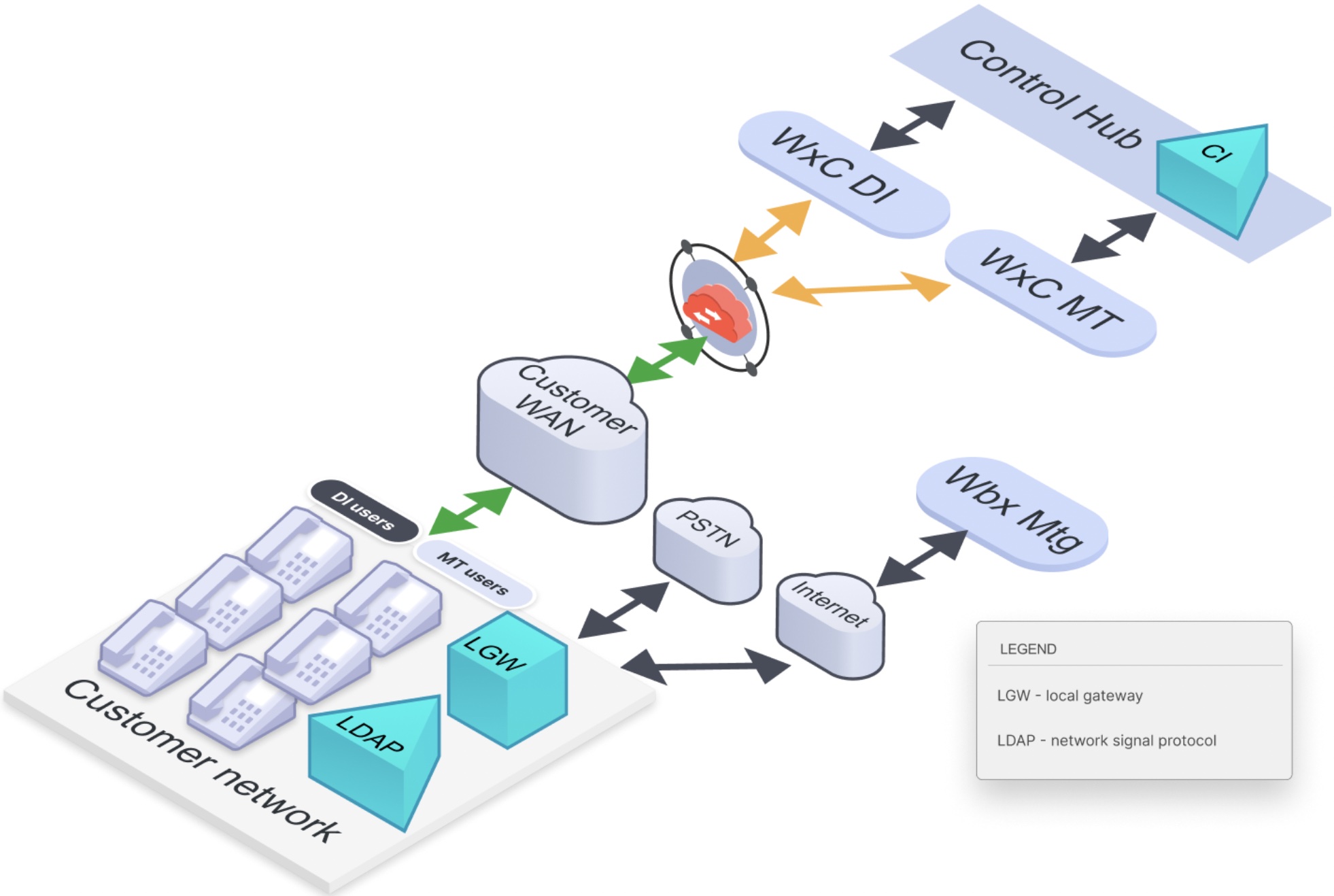
The Webex Calling Dedicated Instance (Dedicated Instance) solution effectively addresses all use cases for users at headquarters. For regional sales teams, Webex Calling Multi-Tenant (Multi-Tenant) is ideal, as they operate entirely over-the-top (OTT) and benefit from the latest Multi-Tenant innovations, such as Customer Assist and Webex Go. Multi-Tenant is also well-suited for the numerous smaller sites, while Dedicated Instance is a perfect fit for the remaining parts of the organization that require extensive applications and customizations.
The diagram shows the Multi-Tenant and Dedicated Instance deployment for one customer.
Connectivity consideration
Customer can do any of the peering models supported in Dedicated Instance and use the same peering for Dedicated Instance and Multi-Tenant. From the peering locations (Equinix or Megaport), the Webex backbone carries the traffic to appropriate service. Also Meeting Edge Audio can also use the same peering. The Edge Audio to use the Dedicated Instance SIP Edge component to connects to Meetings service, customer on-premises Edge Audio component (CUBE or Expressway) isn’t needed.
Guidance for splitting users between Dedicated Instance and Multi-Tenant
Considerations for Splitting the User Base Between Webex Calling Multi-Tenant (Multi-Tenant) and Dedicated Instance:
-
Migration: Dedicated Instance helps alleviate the challenges of enterprise calling migrations to the cloud. Customers may choose to migrate to Dedicated Instance first and then divide the user base between Multi-Tenant and Dedicated Instance as needed.
-
Contiguous Phone Numbers: When splitting the user base between Multi-Tenant and Dedicated Instance, it is recommended to keep contiguous phone numbers within the same call control. This simplifies dial plan and routing provisioning on both platforms.
-
Feature Differences: Customers splitting users across Multi-Tenant and Dedicated Instance platforms should consider that calling features are not fully harmonized between the two. It is generally advisable to keep users requiring group-based features (e.g., Call Pickup groups, Hunt groups, Manager/Secretary configurations) within the same call control platform, either Multi-Tenant or Dedicated Instance, to ensure consistency.
-
Endpoint Support: Dedicated Instance supports all endpoints compatible with on-premises Unified CM, including older Cisco phone models. For endpoints that cannot be migrated to Multi-Tenant, Dedicated Instance is the natural choice.
-
Enhanced Survivability: Dedicated Instance supports Enhanced Survivable Nodes (ESN) where a UCM node can be deployed on-premises for a full on-premise failover capability. For customers requiring high availability for critical services (e.g., hospitals), Dedicated Instance with ESN is a suitable option. Additionally, if the customer’s existing solution is Unified CM with SRST for remote sites, the same SRST can be extended to Dedicated Instance Unified CM.
-
Integrations: Dedicated Instance supports third-party integrations similar to on-premises Unified CM. If there are existing business workflows integrated with on-premises Unified CM, transitioning those workflows to Dedicated Instance is typically easier. User allocation can also be based on such workflow dependencies.
Directory Synchronization Considerations:
-
Control Hub Synchronization: The customer directory should be synchronized with the Control Hub cloud, and Dedicated Instance Unified CM will synchronize directly from the Control Hub.
-
Group Filters:Group filters can be configured so that Dedicated Instance Unified CM synchronizes only users designated for Dedicated Instance, rather than all users.
-
User Assignment: For calling services, each user must belong to either Dedicated Instance or Multi-Tenant, but not both. Ensure proper assignment of services for each user.
This approach ensures thoughtful planning and smooth operations when splitting the user base between Multi-Tenant and Dedicated Instance.
PSTN consideration
Organizations can adopt either a customer-premises Local Gateway (LGW) to connect to the PSTN or utilize Cloud-Connected PSTN services. The decision may depend on factors such as cost benefits, simplifying unified communications (UC) services through a single provider, network traffic considerations, and other business priorities.
For the Local Gateway approach, the following details apply:
-
Direct SIP Trunk to Dedicated Instance Unified CM: The customer configures a direct SIP trunk from Dedicated Instance Unified CM to the on-premises Local Gateway, following the Unified CM configuration guidelines.
-
Multi-Tenant Configuration: The Local Gateway is configured with Multi-Tenant, adhering to the Multi-Tenant guidelines. The trunk can connect via common peering or the internet.
-
Single Local Gateway with Split Trunking: A single Local Gateway can support two trunks—one to Dedicated Instance Unified CM and one to Multi-Tenant. However, it is recommended to split the user base so that each site is entirely in either Dedicated Instance or Multi-Tenant. As a result, from a given Local Gateway, only one trunk (to either Dedicated Instance or Multi-Tenant) is typically recommended.
For Cloud Connect PSTN, both Multi-Tenant and Dedicated Instance users can leverage the existing CCP partner peering to the Multi-Tenant platform.
Integrations
-
Webex App – Webex App is an end point in Unified CM. From the Dedicated Instance Unified CM perspective, Webex App is a softphone registered in Unified CM with the applicable SIP line features.
-
O365 Email integrations – If ABC has already integrated their Unified CM with O365, the same integrations can be done with Dedicated Instance as well. With this integration, Unity Connection can provide a Single Inbox feature for voice mail; and Unified CM/IM&P can provide contact and presence integration with user’s email. Traffic between Dedicated Instance UC applications and MS O365 cloud uses Dedicated Instance HTTP proxy. Cisco customer on-boarding process ensures that the required ports are opened at the Dedicated Instance side.
-
RedSky for E911 – RedSky is an emergency call service that provides location services and routes the call to PSAP.
Dedicated Instance customer (global, SME)
A multinational enterprise headquartered in Dallas, Texas, serving a global customer base. The company operates in highly collaborative, communication-centric industries and maintains a distributed workforce across major international markets.
User Base:
- Total users: 11,000
- U.S.: 6,000
- UK: 2,000
- Spain: 500
- UAE/Dubai: 500
- Malaysia-Singapore region: 1,000
Current UC Environment:
- Existing Solution: On-premises multi-cluster Cisco Unified Communications Manager (Unified CM) deployment with clusters located in the U.S., UK, Dubai, and Singapore.
- PSTN Connectivity: Leveraging regional PSTN providers via gateways in the U.S., UK, Dubai, and Singapore.
- Endpoints: A mix of legacy 79xx and 88xx IP phones, Jabber soft clients, Webex Room devices, and ATA-connected analog endpoints.
Network & Services:
- Global WAN with multiple regional peering locations, ensuring low-latency voice and collaboration traffic.
- Integrated with Webex Meetings and Microsoft Office 365 (O365) email for productivity and collaboration.
Business Drivers & Challenges:
- Aging on-prem infrastructure with increasing maintenance and operational costs.
- Growing demand for remote and mobile collaboration solutions post-pandemic.
- Need for greater scalability, redundancy, and simplified management of UC services globally.
- Security and compliance requirements across different regulatory environments.
Dedicated Instance service high-level overview
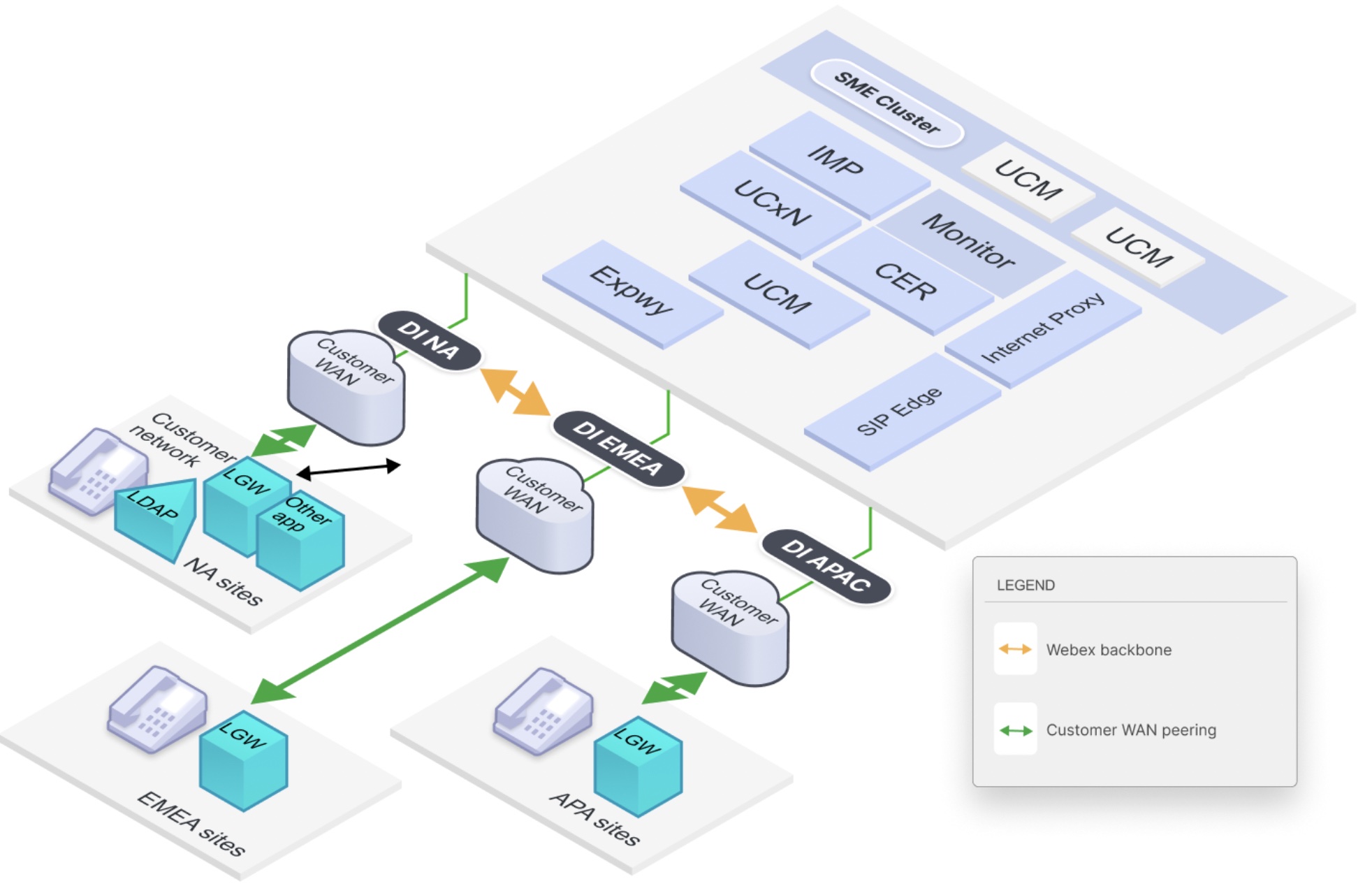
The Webex Calling Dedicated Instance (Dedicated Instance) solution meets the customer’s needs for transitioning to the cloud, offering enhanced scalability, redundancy, and global presence while reducing overall operating costs. By migrating their UC clusters to three Dedicated Instance regions—North America (NA), EMEA, and Asia-Pacific and Japan (APJ)—the customer can efficiently support their global operations. The UC applications within Dedicated Instance seamlessly integrate with existing workflows and integrations, eliminating the costs associated with managing on-premises Unified CM clusters, all without impacting the end-user experience.
Additionally, a Session Management Edition (SME) is employed to route calls across regions. Integration with other Webex services and cloud platforms aligns with standard configurations, ensuring a consistent experience.
For remote and mobile users, the customer can utilize Webex Calling Multi-Tenant (Multi-Tenant) or the Mobile and Remote Access (MRA) service, which is deployed across all regions as part of service activation. This provides the flexibility to scale and adapt based on specific use cases.
Connectivity consideration
Customer can extend their WAN to Dedicated Instance from their presence in Equinix or Megaport locations. Customer will have to peer in every region (AMER, EMEA, UK, APJ, AUS) where they have a UC footprint.
UC application consideration
Dedicated Instance is activated with the below domain, based on the region. Customer/Partner is required to configure the service domains and SRV records appropriately for users to login to Jabber with the customer domain.
Service Discovery domain: <cust>.amer.wxc-di.webex.com (for NA) , <cust>.emea.wxc-di.webex.com (for EMEA), <cust>.apjc.wxc-di.webex.com (for APJC)
End-user login domain: cust.com
Doc reference: Configure Jabber in Dedicated Instance to use Customer's Domain for Login
On-premises endpoints must be able to resolve DNS names associated with specific domains. To enable this, the customer should configure their internal DNS service to forward queries for these domains to Cisco, which manages them. Refer to DNS requirements for more information.
PSTN consideration
With the move to Dedicated Instance, customer can maintain their existing PSTN service or leverage Cisco Cloud Connected PSTN (CCP) for PSTN calling.
Dedicated Instance customer (Contact Center)
Customer data:
- Number of users: 2000 (U.S.); 250 agents
- Existing solution: On-premise Unified CM with Contact Center Express (UCCX) solution
- Endpoints: 79xx, 88xx, Jabber, VG3xx/Analog phones
- Related services: Call Recording
Description: The customer delivers call center services to retail companies. Customer has their headquarters in Herndon, VA, and a branch office in Atlanta, GA, where their call center is located. Their Unified Communications Manager (Unified CM) and Unified Contact Center Express (UCCX) are hosted in the Atlanta office. They are seeking to migrate to the cloud to minimize IT costs and staffing needs for managing their UC environment, while also modernizing their contact center operations.
Dedicated Instance service high-level view
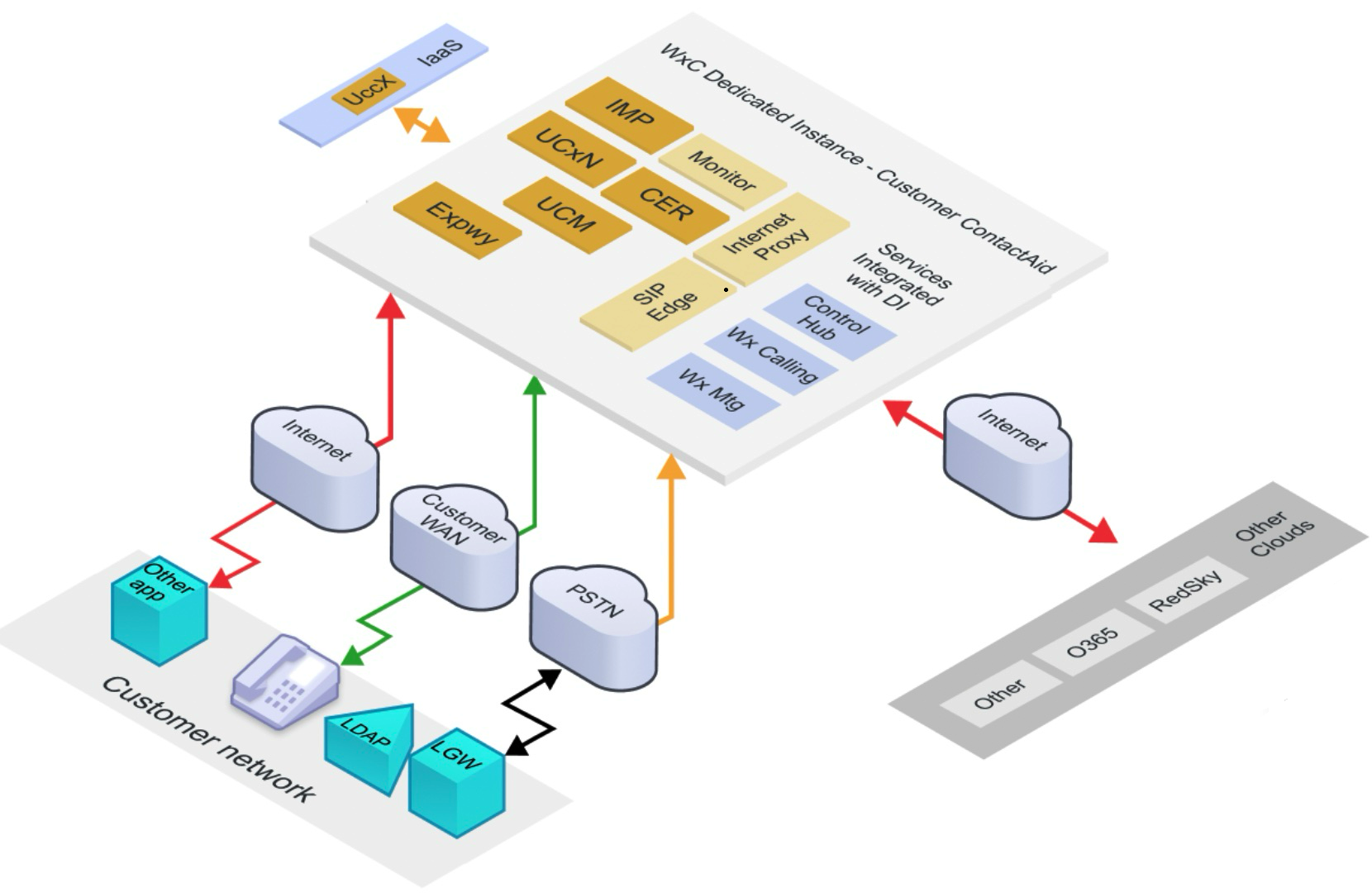
Dedicated Instance meets the requirements for the customer’s back-office users. For their Contact Center solution, customer has three options.
Approach 1: The customer can transition their contact center users to Webex Contact Center, enabling a more modern experience with advanced features. Webex Contact Center also leverages cutting-edge AI capabilities to enhance customer interactions and drive improved business outcomes. Additionally, Dedicated Instance seamlessly integrates with Webex Contact Center, allowing agents to communicate efficiently with back-office users and vice versa.
Approach 2: Dedicated Instance offers Infrastructure as a Service (IaaS), enabling customers to acquire compute and storage resources for deploying applications co-located with their UC applications. Customers will have to purchase UCCX separately and deploy it within the IaaS environment, ensuring it meets the low-latency requirement of 60ms for seamless integration with UC applications.
Approach 3: Customer can continue to use the UCCX on-premises while moving all the back-office users to Dedicated Instance, as far as the 60ms round-trip-time between the UC Manager and UCCX is met. This however is not desired for the customer in this use case.
Cisco recommends agents to be deployed on Webex Calling.
Integration
Call Recording – Customer can use call recording solutions deployed on-premises or in the cloud. For on-premises Call Recording solutions, customers can use the Built-in-bridge feature on the phones to fork the recording media directly to the servers. For cloud recording solutions, customers will require a CUBE setup to secure the media to the cloud provider.
Dedicated Instance customer (MS Teams)
Customer Scenario: Webex Calling Dedicated Instance (Dedicated Instance) with Microsoft Teams Integration.
-
Solutions Industry: Professional Services / Technology
-
Number of Users: 8,000
-
Geographies: U.S. (HQ), UK, Germany, India
-
Current UC Platform: On-premises Cisco Unified CM (multi-cluster)
-
PSTN: Mix of local gateways and third-party SIP providers
-
Productivity Suite: Microsoft 365 (including Teams)
-
Other Services: Webex Meetings, Webex Contact Center (pilot phase)
-
Network: SD-WAN backbone with Azure and Equinix cloud peering
Business Drivers
Customer is modernizing its unified communications infrastructure to improve operational efficiency, reduce infrastructure overhead, and enhance collaboration across global teams. The IT team aims to standardize calling services while maintaining the enterprise-grade calling features and survivability that users are accustomed to.
At the same time, the company has invested heavily in Microsoft 365 and adopted Microsoft Teams as the primary collaboration tool. Many employees prefer to work within the Teams interface, but the enterprise requires a robust telephony backbone with advanced call control features like hunt groups, call queues, Barge/Whisper, and Contact Center integration.
Solution Chosen: Dedicated Instance with Webex Calling integration for Microsoft Teams
Key Drivers for this Solution:
- Enterprise-grade calling features with Cisco’s proven Unified CM platform.
- Retain existing dial plan and analog endpoints during migration via Dedicated Instance.
- Full interoperability with Cisco-certified SBCs and PSTN providers in different regions.
- Webex Calling app embedded inside Microsoft Teams, allowing users to make and receive business calls directly within Teams, while maintaining call logs, voicemail, and directory sync.
- Phased migration path from on-prem to cloud with no business disruption.
- Secure hybrid environment, with the ability to extend Webex Contact Center to Teams-enabled agents in the future.
Dedicated Instance service high-level view
With Dedicated Instance, the customer modernizes their voice platform without sacrificing control or features, while enabling users to stay productive inside Microsoft Teams. IT benefits from centralized management through Control Hub and simplifies support with Cisco TAC while meeting end-user demand for seamless workflows.
Webex Calling for MS Teams Integration provides the following capabilities:
- Initiate Webex App based calling over the Microsoft Teams interface
- Softphone and desk phone Control Mode
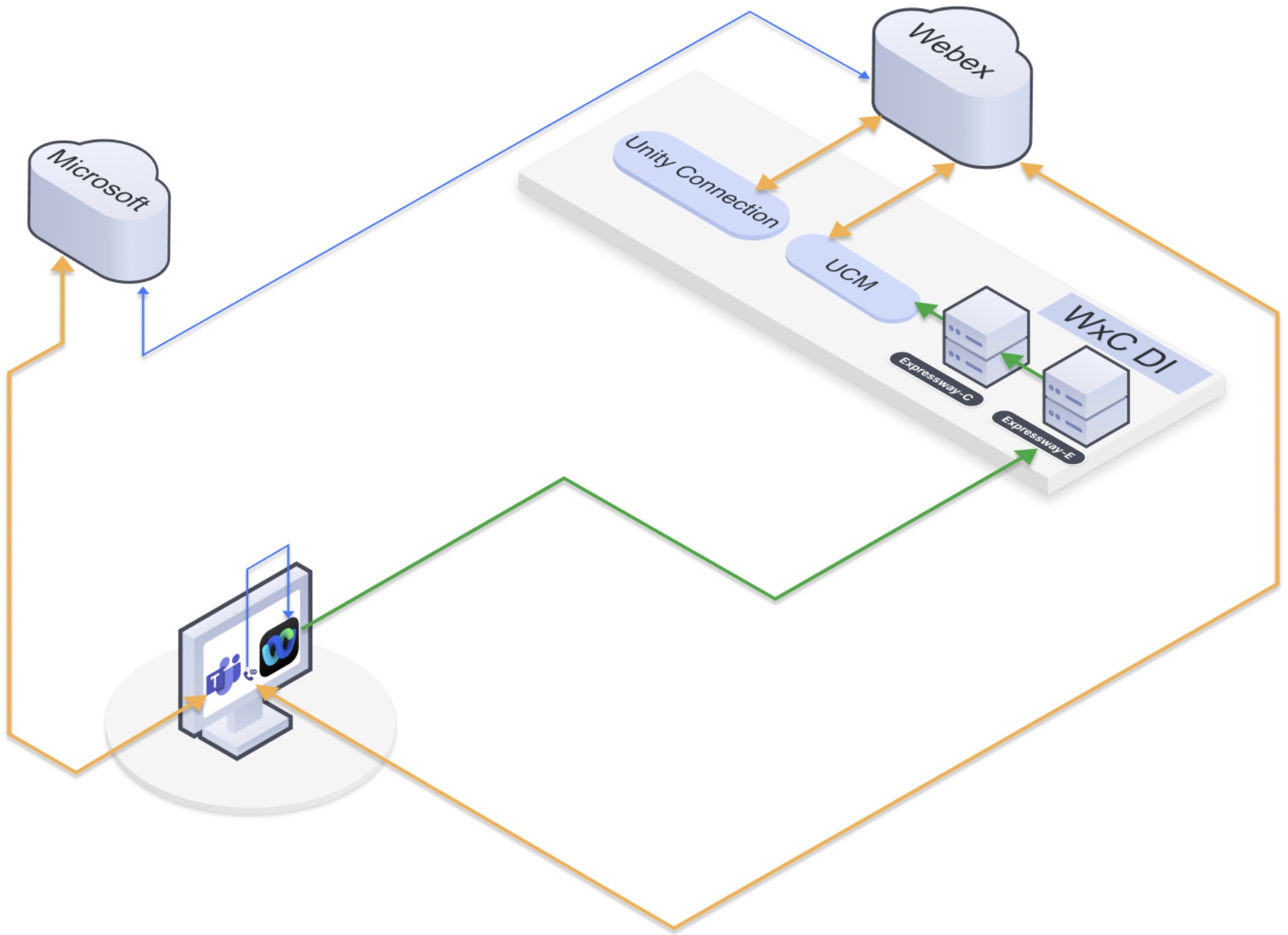
Webex Calling for Microsoft Teams provides the following capabilities:
- Webex Calling
- Webex for BroadWorks
- Dedicated Instance
- Unified CM
- Softphone Mode
- Desk phone Control Mode
- PSTN
- Voicemail
- Call History
- Speed Dials
- Desktop and Mobile
Dedicated Instance customer (Webex Contact Center Enterprise)
Customer data:
-
Number of users: 20000 (U.S.); 15000 agents
-
Existing solution: Unified Communications Manager (Unified CM)/Contact Center Enterprise (UCCE)
-
PSTN: Local Gateway
-
Endpoints: 79xx, 88xx, Jabber, VG3xx/Analog phones
-
Related services: Calabrio call recording
Description: A U.S.-based organization with 20,000 users—5,000 of whom are call center agents—provides outsourced contact center services to major retail brands. Their operations are anchored in Seattle, WA, with their primary call center and Unified CM/Contact Center Enterprise (UCCE) infrastructure hosted in Denver, CO. Customer has a directive to move to the cloud and optimize their operations.
Dedicated Instance, Webex Contact Center Enterprise (WxCCE) service high-level view
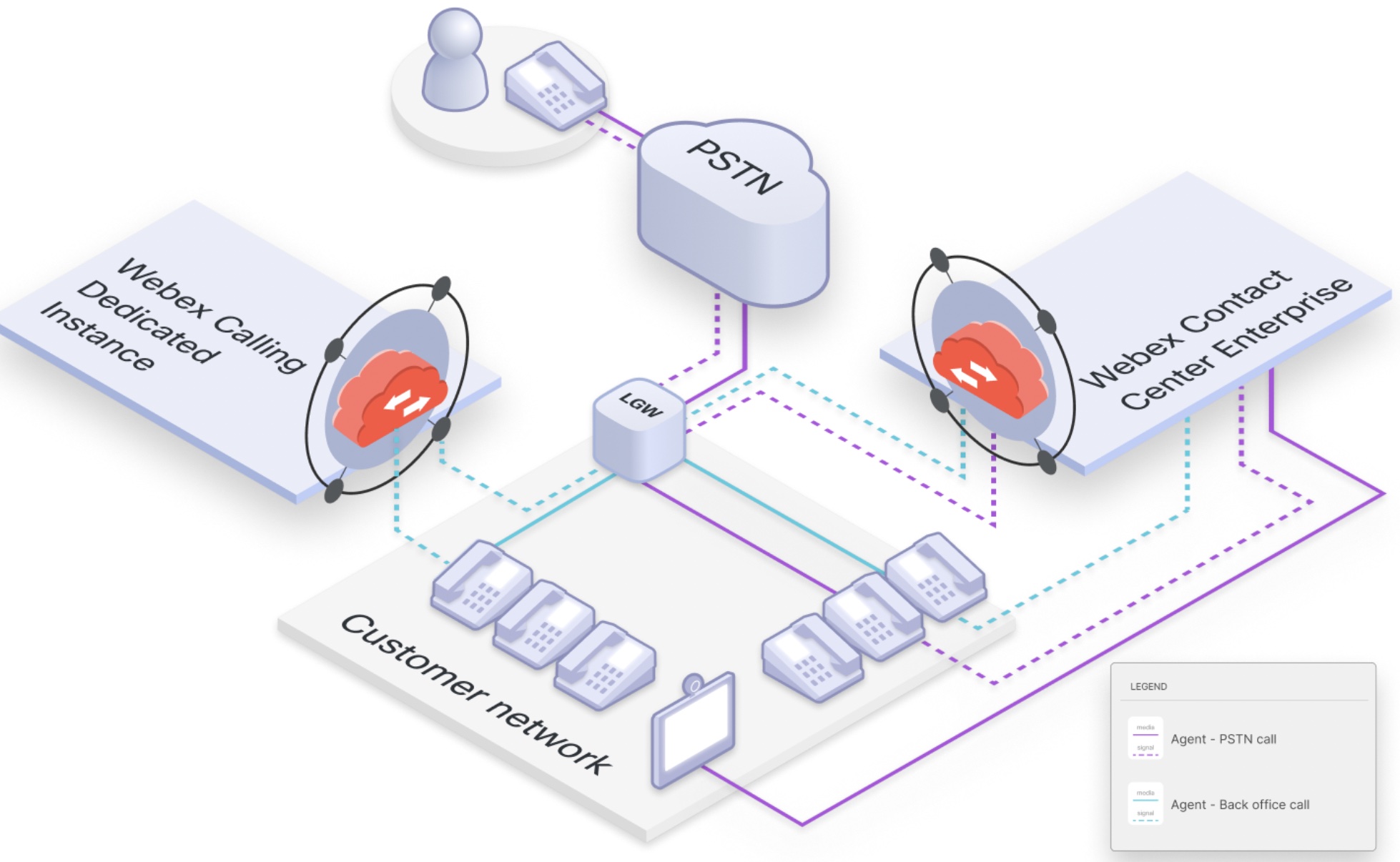
Dedicated Instance and Webex Contact Center Enterprise (WxCCE) together meets the customer’s requirement. Customer can migrate their back office users to Dedicated Instance while move the 5000 agents to the WxCCE platform.
Connectivity consideration
With Edge Connect 3.0, customers can establish a single peer connection to Webex via Edge Connect, enabling seamless connectivity to both Dedicated Instance and Webex Contact Center Enterprise (WxCCE). For cost-effective peering, customers are encouraged to connect at the same location where Webex Points of Presence (POPs) are available, as this setup only requires a cross-connect. However, if the customer operates out of a different Equinix site where Webex does not have a presence, they will need to purchase an ECX Remote Connection to an Equinix DC that has a Webex presence, which is relatively more expensive.
UC application and flow
For this customer, the following attributes apply based on the selected options for peering, user distribution between Dedicated Instance and WxCCE, and PSTN configurations:
- Agents are hosted in WxCCE.
- Back-office users are hosted in Dedicated Instance.
- Both Dedicated Instance and WxCCE utilize a Local Gateway (LGW) for PSTN connectivity.
- A single peering connection is used for Dedicated Instance and WxCCE.
Call Scenarios:
-
Agent – PSTN Inbound Calls:
- Inbound calls from the PSTN are routed through the Local Gateway (LGW) to WxCCE call control, which then directs the call to the Agent.
- Media flows directly from the LGW to the Agent.
- Agent – Back-office Calls:
When an Agent receives an inbound call and transfers it to a back-office user, the media flow is as follows:
- Initially, the media flows from the Local Gateway (LGW) to the Agent when the call is received.
- Once the Agent transfers the call, the media path is updated, and it flows directly from the LGW to the Dedicated Instance back-office user.


